📑 Table of Contents
- 1. What Is n8n? (And Why Developers Love It)
- 2. n8n vs Zapier vs Make.com: The 2026 Comparison
- 3. n8n Pricing: Self-Hosted vs Cloud (2026)
- 4. Step-by-Step: Build Your First n8n AI Workflow
- 5. Real-World Example: rtCamp's AI Lead Qualification System
- 6. Common Pitfalls to Avoid
- 7. Frequently Asked Questions
- 8. For the Complete Technical Framework
- 9. Bottom Line
This guide is part of our complete Autonomous AI Agents framework — if you're new to AI agents, start there.
What Is n8n? (And Why Developers Love It)
n8n (pronounced "n-eight-n") is a workflow automation platform with a node-based visual builder. You drag nodes onto a canvas, connect them, and the workflow runs. No YAML config files. No rigid DSL. Just visual building with code escape hatches when you need them.
What sets n8n apart from Zapier and Make.com is its license: fair-code. That means you can self-host the entire platform on your own server, run unlimited executions, and pay zero platform fees. The only cost is your server bill — typically $5-20/month on a VPS.
n8n ships with 400+ native integrations and 70+ AI agent nodes built on LangChain. You can execute inline JavaScript or Python at any node. You can call any API. You can build an autonomous agent that reasons, calls tools, and takes action — all inside the same visual workflow.
The result: n8n has become the default automation platform for technical teams and agencies in 2026. The economics work at scale, and the AI capabilities are the deepest of the three major platforms.
What's new in 2026: n8n released version 2.0 in December 2025 with autosave, versioned publishing, and enhanced MCP (Model Context Protocol) integration. The team has since added dozens of new nodes — including dedicated integrations for Anthropic Claude, Google Gemini, Perplexity, ElevenLabs, and Groq. The new Canvas UI replaces the flat workflow builder with a spatial canvas supporting grouped node clusters. (Check docs.n8n.io/release-notes for the latest version and feature list.)
n8n vs Zapier vs Make.com: The 2026 Comparison
Here's the honest breakdown. All three platforms work. The right choice depends on your technical level, volume, and whether you need self-hosting.
| Factor | n8n | Make | Zapier |
|---|---|---|---|
| Pricing (entry, monthly) | €24/mo Cloud (or free self-host) | $9/mo (annual) | $19.99/mo (annual) |
| Self-hostable | ✅ Yes | ❌ No | ❌ No |
| Integrations | 400+ native nodes | 3,000+ apps | 9,000+ apps |
| AI/LLM Nodes | 70+ native LangChain nodes | Native AI blocks + agents | Native AI blocks + agents |
| Billing model | Per workflow execution | Per single action | Per single action |
| Target user | Developers, IT teams | Visually-oriented teams | Non-tech sales/marketing |
| Best For | Devs, agencies, AI workflows | SMB, ops teams | Non-technical users |
Sources: heise.de (Sep 2026), theaiagentindex.com (Sep 2026), buildberg.co (Apr 2026). n8n billed in EUR; USD equivalent approximate at Sep 2026 exchange rate.
The short version:
- Zapier — largest app library (9,000+), easiest to learn, expensive at scale ($19.99/mo entry, billed annually)
- Make — visual builder, strong middle ground ($9/mo entry, billed annually), no self-hosting
- n8n — free at scale, deepest AI capabilities (70+ LangChain nodes), but you need technical chops
If you run more than 2,500 executions per month, n8n self-hosted is dramatically cheaper. A workflow that costs $150+/month on Zapier runs for $0 in platform fees on n8n. The only cost is your server.
For the full pricing math, real cost at 10K executions/month, and self-hosting trade-offs, see our deep-dive: n8n vs Make vs Zapier — Which Automation Tool Wins in 2026?
n8n Pricing: Self-Hosted vs Cloud (2026)
n8n has two flavors: self-hosted (Community Edition) and Cloud (managed hosting). Both run the same workflows. The difference is who manages the infrastructure.
| Plan | Monthly billing | Annual billing (per mo) | Executions/mo | Best for |
|---|---|---|---|---|
| Community Edition | Free | Free | Unlimited | Self-hosters |
| Starter | €24 | €20 | 2,500 | Small teams |
| Pro | €60 | €50 | 10,000 | Growing teams |
| Business | €800 | €667 | 40,000 | Large teams |
| Enterprise | Contact sales | Contact sales | Custom | Large orgs |
Pricing verified September 2026 from n8n.io/pricing, billed in EUR. Annual billing typically includes a discount. Check n8n.io/pricing for the most current tier list — plans change.
Key details:
- Every plan includes unlimited users and unlimited workflows
- Concurrent executions cap how many runs execute at the same instant — hit the cap and runs queue rather than fail
- Starter includes AI Assistant credits (separate from workflow executions)
The math that matters: Self-hosted n8n runs unlimited workflows and executions at zero platform cost. A $10/month VPS handles most SMB workloads. For a team running 50,000 executions/month, that's ~$10/month in server fees — versus hundreds on n8n Cloud's higher tiers.
Step-by-Step: Build Your First n8n AI Workflow
You're going to build a working AI agent that captures leads, scores them, and sends SMS responses. Total time: 45-60 minutes if you follow along.
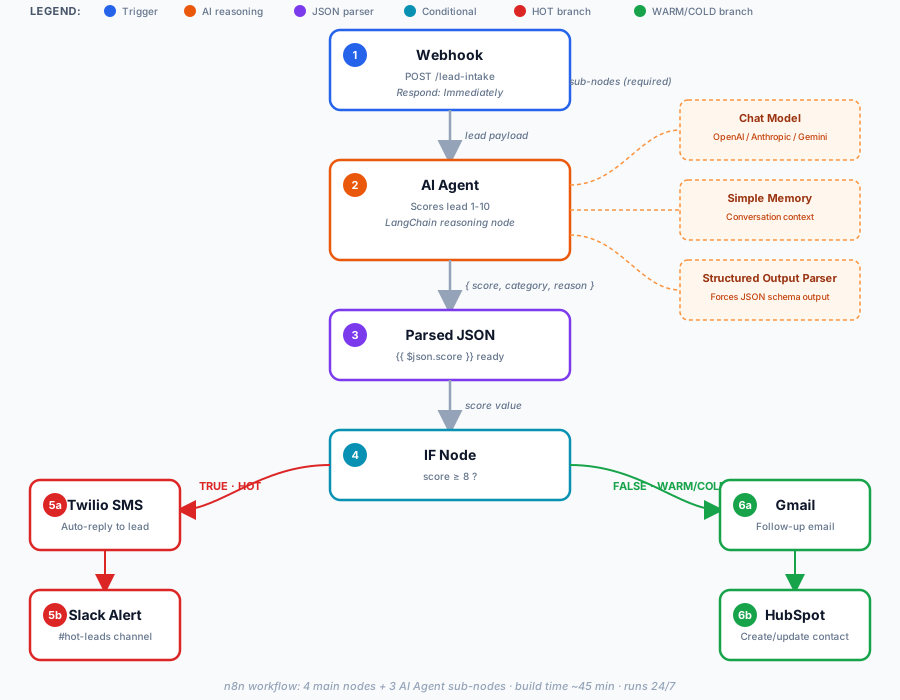
The flow: Webhook → AI Agent (LangChain) → Structured Output Parser → Conditional Logic → Twilio SMS → CRM Update
Step 1: Install and Launch n8n
Self-hosted via Docker (recommended):
docker volume create n8n_data
docker run -it --rm \
  --name n8n \
  -p 5678:5678 \
  -e GENERIC_TIMEZONE="YOUR_TIMEZONE" \
  -e TZ="YOUR_TIMEZONE" \
  -e N8N_ENFORCE_SETTINGS_FILE_PERMISSIONS=true \
  -e N8N_RUNNERS_ENABLED=true \
  -v n8n_data:/home/node/.n8n \
  docker.n8n.io/n8nio/n8n
Official command from docs.n8n.io (verified Sep 2026). Replace YOUR_TIMEZONE with your local timezone — for example, America/New_York (US Eastern), America/Los_Angeles (US Pacific), or Europe/London (UK).
Windows note: If you're on Windows without WSL, use C:\Users\YourName\.n8n instead of n8n_data for the volume path, or install Docker Desktop first.
Open your browser to http://localhost:5678. You'll see the n8n Canvas UI.
Or use n8n Cloud: Sign up at n8n.io — trial available, then €24/mo for Starter.
Step 2: Create a New Workflow
Click Workflows → + button. You'll see an empty canvas.
Step 3: Add a Webhook Trigger
Click + → search for "Webhook" → add the node.
New to webhooks? Our dedicated n8n Webhooks Tutorial (Part 2) covers the Webhook node in depth — Test vs Production URLs, 4 security layers, and a production deployment checklist.
Configure:
| Parameter | Value |
|---|---|
| HTTP Method | POST |
| Path | /lead-intake |
| Authentication | Header Auth (recommended) |
| Respond | Immediately |
| Response Code | 200 |
Copy the Production URL — this is what your form will POST to.
Step 4: Add the AI Agent Node
Click + → search for "AI Agent" → add the node.
The AI Agent node is n8n's LangChain-powered reasoning node. It's what makes n8n different from simple if-this-then-that platforms.
Connect these sub-nodes:
| Sub-node | Node Name | Purpose |
|---|---|---|
| Chat Model | OpenAI Chat Model (or Anthropic Chat Model) | The LLM that reasons about each lead |
| Memory | Simple Memory | Keeps conversation context across interactions |
| Output Parser | Structured Output Parser | Critical — forces JSON output for downstream nodes |
{{ $json.score }} — which only works with structured JSON output. Add the parser sub-node to avoid silent workflow failures.
Configure OpenAI credential: You'll need an API key from platform.openai.com. Add it under Credentials → OpenAI API. For lead scoring (a classification task), a cost-effective mini or nano-tier model is sufficient — you don't need a flagship model.
System prompt:
You are a B2B lead scoring assistant. Score each lead 1-10 based on:

HIGH (8-10):
- Emergency keywords: "ASAP", "urgent", "broken", "not working"
- Commercial property, multi-unit
- Ready to buy: "send quote", "schedule call"

MEDIUM (5-7):
- Researching, planning 1-3 months out
- Residential, single-property
- Flexible timeline

LOW (1-4):
- Price shopping, "just wondering"
- No phone number
- Out of service area

Return JSON: { "score": X, "category": "HOT/WARM/COLD", "reason": "..." }
Note on model choice: Model IDs and versions change frequently across all AI providers. Before deploying, verify the current flagship, mini, and nano model IDs at your provider's docs — for OpenAI at platform.openai.com/docs/models, for Anthropic at docs.anthropic.com, for Google at ai.google.dev. You can also use any OpenAI-compatible endpoint or a local model via Ollama.
Step 5: Add Conditional Logic
Click + → search "IF" → add the node.
Condition: {{ $json.score }} is greater than or equal to 8
This creates two branches:
- True branch (HOT leads) → immediate SMS + Slack alert
- False branch (WARM/COLD) → email follow-up + CRM log
Step 6: Add Action Nodes
True branch (HOT leads):
- Add Twilio node → Send SMS:
Hi {{ $json.name }}, we got your request. A specialist will call you in 5 minutes. Reply STOP to opt out. - Add Slack node → Post to
#hot-leadschannel:🔥 HOT LEAD: {{ $json.name }} | {{ $json.phone }} | Score: {{ $json.score }}
False branch (WARM/COLD):
- Add Gmail node → Send follow-up email with calendar link.
- Add HubSpot node → Create/update contact.
Step 7: Test and Activate
Click "Listen for test event" on the Webhook node. Send a test POST:
curl -X POST https://your-n8n-instance.com/webhook/lead-intake \
  -H "Content-Type: application/json" \
  -d '{"name":"John Smith","phone":"+15551234567","message":"My AC is broken, need help ASAP"}'
You should see:
- AI Agent runs and returns a score of 9-10 (HOT)
- Structured Output Parser converts to JSON
- IF node routes to true branch
- Twilio node fires (verify SMS arrives)
- Slack notification posts
Toggle "Active" at the top right. Your workflow is live.
Real-World Example: rtCamp's AI Lead Qualification System
rtCamp, a WordPress enterprise agency, published a detailed case study of their n8n-powered lead qualification system in 2026. Here's what they built.
The problem: Sales leads arrived through a form and landed in a dedicated Slack channel. As volume grew, the channel filled with agency pitches, resumes, phishing scams, and fake inquiries. The sales team had to manually review every submission.
The solution: rtCamp built an AI automation system using n8n as the workflow orchestration layer. The system watches for genuine lead activity and ignores everything else. Only messages that match the expected pattern of a real form submission move forward for processing.
How it works:
- Qualification stage: An AI agent reviews each submission and classifies it as spam or relevant, with a short reason. They use lightweight AI models chosen for high-volume, low-cost classification — mixing lightweight and mid-tier Gemini models, each assigned to the stage it handles best.
- Three-level system: Genuine leads get a color code:
- Green — Relevant lead with consistent information. Ready for immediate sales follow-up.
- Yellow — Potentially relevant, needs closer look (mismatched company domain, incomplete details).
- Red — Likely spam or irrelevant. Workflow stops here. No further AI credits or sales time spent.
The result: An estimated 100 hours of manual work saved every month.
The key insight: rtCamp's approach is "only spend AI effort where it earns its keep." Not every step needs the most powerful model. Match the model to the task — that's the difference between an AI feature and a working AI system.
Common Pitfalls to Avoid
| # | Pitfall | Fix |
|---|---|---|
| 1 | Missing Structured Output Parser | Add the parser sub-node to AI Agent — without it, IF node fails silently |
| 2 | Using Cloud for high-volume | Self-host if you run >2,500 executions/month — saves €50+/mo |
| 3 | Hardcoded API keys | Use n8n credentials vault, never hardcode strings |
| 4 | No error handling | n8n 2.x has configurable retry per node (retryOnFail + maxTries + waitBetweenTries) — enable it |
| 5 | Ignoring rate limits | Add "Wait" node or use built-in retry logic |
| 6 | No human-in-the-loop | Add approval step for customer-facing communications |
| 7 | Skipping execution logging | Log every execution to Postgres or Sheets for audit trail |
One more thing: Test with fake leads before going live. Submit 5 test payloads. Verify each one gets scored, parsed, routed, and logged. This 10-minute check saves hours of debugging later.
Frequently Asked Questions
1. Is n8n really free?
Yes. The Community Edition is 100% free and open-source under the fair-code license. You can self-host on your own server with unlimited executions and unlimited workflows. The only cost is your server — typically $5-20/month on a VPS. Cloud plans start at €24/month for managed hosting.
2. Can I use n8n without coding?
Partially. n8n is low-code — you can build workflows visually. But for complex data transformations, you'll need basic JavaScript or Python (the Code node accepts both). For a fully no-code experience, Make.com is a better fit. For maximum power and zero platform fees, n8n wins.
3. How does n8n compare to Zapier for AI workflows?
n8n has 70+ native AI agent nodes built on LangChain, enabling autonomous workflows that reason, call tools, and take action. Zapier's AI features are more basic — mostly prompt-based steps. If you're building real AI agents, n8n is the clear winner for depth and cost at scale.
4. What's the learning curve for n8n?
Moderate. Self-hosting requires basic Docker knowledge. The visual builder is intuitive, but complex workflows benefit from programming fundamentals. Based on community reports, most users need 20-40 hours of hands-on practice to feel confident building custom workflows.
5. Can I migrate my Zapier workflows to n8n?
Yes. n8n has community-built migration tools and templates. Most Zapier Zaps can be replicated in n8n within a few hours. The API structure is similar — a trigger, a few actions, and some conditional logic.
6. What server specs do I need for self-hosted n8n?
Minimum: 1 CPU, 1GB RAM, 10GB storage. Recommended for production: 2 CPU, 4GB RAM, 20GB SSD. A $5-20/month VPS (Hetzner, DigitalOcean, Vultr) handles most SMB workloads. For high-volume workflows, bump RAM to 8GB.
7. Does n8n work with AI models other than OpenAI?
Yes. n8n supports Anthropic Claude, Google Gemini, Mistral, Perplexity, ElevenLabs, Groq, Ollama (local models), and any OpenAI-compatible endpoint. Recent releases added dedicated nodes for many of these providers. You can even run local LLMs via Ollama — no API costs at all.
For the Complete Technical Framework
This guide covers the fundamentals of n8n. But the underlying pattern — trigger → AI reasoning → conditional routing → multi-action execution — scales to every automation you'll ever build.
If you want the full picture, read our complete guide: Autonomous AI Agents: Architectural Blueprint. It covers multi-agent orchestration, RAG pipelines, error handling, and production deployment patterns.
Related reading:
- RAG vs Function Calling — for when to use retrieval vs API calls in your agent
- Red-Flag Protocol — safety patterns before deploying customer-facing AI
- Build vs Buy AI Agents — DIY vs hire decision framework
Bottom Line
Three things to take away:
1. n8n is free at scale. Self-hosted, unlimited workflows, zero platform fees. A $10/month VPS runs what costs hundreds per month on n8n Cloud's higher tiers — and thousands more on Zapier.
2. The AI capabilities are deeper. 70+ native LangChain nodes mean you can build real AI agents — not just prompt-based steps. rtCamp's case study saved 100 hours/month with this exact approach.
3. You have two options. Build it yourself in a weekend (the tutorial above gets you 80% there), or hire an n8n specialist for $100-$200 and have it live tomorrow.
Either way, stop paying per-task fees for workflows you could own.
For the complete framework, read the Autonomous AI Agents Architectural Blueprint.