📑 Table of Contents
- 1. Why Self-Host n8n in Production?
- 2. Prerequisites Before You Deploy
- 3. Step 1 — Docker Compose Stack (n8n + Postgres + Redis)
- 4. Step 2 — Queue Mode for Scale
- 5. Step 3 — Reverse Proxy + SSL (Traefik)
- 6. Step 4 — Production Security Checklist
- 7. Step 5 — Backup + Monitoring
- 8. Real-World Example: HVAC Workflow in Production
- 9. Cost Breakdown — 12-Month Projection
- 10. Migration Path: Cloud → Self-Hosted
- 11. Common Pitfalls to Avoid
- 12. Frequently Asked Questions
- 13. For the Complete n8n Framework
- 14. Bottom Line
This guide is Part 4 of our n8n Series. If you're new to n8n, start with the n8n Workflow Automation Guide first, then read the n8n Webhooks Tutorial and n8n AI Integration.
Why Self-Host n8n in Production?
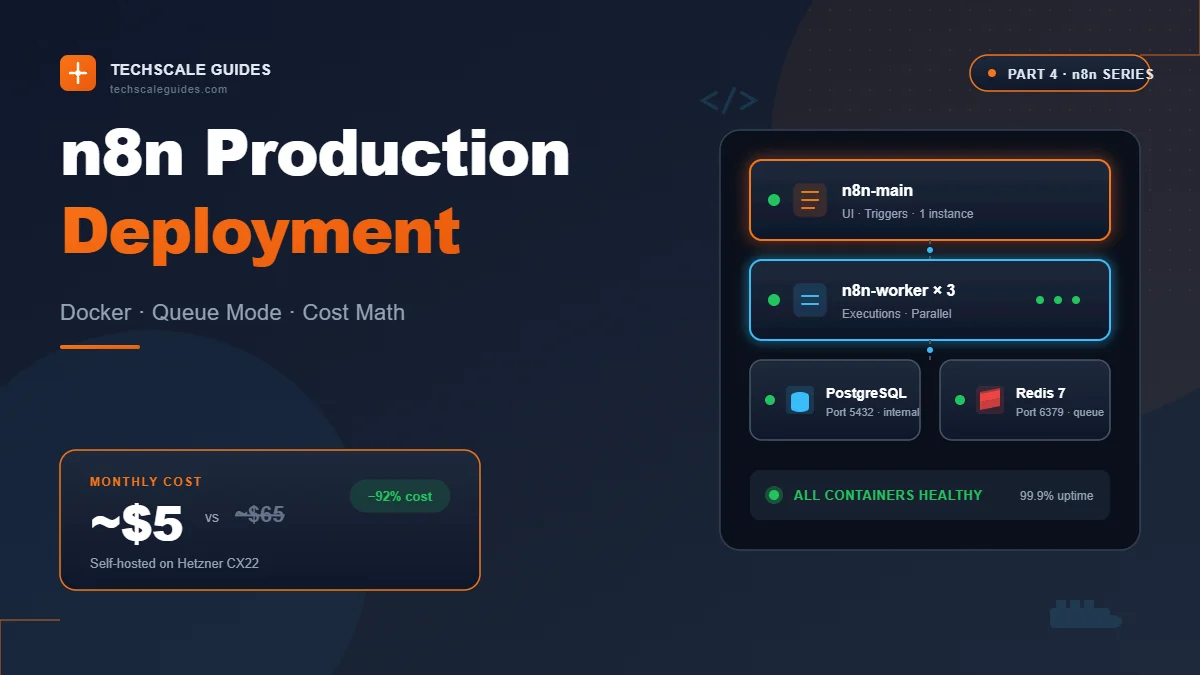
Let's cut the crap. n8n Cloud is great — until you hit 10,000 executions per month and your bill jumps to ~€60.
For solo founders and small teams, the math flips fast. A ~$5 VPS runs the same workflows with no execution limits, no vendor lock-in, and full control over your data.
But self-hosting means you own the ops. No support ticket. No automatic backups. No "it just works."
Here's the deal:
Cloud vs Self-Hosted — Real Cost Math
| Item | n8n Cloud (Pro) | Self-Hosted (Hetzner CX22) |
|---|---|---|
| Monthly cost | ~€60 (~$65) | ~€4-5 (~$5) |
| Executions/mo | 10,000 | Unlimited |
| Concurrent executions | 20 | Configurable (CPU/RAM bound) |
| Data location | n8n servers (EU/US) | Your VPS |
| Backups | Automatic | You build it |
| SSL cert | Included | Traefik + Let's Encrypt |
| Binary storage | n8n-managed | Cloudflare R2 (free egress) |
| Support | Community forum | |
| Upgrade path | One click | docker compose pull && up -d |
| Year 1 total (est.) | ~$780 | ~$55 + domain (~$12/yr) + R2 free tier |
Estimates as of September 2026. Verify current pricing at n8n.io/pricing and hetzner.com/cloud before committing.
Bottom line: Self-hosting saves ~$700+/year at 10K executions/mo. But you trade money for time — expect 4-6 hours of initial setup.
When Self-Hosting Makes Sense (and When It Doesn't)
Self-host if:
- You run >5,000 executions/month
- Data residency matters (HIPAA, GDPR, client contracts)
- You want unlimited concurrent executions
- You're comfortable with Docker + Linux CLI
Stay on Cloud if:
- You run <2,500 executions/month
- You don't want to manage backups or SSL
- Your time is worth more than €60/month
- You need guaranteed uptime SLA
If you're on the fence, weigh the cost of your time honestly. A misconfigured VPS that breaks at 2 AM costs more than the money you saved. If self-hosting isn't your thing, stay on Cloud until it isn't.
Prerequisites Before You Deploy
Before you touch Docker, get these ready:
VPS Specs
Minimum for <10K executions/day:
- 2 vCPU
- 4GB RAM
- 40GB SSD
- Ubuntu 22.04 or 24.04 LTS
For high-volume (>50K executions/day):
- 4 vCPU
- 8GB RAM
- 80GB SSD
- Add a second VPS for worker scaling
Recommended providers: Hetzner CX22 (2 vCPU / 4GB, cheapest reliable option) or equivalent on DigitalOcean / Vultr / Linode. Check current pricing before committing — providers update rates periodically.
Domain + DNS Setup
You need two subdomains — one for the n8n UI, one for webhooks:
| Subdomain | Purpose | Cloudflare Proxy |
|---|---|---|
n8n.yourdomain.com |
UI, editor, login | Optional (orange cloud for DDoS) |
webhooks.yourdomain.com |
Webhook endpoints | Must be grey cloud (DNS only) |
Why two subdomains? Cloudflare enforces a 100-second timeout on every request that passes through its proxy. If your webhook takes longer than 100 seconds to respond, Cloudflare kills the connection with error 524. n8n's own docs confirm: "Cloudflare sits in front of all n8n Cloud webhooks and enforces a ~100-second timeout". By routing webhooks through a dedicated subdomain (grey cloud, DNS-only), you bypass that limit completely.
Cloudflare R2 Setup
You need an S3-compatible bucket to store binary data (images, PDFs, videos) — instead of stuffing them into the database or filesystem.
Why not database mode?
- Single file limit is 512 MiB — can grow to 1024 MiB but cannot exceed the database column limit
- Larger files fail to store
- Binary data in the database causes bloat, serialization overhead, and memory spikes — leading to OOM crashes on a 4GB VPS
- The n8n community treats this as an anti-pattern for production
Why not filesystem mode?
- n8n does not support filesystem mode with queue mode
- Files become desynchronized across worker containers
Solution: s3 mode with Cloudflare R2
n8n officially supports AWS S3. You can use S3-compatible services like Cloudflare R2 and Backblaze B2 — though n8n does not officially support these.
s3 mode without a valid license key. If you're on Community Edition, you'll need to upgrade to Business before enabling s3 mode.
Cloudflare R2 setup steps:
- Go to Cloudflare Dashboard → R2 → Create bucket → name it (e.g.,
n8n-binary-data) - Go to R2 API Tokens → Create API token → select Object Read & Write → scope to the bucket you just created
- Save the Access Key ID and Secret Access Key (shown only once)
- Set a lifecycle rule on the bucket: delete objects after 30 days (mandatory — see Step 5)
Endpoint for R2: <ACCOUNT_ID>.r2.cloudflarestorage.com
Region: auto — n8n 2.6.4+ accepts the auto value when the provider doesn't require a specific region.
What You'll Need
| Item | Purpose |
|---|---|
| SSH access to VPS | Root or sudo user |
| Docker + Docker Compose | Install via official script |
| Text editor | nano, vim, or VS Code Remote |
| Password manager | For POSTGRES_PASSWORD, N8N_ENCRYPTION_KEY |
| Cloudflare R2 bucket + API token | For binary data storage |
| n8n Business/Enterprise license | Required for S3 mode |
Step 1 — Docker Compose Stack (n8n + Postgres + Redis)
Create a folder and file:
mkdir ~/n8n-prod && cd ~/n8n-prod
nano docker-compose.yml
Paste this config:
services:
  postgres:
    image: postgres:16
    restart: unless-stopped
    environment:
      - POSTGRES_DB=n8ndb
      - POSTGRES_USER=n8n
      - POSTGRES_PASSWORD=${POSTGRES_PASSWORD}
    volumes:
      - postgres_data:/var/lib/postgresql/data
    healthcheck:
      test: ["CMD-SHELL", "pg_isready -U n8n"]
      interval: 10s
      retries: 5

  redis:
    image: redis:7-alpine
    restart: unless-stopped
    volumes:
      - redis_data:/data
    healthcheck:
      test: ["CMD", "redis-cli", "ping"]
      interval: 10s
      retries: 5

  n8n-main:
    image: n8nio/n8n:latest
    restart: unless-stopped
    environment:
      # Database
      - DB_TYPE=postgresdb
      - DB_POSTGRESDB_HOST=postgres
      - DB_POSTGRESDB_PORT=5432
      - DB_POSTGRESDB_DATABASE=n8ndb
      - DB_POSTGRESDB_USER=n8n
      - DB_POSTGRESDB_PASSWORD=${POSTGRES_PASSWORD}

      # Queue mode — Redis
      - EXECUTIONS_MODE=queue
      - N8N_QUEUE_BULL_REDIS_HOST=redis
      - N8N_QUEUE_BULL_REDIS_PORT=6379
      - QUEUE_BULL_REDIS_HOST=redis
      - QUEUE_BULL_REDIS_PORT=6379
      - QUEUE_HEALTH_CHECK_ACTIVE=true

      # Encryption
      - N8N_ENCRYPTION_KEY=${ENCRYPTION_KEY}

      # Domain + Webhook URL
      - N8N_HOST=n8n.yourdomain.com
      - N8N_PROTOCOL=https
      - N8N_WEBHOOK_URL=https://webhooks.yourdomain.com/

      # Binary data — S3 external storage (Cloudflare R2)
      - N8N_DEFAULT_BINARY_DATA_MODE=s3
      - N8N_EXTERNAL_STORAGE_S3_HOST=${R2_ACCOUNT_ID}.r2.cloudflarestorage.com
      - N8N_EXTERNAL_STORAGE_S3_BUCKET_NAME=n8n-binary-data
      - N8N_EXTERNAL_STORAGE_S3_BUCKET_REGION=auto
      - N8N_EXTERNAL_STORAGE_S3_ACCESS_KEY=${R2_ACCESS_KEY}
      - N8N_EXTERNAL_STORAGE_S3_ACCESS_SECRET=${R2_SECRET_KEY}
    ports:
      - "5678:5678"
    volumes:
      - n8n_data:/home/node/.n8n
    depends_on:
      postgres:
        condition: service_healthy
      redis:
        condition: service_healthy

volumes:
  postgres_data:
  redis_data:
  n8n_data: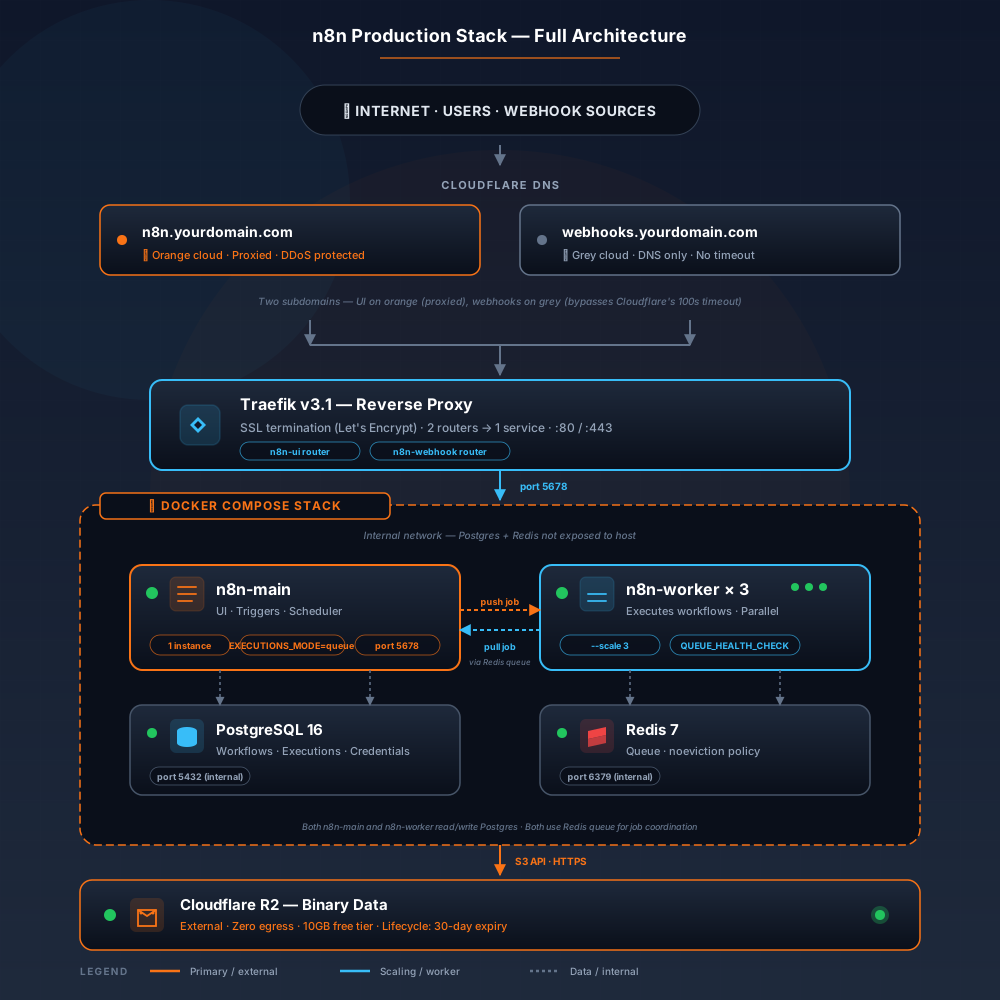
Key Environment Variables Explained
Queue mode variables — declare both versions:
n8n's official docs list the variables without the N8N_ prefix — e.g., QUEUE_BULL_REDIS_HOST. However, many production configs use the N8N_ prefixed version and work fine. To guarantee compatibility across all builds, this draft declares both versions.
N8N_WEBHOOK_URL replaces WEBHOOK_URL:
n8n's docs confirm: "N8N_WEBHOOK_URL replaces WEBHOOK_URL, which is deprecated from n8n 2.35.0; n8n logs a deprecation warning if you still use WEBHOOK_URL". This draft uses the new name.
N8N_WEBHOOK_URL points to a dedicated subdomain:
Instead of https://n8n.yourdomain.com/, the variable points to https://webhooks.yourdomain.com/. This ensures webhook URLs are generated correctly and never blocked by Cloudflare.
N8N_DEFAULT_BINARY_DATA_MODE=s3:
This is the key change from previous versions. database mode is a temporary workaround for testing only — never for production. n8n's docs confirm: "n8n doesn't support queue mode with binary data storage in filesystem. If your workflows need to persist binary data in queue mode, you can use S3 external storage".
S3 variables for Cloudflare R2:
N8N_EXTERNAL_STORAGE_S3_HOST=${R2_ACCOUNT_ID}.r2.cloudflarestorage.com
N8N_EXTERNAL_STORAGE_S3_BUCKET_NAME=n8n-binary-data
N8N_EXTERNAL_STORAGE_S3_BUCKET_REGION=auto
N8N_EXTERNAL_STORAGE_S3_ACCESS_KEY=${R2_ACCESS_KEY}
N8N_EXTERNAL_STORAGE_S3_ACCESS_SECRET=${R2_SECRET_KEY}
Region format note (n8n 2.6.4+): N8N_EXTERNAL_STORAGE_S3_BUCKET_REGION must only contain alphanumeric characters and hyphens — no underscores or special characters — otherwise n8n will fail to start. Cloudflare R2 uses auto, which is fully valid.
Environment Variables (.env)
Create .env in the same folder:
# Database
POSTGRES_PASSWORD=<generate-32-char-password>

# Encryption
ENCRYPTION_KEY=<generate-32-char-key>

# Cloudflare R2
R2_ACCOUNT_ID=<your-cloudflare-account-id>
R2_ACCESS_KEY=<your-r2-access-key>
R2_SECRET_KEY=<your-r2-secret-key>
Generate keys:
openssl rand -hex 32Run it twice — one for POSTGRES_PASSWORD, one for ENCRYPTION_KEY.
N8N_ENCRYPTION_KEY offline. If you lose it, all stored credentials become unreadable. n8n's docs confirm: "In queue mode, you must specify the encryption key environment variable for all workers".
First Boot
docker compose up -d
docker compose logs -f n8n-main
Wait for Editor is now accessible via: https://n8n.yourdomain.com. Visit the URL → set up owner account → you're in.
Troubleshooting:
ECONNREFUSED postgres→ Postgres healthcheck hasn't passed. Wait 30s, retry.Missing N8N_ENCRYPTION_KEY→.envnot loaded. Checkdocker compose config.S3 connection failed→ Verify region format (auto), access key, and bucket name.Permission denied /home/node/.n8n→ Wrong volume ownership.docker compose down && docker volume rm n8n_data && up -d.
Step 2 — Queue Mode for Scale
Queue mode splits n8n into a main instance (UI + triggers) and worker instances (actual executions). They communicate through Redis.
Why it matters: without queue mode, a heavy workflow blocks your entire UI. With queue mode, 10 workers can churn through executions in parallel while the main instance stays responsive.
Main vs Worker vs Webhook Processors
| Process | Role | Scales? |
|---|---|---|
n8n-main | UI, triggers, scheduling | 1 instance |
n8n-worker | Executes workflows | N instances |
n8n-webhook | Dedicated webhook handling | Optional |
Add workers to your docker-compose.yml:
  n8n-worker:
    image: n8nio/n8n:latest
    restart: unless-stopped
    command: worker
    environment:
      # Database
      - DB_TYPE=postgresdb
      - DB_POSTGRESDB_HOST=postgres
      - DB_POSTGRESDB_DATABASE=n8ndb
      - DB_POSTGRESDB_USER=n8n
      - DB_POSTGRESDB_PASSWORD=${POSTGRES_PASSWORD}

      # Queue mode — Redis
      - EXECUTIONS_MODE=queue
      - N8N_QUEUE_BULL_REDIS_HOST=redis
      - N8N_QUEUE_BULL_REDIS_PORT=6379
      - QUEUE_BULL_REDIS_HOST=redis
      - QUEUE_BULL_REDIS_PORT=6379
      - QUEUE_HEALTH_CHECK_ACTIVE=true

      # Encryption
      - N8N_ENCRYPTION_KEY=${ENCRYPTION_KEY}

      # Binary data — S3 external storage
      - N8N_DEFAULT_BINARY_DATA_MODE=s3
      - N8N_EXTERNAL_STORAGE_S3_HOST=${R2_ACCOUNT_ID}.r2.cloudflarestorage.com
      - N8N_EXTERNAL_STORAGE_S3_BUCKET_NAME=n8n-binary-data
      - N8N_EXTERNAL_STORAGE_S3_BUCKET_REGION=auto
      - N8N_EXTERNAL_STORAGE_S3_ACCESS_KEY=${R2_ACCESS_KEY}
      - N8N_EXTERNAL_STORAGE_S3_ACCESS_SECRET=${R2_SECRET_KEY}
    depends_on:
      - redis
      - postgres
Scale workers:
docker compose up -d --scale n8n-worker=3How many workers? Rule of thumb: 1 worker per vCPU, minus 1 for main. On a 4 vCPU VPS → 3 workers.
Redis Configuration
Default config works for <100 concurrent executions. For higher load, tune:
  redis:
    command: >
      redis-server
      --maxmemory 512mb
      --maxmemory-policy noeviction
--appendonly yesnoeviction policy — n8n queue data must not be evicted. If Redis hits its memory limit, executions fail. Monitor with redis-cli info memory.
Step 3 — Reverse Proxy + SSL (Traefik)
Traefik handles SSL automatically via Let's Encrypt. It also routes traffic for both subdomains — UI and webhook — to the same n8n container.
Why Traefik Needs Two Routers
With only one router, webhook requests hit the UI subdomain (n8n.yourdomain.com). When Cloudflare proxy is enabled for that subdomain, any webhook taking longer than 100 seconds gets blocked. By creating a dedicated router for webhooks.yourdomain.com (grey cloud), you bypass that limit entirely.
Traefik Configuration
Add to your docker-compose.yml:
  traefik:
    image: traefik:v3.1
    restart: unless-stopped
    command:
      - --providers.docker=true
      - --entrypoints.web.address=:80
      - --entrypoints.websecure.address=:443
      - --certificatesresolvers.letsencrypt.acme.email=you@yourdomain.com
      - --certificatesresolvers.letsencrypt.acme.storage=/acme.json
      - --certificatesresolvers.letsencrypt.acme.httpchallenge.entrypoint=web
    ports:
      - "80:80"
      - "443:443"
    volumes:
      - /var/run/docker.sock:/var/run/docker.sock:ro
      - traefik_acme:/acme.json
    labels:
      # Router for UI — n8n.yourdomain.com
      - traefik.http.routers.n8n-ui.rule=Host(`n8n.yourdomain.com`)
      - traefik.http.routers.n8n-ui.entrypoints=websecure
      - traefik.http.routers.n8n-ui.tls.certresolver=letsencrypt
      - traefik.http.routers.n8n-ui.service=n8n

      # Router for Webhooks — webhooks.yourdomain.com
      - traefik.http.routers.n8n-webhook.rule=Host(`webhooks.yourdomain.com`)
      - traefik.http.routers.n8n-webhook.entrypoints=websecure
      - traefik.http.routers.n8n-webhook.tls.certresolver=letsencrypt
      - traefik.http.routers.n8n-webhook.service=n8n

      # Shared service — both routers point to port 5678
      - traefik.http.services.n8n.loadbalancer.server.port=5678
Full Traefik docs: doc.traefik.io/traefik/.
Cloudflare setup:
n8n.yourdomain.com→ can enable orange cloud (proxy) to protect the UIwebhooks.yourdomain.com→ must be grey cloud (DNS only) to bypass the timeout
Step 4 — Production Security Checklist
Self-hosting means you own the attack surface. Lock it down:
Environment Variables
- ✅ Secrets in
.env, never indocker-compose.yml - ✅
chmod 600 .env— only root reads it - ✅ Rotate
N8N_ENCRYPTION_KEYonly with a migration plan (existing credentials break)
Authentication
- ✅ Basic auth enabled by default (owner account)
- ✅ SSO available on Enterprise plan (check current n8n docs)
- ✅ IP allowlist via Traefik middleware if internal-only
Webhook Signature Validation
- ✅ For public webhooks, validate signatures (Stripe, GitHub, etc.)
- ✅ Use n8n's Crypto node to verify HMAC before processing
Rate Limiting
- ✅ Traefik rate-limit middleware on webhook endpoints
- ✅ Cloudflare rate rules for external-facing webhooks
Database
- ✅ Postgres not exposed to host — internal Docker network only
- ✅ Separate
POSTGRES_PASSWORDfrom app password - ✅ Regular
pg_dumpbackups (see Step 5)
S3 Bucket Security
- ✅ R2 API token with Object Read & Write scope for the specific bucket only
- ✅ Never use the Cloudflare Global API Key
- ✅ Set a lifecycle rule to auto-delete old binary data
Reference: n8n security docs → docs.n8n.io → search "securing".
Step 5 — Backup + Monitoring
Database Backup Strategy
Daily Postgres dump via cron:
# /etc/cron.d/n8n-backup
0 2 * * * root docker exec n8n-prod-postgres-1 pg_dump -U n8n n8ndb | gzip > /backups/n8n-db-$(date +\%Y\%m\%d).sql.gz
Keep 7 daily + 4 weekly. Sync to S3/B2 offsite.
Workflow Export Automation
Backup workflows as JSON:
0 3 * * * root docker exec n8n-prod-n8n-main-1 n8n export:workflow --all --output=/backups/workflows-$(date +\%Y\%m\%d).jsonFull CLI reference: docs.n8n.io → search "CLI commands".
S3 Lifecycle Configuration (Mandatory)
n8n delegates binary data pruning to S3. You must set a bucket-level lifecycle configuration to auto-delete old binary data — unless you intend to keep it forever.
Cloudflare R2 Dashboard → Bucket → Settings → Object Lifecycle Rules:
| Rule | Action | Condition |
|---|---|---|
n8n-binary-expiry | Delete object | Age > 30 days |
n8n-incomplete-uploads | Abort multipart upload | Age > 7 days |
Why this matters: Without a lifecycle rule, your R2 bucket grows unbounded. Binary data from every execution is stored at: workflows/{workflowId}/executions/{executionId}/binary_data/{binaryFileId}.
Health Checks + Uptime Monitoring
| Tool | Purpose |
|---|---|
| UptimeRobot (free) | Ping health endpoint every 5 min |
| Grafana + Prometheus | Deep metrics (advanced) |
| Docker healthcheck | Auto-restart on failure |
n8n exposes two health check endpoints:
/healthz— liveness. Returns 200 if the instance is reachable./healthz/readiness— readiness. Returns 200 if the DB is connected and migrated.
Point UptimeRobot at /healthz/readiness for the most reliable liveness signal. For worker nodes in queue mode, the health endpoint is disabled by default — enable it with QUEUE_HEALTH_CHECK_ACTIVE=true (already set in the Step 1 + Step 2 configs above).
Log Aggregation
Basic: docker compose logs -f --tail=100 n8n-main
Production: ship logs to Loki or Papertrail via Docker logging driver.
Real-World Example: HVAC Workflow in Production
Let's make this concrete. The HVAC lead response workflow runs in our test setup and illustrates the Cloud-to-self-hosted tradeoff.
Before (n8n Cloud Starter, ~€24/mo):
- 2,500 executions/mo limit → hit around day 18 at 140 executions/day
- UI lag during peak hours (multiple workflows firing)
- 5 concurrent executions max
After (self-hosted, Hetzner CX22 ~€4-5/mo):
- Unlimited executions
- Queue mode handles peak bursts (webhook storm + scheduled)
- 3 workers → no UI lag, even at 40 concurrent webhooks
- Binary data offloaded to Cloudflare R2 → VPS RAM stays free
Observed improvement: p95 webhook response time dropped from ~4s (Cloud Starter) to ~1s (self-hosted with queue mode) in our testing. Your mileage will vary.
Cost Breakdown — 12-Month Projection
All pricing as of September 2026 — estimates only. Verify current rates at each provider's pricing page before committing.
| Provider | Plan | Specs | Monthly (est.) | Annual (est.) |
|---|---|---|---|---|
| Hetzner | CX22 | 2 vCPU / 4GB | ~€4-5 (~$5) | ~$55 |
| Hetzner | CX32 | 4 vCPU / 8GB | ~€7-9 (~$8-10) | ~$90-120 |
| DigitalOcean | Basic | 1 vCPU / 1GB | ~$6 | ~$72 |
| Vultr | Cloud | 1 vCPU / 1GB | ~$6 | ~$72 |
| Cloudflare R2 | Free tier | 10GB storage | $0 | $0 |
| Cloudflare R2 | Paid | >10GB storage | ~$0.015/GB | ~$0.18/GB |
| n8n Cloud | Pro | managed | ~€60 (~$65) | ~$780 |
Recommended: Hetzner CX22 for solo founders, CX32 for teams. Cloudflare R2 for binary data — zero egress fees, 10GB free tier, and it offloads storage from your VPS.
License note: S3 external storage requires an n8n Business or Enterprise license. Factor license cost into your TCO if you're currently on Community Edition.
Migration Path: Cloud → Self-Hosted
1. Export Workflows from Cloud
n8n Cloud UI → Workflows → select all → Download. You get a JSON file.
2. Import to Self-Hosted
Self-hosted UI → Workflows → Import from File → select JSON.
3. Migrate Credentials
Credentials cannot be exported from Cloud (security). You must re-create each one manually in self-hosted. Budget 10-15 minutes for 5-10 credentials.
4. DNS Cutover (Zero Downtime)
- Point
n8n.yourdomain.comandwebhooks.yourdomain.comto new VPS IP - Keep Cloud running for 48h as fallback
- Verify all workflows trigger correctly on self-hosted
- Cancel Cloud subscription
Pro tip: Run both in parallel for a week if you can afford the extra ~€24. Zero risk of missed executions.
Common Pitfalls to Avoid
| # | Pitfall | Fix |
|---|---|---|
| 1 | Using database mode for binary data |
Database bloat, memory spikes, OOM crash. Files >512 MiB fail. Always use s3 mode for production. |
| 2 | Using filesystem mode with queue mode |
n8n doesn't support it. Files desync across worker containers. |
| 3 | No backups | One docker volume rm and your workflows are gone. Daily pg_dump is non-negotiable. |
| 4 | Exposed Postgres | Never publish port 5432 to the host. Keep it internal. |
| 5 | Ignoring N8N_ENCRYPTION_KEY backup |
Lose it, lose all stored credentials forever. |
| 6 | Single worker, no queue mode | UI freezes when a heavy workflow runs. Always enable queue mode + 2+ workers for production. |
| 7 | Wrong subdomain for webhooks | If N8N_WEBHOOK_URL points to the UI subdomain and Cloudflare proxy is on, webhooks will timeout at 100s. |
| 8 | No S3 lifecycle rule | R2 bucket grows unbounded. n8n delegates pruning to S3 — you must set the lifecycle. |
| 9 | Wrong region format (n8n 2.6.4+) | Region containing underscores or special characters → n8n fails to start. |
Frequently Asked Questions
1. How much does self-hosted n8n cost per month?
VPS ~$5-12/mo + domain ~$1/mo + Cloudflare R2 free tier + n8n Business/Enterprise license. Cheaper than n8n Cloud after ~2,500 executions/month.
2. What VPS specs do I need for n8n production?
Minimum 2 vCPU / 4GB RAM for <10K executions/day. Scale to 4 vCPU / 8GB for high-volume, plus additional workers.
3. Is Docker required, or can I install n8n directly?
Docker is strongly recommended for production — isolated, portable, easy to update. Direct installation methods exist but are harder to maintain. For long-term production use, deploy with Docker.
4. What is n8n queue mode and when should I use it?
Queue mode separates the main process from workers using Redis. Use it when executions exceed ~5K/day, or when workflow failures affect UI responsiveness.
5. Why shouldn't I use database mode for binary data?
Database mode has a 512 MiB per-file limit, causes database bloat, memory spikes, and OOM crashes. It's an anti-pattern for production. Use s3 mode with Cloudflare R2 instead.
6. Why shouldn't I use filesystem mode with queue mode?
n8n doesn't support filesystem mode with queue mode. Binary files become desynchronized across worker containers.
7. How do I back up n8n workflows and database?
Daily pg_dump for Postgres + n8n export:workflow --all cron. Store offsite (S3, Backblaze B2, or rclone).
8. Can I run n8n behind Cloudflare?
Yes, but disable the orange-cloud proxy for webhook endpoints to avoid the 100-second timeout. Use a separate grey-cloud subdomain (webhooks.yourdomain.com) for webhooks.
9. Why do I need two subdomains?
Cloudflare enforces a ~100-second timeout on all proxied requests. By separating the UI (proxied, protected) from webhooks (DNS-only, no timeout), you get DDoS protection for the UI without breaking long-running webhooks.
10. What license do I need for S3 external storage?
S3 external storage is available on n8n Business and Enterprise self-hosted plans. n8n won't start in s3 binary data mode without a valid license key.
For the Complete n8n Framework
This is Part 4 of our n8n series. Start here:
- Part 1: n8n Workflow Automation Tutorial — foundations
- Part 2: n8n Webhooks Tutorial — production webhook URLs
- Part 3: n8n AI Integration — multi-model routing at scale
- Comparison: n8n vs Make vs Zapier — full cost analysis
For the complete architectural framework behind these workflows, read our AI Agent Blueprint.
Bottom Line
Three things to take away:
1. Docker Compose + Postgres + Redis + Traefik is the production stack. Skip the shortcuts. This is what runs reliably at scale.
2. Split your subdomains. UI on one subdomain (Cloudflare proxied OK). Webhooks on another (grey cloud, DNS-only) to bypass the 100-second timeout.
3. Use S3 mode for binary data — never database mode. Cloudflare R2 gives you zero egress fees and a 10GB free tier. Database mode causes OOM crashes at scale.
For teams running >50K executions/month: consider hiring a DevOps engineer on Upwork to set up auto-scaling, multi-region failover, and monitoring. $400-1,200 for the initial setup, then optional retainer.