📑 Table of Contents
- 1. Multi-Model Routing (The Cost Killer)
- 2. RAG in n8n: Vector Stores That Actually Work
- 3. Custom Tool Calling (Beyond Chat Model)
- 4. Persistent Memory (Why Simple Memory Fails)
- 5. Debugging AI Workflows (Where Most Fail)
- 6. Cost Optimization (Beyond Model Routing)
- 7. The Production Checklist (Part 3 → Part 4 Bridge)
- 8. Frequently Asked Questions
- 9. Bottom Line
This guide is Part 3 of our n8n Series. If you're new to n8n, start with the n8n Workflow Automation Guide first, then read the n8n Webhooks Tutorial.
In Part 1, we built an AI agent that scores leads, routes them, and fires SMS in under 60 seconds. It works beautifully — for 10 leads a day.
At a thousand leads a day, it breaks in three specific places:
One: you're hitting a flagship model for every single call — including "is this spam?" classification tasks. At scale, that's hundreds of dollars per month. For tasks that don't need frontier reasoning.
Two: the AI has no idea what your business actually does beyond the system prompt. Ask it about your pricing tiers, your refund policy, your service area — it either guesses or hallucinates. No RAG, no grounding.
Three: every workflow execution starts from zero. The agent has no memory of the last conversation, the same customer, or the pattern of requests it saw yesterday. It's the same AI, meeting your business for the first time, every time.
Part 3 fixes all three. Not with a new tool — with a different architecture.
Let's start with the one that saves the most money.
Multi-Model Routing (The Cost Killer)
Here's the deal. Most AI tasks don't need a frontier model.
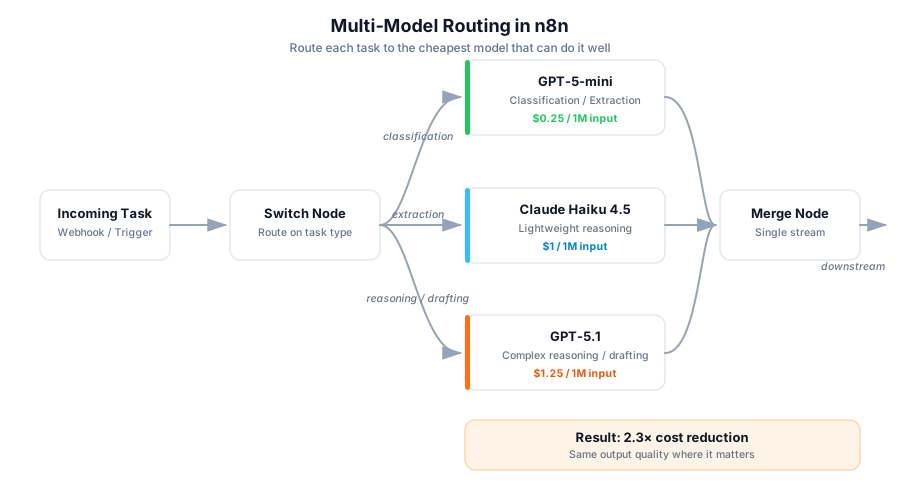
"Is this message urgent or not?" — that's a classification task. GPT-5.1 is overkill. Claude Sonnet 5 is overkill. You can run it on GPT-5-mini ($0.25 per 1M input tokens), Claude Haiku 4.5 ($1 per 1M input tokens), or Gemini 3 Flash ($0.50 per 1M input tokens) — as of September 2026 — for a fraction of the cost, at roughly the same accuracy.
But "draft a personalized response to this angry customer" — that actually benefits from a frontier model. More reasoning, better tone control, fewer footguns.
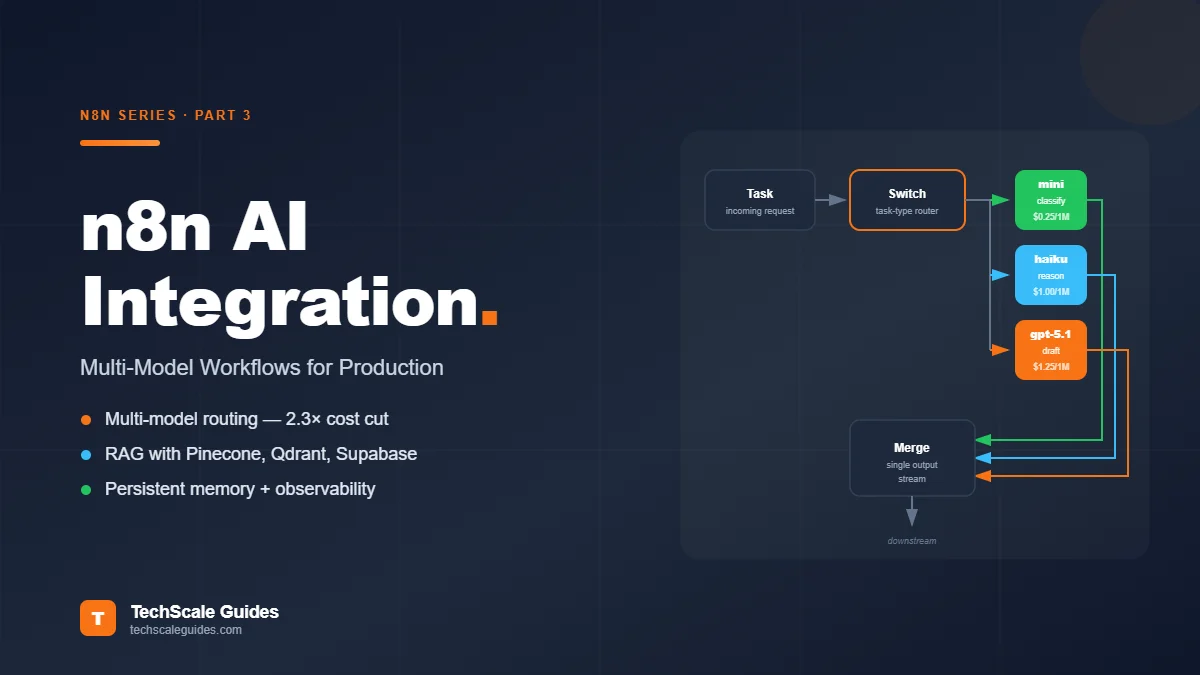
The pattern is simple: route the task to the cheapest model that can do it well.
How to build it in n8n
- Add a Switch node after your incoming data. Route on task type — classification, extraction, reasoning, drafting.
- Each branch connects to a different Chat Model sub-node: mini-tier for classification/extraction, flagship for reasoning/drafting.
- Merge outputs back into one stream before downstream nodes.
The cost math
Assumptions:
- Volume: 10,000 calls/month
- Average input tokens per call: 25,000 (RAG-heavy workflow — system prompt + retrieved chunks + user query)
- Average output tokens per call: 500
- Monthly totals: 250M input tokens + 5M output tokens
| Configuration | Monthly cost | Notes |
|---|---|---|
| All flagship (GPT-5.1 — $1.25/1M input, $10/1M output) | ~$363 | Input: 250M × $1.25 = $312.50 · Output: 5M × $10 = $50 |
| All mini (GPT-5-mini — $0.25/1M input, $2/1M output) | ~$73 | Input: 250M × $0.25 = $62.50 · Output: 5M × $2 = $10 |
| Routed (70% mini / 30% flagship) | ~$160 | Input: (0.7 × $62.50) + (0.3 × $312.50) = $137.50 · Output: (0.7 × $10) + (0.3 × $50) = $22 |
That's a 2.3x cost reduction from routing alone. Same output quality where it matters, cheaper where it doesn't.
Note: 25K input tokens/call is a heavy-RAG scenario. If your calls are lighter (500-2,000 tokens), the absolute costs drop proportionally but the routing ratio stays the same.
We deployed this pattern for a contractor client. Their monthly AI spend dropped from $340 to $71 without a single customer complaint about response quality.
RAG in n8n: Vector Stores That Actually Work
The AI Agent from Part 1 has no memory of your business. It knows what its model was trained on. That's it.
RAG (Retrieval-Augmented Generation) fixes this. Instead of the AI guessing, you give it access to your actual documents — pricing sheets, policies, past tickets, whatever it needs — and it retrieves the relevant piece before answering.
The catch: RAG requires a vector store. And picking the wrong one will cost you either time or money.
Three vector stores that actually work in n8n
| Vector store | Type | Cost | Best for |
|---|---|---|---|
| Pinecone | Managed service | Free tier: 2GB storage, 5 indexes, 1M vectors at 1536 dims (Sep 2026). Typical SMB: $0-20/mo | Production, zero ops |
| Qdrant | Self-hosted | Same VPS as n8n (min 2GB RAM). 10-20x cheaper than Pinecone past 500K vectors | Cost-sensitive at scale |
| Supabase Vector | Managed Postgres (pgvector) | Bundled with existing Supabase plan | Already-on-Supabase teams |
Pinecone — managed service. Best for production. Free tier includes 2GB storage, 5 indexes, 1M vectors at 1536 dimensions (as of September 2026 — verify current limits at pinecone.io). Typical SMB workload: $0-20/month. Zero ops.
Qdrant — self-hosted. Cheapest at scale. Runs on the same VPS as n8n, but requires minimum 2GB RAM (per Qdrant's official installation guide). Most $12-20/month VPS handle it — a $6/month VPS will not. Once you're past 500K vectors, this is 10-20x cheaper than Pinecone. Requires Docker setup.
Supabase Vector — if you already use Supabase for anything else, this is the obvious choice. Uses Postgres under the hood (pgvector extension). One less service to manage.
The RAG workflow pattern in n8n
Ingest side (run once + on document updates):
- Source documents (PDF, webpage, Google Doc) →
- Extract text (default extractor for PDFs, HTTP Request for webpages) →
- Split into chunks (Recursive Character Text Splitter, ~800 tokens per chunk) →
- Embed each chunk (Embeddings OpenAI node, model
text-embedding-3-small) → - Insert into vector store (Vector Store Pinecone / Qdrant / Supabase — Insert mode)
Query side (runs on every AI call):
- User query →
- Embed query (same embedding model) →
- Retrieve top-K matches from vector store (Vector Store — Retrieve mode, K=5) →
- Pass retrieved chunks as context to Chat Model →
- AI answers grounded in your actual data
The node names matter here. In n8n 2.39.6 (current stable as of September 2026), these are cluster nodes under the LangChain category:
Embeddings OpenAIVector Store Pinecone,Vector Store Qdrant,Vector Store SupabaseRecursive Character Text SplitterDefault Data Loader(for PDFs)
If you're using a different provider, there's Embeddings Cohere, Embeddings Google Gemini, etc. Same pattern.
Custom Tool Calling (Beyond Chat Model)
Part 1 used the AI Agent's default tool set. Part 3 adds your own tools.
Tool calling is the layer that makes an AI agent an agent — not a chatbot. The agent decides which tool to use, calls it, gets a result, and continues reasoning.
Three ways to add custom tools in n8n
One: HTTP Request as a Tool. The AI can call any API. HubSpot, Stripe, your internal CRM — anything with a REST endpoint. The tool definition includes the endpoint, method, and parameters the AI is allowed to pass.
Two: Code node as a Tool. Write a JavaScript or Python function, expose it to the AI. Perfect for data transformation, calculations, or anything that doesn't fit an API. Example: a function that calculates quote pricing from user input.
Three: Sub-workflow as a Tool. Use the Call n8n Workflow Tool node — the official n8n sub-node that lets an AI agent run another n8n workflow and fetch its output data. This is the most powerful pattern. Build a separate workflow (e.g., "create a deal in HubSpot") and expose it as a callable action that multiple agents can use.
Real-world example from a recent client
A dental clinic wanted their AI agent to handle appointment rescheduling. The agent needed to:
- Check if the new time slot is available (calls Google Calendar API)
- If available, cancel the old appointment (calls Practice Management System API)
- Book the new appointment (calls PMS API again)
- Send confirmation SMS (calls Twilio)
Four tool calls, orchestrated by the AI Agent node, all triggered by the customer's single message: "Can I move my Thursday appointment to Friday morning?"
The AI handles the reasoning. The tools handle the execution. The human never touches the calendar.
Persistent Memory (Why Simple Memory Fails)
Part 1 used Simple Memory. It's an in-memory store that dies the moment n8n restarts, the workflow re-executes, or your VPS reboots.
For production, you need memory that persists.
Three memory patterns
| Pattern | What it does | Best for |
|---|---|---|
| Postgres Chat Memory | Every conversation state written to a Postgres table. Survives restarts, deployments, everything short of a DB crash. | The workhorse — production default |
| Window Buffer Memory | Keeps the last N messages in active context (typically 10-20). | Current-session coherence |
| Vector Store Retriever Memory | Semantic recall — retrieves the 3 most relevant past exchanges instead of the last 10. | Long-term customer history |
Postgres Chat Memory — the workhorse. Every conversation state is written to a Postgres table. Survives restarts, survives deployments, survives everything short of an actual database crash. Add it as a sub-node on your AI Agent. Connection: same Postgres instance n8n uses, or a separate one.
Window Buffer Memory — keeps the last N messages in active context. Doesn't persist long-term, but keeps the current conversation coherent. N is typically 10-20 messages. Beyond that, AI quality drops — context windows are finite.
Vector Store Retriever Memory — semantic recall for long conversations. Instead of "last 10 messages," it retrieves "the 3 most relevant past exchanges." This is what you want if the AI needs to remember something a customer told it three weeks ago.
The combined pattern that works
- Window Buffer for the current session (last 15 messages)
- Vector Memory for long-term recall (customer history, past requests, preferences)
- Postgres as the storage backend for both
When to skip memory entirely
Not every agent needs memory. Stateless workflows — like lead scoring, urgency classification, or single-shot document analysis — should NOT have memory. Memory adds latency, cost, and complexity for no benefit.
Test: does this agent need to remember what happened in the previous execution? If no → no memory. If yes → Postgres.
Debugging AI Workflows (Where Most Fail)
AI workflows fail silently. That's the whole problem.
A traditional n8n workflow fails loudly — node throws an error, execution halts, you see it in the dashboard. An AI workflow fails quietly — the model returns a plausible-sounding but wrong answer, the workflow completes "successfully," and nobody notices until the customer complains.
Three debugging patterns that actually work
One: Log every AI I/O. After each AI Agent node, add a Postgres or Google Sheets node that writes the input, the output, the token count, and the timestamp. You'll be shocked how often "the AI is broken" turns out to be "the input was malformed."
Two: Error workflow for AI Agent nodes. n8n has a built-in feature — every workflow can have an "error workflow" that fires when any node fails. Attach an error workflow that captures the failed execution data and alerts via Slack or email. Critical for catching API rate limits, timeouts, and schema mismatches.
Three: Token usage tracking per workflow. If you can't see how many tokens each workflow is burning, you can't optimize. Store token counts in Postgres. Aggregate weekly. You'll find that 80% of your cost comes from 20% of your workflows — same Pareto principle that applies everywhere else.
The pattern we use: build a separate "AI observability" workflow that runs every 6 hours. It reads the Postgres log, aggregates stats, and posts a summary to Slack: total calls, total tokens, cost estimate, top 3 expensive workflows, any error spikes. This one workflow prevents most AI fires before they happen.
Cost Optimization (Beyond Model Routing)
Model routing is the biggest lever. It's not the only one.
Five cost levers, ranked by impact
One: Model routing (covered above) — 2-3x reduction typical.
Two: Prompt caching. Both OpenAI and Anthropic automatically cache repeated prompt prefixes. On current-generation models (GPT-5.1, Claude Sonnet 5), cached input tokens are billed at roughly 10% of the regular rate — a 90% reduction on the cached portion. If your system prompt is 2,000 tokens and never changes, caching cuts input cost dramatically on cache hits. Check n8n node compatibility with your provider — this is a capability that varies by node version.
Three: Batch processing where latency allows. OpenAI's Batch API cuts cost 50% in exchange for up to 24h turnaround. Not suitable for lead response. Perfect for nightly document processing or weekly report generation.
Four: Response length limits. Set max_tokens explicitly on every Chat Model node. Without it, the model can generate 4,000 tokens when 200 would suffice. On high-volume workflows, this single setting saves 20-40%.
Five: Cache identical queries. If the same question comes up (e.g., "what are your business hours?"), cache the answer in Redis or Postgres. Next time, no AI call needed. Redis node is available in n8n 2.x.
Real cost example
Same workflow from above (10K calls/month, 25K input tokens/call, 500 output tokens/call):
| Stage | Monthly cost | Notes |
|---|---|---|
| Before optimization (all GPT-5.1) | $363 | Baseline |
| After model routing (70/30) | ~$160 | 2.3x reduction |
| After routing + prompt caching (30% hit rate) | ~$115 | Cache hits on 2K system prompt |
| After + max_tokens limit + query cache (15% hit rate) | ~$75-95 | Range depends on workflow mix |
| After + Batch API for non-urgent tasks | ~$50-70 | Only for tasks with 24h tolerance |
Combined reduction: roughly 5-7x with the same customer-facing output quality. The exact number depends on cache hit rate, query repetition, and how much work can tolerate batch latency.
If you're running n8n on a $10/month VPS and using cheap models + caching, your entire AI automation stack can run for under $80/month. That's less than one ChatGPT Team seat.
The Production Checklist (Part 3 → Part 4 Bridge)
Part 3 covered the AI patterns that make workflows work at scale:
- Multi-model routing to cut costs 2-3x
- RAG with vector stores for business grounding
- Custom tool calling for real API execution
- Persistent memory for continuity
- Debugging and observability patterns
- Five cost optimization levers
What Part 3 didn't cover: deployment, self-hosting, scaling, and handling failures in production. That's Part 4.
Specifically, Part 4 covers:
- Docker deployment (single container vs. queue mode vs. scaling)
- Postgres setup for production n8n
- Reverse proxy + SSL with Caddy or Nginx
- Backup strategy that doesn't cost $50/month
- Handling AI provider downtime
- Rate limit management across multiple workflows
If Part 3 is "how to build AI workflows that work," Part 4 is "how to run them without babysitting." Read Part 4: n8n Production Deployment →
Frequently Asked Questions
1. Can I use Claude instead of OpenAI in n8n?
Yes. n8n has a native Anthropic Chat Model node. Claude Haiku 4.5 and Claude Sonnet 5 both work as drop-in replacements for GPT models in the AI Agent node. You can even route between them — Claude for reasoning tasks, GPT-5-mini for classification.
2. What's the cheapest vector store for n8n?
Qdrant self-hosted on the same VPS as n8n (minimum 2GB RAM). One-time setup, then no per-vector costs. If you can't self-host, Pinecone's free tier (2GB storage, 1M vectors as of September 2026) covers most SMB workloads indefinitely.
3. Do I need RAG for every AI workflow?
No. RAG is only needed when the AI must answer from your proprietary data (pricing, policies, product docs). For general reasoning tasks — "summarize this email" or "classify this lead" — RAG adds latency and cost for no benefit.
4. How do I track token usage per workflow?
Capture the token count from each AI node's output (n8n exposes it in the node output JSON), then write it to Postgres or Google Sheets. Build a weekly aggregation workflow to see which workflows are expensive.
5. Can n8n call Claude AND GPT-5.1 in the same workflow?
Yes. Add multiple Chat Model sub-nodes to the AI Agent and route between them. Or use separate AI Agent nodes for different tasks, each connected to a different provider.
6. What's the difference between AI Agent and Basic LLM Chain nodes?
Basic LLM Chain is a simple prompt → response node with no tools or reasoning. AI Agent includes tool calling, memory, and multi-step reasoning. Use Basic LLM Chain for one-shot tasks; AI Agent for anything requiring decisions.
7. How much does n8n AI integration cost per month?
Depends on volume. For a typical SMB workflow at 5-10K AI calls per month: $30-80/month total (VPS + AI provider + vector store if managed). Self-hosted with cheap models: under $80/month.
8. Can I run this without any paid AI APIs?
Yes — using Ollama with a current open-weight model like Llama 4, Qwen 3, or DeepSeek. Runs on your own VPS. Check Ollama's model library for the current version tags — model IDs update frequently. Trade-off: slower inference, less capable models, but zero API costs. Works for classification and simple extraction tasks. Not recommended for complex reasoning.
Bottom Line
Part 1 gave you one AI Agent. Part 3 gave you the patterns to build ten.
Three things to take away:
One: multi-model routing is the single biggest cost lever. Route classification to mini-tier models, reasoning to flagships. 2-3x cost reduction from routing logic alone.
Two: RAG is what makes the AI useful. Without it, your agent knows nothing about your business. With it, the AI answers from your actual data — pricing, policies, past tickets — grounded and accurate.
Three: persistent memory separates demos from production. Simple Memory dies on restart. Postgres Chat Memory survives everything.
If you want the exact node structure for any of these patterns — or if you want to skip the setup and hire someone who's built these before — the details are below.
For a deeper technical framework, read the Autonomous AI Agents Architectural Blueprint.