📑 Table of Contents
- 1. The "Invisible Work" Trap – Why Open-Loop Systems Are Bleeding Your Business Dry
- 2. The Closed-Loop Architecture – 4 Core Technical Modules
- 3. The Red-Flag Protocol – Keeping Human Control Over AI Decisions
- 4. The B2B Vetting Checklist – 3 Questions to Separate "Prompt Typists" from Systems Architects
- 5. Shortcut to Implementation – Why Hiring a Vetted Expert Beats DIY
- 6. Conclusion & Call to Action (Bonus: Workflow Audit Template)
- 7. Frequently Asked Questions (FAQ)
The "Invisible Work" Trap – Why Open-Loop Systems Are Bleeding Your Business Dry
Last week, a B2B CEO came to me visibly frustrated: "I just dropped $200 on Upwork to hire someone for 'AI Automation,' and all I got was a glorified chatbot that regurgitates my company's PDFs!"
If you are looking to integrate AI into your business, proceed with caution. Countless founders are making a fatal mistake: burning money on half-baked systems and mistaking them for true automation.
The Reality: 90% of SMBs Run on Open-Loop Systems
Here's the math that keeps me up at night:
- 15 minutes per status check
- 8 checks per day = 2 hours
- 5 days per week = 10 hours
At $30/hour for an Operations Manager = $300/week = $1,200/month.
That's $1,200 per month you're paying just to ask people for updates.
Open-Loop Systems are workflows that only move forward if someone actively chases them:
- Sales sends a quote → waits for confirmation → silence → chases again.
- Warehouse updates shipping → needs to manually enter tracking → silence → someone calls to check.
- Finance sends an invoice → waits for payment → silence → emails a reminder.
One missed message creates a snowball effect that stalls 5 other tasks. This isn't "management." This is high-paid administrative work.
The Truth
You don't lack staff. You don't lack processes. You lack a Closed-Loop System—where machines automatically track, automatically remind, and only alert humans when intervention is truly needed.
If you run a local service business — a dental clinic, moving company, or contracting business — the same Closed-Loop architecture applies to reviews, booking reminders, and lead response. See our Local Business Growth Blueprint for the 10 strategies that map directly to this blueprint.
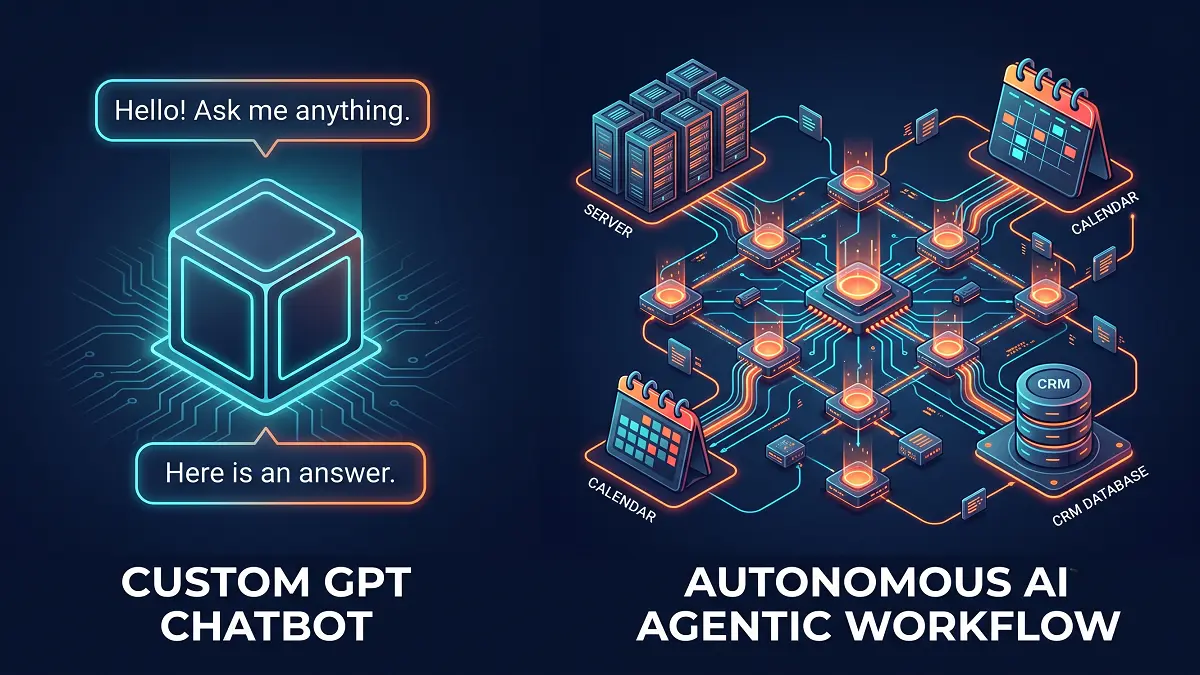
🛑 The Fatal Difference: Chatbots vs. Agents
Custom GPTs are merely passive "LLM Wrappers" that require constant human prompting. Autonomous AI Agents, however, use Function Calling to operate Agentic Workflows—making decisions and executing tasks independently across your tech stack.
👉 Read our deep dive: Custom AI Agents vs. Chatbots: Why Traditional RAG is Dead.
The Closed-Loop Architecture – 4 Core Technical Modules
The truth is: There is a massive chasm between a standard Custom GPT (AI Chatbot) and an Autonomous AI Agent. This section exposes the core architectural blueprint, helping you stop wasting capital on tech toys and start building a genuine operational machine.
The Big Picture: Data Flow Diagram
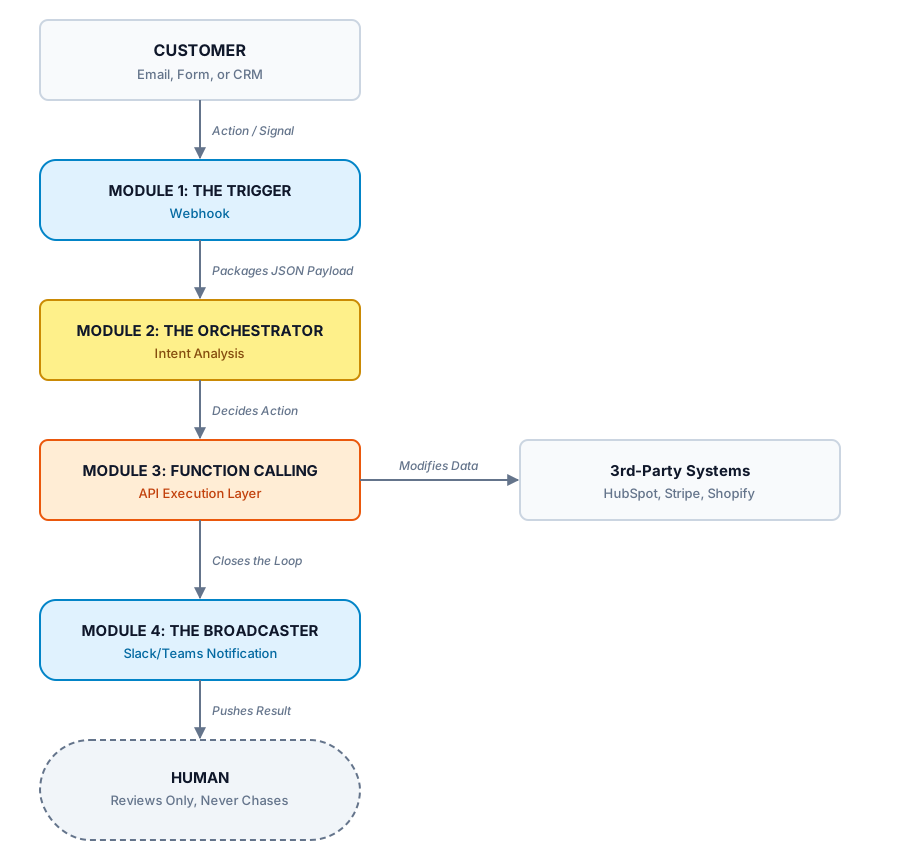
2.1. Module 1: The Trigger – Webhook-Powered Event Detection
This is where everything starts. The Trigger is a Webhook—a digital "ear" that's always listening for a signal.
| Scenario | What the Webhook Captures |
|---|---|
| Customer fills out a "Request a Quote" form | Name, email, needs, estimated contract value |
| New email arrives in the support inbox | Email content, sender, priority level |
| A deal is updated in HubSpot | New status, assignee, timestamp |
| Payment is confirmed via Stripe | Amount, order ID, customer info |
This raw data is packaged into a JSON Payload and passed to Module 2. Real-World Example: A prospect named ABC Corp fills out a quote request form on your website. The Webhook instantly captures:
{
  "company": "ABC Corp",
  "email": "contact@abccorp.com",
  "estimated_value": 15000,
  "timeline": "7 days",
  "industry": "Manufacturing"
}
No one needs to manually re-enter data. No one needs to "hand off" to the right salesperson. Module 1 has already done the job. Pro Tip: Don't code your own Webhook if you're not a developer. I once spent 2 days debugging a CORS configuration error. Now I hire a specialist on Fiverr to set this up for $30-50.
2.2. Module 2: The Orchestrator – Intent Analysis & Decision-Making
This is the brain of the entire system. The Orchestrator is an AI Agent—not a chatbot that answers questions, but a "brain" that knows how to reason and make decisions.
| Chatbot (RAG-only) | AI Agent (with Orchestrator) |
|---|---|
| Receives a question → searches for an answer in the knowledge base → outputs text | Receives data → analyzes Intent → decides the next step → commands the system to act |
| Passive – only responds when asked | Proactive – acts even when no one asks |
| Cannot change system state | Can change real data (create deals, send emails, update CRM) |
Real-World Example: Module 1 sends this payload: "ABC Corp requests a quote, estimated value $15,000, timeline 7 days, industry Manufacturing."
The Orchestrator (running on advanced middleware like n8n or Make.com) will:
- Classify: Identify this as a High-Value lead (over $10K).
- Check: Does a quote template exist for Manufacturing? (retrieve from Google Drive).
- Assess: How well does this match your product/service?
- Decide: Automatically generate a preliminary quote and pass it to Module 3.
2.3. Module 3: Function Calling – The API Execution Layer
This is where the AI Agent gets its hands dirty with your systems. Instead of just giving suggestions to humans, Function Calling allows the AI to automatically call APIs and make real data changes.
| Orchestrator Decision | Function Calling Executes |
|---|---|
| "Create a quote for ABC Corp" | Calls HubSpot API → creates a new deal |
| "Schedule a demo" | Calls Google Calendar API → books an appointment |
| "Send the quote to the client" | Calls Email System API → sends the email |
| "Update order status" | Calls Shopify API → changes the status |
All of this happens in seconds, without a human opening a single tab.
The Critical Distinction: Not every AI Agent has Function Calling. Many "experts" only know how to use RAG (Retrieval-Augmented Generation). That's chatbot technology, not autonomous agent technology. An agent must know how to call APIs (while handling rate limits, like a Google Calendar 429 error) to change the state of external systems. To understand the core technical difference, read our guide on why RAG alone isn't enough.
2.4. Module 4: The Broadcaster – Closing the Loop with Human Notifications
After Function Calling completes its work, Module 4 is responsible for notifying humans of the result—but only when necessary.
- Success: Pushes a message to Slack: "✅ Deal created for ABC Corp. Preliminary quote sent. Demo scheduled for Wednesday. Team members only need to review."
- Error: Pushes an alert: "⚠️ Could not schedule meeting—Google Calendar API returned error 403. Please check access permissions."
The Broadcaster provides total transparency—your team knows what the system is doing without having to chase anyone for updates.
The Red-Flag Protocol – Keeping Human Control Over AI Decisions
I know what you're thinking: "What if the AI sends the wrong quote?"
You never give full control to the machine. You set up a Red-Flag Protocol—a control layer above the AI Agent to prevent Hallucination (when an AI confidently generates false information). For the complete implementation guide, see our dedicated article on the Red-Flag Protocol: 3 Layers of Protection.
The 3-Layer Protection System
- Layer 1: Dual-Gate Verification: A Verifier Agent (smaller, cheaper model) checks the data's validity. If it doesn't match your business logic—it doesn't send.
- Layer 2: Scope Limitation: The agent does not have permission to automatically send high-risk items. It creates a draft → sends to Manager for approval → Human clicks send.
Layer 3: Trigger-Based Human Takeover (The most important layer):
| Signal | Agent Action |
|---|---|
| Price change >10% | Doesn't auto-send → Creates an urgent meeting on Manager's calendar |
| Client email contains "cancel contract," "error" | Doesn't auto-reply → Escalates to Support Team |
| 3rd-party API fails repeatedly (5+ times) | Halts the entire workflow → Raises a red flag for IT |
| Input data doesn't match any template | Doesn't auto-process → Requests human review |
The B2B Vetting Checklist – 3 Questions to Separate "Prompt Typists" from Systems Architects
I've seen too many Founders pay $5,000 to an "AI Agency" and get back... a ChatGPT chatbot embedded in their website. 70% of freelancers on Upwork/Fiverr are Prompt Typists—not Systems Architects. They don't know how to set up a Webhook, configure Function Calling, or handle API errors.
I've discovered that just 3 questions clearly separate the "Prompt Typists" from the true "Systems Architects." Print this cheat sheet:
| Question | ✅ GOOD Answer (Systems Architect) | ❌ BAD Answer (Red Flag) |
|---|---|---|
| Error Handling: "When a 3rd-party API goes down, how does your system handle it?" | Circuit breaker, checkpoints, state-saving fail-safes. | "Just retry" / "OpenAI API is stable" |
| Function Calling: "Do you set up Function Calling, or just RAG? Give an example." | Uses both. Gives specific API examples (e.g., calling Shopify API). | "What's Function Calling?" / Only knows RAG chatbot setups. |
| Hallucination: "How do you ensure the AI doesn't hallucinate a quote?" | Dual-gate verification, scope limitation, grounding. | "GPT-4 rarely hallucinates" / "Humans can just check it." |
For a concrete example of this architecture in action — a no-code chatbot (YourGPT) connected to an n8n automation stack for real-time lead scoring and routing — see our YourGPT + n8n Integration guide.
Shortcut to Implementation – Why Hiring a Vetted Expert Beats DIY
Building an Autonomous AI Agent requires the logical mindset of a Systems Architect. If you're running a business and your time is worth $100+/hour, the DIY route (10-20 hours of debugging) is an expensive mistake. Not sure if you should build custom or buy off-the-shelf? Our custom vs off-the-shelf comparison breaks down the 4 dimensions that matter.
Real-world examples: For a high-stakes application of this exact 4-module architecture, see our Medical Prior Authorization RAG Agent guide — a HIPAA-compliant pipeline with dual vector stores (PHI vs. policy), GPT-6 Luna structured extraction via the Responses API, and confidence-based human routing. Same architecture, healthcare constraints.
Or see the Property Management AI Agent guide — the same 4-module pattern applied to tenant maintenance triage: webhook intake, GPT-6 Luna urgency classification, PMS function calling, and confidence-based routing with human oversight on every emergency branch.
For the infrastructure layer underneath any of these agents, see our Best VPS for n8n Self-Hosting guide — DigitalOcean, Vultr, and Linode/Akamai compared on price, specs, and n8n support, with a step-by-step DigitalOcean deployment walkthrough.
| Criteria | DIY | Hire a Prompt Typist (Cheap) | Hire a Systems Architect (Vetted) |
|---|---|---|---|
| Setup time | 2-4 weeks | 1-2 weeks | 48 hours |
| Cost | $0 (but massive time cost) | $30-80 | $50-150 |
| Function Calling? | Depends on you | ❌ Doesn't know how | ✅ Always |
| Red-Flag Protocol? | Depends on you | ❌ Doesn't know | ✅ Always |
🚀 Start Automating Today
Stop paying for "invisible work" and manual follow-ups. Free up your team's bandwidth right now by connecting your business APIs to an Agentic Workflow.
- Step 1: Download the Workflow Audit Template below to identify your core bottlenecks.
- Step 2: Skip the Upwork gamble. Access our vetted Rolodex of true Systems Architects.
Conclusion & Call to Action
"Don't make your boss or your clients chase you for updates on a process they've already paid for. Let the machine do that. You have more important work to do—building strategy, not chasing status."
You can keep being the "human reminder machine running on rice"—or you can build an AI Agent system to do it for you. The choice is yours.
Frequently Asked Questions (FAQ)
How much does it cost to build a production-grade autonomous AI Agent?
A basic agent with simple Function Calling and Webhook integration costs $50-150 (one-time setup) + $30-100/month in tools. A production-grade multi-agent system with RAG, complex error handling, and custom integrations costs $500-2,000+ setup + $200-500/month in tools. For most B2B businesses, starting with a simple agent and scaling is the most cost-effective approach.
What's the difference between a Custom GPT and an Autonomous AI Agent?
Custom GPTs are LLM Wrappers that only generate responses based on your data (RAG). They are passive. Autonomous AI Agents use Function Calling to execute actions via APIs, operate on Closed-Loop workflows, and act proactively without human prompting. A Custom GPT tells you what you should do. An AI Agent does it for you.
| Custom GPT (RAG-only) | Autonomous AI Agent | |
|---|---|---|
| Role | Talk | Do |
| Action | Responds to prompts | Executes real actions |
| Integration | None (just chat) | APIs + Webhooks + Function Calling |
| Proactivity | Passive | Proactive |
Where do I start if I want to build an AI Agent for my business?
Start by identifying one repetitive workflow that is costing you time and money (e.g., manual data entry from forms to CRM, or chasing clients for signed quotes). Then map out the steps: What triggers the process? What action needs to happen? Then build a simple Closed-Loop workflow using no-code tools like Make.com or n8n. Once it's working, add more complexity with Function Calling and AI Agents. Always start small.
What's the difference between RAG and Function Calling?
RAG (Retrieval-Augmented Generation) is when the AI reads your documents and generates a response based on that content. Function Calling is when the AI connects to external systems via APIs to execute real actions. RAG = reading and talking. Function Calling = doing and executing. A true Autonomous AI Agent combines both: RAG to understand context, Function Calling to take action.
| RAG | Function Calling | |
|---|---|---|
| Role | Reading + generating text | Executing actions via APIs |
| Example | Summarizes a PDF | Creates a deal in HubSpot |
| Capability | Understands context | Changes real data |
| Result | Tells you what to do | Does it for you |
How do I prevent AI hallucination when my agent sends quotes or emails?
Implement a Red-Flag Protocol with three layers:
- Layer 1: Dual-Gate Verification – use a smaller model to check data accuracy before sending.
- Layer 2: Draft-Only Mode – the agent only creates drafts; humans approve before sending.
- Layer 3: Trigger-Based Human Takeover – if the agent detects abnormal data (e.g., price change >10%), it escalates to a human instead of acting.
Never give full control to the machine. Always have a Human-in-the-Loop.
Can I use both RAG and Function Calling in the same AI Agent?
Yes, and this is exactly what a production-grade AI Agent does. RAG is used to understand context from your data (e.g., retrieving the latest pricing from your knowledge base). Function Calling is used to execute actions based on that understanding (e.g., sending a quote with those accurate numbers). The Orchestrator component coordinates both: RAG provides context, and Function Calling executes the action.
Bonus: Workflow Audit Template
Identify your chokepoint. Use this framework (included in our free Excel download) to list every bottleneck in your process in 10 minutes.
| # | Task/Process | Owner | Frequency | Time per task (min) | Bottleneck? | Automatable? |
|---|---|---|---|---|---|---|
| 1 | Send quotes to clients | Sales | 5x/week | 20 | Waiting for client response | ✅ Yes |
| 2 | Update order status | Warehouse | 10x/week | 10 | Manual data entry | ✅ Yes |
| 3 | Remind about meetings | Admin | 8x/week | 5 | Manual emails | ✅ Yes |
Instructions: List every repetitive task in your week. Mark the ones that get "stuck" because you're waiting for information from someone else. Pick the 3 "most painful" tasks to start automating, and use the Rolodex to find the right expert to implement them.
(Excel file – takes 10 minutes to complete)