📑 Table of Contents
You built a chatbot. It answers FAQs. But when a hot lead asks for a quote at 11 PM, your chatbot either hallucinates a price or says "contact us during business hours."
Either way, you lost the deal.
Here's the deal: a chatbot alone doesn't close business. It's just the front door. What closes deals is what happens after the conversation — the lead scoring, the CRM sync, the instant SMS follow-up.
That's where n8n comes in.
In this guide, I'll show you exactly how to connect YourGPT's no-code chatbot to n8n's automation engine. You'll get a working stack that captures leads, routes hot prospects, and syncs everything to your CRM — all without writing a single line of production code.
Let's cut the crap and build it.
Why Chatbot Alone Isn't Enough
You installed a chatbot on your website. Good. It handles "What are your hours?" and "Do you service my area?" on autopilot.
But here's what it doesn't do:
- Score leads. Every inquiry looks the same on your end.
- Route by intent. A price-shopper and a ready-to-buy customer get identical treatment.
- Trigger follow-up. If the visitor leaves, the conversation dies.
- Sync to CRM. You're copy-pasting names into HubSpot at midnight.
I talked to an HVAC owner earlier this year who installed a chatbot on his website. His exact words: "It's great for FAQ. Useless for anything else."
He was losing a significant chunk of after-hours leads because his chatbot couldn't tell the difference between "just wondering" and "my AC is broken, I need someone NOW."
Bottom line: The chatbot is the conversation layer. The automation is the business layer. You need both.
What YourGPT Actually Does
YourGPT is a no-code AI chatbot platform. You feed it your business docs, FAQs, PDFs, or website URLs. It builds a chat agent that answers questions using your content — not generic ChatGPT responses.
If you're still fuzzy on how AI agents differ from legacy chatbots, the Autonomous AI Agent Blueprint covers the 4-module architecture that every modern agent is built on.
Key features that matter for this stack:
URL Extractor & Document Training
Drop a URL or upload a PDF. YourGPT indexes the content and uses it as the chatbot's knowledge base. No prompt engineering required. According to YourGPT's documentation, the URL extractor indexes content directly from web pages and PDFs.
Multi-Channel Deployment
Website widget, WhatsApp, Slack, or embed. Same chatbot, different doors.
Copilot SDK
For developers who want to embed the chatbot into custom apps, YourGPT offers an open-source Copilot SDK (MIT licensed). It supports multiple LLM providers including OpenAI, Anthropic, Google, and xAI, and you can deploy it on your own infrastructure. Full documentation at copilot-sdk.yourgpt.ai.
No-Code Builder
If you can use Notion, you can use YourGPT. Drag, drop, deploy.
Here's what YourGPT doesn't do well: multi-step business logic. It won't book an appointment, sync with your CRM, or trigger a Twilio SMS. That's by design — it's a conversation tool, not a workflow engine. (For a deeper dive into why traditional chatbots fail at complex tasks, see Custom AI Agents vs Chatbots.)
What n8n Adds to the Stack
n8n is a workflow automation platform. Think Zapier, but with real branching logic, self-hosting options, and no per-task pricing.
This guide assumes n8n 2.x (current stable: 2.39.6 as of Sep 2026). n8n 1.x was end-of-lifed in March 2026. Check github.com/n8n-io/n8n/releases for the latest version before you build. Note: n8n 3.0 is scheduled for Oct 2026 with Docker-only breaking changes — if you're planning long-term infrastructure, review the migration notes now.
For this stack, n8n handles four things:
1. Webhook Receiver
YourGPT fires a webhook when a conversation reaches a certain state (e.g., visitor provides contact info). n8n catches that webhook and starts the workflow. The n8n Webhook node accepts POST requests with JSON payloads by default.
2. Lead Scoring
n8n calls an LLM to score the lead 1-10 based on conversation content. Emergency keywords, intent signals, budget indicators — all scored automatically.
3. Conditional Routing
Score ≥ 8? → Twilio SMS + Slack alert to sales. Score ≤ 7? → Gmail follow-up + CRM sync. No more one-size-fits-all responses.
4. Multi-Tool Orchestration
n8n ships with hundreds of built-in integrations — HubSpot, Salesforce, Airtable, Twilio, Slack, Gmail — all wired into a single workflow. You can browse the current list at n8n.io/integrations.
If you're new to n8n, start with my n8n basics guide. For webhook setup specifically, see the n8n webhook tutorial. And if you're planning to run this in production long-term, review the n8n production deployment guide before you commit to Cloud vs self-hosted.
The Integration Architecture
Here's the actual flow. Nothing fancy — this is a real production pattern:
[Website Visitor]
       ↓
[YourGPT Chatbot]
   (Conversation Layer)
       ↓ webhook
[n8n Webhook Node]
       ↓
[AI Agent - Lead Scoring]
       ↓
[IF Hot Lead ≥8]
   ├── YES → Twilio SMS + Slack Alert
   └── NO  → Gmail Follow-up + HubSpot Contact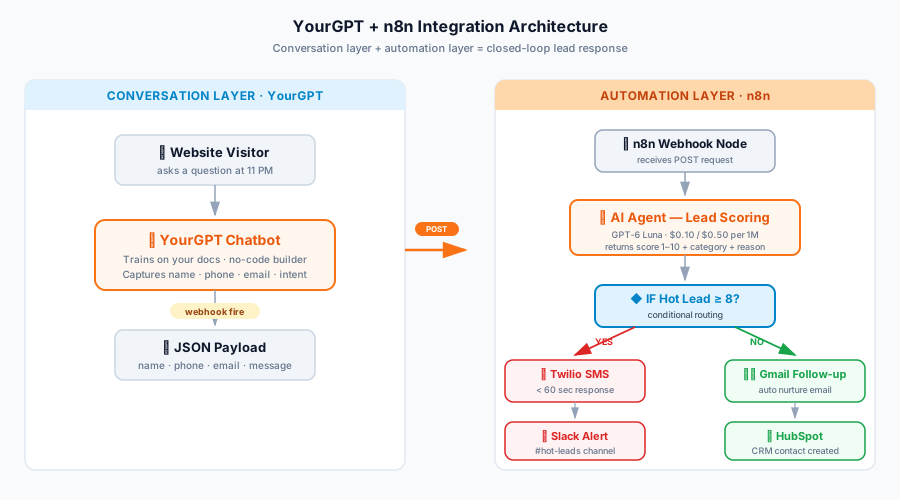
Step 1: Configure YourGPT Webhook
In YourGPT Studio, go to your integration settings. Select Webhook → click Manage → click Add New Webhook. Enter your n8n endpoint URL and select the events you want to subscribe to (e.g., Message Sent, Message Received, Escalated to Human). YourGPT allows you to customize the webhook payload to send tailored messages as notifications. If this is your first webhook setup, review the webhook security best practices before exposing your endpoint publicly.
Step 2: Set Up n8n Webhook Node
Create a new workflow in n8n. Add a Webhook node. Set method to POST. Copy the production URL. Paste it into YourGPT.
Step 3: Parse the Payload
YourGPT sends a JSON payload with conversation data. Use an n8n Function node to extract the fields you need.
- Trigger a test conversation in YourGPT Studio.
- Go to Webhook → Manage → check the Payload tab.
- Adjust the field references below to match YOUR payload.
Here's a generic parsing example — adjust field names based on your actual payload:
// ⚠️ Field names depend on YOUR YourGPT webhook config.
// Check the "Payload" tab in YourGPT Studio after testing your webhook.
// The code below is illustrative, NOT a guaranteed schema.
const payload = $input.first().json.body;

return [{
  json: {
    name: payload.name || payload.user_name || 'Unknown',
    phone: payload.phone || payload.user_phone || '',
    email: payload.email || payload.user_email || '',
    message: payload.message || payload.message_content || '',
    session_id: payload.session_id || payload.session_uid || '',
    timestamp: new Date().toISOString()
  }
}];
Step 4: Score the Lead
Connect an AI Agent node. Use OpenAI's GPT-6 Luna at $0.10 per 1M input tokens and $0.50 per 1M output tokens. It's OpenAI's latest efficient model released Sep 2026 — perfect for high-volume lead scoring where you need fast, cheap inference.
Pass the message + a scoring rubric. Return structured JSON with score, category, and reason.
For a deeper walkthrough of AI integration patterns (including multi-model routing and cost optimization), see n8n AI Integration.
Step 5: Route with IF Node
IF score ≥ 8 → HOT branch. Otherwise → WARM/COLD branch. Each branch triggers a different set of actions.
Step 6: Deliver
- HOT: Twilio SMS to the lead in under 60 seconds + Slack alert to your sales channel.
- WARM/COLD: Gmail auto-follow-up + HubSpot contact creation for nurture.
Real Implementation: HVAC Lead Response
Here's a concrete scenario to show how this works in practice. If you want to see the full HVAC implementation with real code, check out the HVAC Lead Response Automation guide — it walks through the same n8n pattern with HVAC-specific scoring rules.
The Setup (hypothetical)
Imagine a small HVAC company with 3 trucks and 15-20 website inquiries per day. Before this stack, response time averaged 4-6 hours during business hours, next-day for after-hours.
The Stack
- YourGPT chatbot trained on 40+ service pages and pricing FAQ
- n8n workflow with scoring rubric tuned for HVAC intent (emergency, commercial, timeline)
- Twilio SMS for hot leads
- HubSpot for CRM sync
The Result (illustrative)
With this architecture, response time for hot leads drops from several hours to under 60 seconds. The difference between winning and losing a deal often comes down to who responds first — and most HVAC companies are still responding tomorrow morning.
Total monthly cost: $110-125. That's YourGPT Professional ($79) + n8n Cloud Starter (~$26) + Twilio usage (source: twilio.com/sms/pricing/us, $0.0083/SMS US as of Sep 2026) + OpenAI API usage (GPT-6 Luna).
For the broader local business context — review automation, GBP optimization, appointment booking — see the Local Business Marketing Strategies pillar.
Now — if you don't want to build this yourself, that's fine. Wiring YourGPT to n8n requires understanding webhooks, JSON payloads, and conditional logic. If that's not your thing, hire a certified automation specialist on Fiverr Pro. A simple AI automation setup starts around $100-$500. A production-grade build with AI scoring and multi-tool orchestration typically runs $500-$1,500, depending on complexity. Fiverr Pro vets every freelancer through a strict process — portfolio review, skill verification, and identity checks — so you're not gambling on an unproven seller.
Or browse YourGPT platform to see if it fits your use case first.
Common Pitfalls (And How to Avoid Them)
Pitfall 1: Duplicate Leads from Webhook Retries
If YourGPT fires the webhook twice (network hiccup, retry logic), you'll create duplicate CRM contacts. Fix: add an idempotency check in n8n using session_uid or conversation_id as a unique key. The n8n webhooks tutorial covers idempotency patterns in detail.
Pitfall 2: Rate Limits & Concurrency
n8n processes webhooks in parallel by default. For high-traffic setups, add concurrency controls using environment variables (see n8n's hosting documentation for current environment variable references) or place a queue in front of your webhook. Start with 1-2 concurrent webhook executions and monitor your n8n Cloud dashboard for execution queue buildup. Adjust based on your plan's limits.
Pitfall 3: Hardcoded Credentials
Never put API keys directly in n8n Function nodes. Use n8n's Credentials system. For self-hosted n8n, use environment variables.
Pitfall 4: No Fallback Path
What happens if the LLM scoring fails or times out? Always add an error branch that sends a neutral notification to your team. Don't let failed automations silently drop leads. For a deeper look at AI safety patterns, see the Red-Flag Protocol.
Pitfall 5: Wrong Lead Scoring Rubric
Garbage in, garbage out. If your rubric says "any mention of price = HOT" you'll route every price-shopper to your sales team. Test the rubric against 20 real conversations before going live.
If you need help with a more complex CRM integration — say, syncing to Salesforce or a custom internal database — look for specialists on Upwork who have both n8n and your specific CRM on their portfolio. Rates run $40-$80/hour, but they'll save you days of debugging.
Cost Breakdown (Sep 2026)
Here's what the stack actually costs for a small business:
| Component | Tier | Monthly Cost |
|---|---|---|
| YourGPT | Professional (annual) | $79 |
| n8n Cloud | Starter (annual) | ~€24 (~$26 USD) |
| Twilio SMS | Usage-based | $0.0083/SMS (US) |
| OpenAI API | GPT-6 Luna | ~$5-15/month |
| Total | ~$110-125/month |
Alternative: Self-host n8n on a $5 VPS. Total drops to ~$89-104/month. But you'll trade money for maintenance time.
Current model pricing for all OpenAI models is available on OpenAI's API pricing page.
Bottom Line
Here's what you need to remember:
1. Chatbot ≠ automation. YourGPT handles the conversation. n8n handles the business logic. You need both to actually convert leads.
2. The stack is affordable. $110-125/month total for an SMB. Compare that to $200-500/month for a single all-in-one solution that does half as much.
3. The build takes an afternoon. No production code required. Webhook + IF node + Twilio node + HubSpot node. If you can use Zapier, you can use n8n.
If you want the foundation understanding, start with the Autonomous AI Agent Blueprint. It covers the 4-module architecture that every AI automation stack is built on.
Then browse all our guides to find the piece that fits your specific business.
Frequently Asked Questions
1. How do I connect YourGPT to n8n?
You need three things: (1) a YourGPT webhook configured in YourGPT Studio under Integrations → Webhook → Manage → Add New Webhook, (2) an n8n Webhook node set to POST, and (3) a Function node to parse the incoming JSON payload. Setup takes about 15 minutes if you're comfortable with both platforms.
2. Does YourGPT work without n8n?
Yes. YourGPT works standalone for FAQ answering, basic lead capture, and website chat. You only need n8n when you want multi-step logic (scoring, routing, CRM sync, SMS triggers). For more on the basics, see the n8n workflow automation guide.
3. Can I use YourGPT with self-hosted n8n?
Absolutely. The integration uses standard HTTP webhooks, so it works with both n8n Cloud and self-hosted n8n. Self-hosting drops your monthly cost significantly.
4. What's the difference between YourGPT and Intercom?
YourGPT is a no-code AI chatbot focused on training from your own docs. Intercom is a broader customer service platform with ticketing, help desk, and CRM features built in. They solve different problems. I'll cover the full comparison in a future guide.
5. How much does a YourGPT + n8n stack cost?
Roughly $110-125/month for most small businesses. YourGPT Professional (~$79 annual), n8n Cloud Starter (~€24/month annual), plus usage-based costs for SMS and LLM calls.
6. Is YourGPT a no-code platform?
Yes. You build the chatbot through a visual builder. No prompt engineering or API calls needed for basic setups. Advanced users can use the open-source Copilot SDK to embed YourGPT into custom applications with support for multiple LLM providers.
7. Can YourGPT handle lead capture for small business?
Yes. YourGPT captures conversation data — name, contact info, message intent. But the processing of that data (scoring, routing, CRM sync) is where n8n takes over.
8. What happens when the chatbot can't answer a question?
Depends on your configuration. Common patterns: (a) route to a human agent, (b) capture the contact info for follow-up, (c) provide a fallback answer. With n8n connected, you can automate any of these fallback paths.