📑 Table of Contents
- 1. The Problem: Prior Auth Is Burning $31B a Year
- 2. The Solution: RAG Agent Architecture for Prior Auth
- 3. Step 1: Ingest Clinical Notes
- 4. Step 2: RAG Retrieval — Match Payer Policy
- 5. Step 3: Decision Support + Auto-Route
- 6. Edge Cases & Failure Handling
- 7. HIPAA + BAA Checklist (Non-Negotiable)
- 8. Real-World Example: Production Results
- 9. Common Pitfalls (And How to Avoid Them)
- 10. Frequently Asked Questions
The Problem: Prior Auth Is Burning $31B a Year (And Delaying Care)
Every prior authorization runs through the same broken loop: fax machines, phone trees, and PDF portals from 2008.
The numbers are brutal.
Physicians spend 13+ hours per week on PA paperwork — time that should go to patients. 93% say PA delays patient care. And 31% of PA requests are often or always denied.
Here's the kicker: 46% of denials that reach independent medical review (IMR) get overturned. The system is rejecting valid care at scale. But fewer than 1% of patients ever exhaust their plan's appeals process — most never challenge the denial.
Sources: AMA 2025 Prior Authorization Physician Survey; Health Affairs IMR study, Dec 2025.
Total administrative cost to the US economy: $31 billion+ annually (estimate, as of 2025).
But here's what most people miss: PA isn't a clinical decision problem. It's a document matching problem.
A patient's clinical notes already contain the answer. A payer's policy already contains the criteria. The job is matching unstructured patient data against structured policy requirements — fast, accurately, at scale.
That's exactly what a RAG agent does.
This guide is part of our complete AI Agent & Automation framework — read the pillar for the full architecture.
The Solution: RAG Agent Architecture for Prior Auth
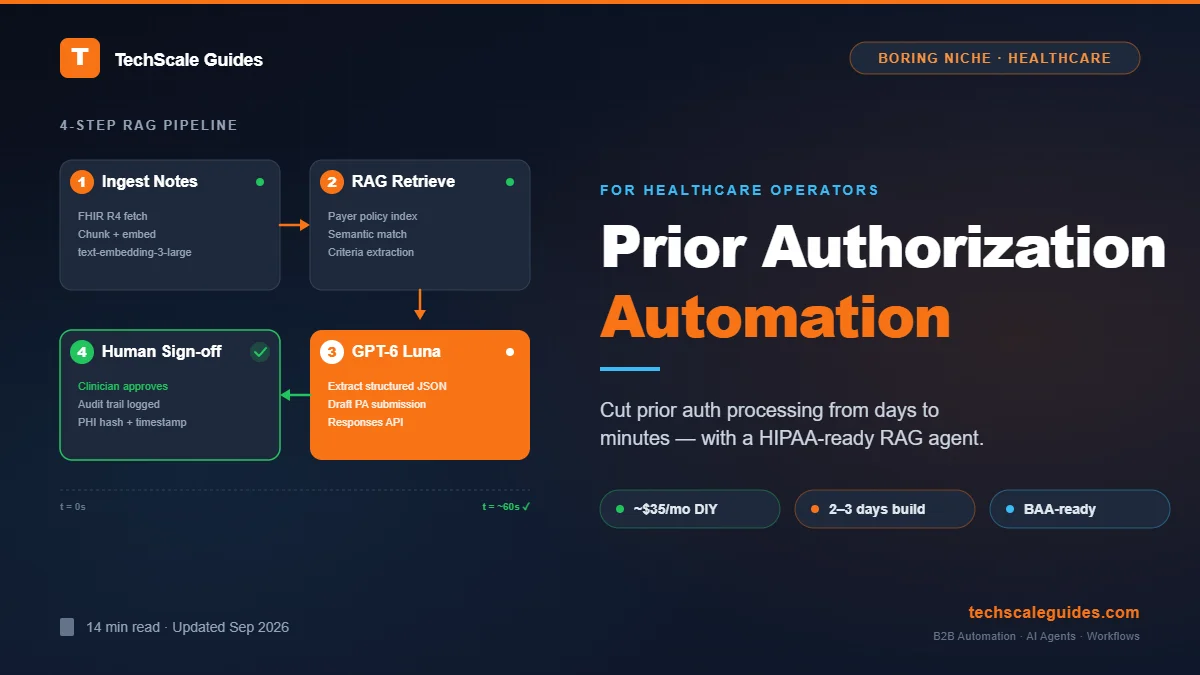
A RAG (Retrieval-Augmented Generation) agent for prior auth has four moving parts:
- Document ingestion — Clinical notes, lab results, imaging reports → chunked, embedded, stored.
- Policy retrieval — Payer policy documents → vector-embedded → semantic search matches patient criteria to policy requirements.
- Structured extraction — LLM reads clinical context, extracts the exact data points the payer needs (diagnosis codes, prior treatments, lab values).
- Decision support — Agent drafts the PA submission, flags confidence level, routes to human for final sign-off.
The core insight: you don't need a custom medical LLM. You need a well-orchestrated pipeline. n8n 2.39.2 handles the orchestration. GPT-6 Luna handles the extraction. A vector store handles the policy matching.
As covered in the full AI Agent architecture blueprint, the key is separating deterministic logic (eligibility check, code lookup) from agentic judgment (medical necessity reasoning, narrative drafting).
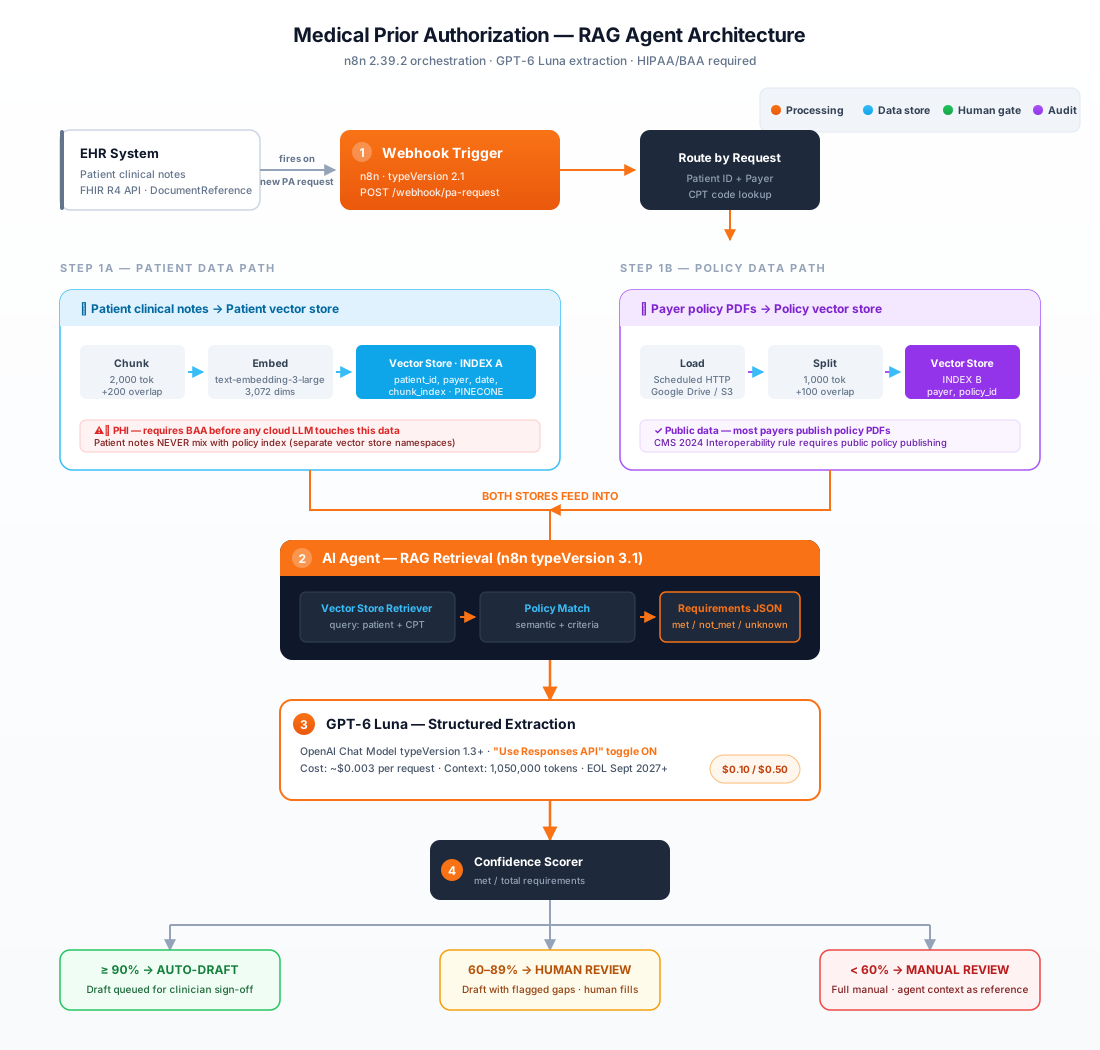
Here's the architecture in practice.
Step 1: Ingest Clinical Notes
Goal: Convert unstructured patient records into searchable vector embeddings.
n8n Workflow: Document Ingestion
Node 1 — Webhook (typeVersion 2.1)
Trigger: EHR system sends a new PA request.
POST /webhook/pa-request
{
  "patient_id": "P-1042",
  "payer": "Aetna",
  "requested_service": "CPT-72148",
  "clinical_notes_url": "https://ehr.example.com/notes/P-1042"
}
Node 2 — HTTP Request
Download clinical notes from EHR API. For FHIR R4:
GET /Patient/P-1042/DocumentReference
Authorization: Bearer {{ $credentials.fhirToken }}
Note: DocumentReference is the FHIR R4 resource type for clinical documents — see HL7 FHIR R4 spec, section 3.36.
Node 3 — Code (JavaScript)
Chunk the document. Clinical notes are dense — 2,000-token chunks with 200-token overlap work well:
const text = $input.first().json.content;
const chunks = [];
const CHUNK_SIZE = 2000;
const OVERLAP = 200;
for (let i = 0; i < text.length; i += CHUNK_SIZE - OVERLAP) {
  chunks.push({ text: text.slice(i, i + CHUNK_SIZE) });
}
return chunks.map(c => ({ json: c }));
Node 4 — Embeddings OpenAI (typeVersion 1.2)
Model: text-embedding-3-large (current as of September 2026 — 3,072 dimensions).
Output: 3,072-dimension vector per chunk.
Note: Verify current node typeVersion in your n8n instance. Embeddings nodes may update independently from Chat Model nodes.
Node 5 — Vector Store (Pinecone / Supabase pgvector)
Store with metadata: { patient_id, payer, date, chunk_index }.
Why Supabase pgvector for this use case: If you're already running PostgreSQL, adding pgvector avoids a separate vector DB service. Pinecone wins on pure simplicity — paste an API key and go. For a first build, start with Pinecone; migrate to pgvector when cost matters.
Step 2: RAG Retrieval — Match Payer Policy
Goal: Given patient clinical context, retrieve the payer's exact policy criteria.
Policy Ingestion (One-Time Setup)
Node 6 — HTTP Request (Scheduled)
Download payer policy PDFs. Most major payers publish these publicly (CMS requires it under the 2024 Interoperability rule). Store in Google Drive or S3.
Node 7 — Document Loader + Recursive Character Text Splitter
Chunk policies at 1,000 tokens with 100-token overlap. Policies are structured — preserve section headers.
Node 8 — Embeddings OpenAI (typeVersion 1.2) → Vector Store
Store policy embeddings with metadata: { payer, policy_id, section, effective_date } in a separate index from patient data.
Retrieval Workflow (Per Request)
Node 9 — AI Agent (typeVersion 3.1)
System prompt:
You are a prior authorization retrieval agent. Given a patient's clinical context, identify the payer's policy criteria that must be satisfied. Retrieve relevant policy sections from the vector store. Output a JSON array of requirements:
[{
  "requirement": "string",
  "policy_section": "string",
  "patient_evidence": "string or null",
  "status": "met | not_met | insufficient_data"
}]
Node 10 — Vector Store Retriever Tool
Connected to the AI Agent as a tool. Query: patient clinical summary + requested service code.
Node 11 — GPT-6 Luna (via OpenAI Chat Model typeVersion 1.3+)
reasoning_effort: "none" or the agent will fail with the error:
"Function tools with reasoning_effort are not supported for gpt-6-luna in /v1/chat/completions. To use function tools, use /v1/responses or set reasoning_effort to 'none'."
n8n's OpenAI Chat Model node v1.3+ supports this toggle. The AI Agent node must be v3.1+ to parse Responses API tool calls correctly.
Reference: n8n PR #36189 (Aug 2026) — updated templates to use Responses API + typeVersion 1.3.
Why Luna: $0.10/$0.50 per 1M tokens (as of September 2026). A typical PA request processes ~15,000 tokens. Cost per request: ~$0.003. At 1,000 requests/month: ~$3/month.
GPT-6 Luna's 1,050,000-token context window handles long clinical notes without aggressive chunking.
Source: OpenAI model reference (verified 2026-09); AWS Bedrock model card.
Why not Astra or Sol: Astra ($10/$50 per 1M) is 100x more expensive. Sol is 20x. For high-volume extraction, Luna is the correct economic choice. Use Astra only for complex edge-case reasoning — and only if the volume justifies it.
Step 3: Decision Support + Auto-Route
Goal: Draft the PA submission, score confidence, route to human.
Node 12 — Code (JavaScript)
Calculate confidence score:
const requirements = $input.first().json.requirements;
const met = requirements.filter(r => r.status === 'met').length;
const total = requirements.length;
const confidence = total > 0 ? met / total : 0;

const route = confidence >= 0.9 ? 'auto_draft' :
              confidence >= 0.6 ? 'human_review' :
              'manual_review';

return [{ json: { confidence, route, requirements } }];
Node 13 — Switch
Three branches:
- auto_draft (≥90%): Agent drafts the submission, queues for clinician sign-off.
- human_review (60–89%): Agent drafts with flagged gaps, human completes.
- manual_review (<60%): Full manual process with agent's retrieved policy context as reference.
Node 14 — AI Agent (typeVersion 3.1) — Draft Generation
System prompt:
Draft a prior authorization submission for {payer}. Use ONLY the clinical evidence provided. For each unmet or insufficient requirement, insert [CLINICIAN INPUT NEEDED: specific question]. Do not fabricate clinical data. Do not infer diagnoses not explicitly stated in the clinical notes.Critical safety rule: The agent never auto-submits. Every draft requires human sign-off. This is the clinical oversight boundary (human-in-the-loop for clinical write-backs) — the line between administrative automation and clinical judgment. Administrative workflows (eligibility, status checking, document assembly) can be fully automated. Clinical write-backs (submitting the PA) require a licensed human.
Node 15 — Audit Log (PostgreSQL / Supabase)
Log every action:
{
  "request_id": "uuid",
  "patient_id": "sha256-hash",
  "model_version": "gpt-6-luna",
  "prompt_hash": "sha256",
  "retrieved_policy_sections": ["..."],
  "confidence_score": 0.94,
  "route": "auto_draft",
  "human_approver_id": "clinician-42",
  "timestamp": "2026-09-27T14:30:00Z",
  "outcome": "submitted"
}
This is non-negotiable for HIPAA audits.
Edge Cases & Failure Handling
Rate Limits (429)
OpenAI rate limits apply per model. If the agent processes >500 PA requests/hour, add a Wait node (10s) before the LLM call and implement a retry loop (max 3 attempts, exponential backoff).
Idempotency
Webhooks can fire twice. Hash the patient_id + requested_service + timestamp and check against your audit log. If duplicate → skip processing. This prevents double-charging the payer and double LLM cost.
Empty Vector Retrieval
If the policy vector store returns 0 results (new payer, new procedure code): → Route directly to manual_review. Do not let the LLM hallucinate policy criteria.
JSON Parse Failure
GPT-6 Luna returns structured JSON 99%+ of the time, but malformed output can occur. Add a Code node after the AI Agent that validates JSON schema. If parse fails → retry once with a corrected prompt, then route to human.
Model Deprecation
GPT-6 Luna has EOL no sooner than September 2027 (AWS Bedrock model lifecycle policy, verified 2026-09). Monitor OpenAI's deprecation page monthly. The workflow's model ID is a single field — swapping to a successor takes 2 minutes.
HIPAA + BAA Checklist (Non-Negotiable)
If your AI vendor touches PHI, you need a signed Business Associate Agreement (BAA). Period. No BAA = no HIPAA compliance, regardless of encryption.
Tools That Require a BAA
| Tool | BAA Available? | Notes |
|---|---|---|
| OpenAI (API) | ✅ Yes — enterprise tier | Zero data retention available |
| Anthropic | ✅ Yes — enterprise tier | Verify current terms |
| Google Cloud (Vertex AI) | ✅ Yes | BAA covers Vertex AI services |
| AWS Bedrock | ✅ Yes | GPT-6 Luna available via Bedrock |
| Pinecone | ✅ Yes — enterprise | Verify current tier |
| Supabase | ⚠️ Limited | Self-hosted = your responsibility |
| n8n Cloud | ✅ Yes — enterprise | Self-hosted = your responsibility |
Self-Hosted n8n + BAA
This is the critical path for most small practices: Self-hosted n8n on a HIPAA-compliant VPS (AWS, GCP, Azure) gives you full control. You sign BAAs with:
- The VPS provider (AWS/GCP/Azure all offer BAAs)
- The LLM provider (OpenAI/Anthropic enterprise)
- The vector DB provider (or self-host PostgreSQL + pgvector — no BAA needed since you control it)
Cost check: A HIPAA-eligible AWS EC2 instance (t3.medium) + self-hosted n8n + self-hosted PostgreSQL/pgvector = ~$30–40/month. Add OpenAI enterprise (BAA required) = usage-based.
Do NOT: Use free-tier Zapier/Make/n8n Cloud with PHI. BAAs only exist on enterprise tiers. Teams prototype on free tiers, then discover this — forcing a full rebuild.
Audit Trail Requirements
Every PHI-touching action must log:
- Who approved (human ID)
- What model version processed the data
- What prompt was used (hash)
- What data was retrieved (policy sections)
- When (timestamp)
- Outcome (submitted / denied / pending)
If you can't reconstruct who approved what and why, you cannot defend the workflow in an audit.
Real-World Example: What This Looks Like in Production
PrescriberPoint — 94.5% Clinician Acceptance
PrescriberPoint's AI prior auth agent processed 1,289 PA responses in a weight management practice. Result: 94.5% clinician acceptance rate — nearly 19 out of 20 AI-drafted answers approved without modification. Median submission time: under 60 seconds.
Source: prescriberpoint.com (verified 2026-09)
Surescripts — 18-Second Median Approval
Surescripts' Prior Authorization Automation now covers 68,000 prescribers across 42 health systems. When all clinical criteria are met, median approval time is 18 seconds. The system supports 104 medications (up from 40 in 2024). Automated approval rate for in-scope medications: 34%.
Source: surescripts.com press release (2026-05-20)
Care New England — 55% Write-Off Reduction
Care New England implemented automated PA processing for radiology and notice-of-admission workflows. Results:
- 55% reduction in authorization-related write-offs
- 2,841 hours saved for staff
- 83% prior authorization success rate
- $644K projected write-off and cost savings within 12 months
Before automation: each NOA/PA took ~15 minutes, average turnaround was nearly 10 days.
Source: notablehealth.com customer story (verified 2026-09)
Open-Source Reference: autonomous-medical-pre-auth-agent
Aniket Work's GitHub project demonstrates the RAG architecture end-to-end. Important caveat: The repo explicitly states this is a "Proof of Concept for educational purposes. Not intended for use in actual clinical settings or for processing real PHI. All data used is synthetic."
Use it as an architecture reference — not a production deployment.
Source: github.com/aniket-work/autonomous-medical-pre-auth-agent (verified 2026-09)
Common Pitfalls (And How to Avoid Them)
Pitfall 1: Sending PHI to a Cloud LLM Without a BAA
The mistake: Prototype on OpenAI free tier with real clinical notes. The fix: Get a BAA before the first PHI byte leaves your network. OpenAI BAA requires enterprise tier. Budget for it.
Pitfall 2: Auto-Submitting Without Human Review
The mistake: Automate the entire workflow including submission. The fix: The agent drafts, the human submits. Full stop. This is the clinical oversight boundary. Automate administrative steps; require human sign-off for clinical write-backs.
Pitfall 3: Using a General-Purpose LLM for Medical Necessity Reasoning
The mistake: Assume GPT-6 Luna can reason about medical necessity without retrieval. The fix: RAG exists for a reason. The LLM extracts from retrieved policy text — it does not "know" the payer's criteria. The vector store does the matching.
Pitfall 4: No Audit Trail
The mistake: Log only successful submissions. The fix: Log everything — retrievals, confidence scores, routes, human approvals, outcomes. HIPAA audits require reconstruction of the decision path.
Pitfall 5: Ignoring Payer Format Variance
The mistake: Assume all payers use the same PA form. The fix: The system must handle per-payer templates. Store payer-specific form schemas in the vector store alongside policy documents.
Frequently Asked Questions
Can I build this without coding?
Partially. n8n is no-code for orchestration. But vector store setup, chunking logic, and confidence scoring require basic JavaScript. If you're not comfortable with that, hire an n8n automation specialist on Fiverr for $200–500 (typical range — verify current rates on platform) to build the initial workflow.
How much does this cost to run?
Self-hosted n8n on a $30/month VPS + GPT-6 Luna at ~$3/month for 1,000 requests + Pinecone free tier (up to 100K vectors) = ~$35/month. Add OpenAI enterprise BAA cost if processing real PHI.
Do I need a HIPAA-compliant LLM?
Yes. OpenAI offers BAA on enterprise tier. Anthropic and Google Vertex AI also offer BAAs. Verify current terms — this changes frequently.
What if I don't use n8n?
Make.com and Zapier can orchestrate the same flow, but BAAs only exist on enterprise tiers. Self-hosted n8n gives you full control for HIPAA compliance.
Can this handle all payer types?
Start with 1–2 payers. Each payer has different policy structures, form requirements, and turnaround patterns. Scale after the first payer is working reliably.
How long does setup take?
DIY: 2–3 days for a working prototype. Production-ready with HIPAA compliance: 2–4 weeks (mostly BAA and audit trail work). If you need it faster, hire a healthcare AI engineer on Upwork — expect $2,000–5,000 for a production build (typical range — verify current rates on platform).
What about FHIR integration?
FHIR R4 is the standard. Most major EHRs (Epic, Cerner, Athena) expose FHIR APIs. n8n has an HTTP Request node — you can call FHIR endpoints directly. No custom node needed.
🚀 For the Complete Technical Framework
This guide covers the PA-specific implementation. For the full architecture — orchestrator patterns, function calling, the Broadcaster module, and how these pieces fit into a production AI agent system — read the complete AI Agent Architectural Blueprint.
Read the Full Blueprint →