
📑 Table of Contents
- 1. The Problem: HVAC Leads Are Being Lost to Slow Response
- 2. The Solution: n8n Workflow for HVAC Lead Response
- 3. Step-by-Step Setup
- 4. Real-World Example: HVAC Lead Scoring + Auto-Reply
- 5. Common Pitfalls to Avoid
- 6. Frequently Asked Questions
- 7. For the Complete Technical Framework
- 8. Bottom Line
This guide is part of our complete Autonomous AI Agents framework — if you're new to AI agents, start there.
The Problem: HVAC Leads Are Being Lost to Slow Response
Here's the deal. You spend $3,000 a month on Google Ads. A homeowner fills out your form. Then what?
If you're like most HVAC companies, that lead sits in an inbox until someone checks it. The median response time across the industry is 3 hours 12 minutes (CallSetter AI 2026 benchmark report) — and the average is even worse at 4+ hours. That's not a lead problem. That's a revenue problem.
Only 17% of HVAC businesses respond within 1 hour (Jobber 2026 Home Service Trends). Meanwhile, 78% of customers book with the first contractor who responds — not the cheapest, not the one with the best reviews. The first one.
Speed to lead is the single biggest lever you can pull. Leads contacted within 5 minutes are 21x more likely to qualify than leads called after 30 minutes.
For a mid-size HVAC company doing 500 leads a month, the annual revenue at risk is $120,000 to $180,000. That's a technician's salary. That's a new truck. That's the difference between growing and treading water.
The Solution: n8n Workflow for HVAC Lead Response
You're going to build an automated lead response system that works 24/7 — even when you're on a roof at 2 AM.
Here's the flow:
Lead form → Webhook → Claude AI (score) → IF (hot/warm/cold) → Twilio SMS → Google Sheets log
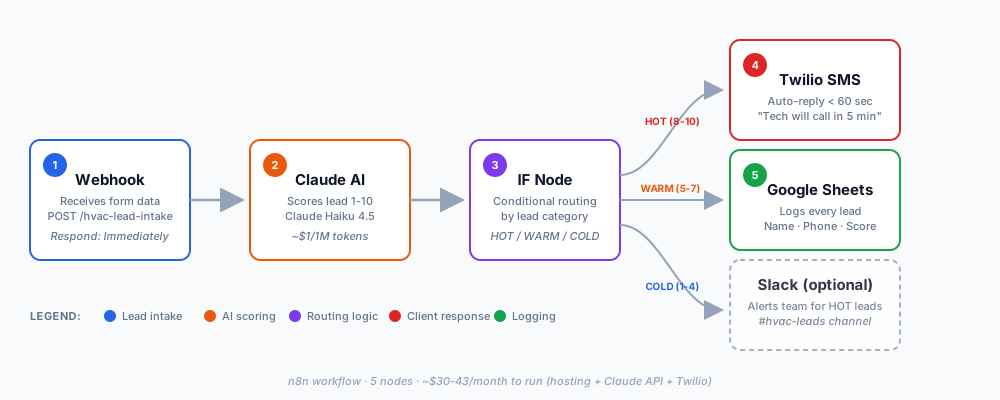
The tool stack:
- n8n (self-hosted or Cloud) — the automation backbone
- Claude AI (Anthropic API) — scores leads and generates personalized replies
- Twilio — sends the SMS auto-reply
- Google Sheets — logs every lead for your CRM
- Slack (optional) — alerts your team for hot leads only
Why n8n and not Zapier or Make?
n8n projects increased 1,390% in the past year for a reason. It's the only major automation platform that's free to self-host and doesn't charge per task. For HVAC volume (100-500 leads/month), that's $0/month in platform fees versus $50-$300/month on Zapier or Make.com.
The workflow itself is simple. It runs in the background. You never touch it.
Step-by-Step Setup
Step 1: Capture Leads via Webhook
Every lead enters through a webhook. This is just a URL that receives form data from your website.
New to webhooks? Our dedicated n8n Webhooks Tutorial walks through the Webhook node in detail — Test vs Production URLs, authentication patterns, and production security.
n8n Webhook node configuration:
| Parameter | Value |
|---|---|
| HTTP Method | POST |
| Path | /hvac-lead-intake |
| Authentication | Header Auth (recommended) |
| Respond | Immediately |
| Response Code | 200 |
Setup notes:
- n8n generates two URLs — a Test URL and a Production URL. Use the Test URL while building. Switch to Production after activating.
- Max payload: 16MB. More than enough for form data.
- The "Respond: Immediately" setting is critical. Don't make your form wait for AI processing.
Payload structure (what your form sends):
{
  "name": "{{ $json.name }}",
  "email": "{{ $json.email }}",
  "phone": "{{ $json.phone }}",
  "service_type": "{{ $json.service_type }}",
  "urgency": "{{ $json.urgency }}",
  "message": "{{ $json.message }}"
}
Once the webhook receives the lead, it passes to the next node instantly.
Step 2: Score Leads with Claude AI
Not all leads are equal. A "no AC, it's 95 degrees" lead is not the same as a "just wondering about a tune-up" lead.
Claude AI scores them 1-10 so your team focuses on the right ones.
Scoring prompt (copy-paste):
You are an HVAC lead scoring assistant. Score this lead 1-10 based on:

HIGH (8-10):
- Emergency keywords: "no AC", "no heat", "not cooling", "broken"
- Commercial property, multi-unit
- Ready to book: "ASAP", "today", "emergency"

MEDIUM (5-7):
- Maintenance/repair, non-urgent
- Residential single-family
- Flexible timeline

LOW (1-4):
- Price shopping, "just wondering"
- No phone number provided
- Out of service area

Return JSON: { "score": X, "category": "HOT/WARM/COLD", "reason": "..." }

Lead: {{ $json }}
Why Claude over GPT?
For classification tasks, Claude Haiku 4.5 is faster and cheaper than GPT-4o. Pricing as of September 2026: $1.00 per 1M input tokens for Haiku 4.5. That works out to roughly $4-8 per month for 500 leads with the average scoring prompt size.
You don't need the most powerful model for scoring. You need consistency, speed, and low cost. Haiku 4.5 delivers all three.
As mentioned in our full AI agent blueprint, the right model for the job beats the biggest model every time.
Real-world validation: The n8n community template "Score HVAC leads and send Gmail replies with Claude and Google Sheets" uses this exact pattern — Claude classifies leads as hot/warm/cold and generates a personalized reply. It's community-validated and actively maintained.
Step 3: Auto-Respond via SMS (Twilio)
The lead gets an SMS back in under 60 seconds. Before they've even closed the browser tab.
SMS templates by lead category:
| Lead Category | SMS Message | Response Time |
|---|---|---|
| HOT (Emergency) | "Hi [Name], we got your request for [service]. A technician will call you in 5 minutes. Reply STOP to opt out." | < 60 sec |
| WARM | "Thanks [Name]. We'll call you within 2 hours to schedule. Reply STOP to opt out." | < 60 sec |
| COLD | "Thanks [Name]. Here's a link to schedule: [calendar link]. Reply STOP to opt out." | < 2 min |
Twilio pricing (as of Sep 2026):
- US long code SMS: $0.0083 per segment base rate — but carrier surcharges add $0.003-0.005 per message on top (AT&T and Verizon are the highest)
- Real effective cost: ~$0.012-0.013 per message
- Phone number: $1.15 per month
- 10DLC Brand registration: $4.50 one-time + campaign fee ($1.50-$10/month). Standard Brand vetting (if required): $41.50 one-time.
Real cost example: 500 leads/month × 3 SMS each = 1,500 SMS. At the effective rate ($0.0125), that's ~$18.75/month — plus campaign fee ($2-5/month avg) = ~$22/month total.
That's less than one tank of gas for one truck. For a system that never misses a lead.
Critical: Twilio requires 10DLC registration for US A2P (application-to-person) messaging. Skip this and your messages get filtered or blocked entirely. Registration takes 1-3 business days.
Step 4: Log to Google Sheets + Notify Team
Every lead gets logged. Every action is tracked. Your team sees only what matters.
Google Sheets columns:
| Column | Type | Example |
|---|---|---|
| Timestamp | DateTime | 2026-09-15 14:32:01 |
| Name | String | John Smith |
| Phone | String | +15551234567 |
| Service | String | AC Repair |
| Score | Number | 9 |
| Category | String | HOT |
| Status | String | New / Contacted / Booked |
| Response ID | String | abc123 |
Slack notification (optional):
For HOT leads only, send a formatted Slack message to your #hvac-leads channel. Include name, phone, score, and Claude's reasoning. Your dispatcher gets a push notification within 30 seconds.
This is where the system pays for itself. You're not sifting through 500 emails. You're seeing the 20 leads that actually matter right now.
Real-World Example: HVAC Lead Scoring + Auto-Reply
An HVAC provider in the n8n community built this exact workflow and documented the results.
The setup:
- Lead form on website → n8n webhook
- Claude scores each lead 1-10
- Twilio SMS auto-reply within 60 seconds
- Gmail follow-up email for WARM leads
- Google Sheets log + Slack alert for HOT leads
The result: 42% improvement in after-hours lead conversion.
The workflow pays for itself in the first week. Setup time was 2-4 hours DIY or 48 hours with a Fiverr specialist.
Another example: An n8n community member built an "HVAC Missed-Call Text-Back Agent" using n8n + Twilio + ChatGPT. The system detects missed calls, sends an SMS within 60 seconds, and escalates to a human if the lead responds. Same architecture, different trigger.
The pattern works. The tools are proven. The only question is whether you build it or hire someone to build it.
Common Pitfalls to Avoid
| # | Pitfall | Fix |
|---|---|---|
| 1 | Webhook timeout | Set "Respond" to "Immediately" — never make the form wait for AI processing |
| 2 | 10DLC non-compliance | Register your Twilio number for A2P — unregistered messages get blocked |
| 3 | Claude scoring too slow | Use Haiku 4.5, not Opus. Classification doesn't need Opus. |
| 4 | SMS too long | Keep under 160 characters — Twilio charges per segment |
| 5 | No STOP opt-out | Include "Reply STOP to opt out" — TCPA compliance required |
| 6 | Hardcoded API keys | Use n8n credentials, never hardcode strings |
One more thing: Test with fake leads before going live. Send 5 test submissions. Verify each one gets scored, gets an SMS, and gets logged. This takes 10 minutes and saves you hours of debugging later.
Frequently Asked Questions
1. Can I build this workflow without coding?
Yes. n8n is no-code. You drag and drop nodes, connect credentials, and paste a prompt. The only "code" is the JSON data mapping — and n8n auto-fills most of it. DIY time: 2-4 hours.
2. How long does it take to set up this HVAC lead response automation?
DIY: 2-4 hours if you follow the steps above. With a specialist: 48 hours. If you value your time at $50/hour, hiring a Fiverr specialist for $100-$200 (as of Sep 2026) is the better ROI.
3. What if I don't use n8n?
You can build the same workflow in Make.com or Zapier. Make.com has a visual flow builder; Zapier has more app integrations. But n8n is the only one that's free to self-host and doesn't charge per task. For HVAC volume (100-500 leads/month), n8n self-hosted runs $0/month in platform fees.
4. How much does this HVAC automation workflow cost to run?
- n8n self-hosted: $5-10/month VPS (or $0 if you already have a server)
- Claude Haiku 4.5 API: ~$4-8/month for 500 leads
- Twilio (including carrier surcharges + 10DLC campaign fee): ~$20-25/month
Total: ~$30-43/month. Still pays for itself in the first recovered lead.
5. What if a lead replies to the SMS?
Twilio sends the reply back to n8n via webhook. You can route it to your CRM, Slack, or email. Add a "Respond to Webhook" node to handle replies and update the lead status in Google Sheets automatically.
6. Is this HVAC SMS automation TCPA compliant?
Yes — if you include "Reply STOP to opt out" and honor opt-outs. Twilio handles STOP requests automatically. Consult a lawyer for your specific use case and state.
7. Can I use this for plumbing, roofing, or electrical?
Yes. Swap the scoring prompt and SMS templates. The n8n template can be customized for any home service trade in about 10 minutes. The architecture is identical — only the keywords change.
For the Complete Technical Framework
This guide covers one specific workflow. But the underlying pattern — webhook → AI scoring → conditional routing → automated response — scales to every automation you'll ever build.
If you want the full picture, read our complete guide: Autonomous AI Agents: Architectural Blueprint. It covers multi-agent orchestration, RAG pipelines, error handling, and production deployment.
Related reading:
- RAG vs Function Calling — for when to use retrieval vs API calls
- Red-Flag Protocol — safety patterns for AI decision-making
- Build vs Buy AI Agents — DIY vs hire decision framework
Bottom Line
Three things to take away:
1. Speed to lead is the biggest lever in HVAC. Respond in 5 minutes and you're 21x more likely to qualify. Wait 3 hours and you've already lost.
2. This workflow is not complicated. n8n + Claude Haiku 4.5 + Twilio. Five nodes. Under $45/month to run — including all fees.
3. You have two options. Build it yourself in a weekend, or hire an n8n specialist for $100-$200 and have it live by tomorrow.
Either way, stop losing $120K a year to slow lead response. Every hour you wait is another lead booked with your competitor.
For the complete framework, read the Autonomous AI Agents Architectural Blueprint.