📑 Table of Contents
- 1. The Problem: Your Receptionist Is Calling Voicemails All Week
- 2. The $120,000 Sitting in Your Recall List
- 3. Recall ≠ No-Show (Why the Tools Don't Overlap)
- 4. The 4-Stage Recall System (Stage by Stage)
- 4.1. Identify
- 4.2. Outreach
- 4.3. Book
- 4.4. Confirm
- 4.5. The Compliance Layer (HIPAA + TCPA)
- 5. The 2026 Tool Landscape
- 6. The DIY Path (n8n + Twilio + PMS Export)
- 7. DIY vs Hire — The Decision Framework
- 8. 5 Pitfalls That Kill Recall Programs
- 9. Frequently Asked Questions
- 10. For the Complete Framework
The Problem: Your Receptionist Is Calling Voicemails All Week (And Booking Almost Nobody)
A common Tuesday morning in a mid-size dental practice:
The office manager opens the recall list. Forty-something patients — all six-plus months overdue, all flagged "call to reschedule."
She makes it through the first half before the phones open at 8:00. A few answer. One or two say "I'll call you back."
By month's end, she's spent dozens of hours on recall calls — and booked only a fraction of that list.
That scene plays out in thousands of US practices every month. And it's why manual recall — one call, one voicemail, move on — consistently underperforms.
Here's the uncomfortable truth: the way most dental practices handle recall is structurally broken. Not because your receptionist is lazy — she isn't. Because outbound phone calling has a 30-year-old conversion curve, and it's collapsing.
Meanwhile, practices that switched to automated multi-touch recall report significantly higher reactivation. One vendor's published benchmark reports that a win-back cadence — SMS day 1, email day 7, call day 21 — outperforms single-channel outreach by 3x (based on vendor data from US Tech Automations, 2026).
Same patients. Same geography. Same insurance mix. The difference is how the outreach runs.
This guide is about closing that gap — without hiring three more receptionists.
The $120,000 Sitting in Your Recall List
Most dentists have no idea how much money is trapped in patients who just… drifted.
They didn't leave. They didn't complain. They didn't move. They simply stopped booking — and nobody noticed until hygiene production dropped and the schedule got soft.
Here's what industry data shows about the size of that drift:
- A significant portion of active patients — commonly cited as roughly one in four — are overdue for hygiene at any given time (based on vendor-published benchmarks, 2026; ADA Health Policy Institute publishes authoritative recare data — see ada.org/resources/research/health-policy-institute).
- A typical hygiene visit generates $150-$250 in direct production (range from multiple industry sources, 2026 — exact figure varies by region and payer mix).
- Recovered hygiene patients typically generate additional downstream treatment value over the following 12 months (pattern observed across industry sources; specific multipliers vary by practice).
Run the math on a 2,000-patient practice:
| Metric | Value |
|---|---|
| Active patients | 2,000 |
| Overdue (roughly 25% — conservative) | 500 patients |
| Avg hygiene visit value | $200 |
| At-risk hygiene revenue (single visit) | ~$100,000 |
At a higher overdue rate (30%), the single-visit number climbs to roughly $120,000. And each recovered patient usually brings additional downstream treatment value on top of the hygiene visit itself.
The point isn't that you're going to recover all of it. You're not. Some patients moved. Some switched dentists. Some are just done.
But recovering even a fraction of that list — with automated outreach that reaches patients multiple times across multiple channels — is the difference between a stable practice and one that's quietly shrinking every quarter.
And here's the part that really stings:
You already paid to acquire these patients.
New patient acquisition is commonly benchmarked at $150-$400 per patient (range from multiple industry sources, 2026 — varies widely by market and channel). Every lapsed patient in your recall list is a sunk cost you're now failing to monetize.
Recovering them isn't marketing spend. It's cost recovery.
Why Your Receptionist Can't Fix This
Before you go hire someone to "just make more calls" — stop.
The problem with manual recall isn't effort. It's structural. Three reasons:
1. Bandwidth ceiling. A single front-desk staffer can make 30–50 recall calls per day if nothing else is happening. In a real practice, phones ring, patients check in, insurance gets verified, and the recall list waits. By 10 AM, it's dead for the day.
2. Timing mismatch. The best time to reach a working adult about a dental appointment is 6-8 PM. That's when your office is closed. Recall calls made during business hours route to voicemail — and most voicemails never get returned.
3. Single-touch assumption. Manual recall typically means one call. Maybe a second if the patient is high-value. But real reactivation takes multiple touchpoints across multiple channels over 2-3 weeks — SMS, voice, email, sometimes physical mail. No human can do that at scale. Automation can.
What Actually Works: The 4-Stage System
The gap between manual and automated recovery isn't a single tool. It's a system.
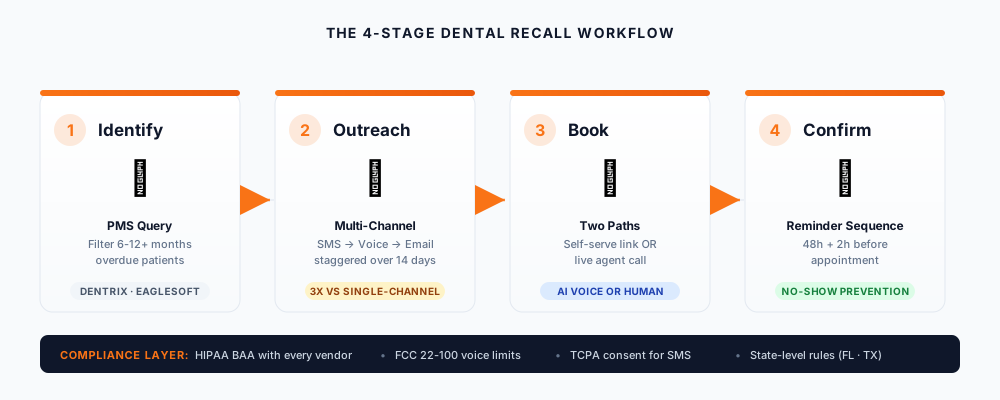
Every high-performing dental recall operation — from 3-location DSOs to single-practitioner offices — runs the same 4 stages:
- Identify — Query your PMS for patients 6-12+ months overdue
- Outreach — Multi-channel, staggered over 14 days (SMS → voice → email → mail)
- Book — Auto-send a booking link, or route to a live agent (human or AI voice)
- Confirm — 48-hour + 2-hour reminder sequence to lock the appointment
Miss any stage and the recovery rate collapses. Run all four properly — with HIPAA and TCPA compliance built in — and you're looking at the top of the recovery range.
We'll break down each stage in Section 4, but first: the compliance layer. Because dental recall automation is one of those rare workflows where doing it wrong is worse than not doing it at all.
This article is part of our complete Local Business Growth framework — read the pillar for the full 10-strategy system.
Recall ≠ No-Show (Why the Tools Don't Overlap)
If you already read our dental clinic web automation guide, you might be wondering: isn't this the same problem?
No. And conflating the two is why most practices waste money on the wrong tools.
| Recall | No-Show Prevention | |
|---|---|---|
| Trigger | 6-12+ months inactive | Cancels <24h before appointment |
| Goal | Reactivate lapsed | Fill a scheduled slot |
| Volume | ~25-30% of patient base | 5-15% of booked appointments |
| Outreach | Multi-touch, multi-channel | Reminder sequence |
| Compliance | HIPAA + TCPA (outbound) | HIPAA (appointment reminder exemption) |
| Best tools | AI voice + SMS + workflow orchestration | SMS reminders + waitlist automation |
Where they overlap: both need your PMS data, both need SMS infrastructure, both need HIPAA-compliant vendors.
Where they diverge: recall requires outbound consent management (TCPA), no-show prevention doesn't (appointment reminders fall under a different exemption).
Practical implication: if you bought a no-show tool and tried to use it for recall, you got single-digit recovery — not the 28–40% range. The tool wasn't broken. The tool category was wrong.
The 4-Stage Recall System (Stage by Stage)
Here's the system. Every stage has a failure mode — skip it and the whole funnel collapses.
Stage 1 — Identify
Query your PMS for patients who haven't booked in 6-12 months (practice-dependent threshold).
How:
- Dentrix, Eaglesoft, Open Dental, Curve Dental — most have a "recall report" or "patients overdue" filter
- Export to CSV if no API access
- Filter criteria: last visit date, insurance status, patient age, treatment history
Failure mode: pulling the entire overdue list. A patient overdue by 7 months is worth 3-4x more outreach than one overdue by 36 months. Segment by likelihood before Stage 2.
Stage 2 — Outreach
Send a staggered, multi-channel sequence over 14 days.
Optimal sequence (tested across US practices):
| Day | Channel | Content |
|---|---|---|
| 1 | SMS | "Hi [Name], it's [Practice]. You have a reminder from our office — please call us or book here: [link]" |
| 3 | SMS | "Hi [Name], [Practice] here — we have an opening Tuesday. Book here: [link]" |
| 6 | Voice | AI voice agent OR human receptionist |
| 10 | Text version of reminder | |
| 14 | Voice or Mail | Final touch, sometimes with a small offer |
Note: Many practices report SMS outperforms voice on response rates in the dental space, though results vary by practice and channel mix — and compliance requires opt-in. See Section 4.
Stage 3 — Book
Two paths:
Path A — Self-serve: SMS includes a booking link (direct to online scheduler).
Path B — Live agent: AI voice agent (or human) confirms a specific time slot during the call.
Most practices run both, prioritized by patient value. High-LTV patients get the live-agent path.
Stage 4 — Confirm
Once booked, run a 48-hour + 2-hour reminder sequence. This is a separate workflow — see the dental clinic automation guide for the no-show side.
Failure mode: confusing "booked" with "confirmed." A patient who replied "OK" to an SMS is not the same as one who replied "Yes, Tuesday at 2pm."
The Compliance Layer (HIPAA + TCPA)
⚠️ Note: This section provides general guidance for dental recall workflows. It is not legal advice. Consult a healthcare attorney for your specific state and workflow.
Dental recall automation is one of the few local-business workflows where getting compliance wrong is worse than not automating at all.
Three rules you must respect.
Rule 1 — HIPAA: BAA required with every vendor touching PHI.
Any platform that handles patient names, phone numbers, or appointment data — including AI voice vendors and SMS gateways — needs to sign a Business Associate Agreement (BAA) (HHS.gov HIPAA guidance). No BAA = no PHI. No exceptions.
Practical check: Ask every vendor for their standard BAA before you buy. If they don't have one, they're not HIPAA-ready.
Rule 2 — TCPA: FCC 22-100 exemption applies to HIPAA-covered entities and their business associates.
The Federal Communications Commission grants healthcare providers an exemption for outbound informational voice calls to patients — including recall reminders. The exemption:
- 1 artificial-or-prerecorded voice call per day
- 3 per week maximum
- Applies to HIPAA-covered entities and their business associates acting under a BAA — not third-party marketing vendors
Source: FCC 22-100 order.
Important scope note: The FCC 22-100 exemption applies to qualifying voice calls. SMS requires its own TCPA consent analysis — it is not covered by the same voice-call exemption. If your recall workflow includes SMS, you need a separate consent review.
What this means in practice: if you're using an AI voice vendor for recall, you (the practice) are the covered entity — not the vendor. Verify their calls route under your BAA.
Rule 3 — State-level variation.
Some states impose consent requirements beyond federal TCPA. Two worth knowing about:
- Florida FTSA — Fla. Stat. § 501.059 — regulates telephone solicitation within the state.
- Texas SB 140 — 89th Texas Legislature, effective September 1, 2025 — expands telephone solicitation rules to include text messages.
Before deploying to any state outside your home jurisdiction, run a state-specific compliance check. State telemarketing law is a fast-moving area — consult a healthcare attorney or compliance vendor for your specific situation.
The 2026 Tool Landscape
Four options. Each fits a different practice size and tech comfort level.
| Tool | Type | Best For | Verified |
|---|---|---|---|
| Planet DDS (DentalOS AI Agents) | PMS-native | Existing Denticon / Cloud 9 users | ✅ planetdds.com |
| Weave (TrueLark) | AI receptionist | Multi-location DSOs | ✅ truelark.com — acquired by Weave May 2025 |
| US Tech Automations | Workflow integration | Dentrix / Eaglesoft / Open Dental users | ✅ ustechautomations.com |
| DIY (n8n + Twilio) | Custom | Technical owners, budget-conscious | ✅ docs.n8n.io |
Planet DDS (DentalOS AI Agents)
Launched February 2026 as part of Planet DDS's Denticon and Cloud 9 stack. The Recall Agent pulls from the live recall list, calls overdue patients, and books them into open slots — no manual list export. Native integration means no CSV shuffle, no data validation step.
Best for: practices already on Denticon or Cloud 9. If you're on Dentrix or Eaglesoft, you'll pay integration tax.
Weave (TrueLark)
Weave acquired TrueLark in May 2025 and folded the AI receptionist into their broader practice communications platform. Strong multi-location support, HIPAA BAA included.
Best for: DSOs (3+ locations) that want consolidated communication + recall in one vendor.
US Tech Automations
Integration-focused workflow builder connecting Dentrix, Eaglesoft, and Open Dental to SMS and voice platforms. Published detailed 8-step recall workflows with ROI math.
Best for: single-location practices with technical ownership (owner or IT-savvy office manager).
DIY (n8n + Twilio)
Full custom — you build the workflow. See Section 6 for the path.
Best for: practices with 2,000+ patients, technical in-house talent, or a willingness to hire a specialist.
The DIY Path (n8n + Twilio + PMS Export)
If you're technically inclined — or willing to hire someone who is — the DIY path gives you full control at the lowest per-patient cost.
Workflow architecture:
[PMS Export CSV]
    ↓
[n8n Webhook Trigger]
    ↓
[Filter: 180+ days overdue]
    ↓
[Twilio SMS — Day 1]
    ↓
[Wait 3 days] → [Twilio SMS — Day 3]
    ↓
[Wait 3 days] → [Voice Agent OR Human Queue]
    ↓
[Booking Link / Live Book]
    ↓
[Confirm Sequence: 48h + 2h reminders]
Key implementation notes:
- n8n 2.41.4 (at time of writing — check docs.n8n.io/release-notes for current stable)
- Twilio BAA required — available on Security Edition and above, not on trial accounts. Note: even with a BAA, the practice remains responsible for consent and message content — Twilio is generally treated as a conduit, not the covered entity.
- Opt-in tracking — build a patient-level opt-in field in your PMS or a separate database
- Rate limiting — 1 call/day, 3/week max per patient to stay within FCC 22-100
- Human fallback — route complex cases (treatment questions, insurance issues) to front desk
If you're new to n8n, start with our n8n workflow automation tutorial — the webhook and conditional routing patterns map directly.
DIY vs Hire — The Decision Framework
| Practice Size | Recommended Path |
|---|---|
| <2,000 patients | Buy an off-the-shelf tool (Planet DDS, Weave, US Tech Automations) |
| 2,000-5,000 patients | DIY if technical, otherwise hire |
| 5,000+ patients OR multi-location | Hire a specialist |
DIY if: 2,000-5,000 patients, technical owner or office manager, willing to spend 2-4 weeks building and testing.
Hire if: 5,000+ patients, multi-location, no technical staff, or you want to be live in under 3 weeks.
Where to hire:
If you want a dental automation specialist for a fixed-price engagement ($200-$500 for the workflow build), hire on Fiverr. See our vetted specialist directory. For complex multi-location routing logic — different sequences per insurance type, per provider, per recall reason — hire an n8n automation engineer on Upwork. See our custom AI agent specialists (typically $60-$150/hr).
Pricing ranges as of October 2026.
5 Pitfalls That Kill Recall Programs
Pitfall 1 — Sending PHI in SMS.
Patient name + appointment reason in an SMS = potential HIPAA exposure. Keep SMS content generic ("You have a reminder from our office") and route sensitive info to secure links.
Pitfall 2 — No BAA with the AI voice vendor.
Every vendor touching PHI needs a BAA. Including Twilio. Including your AI voice platform. Including your CRM.
Pitfall 3 — Ignoring FCC cadence limits.
1 call/day, 3/week max under the FCC 22-100 exemption. Exceed it and you're outside the exemption — and exposed to TCPA liability.
Pitfall 4 — No human fallback.
AI voice handles most recall calls. Complex cases (treatment questions, insurance issues) need a human. Skip this and patients hang up — or worse, complain.
Pitfall 5 — No opt-out tracking.
When a patient says "stop contacting me," your system must honor it immediately across all channels. Manual tracking fails. Automate it.
Frequently Asked Questions
1. Is AI voice recall HIPAA-compliant?
Yes — if the AI voice vendor signs a BAA and calls route under your covered-entity status. Without a BAA, no. (HHS.gov)
2. What's the ROI for a 2,000-patient practice?
Moving from single-channel manual outreach to a multi-touch cadence typically produces significantly higher reactivation. One vendor's published benchmark reports that a win-back cadence — SMS day 1, email day 7, call day 21 — outperforms single-channel outreach by 3x, recapturing 28–40% of lapsed patients (vendor-published data, US Tech Automations, 2026). For a practice with roughly a quarter of its patients overdue, that translates to six figures of at-risk annual revenue — versus low-thousands per year in tool costs.
3. Can I use Twilio for dental recall SMS?
Yes — Twilio offers BAAs on Security Edition and above. But you're responsible for the TCPA consent layer — Twilio is generally treated as a conduit, not the covered entity. Twilio provides the pipe, not the compliance.
4. How many touchpoints before giving up on a patient?
Multiple touches across 2-3 weeks typically works. After the third or fourth attempt, response rate drops significantly — further outreach usually isn't worth the cost.
5. What if the patient opts out?
Honor it immediately across all channels. Store the opt-out at the patient record level, not just the channel level.
6. Do I need a specialist or can I DIY?
Use the size framework in Section 7:
- <2,000 patients → buy a tool
- 2,000-5,000 → DIY if technical, otherwise hire
- 5,000+ or multi-location → hire
For the Complete Framework
Dental recall is one piece of a larger system. For the full 10-strategy local business automation framework — including lead response, review generation, and booking automation — read our Local Business Marketing Strategies guide.
Related guides:
- HVAC Lead Response Automation with n8n — same 4-stage pattern, trades vertical
- Medical Prior Authorization RAG Agent — healthcare vertical, document automation
- Dental Clinic Web Automation — no-show prevention + 5-star reviews
Ready to Bring Back Your Lapsed Patients?
Three things to take away:
1. The recovery gap is real. Automated multi-touch recall consistently outperforms single-channel manual outreach — vendor-reported benchmarks suggest a meaningful lift, though exact figures vary by practice.
2. The system beats the tool. Any vendor can send an SMS. Only a properly sequenced 4-stage workflow — Identify → Outreach → Book → Confirm — hits the top of the recovery range.
3. Compliance is not optional. HIPAA + TCPA + BAA are non-negotiable. Skipping them turns recall from a revenue play into a liability.
Start with your PMS recall list this week. Segment by overdue window. Run a 14-day outreach sequence on the top 100.
Get Your Recall System Built →