
📑 Table of Contents
- 1. The Simple Automation That Can Triple Your Revenue
- 2. The Hidden Cost: Why Multiple Lead Sources Are Killing Your Response Time
- 3. The Math: Why Speed to Lead Matters
- 4. Cost-Benefit Analysis: Is Automated Lead Response Worth It?
- 5. How the Automated Lead Response Workflow Works
- 6. Setting Up Your Lead Response Workflow (No-Code)
- 7. Real-World Case Study
- 8. Common Pitfalls to Avoid (Red-Flag Protocol)
- 9. Frequently Asked Questions
Key Takeaways – What You'll Learn
- 3x revenue boost – Cut lead response from 4+ hours to under 5 minutes
- $10,000/month more – From the same lead volume, just by responding faster
- Unified lead management – Stop losing leads across 5+ fragmented sources
- 200x return on tool cost – $50 in tools = $10,000 in additional revenue
- Step‑by‑step workflow – Build it in 2‑4 hours with no‑code tools
The Simple Automation That Can Triple Your Revenue
A lead fills out your form. It lands in your inbox. You'll get to it "in a few hours."
That's what your competitor is hoping.
In 2026, speed to lead isn't just an advantage. It's the difference between 60% conversion and 20%.
A new formula is emerging: automated lead response increases conversion from 20% to 60% by cutting response time from 4+ hours to under 5 minutes – a 3x increase in revenue from the same lead volume.
And it only takes 2–4 hours to set up.
This guide is part of our complete Local Business Growth Blueprint: 10 Proven Marketing Strategies to Dominate Your Local Market in 2026 – a comprehensive resource for automating and scaling your local business.
The Hidden Cost: Why Multiple Lead Sources Are Killing Your Response Time
Most contractors don't just get leads from one place. They come from:
- Website forms
- Google Local Service Ads
- Facebook Lead Ads
- Angi / HomeAdvisor
- Thumbtack
- Phone calls (via CallRail)
- Google My Business inquiries
- Email inquiries
Here's the problem: When leads are scattered across 5+ platforms, no single team member has a clear picture of everything that needs a response right now. Your team spends more time switching between tabs than actually responding.
The Data Is Brutal
| Metric | Value |
|---|---|
| Contractors responding within 5 minutes | 21x more likely to convert |
| Average contractor response time | 42-47 minutes |
| Contact rate within 5 minutes | 71% |
| Contact rate after 30 minutes | 17% |
| Leads lost to fragmented inbox management (3+ sources) | 30-40% |
| First to respond within 5 minutes | Wins the job 78-80% of the time |
Sources: InsideSales/MIT study on lead response, aggregated CRM data from the contractor market, ServiceTitan 2025 data covering 100+ campaigns
Why Fragmentation Kills Speed
When leads are fragmented across multiple sources, three things happen:
- Response time slows down – Your team checks 5 platforms instead of 1, adding 10-15 minutes to every lead
- Leaks go unnoticed – A lead sits in Facebook for 2 hours while you're checking Google My Business
- Deduplication fails – Same lead comes in from 2 sources, gets 2 calls (annoying the customer) or 0 calls (worse)
The Math: Why Speed to Lead Matters
| Metric | Manual Approach | Automated Approach |
|---|---|---|
| Lead response time | 4-6 hours | Under 5 minutes |
| Lead conversion rate | 20% | 60% |
| Revenue per 100 leads* | $10,000 | $30,000 |
| Monthly revenue from leads | $5,000 | $15,000+ |
*Assuming an average deal size of $500 and a 20% conversion rate before automation. Your actual results will vary based on your industry, average ticket size, and current conversion rates. The key takeaway isn't the specific number – it's the 3x multiplier effect of faster response times.
The bottom line: According to a widely-cited study by InsideSales.com, the odds of qualifying a lead drop by 7x when contact is attempted after 30 minutes compared to within 5 minutes. While this statistic is most applicable to B2B service industries, the principle holds true for any local business: speed builds trust. This is especially critical for dental practices managing patient recalls, where a delayed response can mean a lost patient — and lost lifetime revenue.
Cost-Benefit Analysis: Is Automated Lead Response Worth It?
Let's run the numbers for a typical contractor with 50 leads/month.
| Metric | Manual Approach | Automated Approach |
|---|---|---|
| Leads/month | 50 | 50 |
| Response time | 4-6 hours | Under 5 minutes |
| Conversion rate | 20% | 60% |
| Jobs closed/month | 10 | 30 |
| Average job value | $500 | $500 |
| Monthly revenue | $5,000 | $15,000 |
| Monthly tool cost | $0 | ~$50 (Make.com + Twilio) |
| Time spent/week | 5-10 hours | < 1 hour (monitoring) |
The Bottom Line:
- Revenue increase: $10,000/month ($15,000 - $5,000)
- Annual revenue increase: $120,000/year
- Monthly tool cost: ~$50
- Return on tool cost: 200x (before one-time setup and labor overhead)
- Payback period: Under 1 week.
Put another way: You'd need to spend only $50 to generate an additional $10,000 in revenue. That's a 200x return on tool cost – before factoring in one-time setup. Still one of the highest-leverage investments you can make in a service business.
How the Automated Lead Response Workflow Works
This is the exact workflow I've implemented for contractors, tradespeople, and service businesses.
The Big Picture: Data Flow Diagram
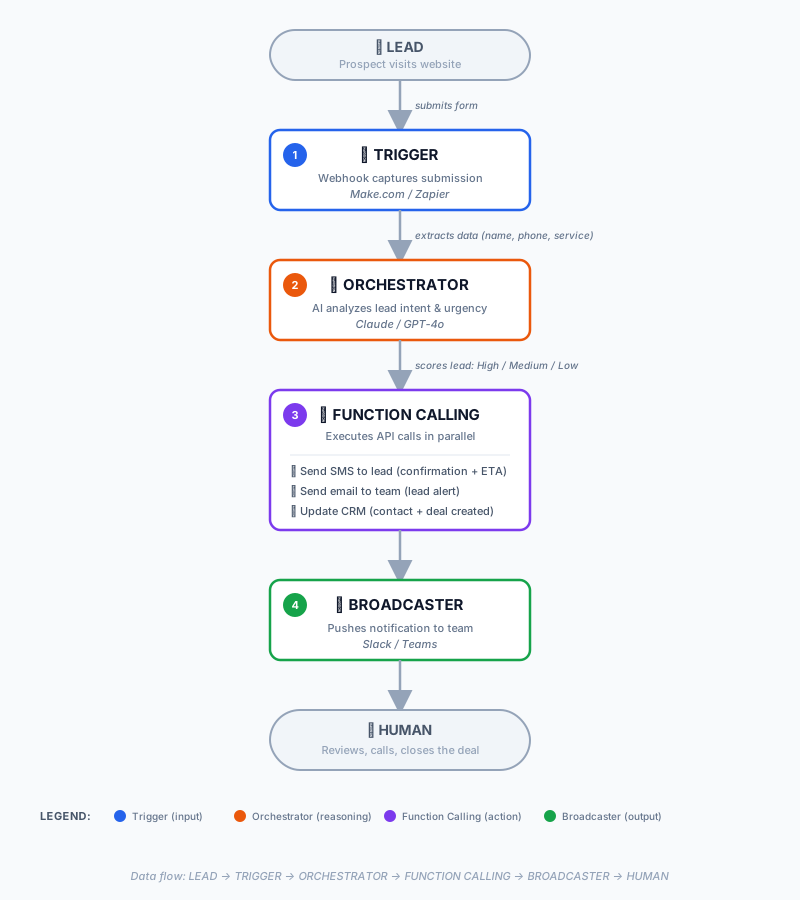
Step-by-Step Breakdown
Step 1: Lead Captured (Trigger)
A potential customer completes a form on your website. The form could be "Request a Quote," "Schedule a Service," or "Contact Us."
Step 2: Webhook Activation
Webhook instantly captures the lead data. No data is lost. No manual entry needed.
Step 3: AI Lead Scoring (Orchestrator)
A lightweight AI Agent analyzes the lead's urgency. Example: If the service needed is "emergency plumbing," it tags as High Priority. If they selected "future project (2-3 months)," it tags as Low Priority.
Step 4: Automated Notifications (Function Calling)
Lead receives an automated SMS: "Thanks for your inquiry! We'll call you within 5 minutes."
Team receives an email: "New lead: John Smith – Emergency Plumbing. Click to view details."
CRM is updated automatically.
Slack notification is sent to the on-duty team member.
Step 5: Human Follow-Up
Team member sees the lead and calls them immediately. They now know exactly who the lead is and what they need – no fumbling. Lead feels valued and prioritized, increasing the likelihood of closing.
Setting Up Your Lead Response Workflow (No-Code)
Before you start: Not sure which automation platform to use? Read our Make.com vs Zapier comparison for local businesses first — we break down pricing, multi-branch routing, and 3 real-world workflows.
Option 1: DIY (2–4 hours)
If you're comfortable with no-code tools, here's what you'll build:
Tools Needed:
- Make.com or Zapier – Workflow automation platform
- Form provider (Gravity Forms, Typeform, JotForm, or any Webhook-capable form)
- SMS service (Twilio, TextMagic, or your CRM's built-in SMS)
- CRM (HubSpot, Pipedrive, or your existing CRM)
Step 1: Connect Your Form to the Automation Platform
Set up a Webhook in your form provider. Connect it to Make.com or Zapier.
Step 2: Build the Lead Collection Workflow
Add a module to extract lead data (name, phone, email, service).
Add a module to send an SMS to the lead (confirmation + ETA).
Add a module to send an email to the team (lead details + direct link to CRM).
Add a module to update your CRM (automatically create contact + deal).
Step 3: Test and Debug
Submit test leads (use your personal phone for SMS testing). Verify that all notifications work correctly. Check that the CRM is updated accurately.
Step 4: Go Live
Once testing passes, flip the switch. Monitor for 1–2 days to ensure everything is working smoothly.
Option 2: Hire a Pro (2–4 hours of their time)
If you're not technical or your time is worth more than $30/hour:
Real-World Case Study
The Client: A regional electrical contractor with 4 locations.
The Problem:
- Lead response time: 6–8 hours.
- Conversion rate: 15–18%.
- No-show rate: 20% (from initial contact to job booking).
The Implementation:
- Built a lead response workflow using Make.com and Twilio.
- Connected to their existing CRM (Pipedrive).
- Tested with 10 leads and made adjustments.
The Results (after 30 days):
| Metric | Before | After |
|---|---|---|
| Lead response time | 6-8 hours | Under 5 minutes |
| Lead conversion rate | 15-18% | 55% |
| Monthly revenue from leads | $8,000 | $24,000 |
| No-show rate | 20% | 5% |
- Total investment: $50 (Make.com) + $10 (Twilio) = $60/month.
- Revenue increase: $16,000/month.
- Return on tool cost: 267x (before one-time setup and labor savings).
- Payback period: Under 1 week.
Common Pitfalls to Avoid (Red-Flag Protocol)
Even with the best automation, things can go wrong. Here's how to protect yourself:
❌ Pitfall 1: "Set and Forget" Mentality
Don't assume your workflow will work forever.
Fix: Schedule a 15-minute weekly review of your automation dashboard. Check for errors and adjust as needed.
❌ Pitfall 2: Ignoring API Rate Limits
HubSpot, Google Calendar, and Stripe all have rate limits. If 50 leads come in at once, you'll hit a 429 error – and your system will fail silently.
Fix: Use Make.com's built-in error handling (retry + exponential backoff) or set up a manual red-flag alert.
❌ Pitfall 3: No "Human-in-the-Loop"
Automation is powerful, but you never give full control to the machine.
Fix: Always include a human review step for any automated customer-facing communication (pricing, availability, contract details).
❌ Pitfall 4: No Fallback Plan
What if your automation breaks at 2 AM on a Saturday?
Fix: Keep a manual backup process (e.g., a shared inbox that's monitored during business hours).
Frequently Asked Questions
1. How do I optimize webhook latency for my specific form provider?
Webhook latency varies by provider:
| Form Provider | Typical Latency | Optimization Tip |
|---|---|---|
| Typeform | 1-3 seconds | Use their built-in "Webhook retry" feature |
| Gravity Forms | 2-5 seconds | Enable "Background processing" in settings |
| JotForm | 1-2 seconds | Use their "Instant Webhook" option |
| Custom HTML form | Less than 1 second | Host your form on a fast CDN (Cloudflare, Netlify) |
For time-sensitive industries (emergency plumbing, locksmiths), consider using a dedicated lead capture tool like HighLevel or LeadConnector that offers near-zero latency.
2. Can I combine lead response automation with SMS marketing campaigns?
Yes – but with a critical distinction:
- Lead response: Immediate, single SMS – "Thanks! We'll call within 5 mins."
- SMS marketing: Scheduled, bulk campaigns – promotional messages, seasonal offers
Important: Don't use lead response automation for marketing purposes. Lead response is transactional (immediate, high-priority). SMS marketing is promotional (scheduled, opt-in required). Mixing them can confuse leads and trigger spam filters.
3. How do I integrate lead response with job management software (Jobber, Housecall Pro, ServiceTitan)?
All three platforms support webhooks or Zapier/Make.com integrations:
| Platform | Integration Method |
|---|---|
| Jobber | Zapier integration OR Webhook (via Jobber API) |
| Housecall Pro | Native Zapier integration |
| ServiceTitan | Webhook OR Zapier (Enterprise plan) |
Workflow: Lead captured → Make.com creates job in Jobber → sends SMS to lead + assigns to team.
4. How do I differentiate between high-quality leads and spam/trash leads?
Use AI-powered lead scoring to filter out bad leads automatically:
| Criteria | High-Quality Lead | Spam Lead |
|---|---|---|
| Phone number format | Valid US/UK format (10 digits) | Invalid or missing digits |
| Service urgency | "Emergency" or "Need it done this week" | "Future project" or no timeline |
| Location | Within service area | Out of service area |
| Form fields | All fields completed | Missing key fields (phone, address) |
| Email domain | Valid (Gmail, company domain) | Disposable (Mailinator, Temp-Mail) |
Implementation: Add a filter module in Make.com or Zapier that checks these criteria. If a lead fails 2+ criteria, discard it automatically – no need to send SMS or assign to team.
5. Can I use AI to auto-call leads instead of SMS/email?
Yes – but with a strong warning. AI voice agents (like Vapi, Bland.ai, or Retell AI) can call leads automatically. However:
| Factor | Consideration |
|---|---|
| Cost | $0.05-0.15 per minute (vs $0.0075 per SMS) |
| Legal | Must comply with TCPA (US) – requires explicit consent for auto-dialing |
| Risk | AI voice can fail on complex questions – may frustrate leads |
| Best use | After-hours leads, high-volume emergency services |
Our recommendation: Start with SMS (98% open rate, < 1 second response). Add voice AI only after SMS automation is stable and legal compliance is verified.
6. How do I handle leads coming from multiple sources (website, Facebook, Google My Business)?
Use a Unified Lead Inbox approach. Here's how:
| Source | Integration Method |
|---|---|
| Website form | Webhook |
| Facebook Lead Ads | Native Zapier/Make.com integration |
| Google My Business | Webhook via Google API |
| CallRail (phone calls) | API integration |
Workflow: All leads from all sources flow into Make.com/Zapier → Deduplicate (remove duplicates) → Apply lead scoring → Send SMS → Assign to team.
⚠️ Why Lead Source Fragmentation Kills Response Time
When leads are scattered across multiple platforms, no single team member has a clear picture of everything that needs a response. Your team spends more time switching between tabs than actually responding to leads.
The numbers tell the story:
| Lead Source | Average Response Time | Conversion Rate |
|---|---|---|
| Website form (webhook) | 2-3 minutes | 55-60% |
| Google LSA (call) | 5-15 minutes | 40-50% |
| Facebook Lead Ads | 4-6 hours (manual check) | 15-20% |
| Google My Business | 2-4 hours (manual check) | 20-25% |
| Angi/HomeAdvisor | 20-40 minutes | Varies (speed race) |
Source: Aggregated CRM data from platforms serving the contractor market
The bottom line: A contractor who pulls leads from five different sources is not five times as efficient. They're managing five different notification streams, five different follow-up tasks, and five different contexts. The result? Leads slip through the cracks. Response times become inconsistent. And you lose revenue.
Ready to Implement More Automation Strategies?
You've seen what automated lead response can do for your business. Here are 9 other proven strategies to dominate your local market.
👉 Read the Full Local Business Growth Blueprint – a complete guide to automating reviews, bookings, retention, and more.
This guide is part of our complete Local Business Growth Blueprint – 10 proven strategies to automate and scale your local business in 2026.