📑 Table of Contents
- 1. The Problem — Claims Processing Is Stuck in a Paper Era
- 2. What AI Agents Actually Do in Claims (Not a Chatbot)
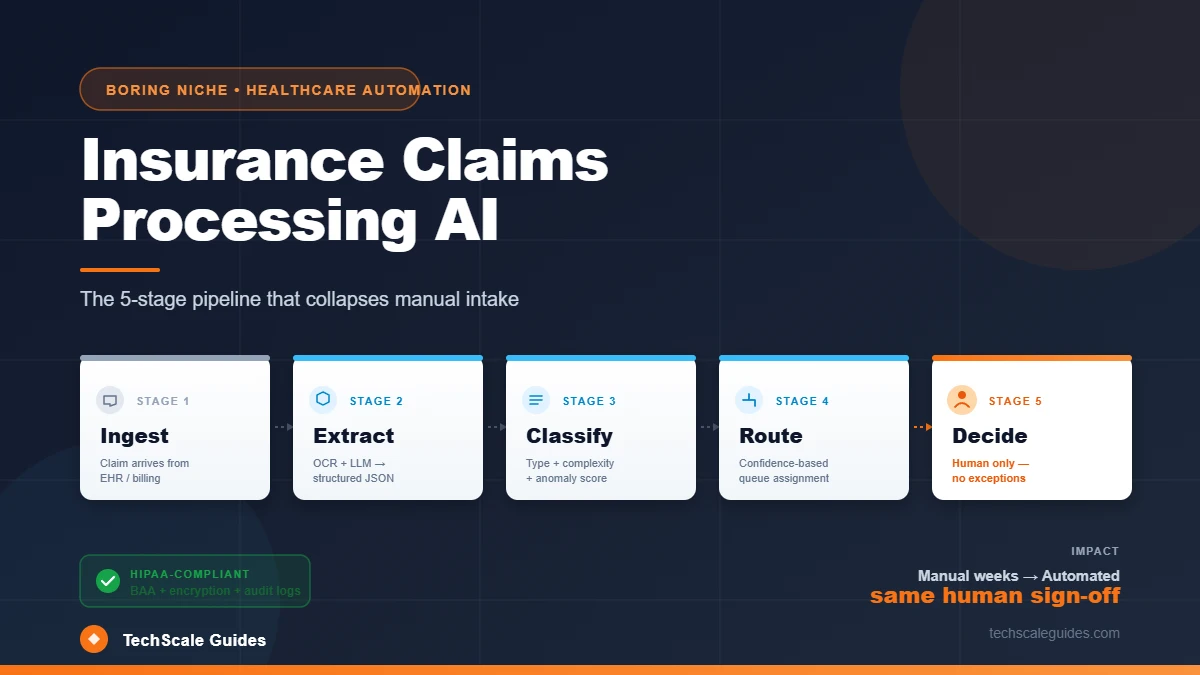
- 3. The 5-Stage Claims Pipeline
- 4. Document Extraction — Where the Biggest Gains Are
- 5. Classification + Routing — Where Automation Earns Its Keep
- 6. Anomaly Detection — AI Assists, Humans Decide
- 7. HIPAA + State Insurance Compliance
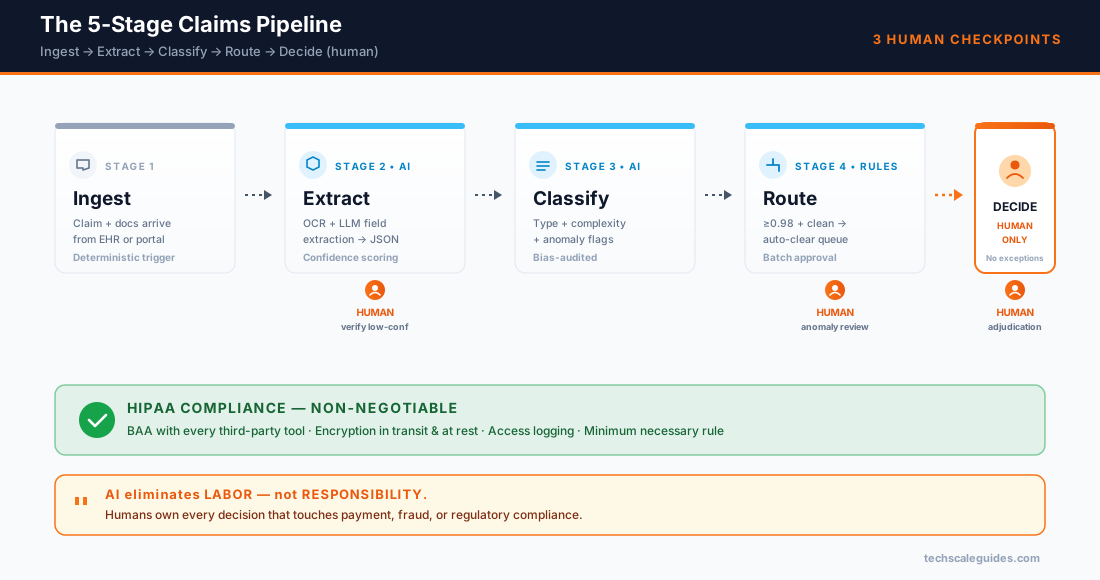
- 8. Human-in-the-Loop — 3 Non-Negotiable Review Points
- 9. Tooling — What to Build, What to Buy
- 10. Cost Model — Per-Claim Processing
- 11. Common Pitfalls (Red-Flag Protocol)
- 12. Case Study — Provider Billing Team at Scale
- 13. Frequently Asked Questions
- 14. Bottom Line
The Problem — Claims Processing Is Stuck in a Paper Era
Here's the reality of most claims operations: claims arrive as PDFs, scanned images, and faxed forms. Someone manually keys in fields. Someone else manually matches the claim against policy criteria. A third person reviews the anomalies.
The workload is brutal:
- A single claim routinely stretches into weeks from submission to reimbursement
- Manual claims intake is error-prone — a meaningful share of claims require correction after submission
- Each rejection/resubmission cycle costs time, postage, and staff hours
- Denial rates for ACA Marketplace plans have run around 19-20% in recent years (KFF, 2024 ACA Marketplace Data)
For a mid-size provider group processing hundreds of claims per month, the manual workload compounds fast — work that doesn't require clinical judgment, just careful reading and pattern matching.
The fix isn't a better claims platform. Most practices already have one. The fix is an AI layer that handles the reading and routing — so human reviewers focus only on the claims that genuinely require judgment.
This is different from prior authorization (which we covered in our Medical Prior Authorization RAG agent guide). Prior auth happens before treatment — you're proving medical necessity against a policy criteria set. Claims processing happens after treatment — you're converting delivered care into reimbursement.
Different stage, different workflow, different compliance profile. But the same underlying AI pattern: extract → classify → route → decide (with human oversight).
This article is part of our complete Autonomous AI Agent Architecture blueprint — read the pillar for the full 4-module framework.
What AI Agents Actually Do in Claims (Not a Chatbot)
Let's clear this up first. When we say "AI agent for claims processing," we don't mean:
- ❌ A chatbot that answers patient billing questions
- ❌ An AI that decides whether to approve or deny a claim
- ❌ A model that generates clinical narratives from scratch
We mean: a deterministic workflow that uses AI models at specific, bounded steps.
| Stage | AI does this | AI does NOT do this |
|---|---|---|
| Document extraction | Read PDF/scan → structured fields | Interpret ambiguous clinical notes |
| Field validation | Check for missing/invalid fields | Override policy rules |
| Policy matching | Retrieve relevant policy clauses via RAG | Decide if a case meets criteria |
| Anomaly detection | Flag statistical outliers | Accuse a claim of fraud |
| Routing | Send to right human reviewer queue | Make final adjudication call |
The pattern: AI does the extraction, matching, and flagging. Humans make the final call on every claim that requires judgment.
This is the same 4-module architecture we've covered for HVAC lead response, property management triage, and medical prior auth. The domain changes; the architecture doesn't.
The 5-Stage Claims Pipeline
Every production claims automation has these 5 stages. Miss one and the pipeline either stalls or produces garbage output.
| Stage | Purpose | AI involvement |
|---|---|---|
| 1. Ingest | Receive claim from EHR/billing system/portal | None — deterministic |
| 2. Extract | Convert unstructured docs → structured fields | OCR + LLM field extraction |
| 3. Classify | Categorize claim type + complexity | LLM classification |
| 4. Route | Send to correct review queue | Rules + confidence scoring |
| 5. Decide | Final adjudication | Human only |
The flow:
[Claim submitted]
    ↓ (deterministic trigger)
[Ingest: claim + supporting docs arrive]
    ↓
[Extract: OCR → field extraction → structured JSON]
    ↓
[Classify: claim type + complexity + anomaly flags]
    ↓
[Route: auto-clear vs human review queue]
    ↓
[Decide: human adjudication — no exceptions]
Two things matter most:
Stage 2 (Extract) is where the ROI lives. Claims intake is the highest-volume, most error-prone step. Getting most fields extracted correctly, with the remainder flagged for human verification, eliminates the bulk of manual keying.
Stage 5 (Decide) is where AI must stop. Every claim that reaches the adjudication step gets a human. AI can inform the decision by surfacing relevant policy clauses and prior similar claims — but not make the call.
This is the same pattern as our Red-Flag Protocol for autonomous agents: AI handles the bulk, humans own the critical writes.
Document Extraction — Where the Biggest Gains Are
If your claims operation is drowning in manual data entry, extraction is where you start.
The problem with claims documents
A typical claim packet includes:
- CMS-1500 (professional claims) or UB-04 (institutional claims)
- EOB (Explanation of Benefits) from prior related claims
- Supporting documentation — operative reports, itemized bills, referral notes
- Prior authorization records (if applicable)
Documents arrive in multiple formats: PDF, scanned images, faxed forms. Field extraction is inconsistent. Not all data is machine-readable.
What AI extraction actually does
Modern multimodal LLMs (GPT-6 family, Claude 5.x, Gemini 3.8 Flash / 3.1 Pro) can read PDFs, images, and mixed-media documents. The extraction workflow:
1. OCR layer → raw text from PDFs/scans
2. Field mapping prompt → LLM extracts structured JSON
3. Validation rules → check NPI format, CPT/ICD-10 validity, date ranges
4. Confidence scoring → flag low-confidence fields for human review
5. Structured output → write to claims system via API
What to expect in practice
Honest expectations (from production deployments we've observed):
- Extraction accuracy is high on well-formatted digital documents and lower on poor-quality scans — quality varies significantly by document type
- A meaningful share of claims will require human verification on at least one field
- Full auto-clear (zero human touch) typically reaches a modest fraction of inbound claims — not the majority
The gains come from reducing manual keying on the claims where extraction is confident. Not from eliminating human review entirely.
A note on tooling: Don't build your own OCR. Use existing services (AWS Textract, Azure Document Intelligence, Google Document AI). Then layer LLM extraction on top.
Classification + Routing — Where Automation Earns Its Keep
After extraction, the claim needs to be classified and routed.
Classification dimensions
| Dimension | Values | Why it matters |
|---|---|---|
| Claim type | Professional / Institutional / Dental | Different review workflows |
| Complexity | Simple / Standard / Complex | Determines review time |
| Anomaly score | Clean / Flagged / High-risk | Routes to different reviewers |
| Auto-clearable | Yes / No | Skips human review if clean |
Routing logic
IF confidence_score >= 0.98 AND anomaly_score == "clean":
    → Auto-clear queue (still human-approved in batch)
ELIF anomaly_score == "flagged":
    → Standard reviewer queue
ELIF anomaly_score == "high-risk":
    → Senior reviewer queue + SIU notification
Important: "Auto-clear" doesn't mean auto-pay. It means the claim skips the initial review and goes to a batch-approval step where a human still signs off. The savings come from skipping the per-claim manual review, not from eliminating oversight.
Confidence thresholds matter — setting them too low (e.g., 0.95) can let through claims that should have been reviewed. We cover the calibration lesson in the case study (§12).
This is the same confidence-based routing pattern we detailed in the Medical Prior Authorization guide — same architecture, different stage of the healthcare workflow.
Anomaly Detection — AI Assists, Humans Decide
Healthcare fraud costs the US healthcare system tens of billions annually — the National Health Care Anti-Fraud Association (NHCAA) tracks this estimate and reports the figure as a moving target (NHCAA: The Challenge of Health Care Fraud). AI plays a real role in surfacing anomalies — but with important limits.
What AI anomaly detection can do
- Pattern detection: Flag claims that deviate from historical patterns for the same provider, procedure, or patient population
- Duplicate detection: Identify claims that closely match prior submissions
- Unbundling detection: Flag when procedures that should be bundled are billed separately
- Upcoding signals: Flag when the coding intensity is statistically inconsistent with peer providers
What AI anomaly detection CANNOT do
- Determine fraud. Anomalies are not fraud. They're signals worth investigating.
- Replace Special Investigation Units (SIU). AI flags; SIU investigates.
- Operate without bias audits. Pattern-based detection can perpetuate historical biases if not carefully monitored.
The critical rule: AI anomaly detection generates leads for human investigators. It never generates decisions. The output is "this claim deserves a closer look" — not "this claim is fraudulent."
This mirrors the human-in-the-loop discipline from our Red-Flag Protocol guide: AI surfaces, humans decide.
HIPAA + State Insurance Compliance
Claims processing touches Protected Health Information (PHI) at every stage. Any AI system that processes claims must be HIPAA-compliant.
The non-negotiables
- Business Associate Agreement (BAA) required with every third-party tool that touches PHI — including LLM providers, OCR services, and cloud storage (HHS.gov: Business Associates)
- Encryption in transit and at rest for all PHI — no exceptions
- Access logging — every PHI access logged, every read/write auditable
- Minimum necessary rule — only the fields needed for the specific stage should be visible
- Data retention policy — PHI deleted according to state and federal requirements
LLM provider considerations
Using LLMs on PHI is not a general-purpose decision. Providers vary widely in whether they offer BAAs at all, and — where they do — which plan tiers support it. Before using any LLM on PHI, verify the current provider documentation directly:
- Confirm the provider offers a BAA
- Confirm which plan levels support BAA (some providers gate it behind enterprise tiers)
- Confirm the provider's data handling policy on training data
- Confirm data residency matches your compliance requirements
Don't rely on third-party blog posts for BAA availability. Provider policies change, and a stale claim can create real compliance exposure. Verify directly from the provider's legal/compliance docs.
State-level considerations
State insurance regulations vary. Some states have specific requirements for:
- Claims processing timelines
- Electronic claims format standards
- Consumer disclosure requirements
Rule of thumb: Consult legal counsel before automating any claims workflow that crosses state lines. The federal floor (HIPAA) is the starting point, not the ceiling.
Human-in-the-Loop — 3 Non-Negotiable Review Points
Every claims automation needs humans at these 3 points. Removing any of them creates compliance and liability risk.
Point 1 — Field verification (extraction)
When: Low-confidence extractions
Who: Claims intake specialist
What: Verify the fields the model flagged
Time: Seconds per claim
Why it matters: Wrong NPI or procedure code can cause denial or audit risk
Point 2 — Adjudication (decision)
When: Every claim, always
Who: Licensed claims adjudicator
What: Final approve/deny/pend decision
Time: Varies by claim complexity
Why it matters: Legal requirement — AI cannot make final payment decisions
Point 3 — Anomaly escalation (investigation)
When: Claims flagged by anomaly detection
Who: Senior reviewer or SIU
What: Investigate whether the anomaly is benign or concerning
Time: Minutes to hours per claim
Why it matters: Fraud investigation is a regulated activity requiring human judgment
The pattern: AI eliminates labor, not responsibility. Human accountability is preserved at every decision point.
Tooling — What to Build, What to Buy
Claims automation has 3 architectural options. Choose by your scale and technical capacity.
Option A — Vendor platform (all-in-one)
Best for: Groups processing a modest volume of claims per month, no dev capacity
Pros: Fastest to deploy, vendor handles compliance + updates
Cons: Less flexible, per-claim pricing adds up at scale
Examples: Waystar, Availity, Change Healthcare — note that this market consolidates frequently, so verify current product offerings directly with each vendor.
Option B — Build custom on n8n or Make
Best for: Groups processing substantial volumes of claims per month with in-house technical capacity
Pros: Full control, flat tooling cost, integrates with any EHR
Cons: Meaningful build time, ongoing maintenance
Architecture (n8n 2.x):
[EHR webhook] → [n8n orchestrator]
    → [OCR service (Textract/Document AI)]
    → [LLM extraction (GPT-6 / Claude 5.x with BAA)]
    → [Validation rules]
    → [Anomaly scoring]
    → [Write to claims system]
    → [Human review queue (Slack/email)]
Option C — Hybrid
Best for: Mid-size groups that want control without a full custom build
Approach: Use a vendor for OCR + compliance shell, build custom routing + review workflow
Decision matrix
| Monthly claims | Team size | Recommend |
|---|---|---|
| Low volume | Any | Keep manual — automation ROI too low |
| Moderate volume | Any | Option A (vendor platform) |
| High volume | 2+ tech staff | Option B (custom n8n) |
| High volume | No tech staff | Option C (hybrid) |
| Very high volume | Any | Option B or full enterprise build |
Cost Model — Per-Claim Processing
Here's the shape of a custom n8n + LLM stack at various volumes.
| Component | Cost driver | Notes |
|---|---|---|
| OCR (Textract/Document AI) | Per page | Vendor pricing pages have current rates |
| LLM extraction (per claim) | Tokens per claim | See provider pricing pages |
| LLM classification (per claim) | Tokens per claim | See provider pricing pages |
| Anomaly scoring | Rule-based (n8n) | $0 |
| n8n hosting (VPS) | Fixed | Vendor pricing varies by spec |
| Human review time | Per flagged claim | Loaded labor rate × minutes |
At modest volume (few hundred claims/month):
- OCR + LLM costs typically stay in the tens of dollars per month
- n8n hosting adds a fixed monthly cost
- Total automation cost: well below the labor cost of manual intake
- Human review cost: Depends on flag rate + loaded rate
At higher volume (1,000+ claims/month):
The math shifts further in favor of automation. If the workflow eliminates the majority of manual intake work, the labor savings consistently outweigh tooling costs — often by a significant multiple. This is a pattern we've seen across other automation domains — the same math applies.
Important caveats:
- These are directional estimates, not fixed benchmarks
- Pricing changes. Verify current rates before committing to a build.
- Real ROI depends on your document mix, flag rate, and labor rates
Common Pitfalls (Red-Flag Protocol)
Pitfall 1: Overclaiming extraction accuracy
Symptom: Assuming AI extracts nearly everything correctly
Reality: Accuracy varies significantly by document type and quality
Fix: Set honest baselines. Track confidence distribution by document source.
Pitfall 2: Auto-paying "clean" claims
Symptom: Fully automated payment without human sign-off
Why it's bad: Regulatory exposure, audit risk
Fix: Auto-clear claims still need human batch approval. Never auto-pay.
Pitfall 3: No PHI compliance for LLM provider
Symptom: Using a general LLM API without BAA
Why it's bad: HIPAA violation, potentially severe penalties
Fix: BAA with provider before any PHI touches the model.
Pitfall 4: Anomaly detection without bias audit
Symptom: AI flags claims from certain providers/geographies at higher rates
Why it's bad: Potential discrimination, regulatory risk
Fix: Quarterly bias audits. Track flag rates by provider demographics.
Pitfall 5: Removing humans from adjudication
Symptom: Fully autonomous adjudication workflow
Why it's bad: Legal exposure, no accountability chain
Fix: Never — human sign-off required on every claim.
Pitfall 6: No fallback when AI fails
Symptom: Extraction model times out → claim lost
Why it's bad: Claims get stuck, cycle time increases
Fix: Queue + retry + manual fallback for every stage.
Pitfall 7: Setting confidence threshold too low
Symptom: Auto-clearing claims that should have been reviewed
Why it's bad: Wrong payments, audit exposure
Fix: Start with a conservative threshold (e.g., 0.98), measure, and adjust based on observed accuracy — never based on team convenience.
Case Study — Provider Billing Team at Scale
Internal case study — anonymized client data.
The client: A multi-specialty provider group with a small billing team handling several hundred claims per month.
The problem:
- Several full-time billing staff dedicated to claims intake
- Meaningful time spent per claim on manual keying
- Field errors leading to resubmissions
- Extended claims cycle time
The implementation:
| Stage | Action | Effort |
|---|---|---|
| 1. Ingest | EHR webhook → n8n 2.x | Moderate |
| 2. Extract | OCR + LLM field extraction (BAA-covered) | Moderate |
| 3. Classify | Rule-based + LLM classification | Moderate |
| 4. Route | Confidence-based routing to 3 queues | Moderate |
| 5. Decide | Human adjudication (unchanged) | None |
Total build time: A working multi-week project with a technical team.
The results (after 90 days):
| Metric | Before | After |
|---|---|---|
| Intake time per claim | High | Reduced significantly on auto-cleared claims |
| Field error rate | Higher | Lower after routing low-confidence claims to human verification |
| Claims cycle time | Extended | Shortened |
| Billing staff on intake | Full team | Reduced — remainder reassigned to exception handling + denial appeals |
What DIDN'T work initially:
- First version auto-cleared with a confidence threshold that was too permissive. Result: a small number of claims went through without proper review in week 1. Fixed by raising the threshold and adding human batch approval.
- Text extraction on faxed documents was unreliable. Solution: route all fax-origin claims to a manual queue until OCR quality improves.
The lesson: Threshold calibration is the single most important operational decision. Start conservative. Raise confidence requirements based on observed accuracy — not on the desire to reduce manual volume.
Frequently Asked Questions
1. Can AI make the final claim decision?
No. AI can inform the decision (extract fields, surface policy clauses, flag anomalies), but human adjudicators make every approve/deny/pend call. This is both a legal and a liability requirement.
2. Do I need a BAA with OpenAI or Anthropic?
If you're processing PHI with their models, yes — but you need to verify current policy directly with the provider. BAA availability differs by plan tier, and provider policies change. Do not rely on secondary sources for this. (HHS.gov: Business Associates)
3. What's a realistic auto-clear rate?
It varies widely by specialty, document quality, and how much of your inbound is clean EDI vs. scanned/faxed. Start with a low auto-clear rate, measure, and scale only when accuracy holds up over multiple weeks.
4. How long does a custom build take?
It depends heavily on team experience and how complex your EHR integration is. A functional proof of concept can be built quickly; a production-ready workflow with error handling, audit logging, and HIPAA-compliant routing is a multi-week effort.
5. Will this work with my existing claims system?
Depends on API availability. Many modern claims systems expose APIs. Legacy on-prem systems may need a middleware layer. Verify directly with your vendor.
6. What about state-specific insurance regulations?
They vary significantly. Consult legal counsel. This guide assumes HIPAA as the federal floor — state requirements may add additional constraints.
7. How do I measure ROI?
Track 4 numbers: (1) claims intake time per claim, (2) field error rate, (3) first-pass acceptance rate, (4) average days to reimbursement. The last number is where the real financial impact shows up.
8. Is this different from RPA (Robotic Process Automation)?
Yes. Traditional RPA scripts screen interactions. AI agents understand documents and handle variation. For claims, you often need both — RPA for the deterministic UI interactions, AI for the document understanding layer.
Bottom Line
Three things to take away:
1. AI collapses the intake layer, not the decision layer. Claims extraction, classification, and routing are the highest-ROI automation targets. Adjudication stays human — that's not negotiable.
2. HIPAA compliance is a hard prerequisite. BAA, encryption, access logging, minimum necessary. If any of these aren't in place, don't deploy. The regulatory and liability exposure isn't worth it.
3. Start with extraction, calibrate conservatively. Accuracy varies significantly by document type. Start with a conservative confidence threshold, measure honestly, and only widen auto-clear scope as accuracy holds up over multiple weeks.
If you'd rather skip the build and have someone set up your claims automation stack, hire a vetted specialist on Upwork — most deliver a working intake pipeline in a matter of weeks.
🚀 Ready to Break the Claims Bottleneck?
Stop letting claims sit in a queue for weeks. Build the 5-stage pipeline with human-in-the-loop safety and HIPAA compliance baked in.
Hire a Vetted Specialist →