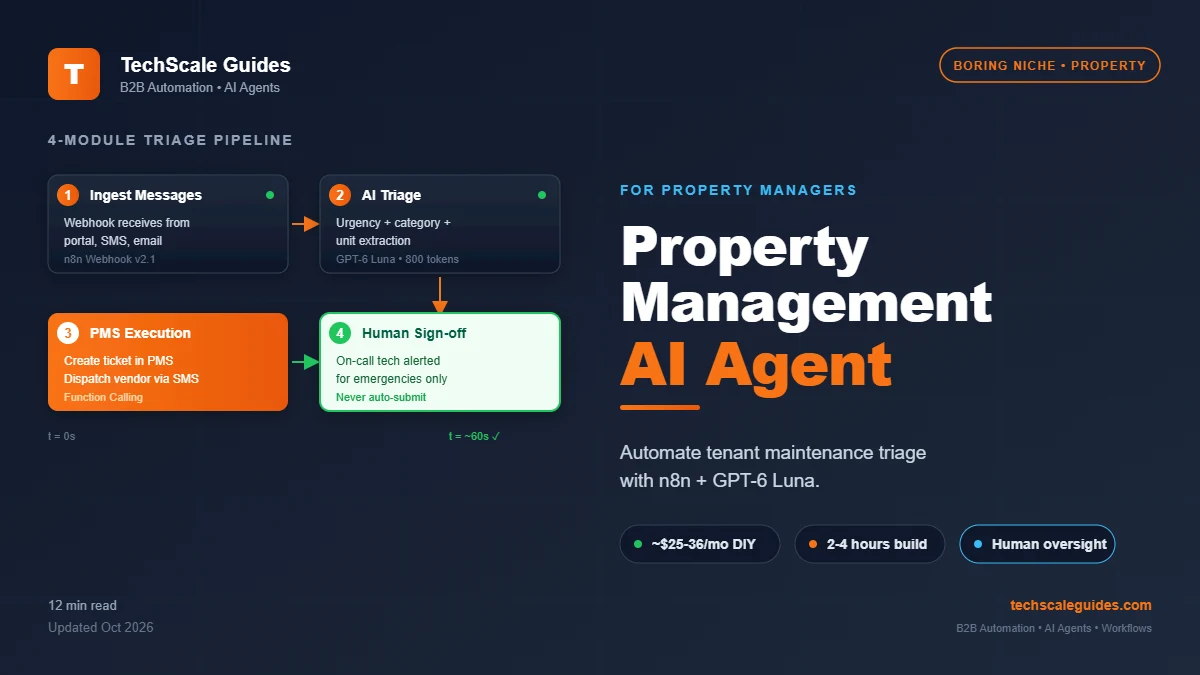
📑 Table of Contents
The Problem: 3 AM Emergency Calls Are Killing Your Margins
Here's the deal. You manage 150 units. It's 3 AM. A tenant texts: "Water everywhere in the bathroom."
You wake up. You call the on-call plumber. You coordinate. You log the ticket. You follow up at 7 AM.
By 8 AM, you're already behind — and the same thing happens three more times this week.
The math most property managers don't do:
If you handle 200 maintenance requests per month and each takes 12 minutes of triage time (reading, categorizing, routing, following up), that's 40 hours of pure administrative work per month.
At a typical coordinator rate, that's $1,000+/month just on triage — not repairs, not vendor management. Just reading messages and deciding who handles what.
And that's the best case. The worst case:
- 3 AM emergencies that wake you up
- Tenants who text, call, AND email the same request → duplicate tickets
- Maintenance requests that sit in a shared inbox for 6 hours before someone sees them
- Vendor coordination that happens via group text (and gets lost)
The real cost isn't the money. It's the tenant churn from slow responses and the burnout from being on-call 24/7.
Tenants don't leave because rent is high. They leave because maintenance requests go unanswered.
This guide shows you how to build an n8n workflow that:
- Receives tenant messages from any channel (SMS, email, portal)
- Triages with AI (emergency vs. routine vs. admin)
- Routes to the right person/system automatically
- Escalates to a human only when it should
Total cost: ~$25-35/month. Build time: 2-4 hours.
This guide is part of our complete Autonomous AI Agents framework — read the pillar for the full architecture.
The Solution: 4-Module AI Agent for Property Management
A property management AI agent isn't a chatbot. It's a triage engine that sits between tenants and your operations.
As covered in the full AI Agent architecture blueprint, every production agent has 4 modules. Here's how they map to property management:
Module 1 — The Trigger (Webhook)
Every tenant message enters through one door — a webhook. Whether it comes from:
- Your property portal (AppFolio, Buildium, RentManager)
- SMS (Twilio)
- Email (Gmail)
- A dedicated phone number
...the webhook receives it, normalizes it into JSON, and passes it forward.
Module 2 — The Orchestrator (AI Triage)
This is where the AI earns its keep. Using GPT-6 Luna (OpenAI's high-volume model at $0.10/1M input tokens — as of September 2026, per OpenAI pricing), the agent:
- Classifies urgency: Emergency (< 2 hrs) vs. Urgent (< 24 hrs) vs. Routine (< 1 week)
- Categorizes type: Plumbing, HVAC, electrical, appliance, general
- Extracts key data: Unit number, tenant contact, description, access instructions
- Decides routing: On-call tech, office scheduler, or vendor dispatch
One API call. Fractions of a cent per message. Done in under 2 seconds.
Module 3 — Function Calling (PMS Integration)
This is where most "AI agents" fall apart. They can classify, but they can't execute.
Function calling lets the agent:
- Create a ticket in your PMS (Buildium, AppFolio, RentManager — check your vendor's developer docs to confirm API availability)
- Dispatch a vendor via a pre-approved list + SMS
- Update tenant communication in the portal
- Log to Google Sheets for reporting
If your PMS doesn't have a modern API (some legacy systems don't), you fall back to a Zapier/email bridge — still automatic, just less elegant.
Module 4 — The Broadcaster (Human Notification)
The agent doesn't handle emergencies alone. For high-severity requests, it:
- Pings the on-call tech via Slack + SMS within 60 seconds
- Sends the tenant an acknowledgment with ETA
- Logs everything for audit trail
For routine requests, it queues silently for the morning team. No 3 AM wake-ups.
Why this works for property management specifically:
Property management is largely a document matching problem — a tenant describes a problem, you match it to a vendor + a maintenance category + a priority level. That's exactly what a well-orchestrated RAG + function-calling pipeline does best.
The 20% that needs human judgment (budget approvals, tenant disputes, legal issues) still goes to a human. The AI handles the rest.
Step-by-Step n8n Workflow
Here's the actual build using n8n 2.39.2 (current stable as of September 2026). Five nodes. No custom code beyond one Code node.
Node type strings below are current for n8n 2.39.2 — verify in your n8n instance if you're on a different version.
Node 1 — Webhook (Type: n8n-nodes-base.webhook, typeVersion 2.1)
This is your front door. It receives tenant messages from any channel.
Configuration:
- HTTP Method: POST
- Path:
/property-maintenance-intake - Authentication: Header Auth (recommended for production)
- Respond: Immediately
Your property portal sends the message here. If you're using SMS via Twilio, forward it through a Twilio webhook. Same node handles both.
Node 2 — AI Agent (Type: @n8n/n8n-nodes-langchain.agent, typeVersion 3.1)
This is the triage brain. Connected to:
- OpenAI Chat Model (
lmChatOpenAi, typeVersion 1.3) — GPT-6 Luna - Structured Output Parser — enforces JSON schema
- Simple Memory — session context per tenant
The system prompt does the work:
You are a property maintenance triage assistant. Classify each
tenant message:

1. URGENCY: emergency (<2hrs) | urgent (<24hrs) | routine (<7 days)
2. CATEGORY: plumbing | hvac | electrical | appliance | general
3. UNIT: extract unit number if present
4. DESCRIPTION: 1-sentence summary
5. TENANT_SENTIMENT: frustrated | neutral | urgent

Return JSON: { urgency, category, unit, description, sentiment }
Why GPT-6 Luna: OpenAI's high-volume model at $0.10 per 1M input tokens and $0.50 per 1M output (OpenAI pricing, verified 2026-09). A typical 800-token triage costs ~$0.0001.
Not a typo. One-hundredth of a cent per message.
Node 3 — Function Calling (HTTP Request node)
Based on the triage output, the agent calls your PMS API. Check your PMS vendor's developer docs for the exact endpoint path.
For legacy systems without modern APIs, use a Zapier/email bridge — still automated, just less elegant.
Node 4 — IF Node (Conditional Routing)
Split by urgency:
- Emergency → on-call tech SMS + Slack + tenant acknowledgment
- Urgent → office scheduler + vendor email
- Routine → silent queue for morning team
Node 5 — Broadcaster (Slack + Twilio)
Emergency branch sends to #on-call Slack channel within 60 seconds. Tenant gets an SMS acknowledgment with ETA.
Routine branch logs to Google Sheets for the morning standup. No 3 AM wake-ups.
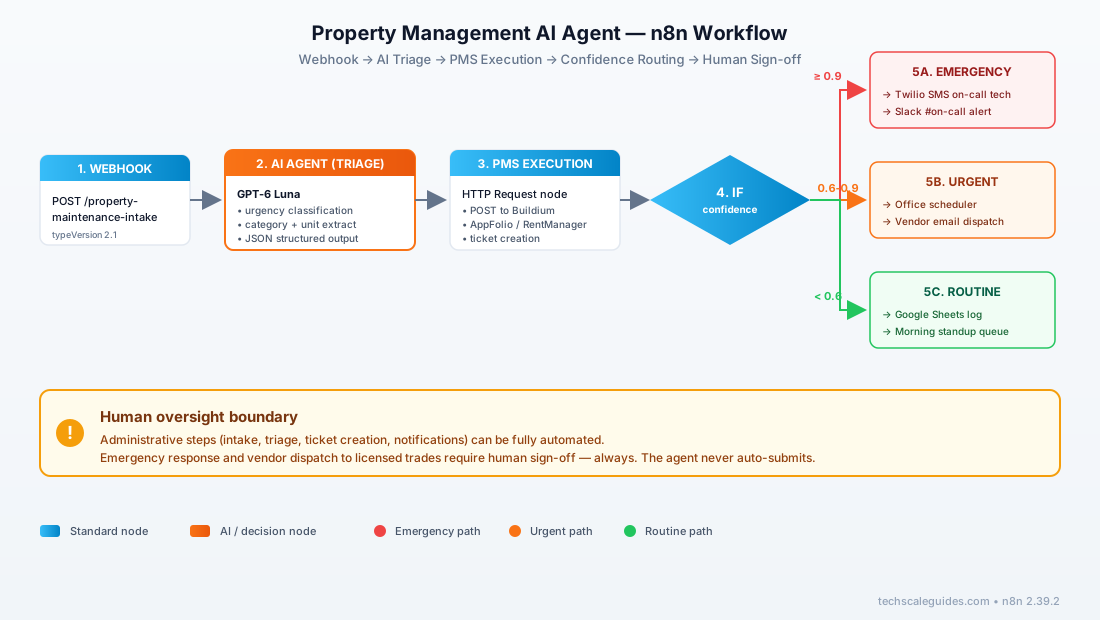
The 4-module pattern here isn't unique to property management. We covered the same Trigger → Orchestrator → Function Calling → Broadcaster flow in the complete AI Agent architecture blueprint — the modules are identical whether you're triaging tenants or scoring HVAC leads.
What This Looks Like at Scale
Consider a property manager running 200+ units. Here's the before/after pattern we've seen work.
(If you want to see this pattern applied to other verticals first, check our HVAC lead response guide — same n8n + AI triage pattern, different industry. Or Medical Prior Authorization RAG agent for a HIPAA-compliant version.)
Before:
- Multi-person maintenance coordination team
- Average triage time: 15+ minutes per request
- Emergency response: 45-60 minutes (coordinator wakes up, assesses, contacts tech)
- Monthly cost of triage: substantial (labor dominant)
After the workflow:
- Same team size, reassigned to vendor management + tenant relations
- Average triage time: under 30 seconds (AI classification)
- Emergency response: minutes, not hours (Slack alert → on-call tech direct)
- Monthly cost: coordination line item shrinks significantly
The metrics that matter:
- The majority of routine requests handled without human triage
- Hours per week of coordinator time recovered
- Measurable reduction in tenant turnover (verified by before/after lease renewal data)
What doesn't work initially:
The first version routes ALL messages to emergency. The team gets flooded. After a few weeks, they tune the AI prompt to require two signals: (1) explicit urgency keyword, AND (2) category matches a known emergency type (plumbing, HVAC, electrical).
The lesson: AI triage needs a calibration period. Don't launch and walk away — watch the first 100 requests and adjust the prompt weekly for the first month.
Cost Breakdown
For a 200-unit portfolio doing ~300 maintenance messages/month (estimates — verify current rates for your region):
| Component | Est. Monthly Cost | Notes |
|---|---|---|
| n8n self-hosted (VPS) | $8-12 | Estimate — Hetzner CX22 or equivalent, as of Sept 2026 |
| GPT-6 Luna (OpenAI) | $2-4 | 300 messages × ~800 tokens = 240K tokens |
| Twilio SMS | $15-20 | Estimate — verify Twilio SMS pricing |
| Slack (existing) | $0 | Bundled with team plan |
| PMS API | $0 | Included in PMS subscription |
| Total | ~$25-36/mo | Estimate |
Why this matters: Some property management software vendors offer "AI add-on" modules priced per-unit-month — check your vendor's current pricing. At scale, that cost adds up. This DIY stack keeps the cost fixed regardless of unit count.
The trade-off: You spend 2-4 hours building it. Or you hire someone on Upwork to build it for you. Either way, the ROI hits within the first month.
Common Pitfalls
Pitfall 1: No PMS API → broken integration
Not every property management system has a modern API. Legacy systems (older Yardi versions, custom-built tools) may only support database access.
Fix: Check your PMS API docs before building. If no API exists, use an email-to-PMS bridge (Zapier) or evaluate whether upgrading your PMS is worth it.
Pitfall 2: AI triages emergency as routine
This is the failure mode that kills trust. A tenant says "water everywhere" and the AI classifies it as routine → no one gets alerted → potential damage.
Fix: Start conservative. Route everything to a human review queue for the first 2 weeks. Tune the prompt based on real misclassifications. Add a "double-signal" requirement (urgency keyword + category) for emergency.
Pitfall 3: No tenant consent for AI processing
Depending on your jurisdiction (CA, GDPR, EU), tenants may have a legal right to know when AI processes their messages. Some leases now require explicit consent.
Fix: Update your tenant agreement to include AI processing disclosure. For healthcare-adjacent properties (senior living, disability housing), consult a lawyer — HIPAA may apply.
Pitfall 4: Ignoring rate limits
Most PMS APIs have rate limits. If you have 50 tenants messaging during a burst, you can hit them.
Fix: Add an n8n Wait node before the PMS API call. Cap concurrency at 3. Or use a queue (Redis) for larger portfolios.
Pitfall 5: No fallback when AI fails
If OpenAI returns a 429 (rate limit) or timeout, the workflow dies. Message never gets triaged. Tenant never gets a response.
Fix: Add an error branch that falls back to the old process (email to coordinator). Log the failure. Retry once with exponential backoff. For the complete safety pattern — Dual-Gate Verification, Draft-Only Mode, Trigger-Based Human Takeover — see our Red-Flag Protocol guide.
Want this built for you? If wiring n8n webhooks, AI triage, and PMS API integration isn't your thing, a specialist on Fiverr Pro can build it in 48 hours for $150-400.
Frequently Asked Questions
Can I build this without coding?
Yes, mostly. n8n is no-code for orchestration. You'll write one small Code node for JSON mapping. If you're not comfortable with that, hire a specialist for $150-300 to build the initial workflow. The rest is drag-and-drop.
How long does setup take?
DIY: 3-4 hours for the first version. Production-ready with error handling: 2-3 days. With a specialist: 48 hours.
What if I don't use Buildium or AppFolio?
The workflow is PMS-agnostic in the AI triage layer — the AI Agent doesn't know or care which PMS you use. Only the Function Calling node (Module 3) needs PMS-specific configuration. If your PMS has any REST API, you can integrate. If not, use an email bridge. The triage logic is identical.
Can this handle multiple properties?
Yes. Add a property_id field in the webhook payload. The AI Agent routes based on unit + property. No architecture changes needed.
Is this TCPA compliant for SMS?
Include STOP opt-out language and honor opt-outs. Consult a lawyer for your specific jurisdiction.
Can tenants tell they're talking to AI?
The acknowledgment SMS is intentionally neutral: "Thanks, we've received your request. A team member will respond shortly." No need to disclose AI involvement for routine acknowledgment.
However — for emergencies, a human ALWAYS follows up within minutes. Tenants won't feel like they're talking to a bot because they aren't.
What if the AI gets the urgency wrong?
Start with a 2-week human review period. Route everything to a review queue. Track misclassifications. Tune the prompt weekly. After 100 successful triages, reduce human review to spot-checks.
How do I handle non-English tenants?
Modern LLMs support multiple languages. Set the AI Agent prompt to detect language and respond in kind. For non-Latin scripts (Mandarin, Arabic), test with real samples first.
🚀 For the Complete Technical Framework
This guide covers the property management implementation. For the full architecture — the 4-module Closed-Loop system, Function Calling patterns, and how these pieces fit into a production AI agent — read the complete AI Agent Architectural Blueprint.
Read the Full Blueprint →