📑 Table of Contents
- 1. Why Manual Fulfillment Is Killing Your Course Business
- 2. What Post Purchase Automation Actually Means
- 3. The 4-Pillar Fulfillment Stack
- 4. Online Course Delivery Platforms Compared
- 5. How to Automate Course Access: Beginner Path (Systeme.io)
- 6. Advanced Path: n8n + Stripe + Kajabi
- 7. Course Drip Content: Schedule or Instant Access?
- 8. Troubleshooting Common Fulfillment Issues
- 9. Common Pitfalls to Avoid
- 10. Final Thoughts
- 11. Frequently Asked Questions
It's 3 AM. Your phone buzzes. Another Stripe notification.
You roll over. $297 sale. Nice.
Then you wake up at 7 AM. Check your inbox:
"Hi, I bought your course last night — where's my access?"
You open Kajabi. Manually add the student. Send the welcome email. Do this 4 more times from sales that came in overnight.
By 8:30 AM you've spent 90 minutes on admin. And you haven't recorded a single minute of content for your next module.
That's the problem. You're not running a course business — you're running a customer service desk. And every hour spent granting access is an hour you're not creating, marketing, or actually growing.
The fix: Post purchase automation. Set it up once. Deliver access in seconds — even at 3 AM while you sleep.
Here's exactly how to do it.
🎯 Key Takeaways
- Cut admin time by 15-20 hrs/month — automate account creation, access grant, and welcome email
- Reduce refund requests — students start the course in 60 seconds, not 8 hours
- Remove the 100-student growth ceiling — the system scales without hiring a VA
- Two paths: Systeme.io (2 hrs, no code) or n8n + Stripe + Kajabi (1 day, full control)
- 4-pillar framework — Trigger → Orchestrate → Execute → Notify
- Platform-agnostic — the math and logic apply to any course checkout
Why Manual Fulfillment Is Killing Your Course Business
Let's cut the crap. Manual fulfillment doesn't feel like a problem at 20 students. It feels manageable. Personal. "Boutique."
Then you hit 100 students. Then 200. And suddenly every sale comes with 5 minutes of admin attached.
Do the math:
5 min × 500 students = 41 hours per month
That's a full-time week of unpaid admin work. Every month.
And it gets worse. Here's what actually happens when you scale with manual fulfillment:
1. Refund rate spikes
Students expect instant access. When they pay $297 and wait 8 hours, they get buyer's remorse. They email support. If the response is slow, they ask for a refund — and most refund policies allow it within 24-48 hours of purchase. Delayed fulfillment is the single biggest avoidable cause of course refunds.
2. Support tickets pile up
Every delayed fulfillment = a "where's my access" email. That's not just 5 minutes of admin — it's also 3 minutes of anxious student hand-holding. Multiply by 100 sales/month and you're sending 100+ emails that automation would've prevented.
3. You hit a growth ceiling at ~100 students
This is the real killer. Solo creators can hand-serve ~100 students. Past that, the admin becomes the bottleneck. You either hire a part-time VA or you cap your business. (Freelance VAs typically run $8-15/hr for admin work like this.)
Neither is a good answer when the actual solution is automation.
4. You miss the "golden window" for onboarding
The first 24 hours after purchase is when students are most engaged. If they wait 8 hours for access, they've mentally moved on. If they get access in 30 seconds, they open the course immediately, finish module 1, and feel momentum.
The difference between 24-hour fulfillment and 60-second fulfillment is the difference between a $297 sale and a $297 sale that turns into a repeat customer.
Want to see the full picture of how this fits into a creator business? Check out our creator economy growth playbook.
What Post Purchase Automation Actually Means
Clear definition before we dive into tools.
Post purchase automation is a system that detects when a customer buys your product, then automatically performs every downstream action required to fulfill that purchase — without you touching anything.
In a course business, that means:
- Trigger: Payment received (Stripe, PayPal, or platform webhook)
- Orchestrate: Identify which product/plan was purchased
- Execute: Grant access in your course platform
- Notify: Send welcome email + onboarding sequence
All four steps run in under 60 seconds. All four steps run without you checking your phone.
What it's NOT
Post purchase automation is not the same as:
- Order bumps — those are pre-purchase upsells (see our order bump playbook)
- Email marketing — that's post-onboarding nurture
- Cold outreach — that's sales, not fulfillment
Different stages, different goals.
The 4-stage framework
Every fulfillment system — beginner or advanced — has these 4 stages:
| Stage | Purpose | Example |
|---|---|---|
| 1. Trigger | Detect purchase event | Stripe checkout.session.completed |
| 2. Orchestrate | Decide what to deliver | "Course A → grant Course A access" |
| 3. Execute | Perform the action | API call to Kajabi to add student |
| 4. Notify | Confirm to customer | Welcome email + SMS |
Get all 4 right → 60-second fulfillment. Miss one → refund risk.
The rest of this guide walks through two implementation paths: one for beginners (no code), one for advanced operators (n8n). Both use the same 4-stage framework.
The 4-Pillar Fulfillment Stack
Here's how the 4 stages map to actual tooling.
Pillar 1 — Trigger
The purchase event fires a webhook to your automation platform. Options:
- Stripe webhook (
checkout.session.completed) — works with any Stripe payment - PayPal IPN — for PayPal-based checkouts
- Platform webhook — Kajabi, Teachable, Systeme.io each emit their own
The trigger is dumb. It just says: "A purchase happened. Here's the data."
Pillar 2 — Orchestrator
This is where routing happens. A single Stripe account might sell 5 different products. The orchestrator decides which action to fire for which product.
Typical logic:
IF product_id = "course_a" → grant access to Course A
IF product_id = "course_b" → grant access to Course B
IF product_id = "membership" → add to membership group
Skip this step and you'll accidentally grant wrong access. Ask me how I know.
Pillar 3 — Function Call
The actual work. This is where you make API calls to:
- Add student to Kajabi/Teachable/Systeme.io
- Create user account
- Assign to course/group
- Set permissions
This is the most fragile step. API calls fail. Rate limits hit. Passwords reset. This stage needs idempotency (so retries don't double-grant) plus retry logic + error handling.
Pillar 4 — Broadcaster
The customer-facing step. After access is granted, notify them:
- Welcome email with login link
- Onboarding sequence (3-5 emails)
- Optional SMS for high-ticket purchases
This pillar gets skipped too often. Skipping it = student can't find the login email = refund.
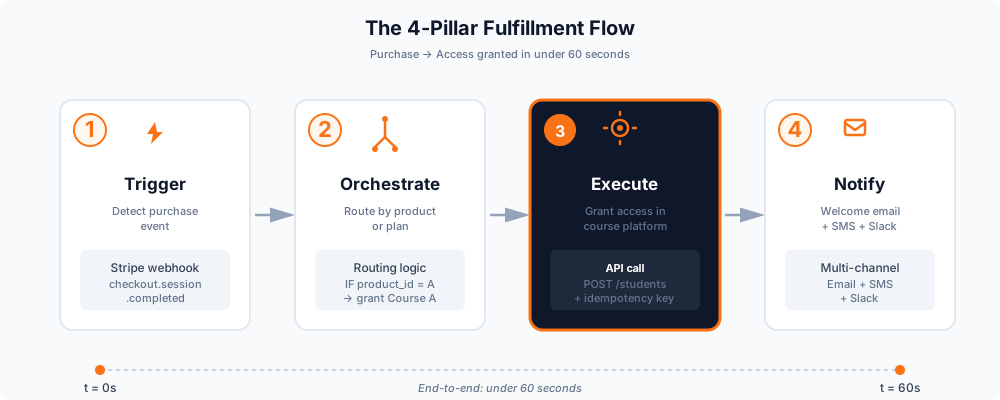
The full stack in action:
Purchase → Trigger (Stripe) → Orchestrate (routing) → Execute (grant access) → Notify (welcome)
Each pillar is a separate concern. Each can fail independently. Each needs monitoring.
Want to see how this integrates with AI chatbots? Check our YourGPT + n8n integration guide.
Online Course Delivery Platforms Compared
Not all platforms handle fulfillment the same way. Here's the breakdown for 2026.
| Platform | Pricing (2026-09) | Auto-grant access? | Best for |
|---|---|---|---|
| Systeme.io | Free → $17/mo → $47/mo → $97/mo | ✅ Built-in | Beginners, solo creators |
| Kajabi | $179/mo → $249/mo → $499/mo | ✅ Built-in | Mid-tier creators, all-in-one |
| ThriveCart | $47/mo (Standard) → $87/mo (Pro+) | ✅ Built-in (checkout only) | Cart-focused, subscription |
| Teachable | $39/mo → $89/mo → $189/mo (yearly: $29/$69/$139) | ✅ Built-in | Course-first creators |
| n8n + Custom | $5-50/mo (self-hosted) + dev time | ✅ Full control | Advanced, multi-platform |
All pricing as of 2026-09. Check vendor sites for current rates.
How to choose
Pick Systeme.io if:
- You're just starting out (<100 students)
- Budget matters (free tier is real)
- You want everything in one place
Pick Kajabi if:
- You're at $5-50K/month
- You want premium features (community, coaching)
- You don't mind the price
Pick n8n + custom if:
- You have multiple platforms (Kajabi + Stripe + your own site)
- You want full control over the logic
- You have technical skills OR willing to hire
The platform choice matters less than the automation inside it. A $17/mo Systeme.io with proper post purchase workflow beats a $499/mo Kajabi with manual fulfillment every time.
For the bigger picture of monetizing your course, see our complete creator monetization blueprint.
How to Automate Course Access: Beginner Path (Systeme.io)
If you're new to this, start here. No code required.
Setup (2 hours)
Step 1 — Create your course in Systeme.io
Log in → Courses → Create new course → add modules/lessons. Upload videos or embed from Vimeo/YouTube.
Step 2 — Connect payment
Systeme.io has built-in Stripe + PayPal integration. Go to Settings → Payment gateways → connect your account. See the Systeme.io help docs for the walkthrough.
Step 3 — Set auto-grant access rule
This is the key step. In your course settings → Access Rules → "Grant access after purchase." Systeme.io handles the rest:
- Student pays
- Systeme.io creates their account
- Systeme.io grants access
- Systeme.io sends welcome email
Step 4 — Setup welcome email sequence
Go to Emails → Automations → "After purchase" trigger. Build 4-5 email onboarding sequence:
- Email 1 (immediate): Welcome + login
- Email 2 (Day 1): How to navigate the course
- Email 3 (Day 3): Module 1 reminder
- Email 4 (Day 7): Engagement check
That's it. Total setup: ~2 hours. Time saved per month: 15-20 hours.
Advanced Path: n8n + Stripe + Kajabi
If you're on multiple platforms and want full control, here's the advanced setup.
Why go advanced?
- Your checkout is on one platform (Stripe), your course is on another (Kajabi)
- You want custom routing logic (multiple products, plans, tiers)
- You want to chain in other tools (CRM, Slack, SMS)
- You already use n8n for other automation
The workflow (1 day setup)
Step 1 — Stripe webhook → n8n
In Stripe dashboard → Developers → Webhooks → Add endpoint. Point to your n8n webhook URL. See Stripe webhook docs for the full event reference.
Listen for: checkout.session.completed, charge.refunded, customer.subscription.updated
Step 2 — n8n orchestrator
In n8n, create workflow:
- Webhook node (typeVersion 2.1) receives event — n8n Webhook docs
- Switch node routes by
product_id - Each branch handles a different product/plan
If you're new to n8n, start with our n8n workflow automation tutorial.
Step 3 — Grant access via Kajabi
Kajabi's API has limitations — automated student creation isn't fully supported on all plans, and access depends on your subscription tier. You have 3 workarounds:
- Zapier/Make bridge — use their Kajabi integration (works on most plans)
- n8n HTTP Request — hit Kajabi's internal endpoints (limited, plan-dependent)
- Manual + Slack notification — n8n sends you a Slack message, you grant access manually
Option 3 is what most advanced solo creators actually do. It's hybrid automation — 80% automated, 20% human touch on the critical step. It's honest about Kajabi's API limitations and doesn't pretend to fully automate what the platform won't let you automate.
Step 4 — Multi-channel notification
After access is granted, fire:
- SendGrid/Postmark email
- Twilio SMS (for high-ticket >$500)
- Slack notification (for you)
Course Drip Content: Schedule or Instant Access?
One more decision before you finalize your setup: should students get everything at once, or dripped over time?
Instant access
Pros: Immediate value, no "when's the next module" emails
Cons: Overwhelm, lower completion rate
Drip content
Pros: Higher completion rate, sustained engagement
Cons: Some students refund because they want everything now
The reality
Drip schedules can cause friction. Some students expect instant access — and if they discover the course unlocks over weeks, they may request a refund before the course is fully available. Always disclose the drip schedule on the sales page before checkout. No surprises = no refunds.
Recommendation: Drip content for long courses (8+ weeks), instant for short courses (2-4 weeks). And always disclose the drip schedule before checkout.
Both delivery modes use the same fulfillment automation — the difference is just the access rule.
Troubleshooting Common Fulfillment Issues
Even with automation, things break. Here's the fix for each.
Duplicate access grants
Symptom: Student gets added twice, sees 2 course enrollments.
Cause: Webhook fired twice (Stripe retries on network errors).
Fix: Add idempotency key — store processed event IDs, skip if already seen.
Failed webhook handling
Symptom: Payment succeeds, but no access granted.
Cause: API call failed (Kajabi down, network hiccup, rate limit).
Fix: Retry queue with exponential backoff. Alert after 3 failures.
Student can't access course
Symptom: Student paid, welcome email sent, but login fails.
Cause: Account created with wrong email, or password reset stuck.
Fix: Send a "reset password" email automatically after 24 hours if login hasn't happened.
Refund edge case
Symptom: Student refunds, but still has access.
Cause: No refund → revoke access automation.
Fix: Listen for charge.refunded event → revoke access automatically.
Common Pitfalls to Avoid
1. Over-automation
Not every step should be automated. High-ticket sales (>$1,000) sometimes deserve a personal welcome. Automate the boring parts — access grant, email sequence — but keep some human touch on the relationship-building side.
2. No fallback when webhook fails
If your automation breaks, you need a manual fallback. Some creators add a Slack/email alert: "Purchase X failed to auto-fulfill — check manually."
3. Missing refund handling
Automation should handle both directions: access grant AND access revoke.
4. Not testing before launch
Run 3 test purchases before you go live. Test each product, each payment method, each edge case.
Final Thoughts
Three things to take away:
- Manual fulfillment caps your business at ~100 students. You can't scale past that without hiring (expensive) or automating (cheap).
- The 4-pillar framework is universal. Trigger → Orchestrate → Execute → Notify. Apply it to any platform.
- Start with Systeme.io if you're new. It's $17/mo, has built-in automation, and lets you focus on content instead of tech. Upgrade to n8n when you outgrow it.
The creators making $50K+ per month aren't doing manual fulfillment. They set up the system once and let it run.
Do the same. Set up post purchase automation this week, then go back to what you actually do best: creating courses people love.
For the complete creator business blueprint, read our creator growth system guide.
Or if you'd rather skip the setup entirely, check out our ready-made fulfillment service.
Ready to Automate Your Course Fulfillment?
Stop losing 15-20 hours per month to manual access grants. Get a done-in-48-hours fulfillment system built for your course platform.
Get Your Fulfillment System Built →Frequently Asked Questions
What is post purchase automation?
Post purchase automation is any system that runs automatically after a customer completes a purchase — from granting access to the product, to sending welcome emails, to revoking access on refunds. In a course business, it's what replaces manual admin work.
Do I need coding skills to set this up?
No. Platform-built automation (Systeme.io, Kajabi, Teachable) requires zero code. Just toggle "auto-grant access" and set up an email sequence. Advanced n8n workflows need some technical skill, but you can hire a specialist for $200-400.
Can I automate post purchase email?
Yes. Every major platform has built-in email automation. In Systeme.io: Emails → Automations → "After purchase" trigger. In Kajabi: Marketing → Automations. Set up a 4-5 email onboarding sequence and let it run.
How much does it cost to automate fulfillment?
- Systeme.io: $17-97/mo (includes automation)
- Kajabi: $179-499/mo (includes automation)
- n8n self-hosted: $5-50/mo (plus setup time or developer cost)
- One-time setup by freelancer: $100-400
Will it work with Stripe + PayPal?
Yes. Both have native webhook integrations. Stripe: checkout.session.completed. PayPal: IPN. Most platforms (Systeme.io, Kajabi) support both directly.
What is course drip content?
Drip content is when you release course modules gradually over time (e.g., Module 1 on day 1, Module 2 on day 7) instead of giving everything at once. It's a delivery mode, not an automation feature — you can automate either instant access or drip access.
What happens if a student refunds?
Best practice: automate refund → access revoke. Listen for the charge.refunded webhook event and trigger access revocation automatically. This prevents students who refunded from keeping course access.
Which platform is best for beginners?
Systeme.io. It's free to start, $17/mo for the Startup plan, includes courses + email + automation in one place, and the auto-grant access rule is native. No code needed. Perfect for your first 100-500 students.