📑 Table of Contents
- 1. What Is an Order Bump? (And Why It's Not an Upsell)
- 2. The Math That Makes Order Bumps Non-Negotiable
- 3. The 4 Anatomy Components of a High-Converting Order Bump
- 4. 7 Order Bump Templates You Can Copy Today
- 5. Pricing: The $9–$297 Sweet Spot
- 6. Order Bumps Beyond Courses
- 7. The Software Landscape (2026)
- 8. A/B Testing Order Bumps: The 4-Week Playbook
- 9. 6 Common Order Bump Mistakes (And How to Avoid Them)
- 10. When to Hire Help
- 11. Bottom Line
- 12. Frequently Asked Questions
What Is an Order Bump? (And Why It's Not an Upsell)
You spent $2,000 on ads this month. 100 customers bought your $97 course. Do the math: $9,700 revenue — minus ad spend, minus platform fees, minus your time. You're barely breaking even.
Meanwhile, a creator in your exact niche is doing $15K/month with the same traffic.
Here's the deal: they're not smarter. They're not running better ads. They just added a $27 checkbox to their checkout.
That's an order bump. And it's the highest-ROI move in your entire funnel — because it doesn't require a single new customer.
An order bump is a checkbox on the checkout page that adds a related product to the customer's order — before they click "Complete Purchase."
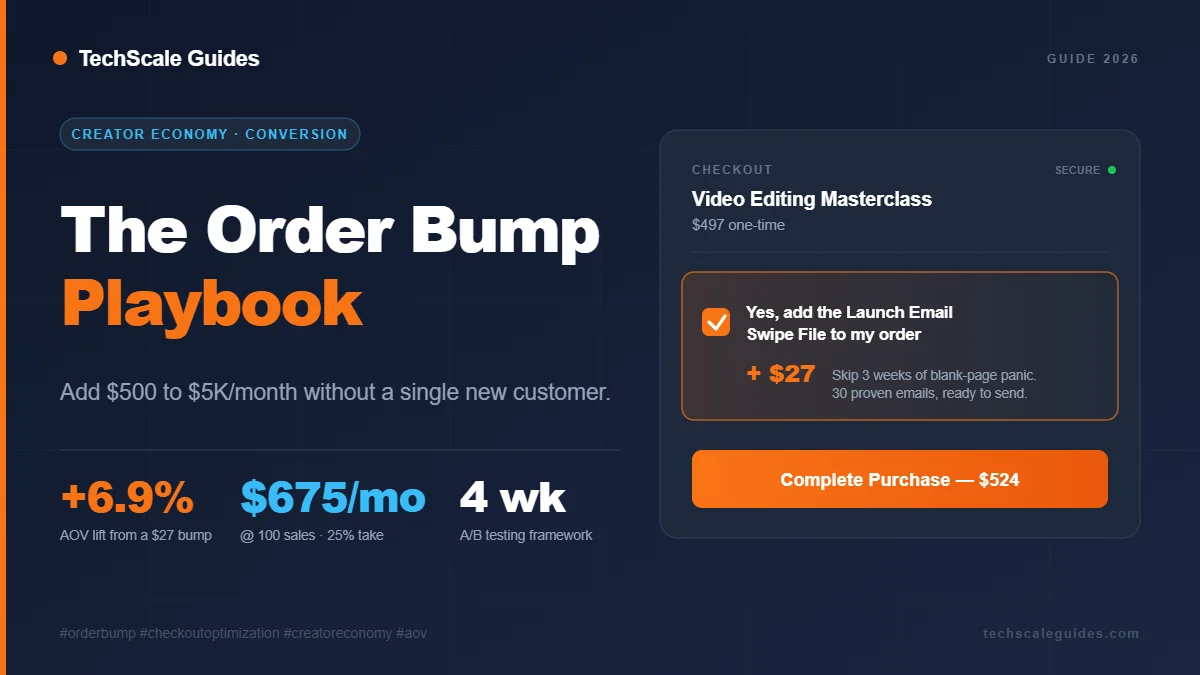
The customer sees something like:
They check it, the price updates, they pay. Total time: 3 seconds.
Order Bump vs Upsell vs Cross-Sell
| Type | When it appears | Example | Take rate |
|---|---|---|---|
| Order Bump | On checkout page (before purchase) | "Add template pack for $27" | 10–40% |
| Upsell | After purchase (one-click) | "Upgrade to Pro for $197" | 5–15% |
| Cross-Sell | Post-purchase or email | "You might also like..." | 2–8% |
Why the order bump wins on volume: the customer is already in buying mode. Credit card is out. The decision friction is minimal. That's why a $27 bump often outperforms a $197 upsell on total revenue — even though the price is 7x lower.
Real experience: A creator I worked with was running a $497 course, 80–120 sales/month. They added a $19 order bump — a "Launch Email Swipe File" — in January.
First month: 22% take rate, ~$418/month extra ($19 × 100 × 22% = $418). Then they tested three changes over six weeks:
- Raised price to $47 → take rate dropped to 14%, revenue jumped to $658/month
- Rewrote headline from "Add the Launch Email Swipe File" to "Skip 3 weeks of blank-page panic — 30 proven emails, $47" → take rate up to 19%
- Added urgency line "Only available on this page" → take rate up to 23%
Final state: $47 × 100 sales × 23% = $1,081/month in pure margin. Same traffic. Same ads. Same content. The order bump alone covered their ad spend for the month.
The Math That Makes Order Bumps Non-Negotiable
For the complete Creator Economy framework that includes order bumps alongside lead magnets, email sequences, and fulfillment automation, see our Creator Economy Growth Blueprint.
Let's run the numbers on a baseline course business:
Without an order bump:
- 100 sales/month × $97 = $9,700/month
With a $27 order bump at various take rates:
- 10% take: 100 × $27 × 0.10 = +$270/month → $9,970
- 25% take: 100 × $27 × 0.25 = +$675/month → $10,375
- 40% take: 100 × $27 × 0.40 = +$1,080/month → $10,780
At 25% take rate, that's a 6.9% lift in average order value (AOV) with zero extra traffic, zero extra ad spend, zero extra content.
Now scale it:
| Monthly sales | No bump | 25% take @ $27 | 25% take @ $47 | 25% take @ $97 |
|---|---|---|---|---|
| 100 | $9,700 | $10,375 | $10,875 | $11,425 |
| 250 | $24,250 | $25,937 | $27,187 | $28,562 |
| 500 | $48,500 | $51,875 | $54,375 | $57,125 |
| 1,000 | $97,000 | $103,750 | $108,750 | $114,250 |
Bottom line: Even a modest 25% take rate at a $47 price point adds $5,875/month at 500 sales. That's not a "growth hack." That's a business model adjustment.
The 4 Anatomy Components of a High-Converting Order Bump
Every effective order bump has the same 4 elements. Miss one, and your take rate drops by half.
Component 1: The Checkbox Headline (≤10 words)
The headline is the only thing most customers read. Make it scannable.
- ❌ Bad: "Would you like to add our exclusive bonus package to your order today?"
- ✅ Good: "Add the 30-Day Launch Email Swipe File — $27"
Rule: Lead with the outcome, not the feature. "Launch Email Swipe File" beats "Bonus Package" every time.
Component 2: Benefit-First Copy (2–3 lines max)
Below the headline, explain what it does for them — not what it is.
- ❌ Bad: "This PDF contains 30 emails you can copy-paste."
- ✅ Good: "Skip 3 weeks of blank-page panic. 30 proven emails, ready to send."
Component 3: Price Anchor + Urgency
Show the price in context:
Or:
The urgency doesn't have to be fake. The "only available here" framing is truthful — the bump is only on the checkout.
Component 4: Pre-Checked vs Unchecked
This is the single most debated decision.
| Setting | Take rate | Ethical concern | Refund risk |
|---|---|---|---|
| Unchecked (default) | 10–20% | None | Low |
| Pre-checked (default on) | 25–40% | Gray area — some jurisdictions regulate | Medium |
My recommendation: Start unchecked. If take rate is under 10%, test pre-checked — but only if your product is genuinely valuable and refund policy is clear. Regulators in Europe and the UK have taken action against businesses that used pre-checked add-ons customers didn't clearly notice — this is a real compliance area, not a hypothetical risk.
→ Decision: Default to unchecked. Optimize copy first. Only test pre-checked after every other variable is dialed in.
7 Order Bump Templates You Can Copy Today
Every template follows the same pattern: [Benefit] + [Price] + [Urgency]. Pick the one that fits your product. Take rate varies by audience — measure against your own baseline.
Template 1: The Companion Product
When to use: You have a main product (course) and a naturally paired tool (template pack, checklist, swipe file).
Example: Course on course creation + "Lesson Outline Template Pack" for $27.
Template 2: The Accelerator
When to use: Your main product is comprehensive but slow to implement. The accelerator gets them to results faster.
Template 3: The Template Pack
When to use: You've created reusable assets (Notion templates, Canva templates, email sequences). Bundle 5+ assets.
Template 4: Premium Support
When to use: Higher-priced courses ($500+) where buyers want access. Only works if you can actually deliver it.
Template 5: The Bonus Module
When to use: You have a "part 2" that stands alone. Frame it as "advanced" — not as "the rest of the course you should have gotten."
Template 6: Community Access
When to use: You have (or can build) an active community. Warning: don't offer this unless you have real engagement. A dead Slack channel triggers refunds.
Template 7: Physical Product Upsell
When to use: Hybrid physical/digital products. Great for courses with workbooks. Adds fulfillment complexity — only if you've got it dialed in.
Pricing: The $9–$297 Sweet Spot
Order bump pricing follows a different logic than main product pricing. Customers aren't comparing — they're deciding yes/no on impulse.
The 3 Price Tiers
| Tier | Range | Take rate (typical) | Best for |
|---|---|---|---|
| Impulse | $9–$29 | 20–40% | Templates, swipe files, checklists |
| Considered | $29–$97 | 12–25% | Bonus modules, accelerators, mini-courses |
| Premium | $97–$297 | 5–15% | Live coaching, done-for-you services, access |
The $27 Sweet Spot — Explained
Why does $27 tend to outperform both $19 and $39?
Three reasons:
- Charm pricing still works. Classic research by Anderson & Simester — the original MIT/Chicago Booth field studies on $9-ending prices — showed that prices ending in 7 or 9 outperform round numbers in low-friction decisions.
Broader pricing research has extended this pattern to other odd endings. The exact premium varies by category, but the pattern is reliable.
- Above the "is this worth it?" threshold. At $19, customers wonder if the quality is low. At $27, it feels intentional.
- Below the "should I think about it?" threshold. At $39+, some customers pause. At $27, it's still impulse.
→ If unsure, start at $27. In our testing and in most creator communities we've tracked, $27 tends to outperform both $19 and $39 for digital products — but the real answer depends on your audience's price sensitivity. Test $47 after you've validated copy.
Order Bumps Beyond Courses
Order bumps work for any digital checkout — not just courses.
| Product type | Bump example | Price point |
|---|---|---|
| SaaS subscription | "Add onboarding call — $49" | $49–$99 |
| Membership | "Add annual archive access — $37" | $27–$47 |
| Ebook | "Add companion workbook — $17" | $9–$27 |
| Template pack | "Add Notion dashboard — $27" | $19–$37 |
| Coaching package | "Add 30-day email support — $97" | $47–$197 |
| Physical product | "Add gift wrap + handwritten note — $12" | $5–$25 |
Rule: The math is identical. If your checkout processes 100+ transactions/month, an order bump applies. The only difference is copy — a SaaS bump should emphasize time saved, a course bump should emphasize faster results.
The Software Landscape (2026)
Order bump support varies widely. Some platforms have native support; others require integrations; a few don't support bumps at all.
Before choosing a platform, verify three things directly with the vendor:
- Native order bump support? (Some platforms call it "checkout add-ons" or "offers.")
- A/B testing built-in? (Many platforms only offer this on higher tiers or via 3rd-party tools.)
- Fee structure on bump revenue? (Some platforms charge a % of bump revenue on lower tiers — always read the pricing page.)
General guidance by business stage:
- Under $10K/month: A free or low-cost platform with native bumps (Systeme.io, Kajabi if already in use)
- $10K–$50K/month: A checkout-focused platform (ThriveCart, SamCart) — worth the higher fee for the testing features
- $50K+/month: Custom checkout + dedicated testing infrastructure
Coming in Q4 2026: Systeme.io vs. Kajabi vs. ThriveCart for order bumps — full feature matrix, real pricing, and which platform wins at your revenue stage.
A/B Testing Order Bumps: The 4-Week Playbook
Don't test everything at once. Test one variable per week.
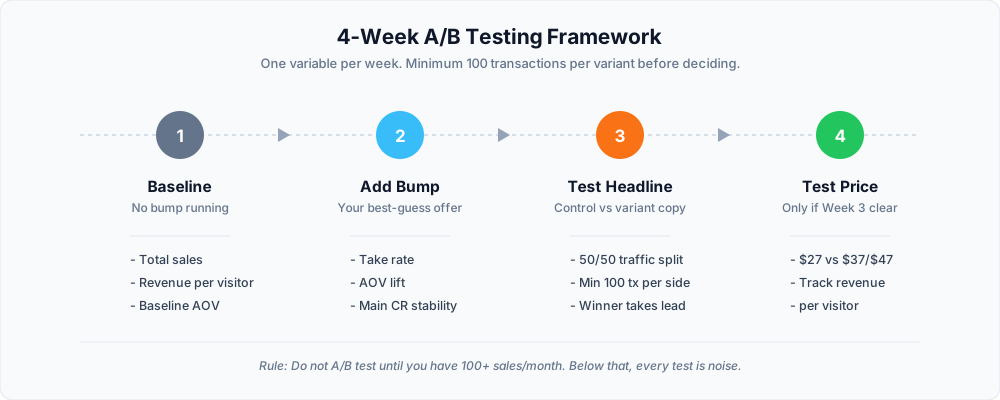
Week 1 — Baseline
Run your checkout without an order bump. Capture:
- Total sales
- Revenue per visitor
- Average order value (AOV)
Week 2 — Add Primary Bump
Add your best-guess order bump. Measure:
- Bump take rate
- Impact on AOV
- Any change in main product take rate (should be ~0)
Week 3 — Test Headline
Split traffic 50/50:
- Control: Original headline
- Variant: New headline (different benefit angle)
Minimum sample: 100 transactions per variant before deciding.
Week 4 — Test Price
Only if Week 3 winner is clear. Split 50/50:
- Control: Current price (e.g., $27)
- Variant: Alternative price (e.g., $37 or $47)
Track revenue per visitor, not take rate. A lower take rate at higher price often wins.
6 Common Order Bump Mistakes (And How to Avoid Them)
❌ Mistake 1: Too many bumps
Two checkboxes = choice paralysis. Take rate for each drops by 30–50%. Fix: One bump per checkout.
❌ Mistake 2: Wrong price
Pricing your bump at $97 when your main product is $49 confuses the customer. Fix: Bump price should be 20–40% of main product price.
❌ Mistake 3: Feature-focused copy
"This PDF has 30 emails" doesn't sell. Fix: "Skip 3 weeks of blank-page panic."
❌ Mistake 4: No urgency signal
Without urgency, the customer can Google it later. Fix: "Only available on this checkout page."
❌ Mistake 5: Bump unrelated to main product
Course on SEO + bump about Instagram = no relevance, no take rate. Fix: Bump must extend the main product's outcome.
❌ Mistake 6: Never testing
The set-and-forget bump loses 20–30% of its revenue potential. Fix: Test one variable per month minimum.
When to Hire Help
DIY is fine when:
- You're on Kajabi, ThriveCart, SamCart, or Systeme.io (native bumps)
- Your bump is a PDF, template pack, or bonus module
- Your main product is under $200
Hire a specialist when:
- Your checkout is custom-built (WooCommerce, custom code)
- You need multi-currency or multi-language bump logic
- You need checkout optimization beyond native tools
- You're doing $50K+/month and need advanced testing infrastructure
- You need checkout logic that ties into your CRM, email sequences, or fulfillment — usually built as a workflow on n8n or Zapier
Fiverr mention: If you're on a native platform and just need copy help, hire a course funnel specialist on Fiverr — many offer fixed-price "funnel audit + bump copy" packages in the $50–$200 range. For a pre-vetted shortlist, see our Course & SaaS Automation specialist directory.
Upwork mention: If you need custom checkout logic or advanced A/B testing, hire an Upwork checkout optimization specialist — expect $60–$150/hour, or fixed-price projects starting at $500+.
Pricing ranges as of September 2026. Verify current rates on each platform before hiring.
Bottom Line
Three actions to take this week:
- Add one order bump at $27–$47. Use Template 1 or Template 3 from this playbook.
- Set it to unchecked by default. Optimize copy before anything else.
- Measure for 14 days. If take rate is 15%+, you've found a winner. If under 10%, rewrite the headline (not the price).
The math is simple. Same traffic, same ad spend, same content — 6–15% more revenue. There is no other lever in your funnel that moves this fast.
For the complete Creator Economy framework — including lead magnets, email sequences, and one-click upsells — read our Creator Economy Growth Blueprint.
If you'd rather hire someone to build the entire funnel — checkout, bump, email sequence, fulfillment — see our Course Fulfillment Automation service.
Frequently Asked Questions
1. What's the difference between an order bump and an upsell?
An order bump appears on the checkout page, before the customer pays. An upsell appears after the purchase, on a separate page. Order bumps typically get 10–40% take rate. Upsells get 5–15%. Order bumps win on volume; upsells win on order value.
2. What's a good conversion rate for an order bump?
Based on published case studies from ThriveCart, SamCart, and creator communities, benchmarks range from 10–40% depending on price, relevance, and copy. If you're under 10%, your copy needs work. If you're over 30%, you're doing something right — test raising the price.
3. What price should I charge for an order bump?
Target 20–40% of your main product price. For a $97 product, that's $19–$39. Start at $27 unless you have a specific reason to go higher. Verify platform fees don't eat the margin — some platforms take a % of bump revenue on lower tiers.
4. Can I add order bumps on Kajabi, Teachable, or Thinkific?
It depends on your specific plan — and it changes. Some platforms offer native order bump support on all plans; others require higher tiers, integrations with ThriveCart or SamCart, or custom development. Contact each vendor's sales team directly and ask specifically about (a) native order bump support, (b) fee structure on bump revenue, and (c) A/B testing availability. Do not rely on any comparison table — including ours — because features and pricing change quarterly.
5. How many order bumps is too many?
One. Two is the absolute maximum, and only if they're wildly different (e.g., one digital, one physical). More than two causes decision paralysis and drops take rate on all of them. Pick the highest-value bump and cut the rest.
6. Do order bumps hurt my main product conversion?
No — when done correctly. A relevant bump doesn't distract. It reinforces the purchase by offering something that makes the main product better. If you see main-product conversion drop, your bump is either unrelated or overpriced.
7. Can I A/B test an order bump without expensive software?
Yes — with limitations. Platforms like ThriveCart and SamCart have native A/B testing. If your platform doesn't, run tests by switching copy on a schedule (2 weeks on, 2 weeks off) and compare sales data. Not as clean as true split-testing, but it works at low volume.
8. What's the best order bump software in 2026?
ThriveCart and SamCart are the most commonly recommended for order bump features specifically. Kajabi works well if you're already on the platform. Systeme.io is one of the few free options with native bump support. The "best" choice depends on your existing stack — don't switch platforms just for order bumps unless you're doing $50K+/month. Verify current capabilities with each vendor directly before purchasing — features and pricing change quarterly.