📑 Table of Contents
- 1. The Problem: Your GBP Isn't Broken — It's Inactive
- 2. Why Your GBP Stopped Ranking
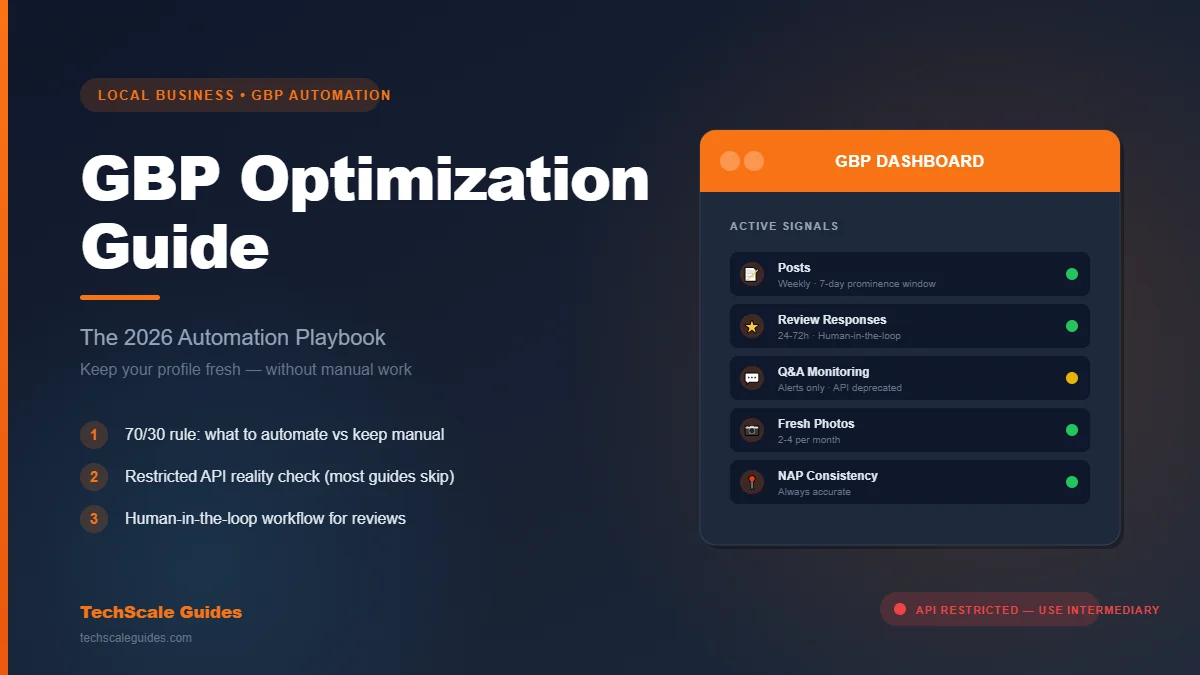
- 3. The 5 Signals Google Rewards
- 4. What to Automate vs Keep Manual — The 70/30 Rule
- 5. The API Reality Check
- 6. Automation Stack 1 — Posting via an Intermediary Tool
- 7. Automation Stack 2 — Review Responses (Human-in-the-Loop)
- 8. Automation Stack 3 — Q&A Monitoring (Not Automation)
- 9. The Complete GBP Automation Workflow (n8n)
- 10. Tools + DIY vs Hire
- 11. Common Pitfalls That Kill GBP Programs
- 12. Frequently Asked Questions
- 13. For the Complete Framework
- 14. Bottom Line
The Problem: Your GBP Isn't Broken — It's Inactive
Here's the uncomfortable pattern:
You claimed your Google Business Profile two years ago. You filled in every field. You added 15 photos. You got 40 reviews.
Then you stopped.
No weekly posts. Reviews sitting for weeks without a reply. Customer questions piling up in the Q&A section. And you're wondering why your competitor — with fewer reviews and a smaller business — keeps showing up ahead of you in the Map Pack.
The answer isn't that you did something wrong. It's that you stopped doing anything.
Google Business Profile isn't a "set up once" asset. It's an active signal. Every week without a post, every unanswered review, every ignored question tells Google: "This business isn't really active."
And Google rewards what's active.
This guide is about keeping your GBP consistently active — without hiring someone to babysit it or spending 3 hours a week on manual updates. Two things it covers:
- The automation stack that keeps posting, review responses, and Q&A monitoring running on autopilot.
- The API reality check most guides skip — why "just connect n8n to GBP" doesn't work, and the intermediary architecture that does.
Let's get into it.
Why Your GBP Stopped Ranking
Google Business Profile signals account for roughly a third of local pack ranking influence — and most of the top-ranked individual factors come from inside the profile itself (Whitespark 2026 Local Search Ranking Factors).
But here's what most business owners miss: the composition of those signals is shifting.
Whitespark's 2026 study — the industry's most-cited ranking factors report — found that several engagement and activity factors moved up significantly in the ranking compared to the 2023 edition.
The numbers below are position changes in Whitespark's ranking — how many spots each factor moved up or down since 2023:
| Factor | Position change (2023 → 2026) |
|---|---|
| Keywords in GBP Services | ↑ 75 positions |
| Proper Hours Set on GBP | ↑ 64 positions |
| In-store visits tracked (Android/Maps) | ↑ 32 positions |
| Quantity of Engagement Signals on GBP | ↑ 14 positions |
| Internal Links FROM GBP Landing Page | ↓ 65 positions |
Translation: Google increasingly rewards businesses that are actively maintaining their profile, not just businesses with complete fields. Posting weekly, responding to reviews, updating hours seasonally, and collecting engagement signals all matter more than they did 12 months ago.
The businesses ranking in the top 3 of the Map Pack aren't winning by having "better" profiles. They're winning by having fresher ones.
This article is part of our complete Local Business Growth framework — read the pillar for the full 10-strategy system.
The 5 Signals Google Rewards (And How Often to Update Them)
Not all GBP activity is equal. Five signals carry most of the weight — and each has a cadence that matters.
| Signal | Weight | Frequency needed |
|---|---|---|
| Posts | High | Weekly — Google posts are generally considered to have a ~7-day prominence window (industry analysis, SocialBee) |
| Review responses | High | Within 24-72 hours (community-recommended best practice — Google Product Experts) |
| Q&A monitoring | Medium | Within 48 hours |
| Fresh photos | Medium | 2-4 per month |
| NAP consistency | Critical | Always accurate |
The trap most businesses fall into: they treat these as one-time tasks. But posts lose prominence, reviews accumulate, and photos get stale. Each signal requires ongoing activity.
At manual speed, maintaining all five signals properly takes 3-5 hours per week. That's why most local businesses get inconsistent results from their GBP — they can't keep up with the maintenance layer.
The fix isn't working harder. It's automating the maintenance layer.
If you're running a dental practice specifically, see our dental clinic web automation guide — the same signals apply, with HIPAA considerations layered on top.
What to Automate vs Keep Manual — The 70/30 Rule
Before we get into the automation stack, let's be clear about what you should never fully automate.
Google's review response policy treats every response as a public statement about your business. Generic, templated, or hallucinated responses create real risk — reputation damage, policy violations, or worse.
Here's the framework:
✅ Automate (70% of the maintenance work)
- Post scheduling — Set a weekly queue, let the tool post
- Positive review response drafts — AI drafts a personalized reply, human approves in one click
- Q&A notifications — Get alerted when a new question appears
- Photo rotation — Schedule photo uploads from a library
- Performance reporting — Automated weekly summary in Slack or email
❌ Keep manual (30% — the judgment layer)
- Negative review responses (1-3 star) — Always human-written
- Sensitive Q&A — Anything involving pricing, refunds, or legal issues
- On-site photo capture — Fresh photos of real work, real staff, real locations
- Strategic decisions — Category changes, service additions, name updates
The 70/30 rule isn't arbitrary. It's the boundary between operational consistency (automatable) and judgment calls (not automatable). Cross that line and you get generic-feeling automation that damages trust rather than building it.
The API Reality Check (Read This Before You Build Anything)
Here's where most GBP automation guides lose credibility.
They show you a nice n8n workflow: Webhook → AI response generator → Google Business Profile node → Done.
Sounds clean. It doesn't work.
The Google Business Profile API is a Restricted API.
According to Google's official documentation:
"The GBP APIs are not open to the public. Users need to request access to the GBP APIs in order to use them."
What this means in practice:
- You can't just generate an API key on Google Cloud and start calling GBP endpoints
- You (or your developer) must submit a formal application to Google, explaining the business use case
- Access is granted at the Google Cloud project level — requires a valid business email, working website, and specific API enablement
- Google does not publish a specific approval timeframe — developer reports describe waits ranging from 1-2 weeks to 5+ weeks in some cases
- Not all applications get approved
For small local businesses: this process often isn't viable. The application review is designed to filter out casual users. A single-location plumber or dental office usually doesn't have the resources or the case that gets through quickly.
For agencies and multi-location businesses: it's possible — but you need to plan for the approval process as part of your rollout, not as an afterthought.
Why this matters: Any guide that shows you "n8n → GBP direct" without mentioning the API restriction is either out of date or skipping the hard part. If you try to build it that way, you'll hit the API access wall on day one and waste two weeks.
The realistic path is an intermediary layer — which is what the rest of this guide covers.
Automation Stack 1 — Posting via an Intermediary Tool
Since you can't reliably hit the GBP API directly, you route through a tool that already has established GBP publishing integrations.
The architecture:
[n8n Orchestrator]
    ↓
[Content Queue (Airtable / Sheets / Notion)]
    ↓
[Buffer / Metricool / GoHighLevel]
    ↓
[Google Business Profile]
n8n doesn't talk to GBP directly. It talks to the intermediary. The intermediary handles GBP publishing.
Why this works:
- Buffer, Metricool, and GoHighLevel have established GBP publishing integrations (Buffer docs)
- You connect your GBP to their platform once (OAuth)
- n8n feeds them scheduled content via their APIs
- They publish on your schedule
Which tool fits which use case:
| Tool | Best for | Notes |
|---|---|---|
| Buffer | Solo operators, single location | Simplest setup, cheapest entry |
| Metricool | Small teams, 2-3 locations | Analytics included |
| GoHighLevel | Agencies, multi-location | All-in-one platform — but see API tier note below |
New to n8n? Start with our n8n workflow automation tutorial — the webhook and scheduling patterns map directly to what you'll build here.
Automation Stack 2 — Review Responses (Human-in-the-Loop)
Review responses are where automation can boost your operation — or wreck it. The difference is whether you include a human approval step.
The 2026 reality: Google reviews every response before it goes live. According to Google's official help documentation, replies usually take up to 10 minutes to review, but sometimes a review can take up to 30 days. Auto-posted generic responses are the fastest way to get flagged.
The safe pattern for positive reviews (4-5 stars):
[New review detected via n8n scraping/webhook]
    ↓
[AI drafts personalized response (business tone + reviewer name)]
    ↓
[Slack message with draft + one-click Approve/Edit button]
    ↓
[Human reviews → Approve]
    ↓
[Posted to GBP via intermediary tool or manually]
The pattern for negative reviews (1-3 stars):
[New negative review detected]
    ↓
[Immediate Slack/email alert — no AI draft]
    ↓
[Human writes response manually]
    ↓
[Owner/manager review]
    ↓
[Posted via GBP dashboard]
Important note on the "post" step: Not every intermediary tool supports posting review responses via API. Verify this for your chosen tool before building. If your tool doesn't support it, the workflow still works — but the final posting step happens manually via the GBP dashboard. The value is in the drafting and alerting layer (which saves the bulk of the time), not necessarily the final post.
Why not fully auto for either:
- Google Product Experts recommend personalized, non-generic responses (community guide — note: community content is not official Google policy)
- AI hallucination risk on specific service details or promises
- Reputation damage from tone-deaf automated replies
For dental/healthcare: add a compliance review layer — see our dental clinic automation guide for the HIPAA-specific review workflow.
Automation Stack 3 — Q&A Monitoring (Not Automation)
Here's another reality check most guides skip.
The Google Business Profile Q&A API was discontinued on November 3, 2025. (Google change log)
You can no longer programmatically read or post Q&A questions via API. The related notification types (NEW_QUESTION, NEW_ANSWER, UPDATED_QUESTION, UPDATED_ANSWER) are deprecated too.
What this means: You can't fully automate Q&A responses anymore. What you can do:
- Monitor notifications — Google may still send notification emails for new questions, but this behavior is not clearly documented post-API-deprecation. Verify current behavior in your GBP notification settings.
- Route alerts to Slack — via n8n email-to-Slack bridge (Google notification email → n8n IMAP trigger → Slack webhook)
- Use response templates — pre-written answers for common questions (hours, service area, insurance accepted)
- Post responses manually — via your GBP dashboard
What you can't do: Auto-answer Q&A. The API is gone and Google's policies don't allow automated responses anyway — Q&A is a public conversation channel, not a form.
Where Q&A automation still adds value: The alerting layer. You want to know within hours when a new question appears — not discover it three weeks later. That's the automation.
For the broader local business framework this fits into, read our Local Business Growth blueprint.
The Complete GBP Automation Workflow (n8n)
Here's how all three stacks combine into one orchestrated workflow:
[n8n Orchestrator]

    ├── TRIGGER 1: Weekly schedule (Mon 9am)
    │       ↓
    │   [Load next post from Airtable queue]
    │       ↓
    │   [Post via Buffer / Metricool API]
    │
    ├── TRIGGER 2: Review scraper (hourly)
    │       ↓
    │   [Detect new review via webhook/scraper]
    │       ↓
    │   [IF rating ≥4: AI drafts → Slack approval]
    │   [IF rating ≤3: Slack alert only]
    │       ↓
    │   [Post approved response via intermediary or manual]
    │
    └── TRIGGER 3: Email monitor (Q&A notifications)
            ↓
        [Parse incoming GBP notification emails]
            ↓
        [Post to #gbp-questions Slack channel]
            ↓
        [Human responds manually via GBP dashboard]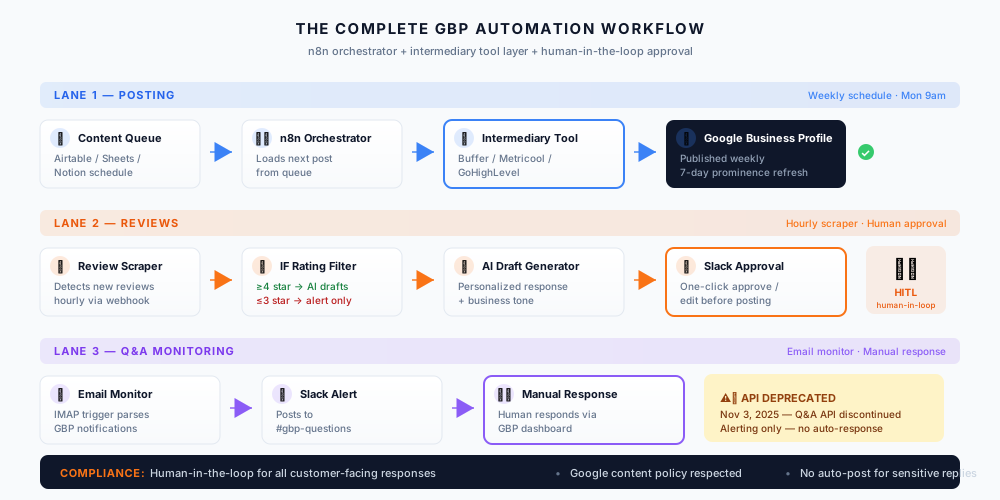
The workflow requires:
- n8n (self-hosted or Cloud) — orchestration
- Airtable or Google Sheets — post queue + review log
- Buffer / Metricool / GoHighLevel — GBP publishing integration
- Slack — human-in-the-loop approval
- AI provider (OpenAI, Anthropic, or Gemini) — draft generation
Setup time: ~4-6 hours for the full workflow if you're technical. Add 2-3 days if you need to sign up for intermediary tools and connect OAuth.
Ongoing cost: $50-$150/month depending on tool tier + AI usage.
Tools + DIY vs Hire
Four tools cover most local business GBP automation needs:
| Tool | Type | Best for | Price | GBP API access |
|---|---|---|---|---|
| Buffer | Posting scheduler | Solo operators | Free / $5-$6/channel/mo | ✓ Integrated publishing |
| Metricool | Posting + analytics | Small teams | Free / $20-$25/mo | ✓ Integrated publishing |
| GoHighLevel | All-in-one platform | Agencies, multi-location | $97-$497/mo | ⚠️ Unlimited tier+ for API (see note) |
| BrightLocal | Local SEO suite | Local SEO focus | $41-$65/mo (1 location) | ✓ Integrated |
Pricing verified as of October 2026. Buffer: $5/channel/mo billed yearly, $6/channel/mo billed monthly. Metricool: $20/mo billed annually, $25/mo billed monthly. See Buffer pricing, Metricool pricing, and BrightLocal pricing for current tiers.
DIY if:
- 1 location
- You or your office manager is comfortable with n8n/Make
- Budget is under $100/month
- You want full control over content tone
Hire if:
- Multi-location
- No technical staff
- You need this live in under 2 weeks
- You want a compliance-reviewed workflow (healthcare, legal, financial)
Where to hire:
If you want a GBP optimization specialist for a fixed-price engagement ($200-$500 for setup + workflow), hire on Fiverr. See our vetted specialist directory for pre-screened options. For custom n8n workflow logic — different posting rules per location, custom review routing, or AI prompts trained on brand voice — hire a custom AI agent engineer on Upwork. See our custom AI agent specialists (typically $60-$150/hr).
Pricing ranges as of October 2026.
Common Pitfalls That Kill GBP Programs
Pitfall 1 — Fake or incentivized reviews.
Google's spam detection is aggressive. Paying for reviews, offering discounts for reviews, or review gating (only asking happy customers) will get your profile suspended. There's no recovery from a suspension. Don't do it.
Pitfall 2 — Keyword stuffing your business name.
"Joe's Plumbing - Emergency Plumber Houston TX 24/7" reads like spam to Google and to customers. Your business name must match your real-world name. Keywords belong in your services section, not your name.
Pitfall 3 — Auto-responding to negative reviews.
Never let AI respond to a 1-3 star review without human review. AI hallucination on service details, tone-deaf apologies, or worse — automated defensiveness — will amplify a bad situation.
Pitfall 4 — Attempting direct GBP API access without approval.
If you skip the restricted API reality check, you'll build an n8n workflow that fails on day one. Always route through an intermediary tool. Get the intermediary's OAuth connected before you build the automation layer.
Pitfall 5 — Not tracking performance.
If you don't measure, you can't improve. Set up weekly reporting: post reach, review response rate, Q&A response time, and Map Pack ranking position. Twenty minutes per week tracking beats twenty hours per month guessing.
Frequently Asked Questions
1. How often should I post on Google Business Profile?
Weekly is the industry-standard recommendation. Google does not publish a specific recommended frequency — the Google support thread on this topic only states: "There is no specific recommended approach for this, you can post as you prefer as long as you adhere to the guidelines." Industry consensus points to weekly as the cadence that maintains freshness without over-posting.
2. Can I automate review responses?
Yes — with a human-in-the-loop step. AI drafts the response, a human approves it in one click via Slack or email, then the tool (or the human) posts it. Fully automated review responses are risky: Google Product Experts recommend personalized, helpful replies (community guide — note: community content is not official policy), and generic templates can trigger spam flags.
3. How do I connect n8n to my GBP?
You don't — not directly. The GBP API is Restricted (Google FAQ) and requires formal approval that most small businesses won't get quickly. The realistic architecture is n8n → intermediary tool (Buffer, Metricool, or GoHighLevel Unlimited+) → GBP.
4. What's the best tool for GBP management?
It depends on your size. Solo operators → Buffer. Small teams → Metricool. Agencies and multi-location → GoHighLevel (Unlimited tier+). Local SEO focus → BrightLocal. See the comparison table in Section 10 for pricing and API tier details.
5. Do GBP posts actually help ranking?
Yes — but not the way most people think. Posts don't directly boost ranking through content; they signal freshness and activity. Since posts have a roughly 7-day prominence window, businesses that post weekly maintain continuous activity signals. Businesses that post sporadically send intermittent signals — Google reads that as "less active."
6. Should I hire a specialist or DIY?
DIY if you're a single location, comfortable with automation tools, and want full control. Hire if you're multi-location, need this live in under 2 weeks, or want a compliance-reviewed workflow. See Section 10 for the decision framework.
For the Complete Framework
GBP automation is one piece of a larger local business growth system. For the full 10-strategy framework — including lead response, review generation, and booking automation — read our Local Business Marketing Strategies guide.
Related guides:
- Contractor Lead Response Automation — 5-minute lead response with GBP as a lead source
- Dental Clinic Web Automation — HIPAA-compliant reviews + reminders
- Regional Relocation Marketing Automation — multi-region GBP strategy
- n8n Workflow Automation Tutorial — build the automation foundation
Bottom Line
Three things to take away:
1. Activity beats completeness. Whitespark's 2026 data shows activity-related factors moving up in the ranking while static factors drop. Your GBP doesn't need to be "better" — it needs to be fresher.
2. The API is restricted — use an intermediary. Direct n8n-to-GBP integration doesn't work without formal approval. Route through Buffer, Metricool, or GoHighLevel (Unlimited+). This is the reality most guides skip.
3. Human-in-the-loop is not optional. For reviews and Q&A, automation drafts and alerts — humans decide. That's the pattern that keeps you compliant and preserves reputation.
Start with one workflow this week: the weekly posting queue. Once that runs cleanly for 14 days, add review responses. Then Q&A monitoring. Build the stack in layers.
🚀 Ready to Automate Your GBP?
If you'd rather have it built for you, our Local Business AI service deploys a complete GBP automation system in under 10 days.
Get Your GBP Automation Built →