📑 Table of Contents
Why DigitalOcean for n8n Self-Hosting
If you're reading this, you've probably already decided to self-host n8n. Good call. Self-hosting cuts costs from ~€24/month on n8n Cloud Starter (verify current pricing at n8n.io/pricing) to under $10/month on a VPS for most workflows. That's a $200+/year delta for a tool most teams use daily.
The next question is where. Three VPS providers dominate the n8n self-hosting conversation in 2026: DigitalOcean, Vultr, and Linode/Akamai. We covered the full comparison in our Best VPS for n8n guide — but if you're already leaning DigitalOcean, here's why it's a reasonable default.
Reason 1 — Predictable flat-rate pricing. Unlike some competitors that bill separately for snapshots and backups, DigitalOcean offers transparent flat-rate droplets with bundled backup retention. No surprise bills when your workflow volume doubles.
Reason 2 — The n8n Marketplace image is real (but skip it). DigitalOcean's Marketplace has a pre-built n8n image. It works — for demos. For production, you want the plain Ubuntu 22.04 droplet path, because the Marketplace image lags behind current n8n versions and locks you out of Docker Compose customization. Everything in this tutorial assumes a plain Ubuntu droplet.
Reason 3 — The ecosystem around it. DigitalOcean's DNS, Spaces (S3-compatible object storage), and Monitoring services all integrate with the same billing dashboard. For a solo operator or small team, one bill beats three.
If DigitalOcean isn't your pick, Linode/Akamai has a comparable tutorial path, and Vultr is slightly cheaper at scale. The rest of this guide is DigitalOcean-specific, but the Docker Compose setup transfers cleanly to any Ubuntu 22.04 VPS.
Prerequisites
What you need before starting:
- A DigitalOcean account (verified email + payment method)
- A domain or subdomain pointed at DigitalOcean's nameservers (e.g.,
n8n.yourdomain.com) — or Cloudflare DNS if you prefer - An SSH key pair (or willingness to use password auth — not recommended)
- About 20 minutes of focused time
Recommended droplet size by workflow volume:
| Volume tier | Droplet | Specs | Cost/month* |
|---|---|---|---|
| Testing / hobby | Basic | 1 GiB RAM, 1 vCPU, 25 GiB SSD | $6 |
| Single-user production | Basic | 2 GiB RAM, 1 vCPU, 50 GiB SSD | $12 |
| Production (recommended) | Basic | 2 GiB RAM, 2 vCPU, 60 GiB SSD | $18 |
| Production + queue mode | Basic | 4 GiB RAM, 2 vCPU, 80 GiB SSD | $24 |
| Scale (multi-worker) | Basic | 8 GiB RAM, 4 vCPU, 160 GiB SSD | $48 |
*Pricing as of October 2026. Verify current rates at digitalocean.com/pricing/droplets.
Why not the $6 droplet for production? Once you run n8n + PostgreSQL + Redis on the same droplet, RAM is the constraint. The $6 tier handles light testing — 50-100 executions/day. Real production workflows (webhooks, multi-step AI calls, file processing) will trigger OOM kills on 1 GiB. The $12 tier is technically viable for a single-user setup with light workflow volume, but once you start queue mode or handle binary files, the $18 tier (2 GiB / 2 vCPU) is the practical floor.
DNS setup: The easiest path is to point a subdomain (n8n.yourdomain.com) at your droplet's IP via an A record. If you use Cloudflare for DNS, keep the proxy OFF during initial SSL issuance — Cloudflare's proxy interferes with Traefik's ACME challenge. Turn it on after the certificate is live.
Step-by-Step: Deploy the Droplet
Step 1 — Create the Droplet
Log in to DigitalOcean. Click Create → Droplets.
Configuration:
- Region: Choose the one closest to your users (or your AI provider's region — OpenAI US-East, Anthropic US-West)
- Image: Ubuntu 22.04 LTS (NOT the n8n Marketplace image — see §1)
- Size: Per the table above
- Authentication: SSH key (recommended) — paste your public key or upload
~/.ssh/id_rsa.pub - Hostname:
n8n-prod-01(or your convention) - Backups: Enable — +20% to droplet cost, worth it
- Monitoring: Enable — free, useful for CPU/RAM alerts
Click Create Droplet. Provisioning takes 30-60 seconds.
Step 2 — SSH In and Harden
Grab the IP from the DO dashboard, then:
ssh root@YOUR_DROPLET_IPInitial hardening:
# Update packages
apt update && apt upgrade -y

# Create non-root user
adduser n8n
usermod -aG sudo n8n

# Copy SSH key
rsync --archive --chown=n8n:n8n ~/.ssh /home/n8n

# Enable firewall
ufw allow OpenSSH
ufw allow 80
ufw allow 443
ufw enable

# Install fail2ban
apt install fail2ban -y
Log out and back in as n8n. From here on, don't use root.
Step 3 — Install Docker + Compose
# Official Docker install script
curl -fsSL https://get.docker.com | sh
sudo usermod -aG docker $USER
newgrp docker

# Verify
docker --version
docker compose version
Verify Docker Compose v2 is available (not the deprecated docker-compose v1 binary). The syntax in this guide assumes v2.
Step 4 — Write docker-compose.yml
Create the working directory:
mkdir -p ~/n8n && cd ~/n8n
nano docker-compose.yml
Paste this (adjust YOUR_DOMAIN and passwords):
version: '3.8'

services:
  traefik:
    image: traefik:v3.7
    restart: unless-stopped
    command:
      - "--api.insecure=false"
      - "--providers.docker=true"
      - "--providers.docker.exposedbydefault=false"
      - "--entrypoints.web.address=:80"
      - "--entrypoints.websecure.address=:443"
      - "--certificatesresolvers.letsencrypt.acme.tlschallenge=true"
      - "--certificatesresolvers.letsencrypt.acme.email=YOUR_EMAIL"
      - "--certificatesresolvers.letsencrypt.acme.storage=/letsencrypt/acme.json"
      - "--entrypoints.web.http.redirections.entryPoint.to=websecure"
      - "--entrypoints.web.http.redirections.entryPoint.scheme=https"
    ports:
      - "80:80"
      - "443:443"
    volumes:
      - "/var/run/docker.sock:/var/run/docker.sock:ro"
      - "traefik_data:/letsencrypt"
    networks:
      - n8n_net

  postgres:
    image: postgres:16
    restart: unless-stopped
    environment:
      - POSTGRES_USER=n8n
      - POSTGRES_PASSWORD=CHANGE_ME_STRONG
      - POSTGRES_DB=n8n
    volumes:
      - postgres_data:/var/lib/postgresql/data
    networks:
      - n8n_net
    healthcheck:
      test: ["CMD-SHELL", "pg_isready -U n8n"]
      interval: 10s
      timeout: 5s
      retries: 5

  redis:
    image: redis:7-alpine
    restart: unless-stopped
    volumes:
      - redis_data:/data
    networks:
      - n8n_net
    healthcheck:
      test: ["CMD", "redis-cli", "ping"]
      interval: 10s
      timeout: 5s
      retries: 5

  n8n:
    image: n8nio/n8n:latest
    restart: unless-stopped
    depends_on:
      postgres:
        condition: service_healthy
      redis:
        condition: service_healthy
    environment:
      - N8N_HOST=YOUR_DOMAIN
      - N8N_PROTOCOL=https
      - N8N_PORT=5678
      - WEBHOOK_URL=https://YOUR_DOMAIN/
      - N8N_EDITOR_BASE_URL=https://YOUR_DOMAIN/
      - DB_TYPE=postgresdb
      - DB_POSTGRESDB_HOST=postgres
      - DB_POSTGRESDB_PORT=5432
      - DB_POSTGRESDB_DATABASE=n8n
      - DB_POSTGRESDB_USER=n8n
      - DB_POSTGRESDB_PASSWORD=CHANGE_ME_STRONG
      - EXECUTIONS_MODE=queue
      - QUEUE_BULL_REDIS_HOST=redis
      - QUEUE_BULL_REDIS_PORT=6379
      - N8N_ENCRYPTION_KEY=CHANGE_ME_RANDOM_STRING
      - GENERIC_TIMEZONE=UTC
      - N8N_LOG_LEVEL=info
    volumes:
      - n8n_data:/home/node/.n8n
    networks:
      - n8n_net
    labels:
      - "traefik.enable=true"
      - "traefik.http.routers.n8n.rule=Host(`YOUR_DOMAIN`)"
      - "traefik.http.routers.n8n.entrypoints=websecure"
      - "traefik.http.routers.n8n.tls.certresolver=letsencrypt"
      - "traefik.http.services.n8n.loadbalancer.server.port=5678"

volumes:
  traefik_data:
  postgres_data:
  redis_data:
  n8n_data:

networks:
  n8n_net:
    driver: bridge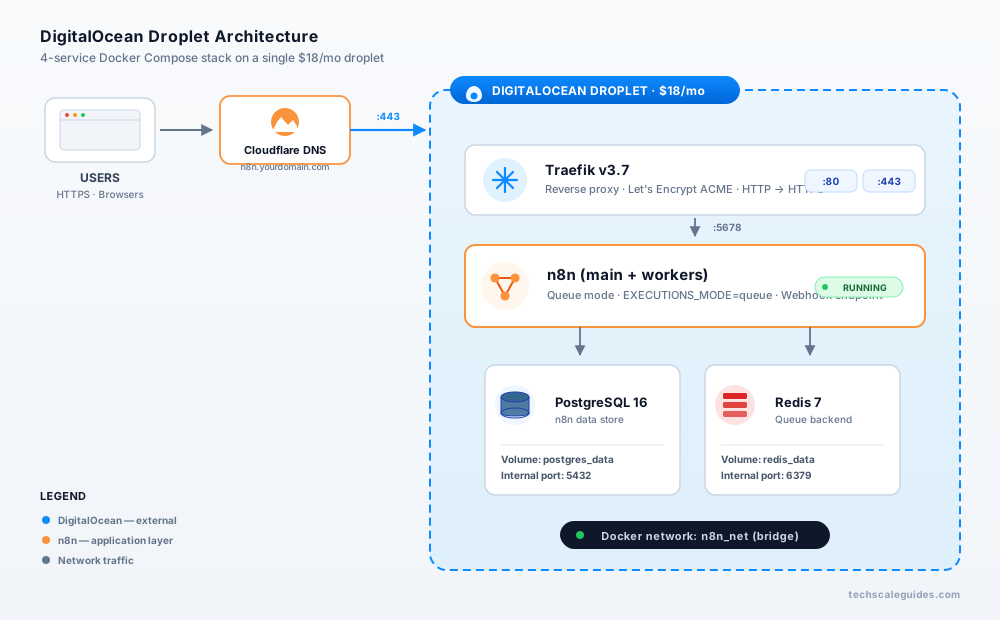
Generate passwords & keys:
# Strong password
openssl rand -base64 32

# n8n encryption key (32+ chars)
openssl rand -hex 32
Replace CHANGE_ME_STRONG, CHANGE_ME_RANDOM_STRING, YOUR_DOMAIN, and YOUR_EMAIL before saving.
Step 5 — Configure Traefik for Auto-SSL
Traefik reads the ACME config from the docker-compose.yml above. The key parts:
--certificatesresolvers.letsencrypt.acme.tlschallenge=true— uses TLS challenge, works without a separate HTTP server- Traefik labels on n8n service — routes
YOUR_DOMAINto port 5678, uses theletsencryptresolver - HTTP → HTTPS redirect — configured via the
redirectionslines
Verify DNS is propagated before bringing up Traefik:
dig +short YOUR_DOMAIN
# Should return your droplet IP
If DNS isn't propagated, Let's Encrypt will fail the ACME challenge and you'll hit the rate limit (5 failures/hour).
Step 6 — Launch and Test
docker compose up -d
docker compose logs -f n8n
Wait for logs to show n8n ready on 0.0.0.0, port 5678. Then open https://YOUR_DOMAIN in your browser.
First launch:
- Create the owner account (email + password)
- Verify the browser shows a valid Let's Encrypt certificate (padlock icon)
- Create a test workflow with a Webhook node
- Copy the webhook URL and test it from another terminal:
curl -X POST https://YOUR_DOMAIN/webhook-test/test \
  -H "Content-Type: application/json" \
  -d '{"test": "hello"}'
If the webhook receives the payload in the n8n editor — you're live.
Post-Deploy Configuration
Persistent storage — DO Volumes vs R2 external storage.
For most single-droplet setups, the n8n_data Docker volume is enough. If your workflows process large binaries (PDFs, images, videos), configure n8n's external storage to Cloudflare R2 or DO Spaces — it's cheaper than provisioning a DO Volume and keeps binary data out of the Postgres.
Backups — Snapshots vs pg_dump.
DigitalOcean Snapshots cost $0.06/GB/month for Droplets (as of October 2026 — verify at docs.digitalocean.com/products/snapshots/details/pricing). A weekly snapshot is enough for most teams. If you want finer control, add a pg_dump cron:
# /etc/cron.daily/n8n-backup
docker exec postgres pg_dump -U n8n n8n | gzip > /root/backups/n8n-$(date +%Y%m%d).sql.gz
Monitoring — DO Monitoring + Uptime Kuma.
DO Monitoring covers droplet-level CPU/RAM/disk. For workflow-level monitoring (execution failures, queue backlog), add Uptime Kuma as a separate container or use n8n's built-in error workflow → Slack/email alerts.
Auto-updates — Watchtower vs manual pinning.
Watchtower auto-pulls new images nightly. Convenient — risky. For production, pin the n8n image to a specific tag (e.g., n8nio/n8n:2.43.8) and upgrade deliberately. As of October 2026, the current stable release is 2.43.8 — verify the latest at docs.n8n.io/changelog or github.com/n8n-io/n8n/releases.
Cost math — 3 tiers:
| Tier | Droplet | Backups (20%) | Snapshot (25 GiB) | Total/month* |
|---|---|---|---|---|
| Testing | $6 | — | — | $6 |
| Production | $18 | +$3.60 | +$1.50 | ~$23 |
| Scale (queue mode) | $48 | +$9.60 | +$3.00 | ~$61 |
*Estimate as of October 2026. Verify current rates at digitalocean.com/pricing/droplets.
Even at the scale tier, this is under n8n Cloud's Pro plan (~€60/month for 10,000 executions — verify current pricing at n8n.io/pricing) — and you get full control over data residency, backups, and worker scaling.
Troubleshooting — 8 Common Errors
Error 1 — Webhook returns 502 Bad Gateway.
Cause: Traefik labels on the n8n service are misaligned, or the internal port is wrong.
Fix: Verify traefik.http.services.n8n.loadbalancer.server.port=5678 and confirm n8n's internal port hasn't been changed via N8N_PORT.
Error 2 — SSL certificate not issuing.
Cause: DNS not propagated, Cloudflare proxy is ON, or ACME rate limit hit.
Fix: dig +short YOUR_DOMAIN should return the droplet IP. Turn Cloudflare proxy OFF. Check docker compose logs traefik for ACME errors. If rate-limited, wait 60 min.
Error 3 — Postgres connection refused.
Cause: Wrong password, service name mismatch, or n8n started before Postgres was healthy.
Fix: The depends_on: postgres: condition: service_healthy in the compose file prevents this. If it still occurs, docker compose logs postgres and verify POSTGRES_PASSWORD matches n8n's DB_POSTGRESDB_PASSWORD.
Error 4 — Out of memory (OOM kill).
Cause: Running n8n + Postgres + Redis on the $6/1 GiB droplet.
Fix: Upgrade to the $18/2 GiB tier. If you can't, add a swapfile (2 GiB) as a stopgap — but this doesn't fix the underlying constraint.
Error 5 — Queue mode: worker not picking jobs.
Cause: In n8n 2.0+, task runners are enabled by default (since n8n 1.69.0). If you're on an older instance and EXECUTIONS_MODE=queue isn't processing jobs, verify the queue configuration.
Fix: Confirm QUEUE_BULL_REDIS_HOST and QUEUE_BULL_REDIS_PORT are set correctly. Note: N8N_RUNNERS_ENABLED was deprecated in n8n 2.0 — task runners are now enabled by default. If you're migrating from an older instance, verify the env var is set correctly — see docs.n8n.io task runners.
Error 6 — Droplet IP banned by email providers.
Cause: Fresh DigitalOcean IP blocks are often flagged by Microsoft/Google mail filters.
Fix: Warm up the IP by sending low-volume test emails first. Or use a transactional email provider (Resend, Postmark) instead of raw SMTP from the droplet.
Error 7 — Large binary workflows bloat the n8n volume.
Cause: n8n's default N8N_DEFAULT_BINARY_DATA_MODE=default stores binary data in memory or on the container filesystem, which can grow the n8n_data volume indefinitely and cause cross-worker inconsistency in queue mode.
Fix: For production queue mode with binary-heavy workflows, set N8N_DEFAULT_BINARY_DATA_MODE=s3 and configure S3-compatible storage (DO Spaces or Cloudflare R2). This keeps binaries out of the container filesystem and consistent across workers. Verify current binary data mode options at docs.n8n.io binary data.
Error 8 — Cron workflow runs at wrong time.
Cause: Droplet timezone is UTC, but the workflow author expected local time.
Fix: Set GENERIC_TIMEZONE=America/New_York (or your zone) in the n8n environment block. n8n uses this for cron scheduling regardless of the OS timezone.
When to Hire vs DIY
DIY if:
- You're comfortable with SSH, Docker, and YAML
- You want to understand your own infrastructure
- You have 2-4 hours for initial setup + ongoing maintenance
Hire if:
- You need production deployment in under 48 hours
- Your workflows handle sensitive data and need audit trails
- Multi-worker queue mode + custom scaling is required
Where to hire:
For a fixed-price deployment walkthrough ($50-$100 typical for standard setups; higher for custom requirements), hire a DigitalOcean deployment specialist on Fiverr Pro — see our vetted specialist directory. For production deployments with queue mode + monitoring + backup automation, hire an n8n infrastructure engineer on Upwork — see our custom AI agent specialists (typically $60-$120/hr, with senior experts up to $150/hr).
Pricing ranges as of October 2026 — verify current rates on platform.
Advanced — Scale to Production
Once your single-droplet setup is stable, the next step is queue mode with dedicated workers. The compose file in §3 already uses EXECUTIONS_MODE=queue — here's how to add workers:
  n8n-worker:
    image: n8nio/n8n:latest
    restart: unless-stopped
    command: worker
    depends_on:
      - n8n
      - redis
    environment:
      # Same env vars as n8n main, minus N8N_EDITOR_BASE_URL
      - EXECUTIONS_MODE=queue
      - QUEUE_BULL_REDIS_HOST=redis
      # ...
    volumes:
      - n8n_data:/home/node/.n8n
    networks:
      - n8n_net
    deploy:
      replicas: 3
External Postgres. DigitalOcean Managed Databases start at $15.15/month (1 GiB RAM / 1 vCPU / 10-30 GiB storage — storage beyond the base is billed separately at $0.215/GiB/month) as of October 2026. Verify at digitalocean.com/pricing/managed-databases. Offloading Postgres frees droplet RAM and gives you automated backups, point-in-time recovery, and failover. Worth it once you cross ~5,000 executions/day.
Redis persistence. The compose file mounts redis_data — but Redis defaults to RDB snapshots every 60 seconds with at least one change. For queue reliability, set --appendonly yes in the Redis command.
External storage. For workflows handling binaries, configure n8n's N8N_DEFAULT_BINARY_DATA_MODE=s3 with Cloudflare R2 or DO Spaces. DO Spaces costs $5/month for 250 GiB storage + 1 TiB (~1,024 GiB) outbound transfer, with additional storage at $0.02/GiB — verify at docs.digitalocean.com/products/spaces/details/pricing.
For the full production-grade walkthrough — including Docker Compose tuning, Traefik routing, and cost breakdowns — see our n8n Production Deployment guide.
Frequently Asked Questions
1. Can I use the DigitalOcean Marketplace n8n image for production?
Yes, technically. But it lags behind current n8n versions and locks you out of the Docker Compose customization used in this guide. For any workflow you care about, use the plain Ubuntu path.
2. Do I need a domain, or can I just use the droplet IP?
You can use the IP, but Let's Encrypt won't issue certificates for IP addresses. Without HTTPS, n8n's webhook endpoints and OAuth flows break. Use a domain or subdomain.
3. What size droplet for 10,000 executions/month?
The $18/2 GiB tier (2 GiB RAM, 2 vCPU) handles this comfortably with room to spare. Add workers only if individual workflows are long-running (>30 seconds per execution).
4. Can I migrate from n8n Cloud to a self-hosted DigitalOcean droplet?
Yes. Export your workflows as JSON from n8n Cloud, import into the new instance. Credentials don't export — you'll re-enter API keys manually.
5. How much does DigitalOcean cost vs n8n Cloud at scale?
n8n Cloud's Starter plan is around €24/month for 2,500 executions; Pro is around €60/month for 10,000 (verify current pricing at n8n.io/pricing — n8n uses tiered plan pricing that changes). DigitalOcean at $18-$23/month covers 50,000+ executions with full control. Break-even is around 3,000 executions/month.
6. Is this setup compatible with the Vultr approach from our Best VPS guide?
Yes. The Docker Compose file is VPS-agnostic. Only the droplet creation step (Step 1) is DigitalOcean-specific. Vultr's UI is different but functionally equivalent.
7. Do I need a separate database droplet?
Not for under ~5,000 executions/day. Self-hosted Postgres in the same Docker network is fine. Above that, DigitalOcean Managed Databases ($15.15+/month base + storage) offloads the concern.
8. What if I want to run multiple n8n instances?
Use DigitalOcean's load balancer + two droplets, both pointing at a shared Postgres + Redis. That's the enterprise-scale path — most teams don't need it.
9. Backup frequency recommendation?
Daily pg_dump cron + weekly DO Snapshot. Belt and suspenders. Test the restore path at least once.
10. Can I use DO Spaces instead of Cloudflare R2?
Yes. DO Spaces is S3-compatible, integrates with the same billing dashboard, and works natively with n8n's N8N_DEFAULT_BINARY_DATA_MODE=s3. Cost: $5/month for 250 GiB storage + 1 TiB outbound transfer (as of October 2026).
Ready to Deploy n8n on DigitalOcean?
Three things to take away:
1. 20 minutes from signup to live. Plain Ubuntu droplet → Docker Compose → Traefik SSL. That's the whole pipeline.
2. $18/month for production is the sweet spot. Not the cheapest, not the most expensive — but the tier where RAM, disk, and backups all stop fighting each other.
3. The setup transfers. Every command in §3-§5 works on Vultr, Linode, or any Ubuntu 22.04 VPS. DigitalOcean is the default recommendation, not a lock-in.
Your next step: Spin up the $6 droplet today. Run the compose file. Test one webhook. If it works, resize to $18 and start migrating real workflows. If it doesn't, the troubleshooting section in §5 covers the 8 errors that account for 90% of failed first deployments.
Hire an n8n Deployment Specialist →