📑 Table of Contents
- 1. What the Orchestrator Actually Does
- 2. Orchestration Patterns — 5 Approaches
- 3. Model Selection — Routing to the Right LLM
- 4. Context Management — Memory, State, and Session
- 5. Real-World Orchestrator Examples
- 6. 4 Failure Modes (And How to Prevent Them)
- 7. When to Build vs When to Buy
- 8. Frequently Asked Questions
1. What the Orchestrator Actually Does
Your AI agent just received this message:
"Hey, our invoice from last month looks wrong — the quantity on line 3 doesn't match what we received. Can someone look into this?"
Simple, right? Route it to billing.
Except — wait. Is it billing? Or a fulfillment issue? Or a retention risk? The customer said "invoice from last month" — that's billing. But they also said "doesn't match what we received" — that's fulfillment. And the tone is calm but pointed — that's a retention signal.
A single-agent router picks one category and moves on. A well-designed Orchestrator picks all three, in priority order, with context attached.
That difference is the entire article.
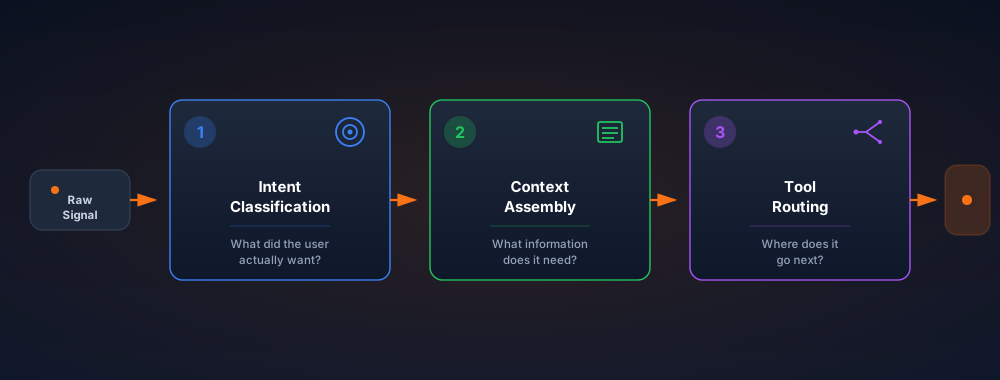
The Orchestrator's 3 jobs (Intent → Context → Routing)
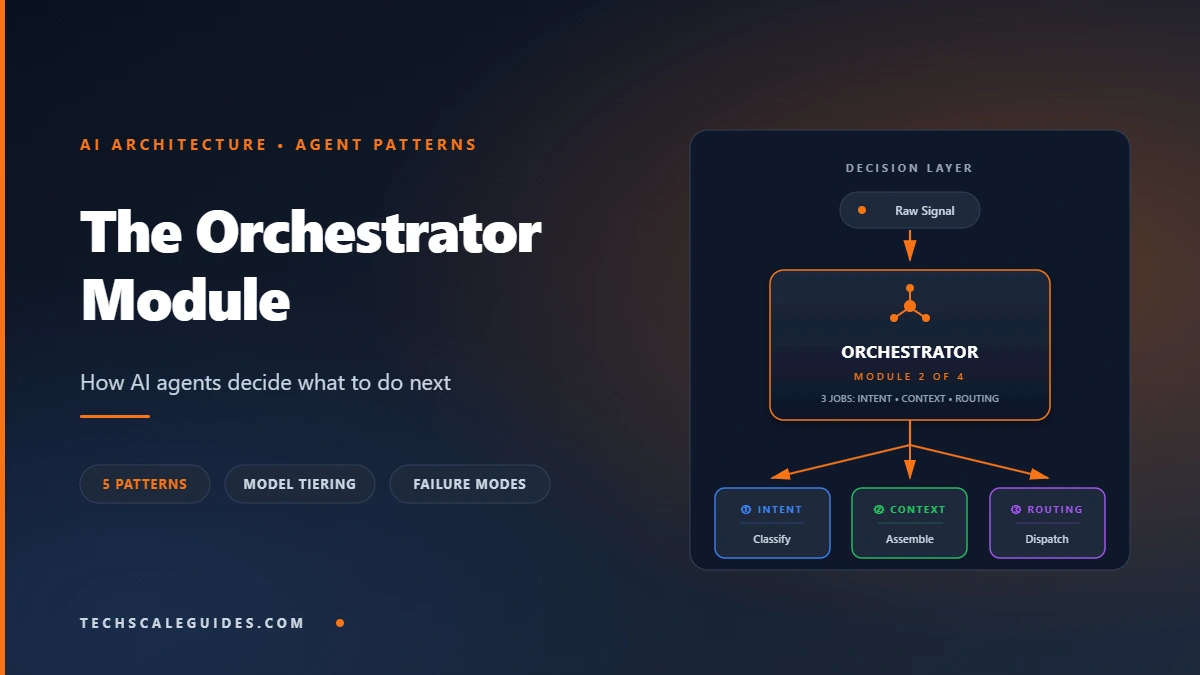
The pillar guide walked through the full 4-module stack. This article zooms in on Module 2 — the decision layer — because it's the module that separates a smart workflow from a genuinely autonomous agent.
The Orchestrator does three things in sequence:
- Intent classification. What did the user actually want? Not what they typed — what's the underlying goal. A refund question might be a churn signal. A support ticket might be an upsell opportunity.
- Context assembly. What information does the downstream decision need? Past interactions, account tier, open tickets, policy docs. Not everything — just what's relevant.
- Tool routing. Which model, which tool, which agent handles this? Route to the cheapest capable model. Route to the right API. Or escalate to a human.
Every other Orchestrator responsibility — memory, error handling, model selection — is a sub-problem of these three.
How it differs from the Broadcaster and Function Calling modules
It's not the Function Calling layer. The Orchestrator decides; Function Calling executes. The Orchestrator decides "create a HubSpot deal." Function Calling calls the HubSpot API. Conflating them produces agents that call APIs without knowing why.
It's not the Broadcaster. The Broadcaster notifies humans of outcomes. The Orchestrator decides the outcome. Different responsibilities, different failure modes.
It's not a chatbot. A chatbot responds to input. An Orchestrator acts on decisions — sometimes before any input arrives (trigger-based flows).
When you need one (vs when a single prompt is enough)
You need an Orchestrator when your agent:
- Routes between 3+ downstream actions
- Selects between multiple models or tools
- Sequences multi-step work
- Decides "act vs. escalate to human"
If none of those apply, you're overengineering. Ship the single-prompt version.
2. Orchestration Patterns — 5 Approaches
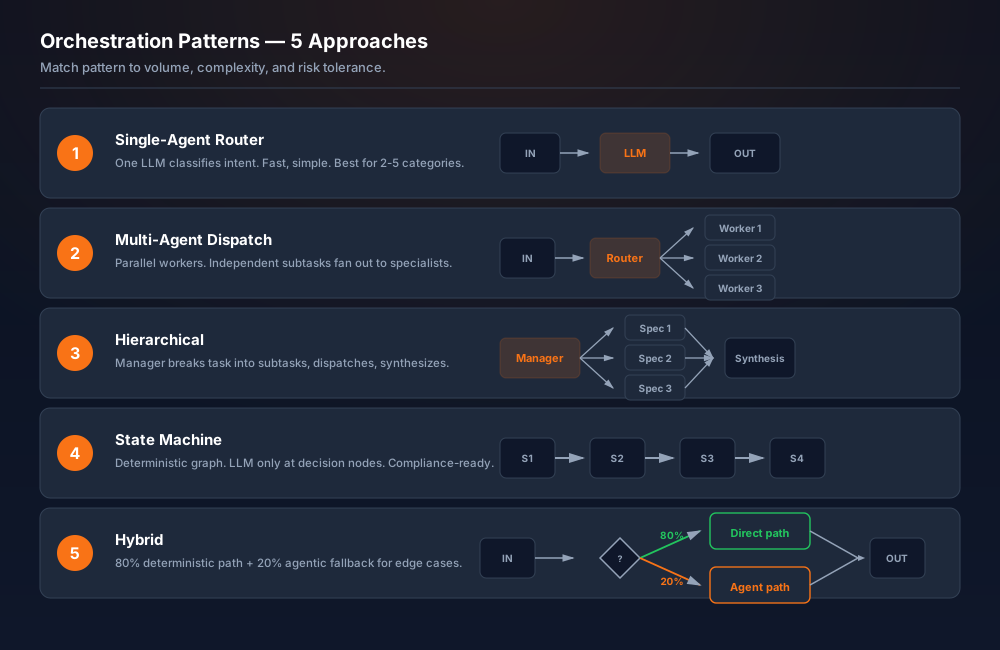
There's no single "best" pattern. There's the pattern that matches your volume, your complexity, and your risk tolerance.
Pattern 1 — Single-Agent Router (simplest)
One LLM classifies intent, then hands off to a downstream workflow. Works for 2-5 intent categories. Doesn't scale past ~5 because accuracy degrades as categories overlap.
- Cost: One LLM call
- Latency: Fast
- Best for: Support ticket classification, basic lead scoring
- Failure mode: Routing drift when categories blur
Pattern 2 — Multi-Agent Dispatch (parallel workers)
Multiple specialist agents, each with a narrow task. The Orchestrator fans out requests in parallel. Works when tasks are independent — "extract data AND check policy AND draft reply."
- Cost: N× LLM calls (parallel)
- Latency: Bounded by slowest agent
- Best for: Independent subtasks
- Failure mode: No cross-agent reasoning — each agent operates blind
Pattern 3 — Hierarchical Orchestrator (manager + specialists)
A manager agent breaks a task into subtasks, assigns each to a specialist, then synthesizes results. Works for complex multi-step work — "research this lead, draft a proposal, schedule a follow-up."
- Cost: High (multi-hop)
- Latency: Slow
- Best for: Research, complex planning
- Failure mode: Manager loses track of state; subtasks drift from original goal
Pattern 4 — State Machine Orchestrator (deterministic flows)
Deterministic flow — the Orchestrator follows a predefined state graph, using LLM only for classification at each node. Works for compliance-heavy workflows where every step must be auditable.
- Cost: Low (LLM only at decision points)
- Latency: Predictable
- Best for: Healthcare, finance, compliance
- Failure mode: Rigid — every new edge case requires a new node
Pattern 5 — Hybrid (deterministic + agentic)
The 80/20 rule — 80% of requests flow through a deterministic path, 20% go to an agentic handler. Most production systems use this. The deterministic path handles known cases fast and cheap; the agentic path handles edge cases.
- Cost: Low on average
- Latency: Fast for common cases, slower for edge cases
- Best for: Production systems at scale
- Failure mode: Misclassification sends edge cases down the wrong path
Pattern comparison
| Pattern | Complexity | Cost | Latency | Best fit |
|---|---|---|---|---|
| Single-Agent Router | Low | Low | Fast | Simple intent routing |
| Multi-Agent Dispatch | Medium | Medium | Medium | Independent subtasks |
| Hierarchical | High | High | Slow | Complex multi-step work |
| State Machine | Medium | Low | Fast | Compliance/audit |
| Hybrid | High | Low-Med | Fast | Production at scale |
Rule of thumb: Start with Pattern 1. Move to Pattern 5 when you have real usage data proving the 80/20 split.
3. Model Selection — Routing to the Right LLM
Why one model doesn't fit all tasks
"Is this message urgent?" — classification. Astra-tier reasoning is overkill.
"Draft a personalized response to this angry enterprise customer" — that benefits from frontier capability. More reasoning, better tone control, fewer footguns.
The RAG vs Function Calling guide covers the technical difference between reading and executing. This section covers a different axis: which model handles which decision.
Cost-tiering (frontier → mid → small)
Current OpenAI model tiers (as of OpenAI's model docs, verified 2026-10-12):
- GPT-6 Astra — flagship. Complex reasoning, coding, multi-step planning. Highest cost.
- GPT-6.1 Sol — balanced intelligence/cost. Good for orchestration decisions and tool selection.
- GPT-6 Luna — cost-sensitive, high-volume. Classification, extraction, simple routing.
Claude equivalents (per Anthropic's docs, verified 2026-10-12): Opus 5 (frontier), Sonnet 5 (balanced), Haiku 4.5 (volume). Google's Gemini family follows the same tiering — 3.1 Pro for frontier work, 3.8 Flash for volume (Gemini API model docs, verified 2026-10-12).
When to use Astra vs Sol vs Luna
Three questions decide the tier:
- Does the task require multi-step reasoning? → Astra
- Does the task require judgment between options? → Sol
- Is the task classification or extraction? → Luna
Apply it consistently. Every Orchestrator call gets one tier assignment. Mixing tiers mid-decision is a routing bug waiting to happen.
Latency vs accuracy trade-offs
Frontier models are slower. They reason longer, generate longer outputs, cost more per call. For real-time flows (SMS response, chat), the latency budget typically rules out frontier models at the routing layer.
Softening rule: use a mid-tier model (Sol, Sonnet 5) for the Orchestrator's decision-making, and reserve Astra/Opus for the specific downstream task where deep reasoning matters. This is the pattern Slot #5 calls "multi-model routing" — see the n8n AI Integration guide for the implementation.
Rule-based vs LLM-based routing
Not every decision needs an LLM. Rule-based routing wins when:
- The signal is structured (e.g.,
if amount > $10,000 → high-priority) - The rule is stable (pricing thresholds, regulatory limits)
- The cost of an LLM call isn't justified
LLM-based routing wins when:
- The signal is unstructured (email text, chat messages)
- The rule is fuzzy ("is this a churn signal?")
- The cost of a wrong decision is high
Most production Orchestrators combine both: rule-based triage, then LLM-based classification within each bucket. Cheaper, faster, more auditable.
4. Context Management — Memory, State, and Session
Short-term memory (conversation history)
The current conversation. If a user says "make it 10% cheaper" three messages in, the Orchestrator needs the previous context to know what "it" refers to. Typically stored in-memory or in a session key-value store (Redis is the standard choice — provider-managed, version-agnostic).
Long-term memory (vector store + retrieval)
Customer history, past tickets, previous decisions. Retrieved via vector search when relevant. Pinecone (managed service), Qdrant (self-hosted or managed), and pgvector on Postgres (Postgres extension) are the common choices — all provider-managed or self-hosted; verify current version at the linked docs. Slot #5 covers the vector-store selection criteria in depth.
Session state (what to persist, what to discard)
Not everything should be remembered. Persist:
- Decisions already made (don't re-decide)
- User preferences signaled in this session
- Failure state (if a step failed, don't loop forever)
Discard:
- Raw conversation turns older than N messages
- Intermediate reasoning traces
- Any PII you don't need for the current task
The test: does the Orchestrator's next decision require this information? If no → discard.
The context-window budget problem
Every model has a finite context window. Every piece of context you assemble competes for space. Fail to manage it and you get two failure modes: (1) the model truncates inputs silently, or (2) the model gets distracted by irrelevant context and picks the wrong path.
The fix: treat context assembly as a budgeting problem. Assign a token budget per context source. Conversation history gets X tokens, retrieved documents get Y, system prompt gets Z. When any source exceeds budget, summarize or truncate — never just append.
Tools: n8n, Redis, Postgres, Pinecone
The n8n AI Integration guide shows the exact node patterns for combining these. The n8n Production Deployment guide covers the infrastructure layer underneath.
5. Real-World Orchestrator Examples
Example 1 — Customer support triage
Input: Free-text support ticket.
Orchestrator's job: Classify intent, assemble customer context (past tickets, plan tier, open orders), route to the correct queue or self-serve answer.
Pattern: Single-Agent Router (Pattern 1) with rules-first triage.
Failure caught by: Rule-based routing catches "cancel contract" before the LLM sees it — immediate human escalation.
Example 2 — Lead qualification
Input: Form submission or inbound email.
Orchestrator's job: Score lead, enrich with firmographic data, route to sales rep or nurture sequence.
Pattern: Hybrid (Pattern 5). Rule-based scoring for hard signals (company size, industry), LLM-based for soft signals (message tone, urgency).
Failure caught by: Confidence threshold. Below a configured cutoff, the Orchestrator escalates to a human rather than guessing.
Example 3 — Content moderation
Input: User-submitted content.
Orchestrator's job: Classify violation type, cross-check against policy, route to remove/warn/allow.
Pattern: State Machine (Pattern 4). Every decision must be auditable.
Failure caught by: Deterministic state graph — every path is traceable, no black-box decision.
Example 4 — Multi-step research agent
Input: A research question.
Orchestrator's job: Plan subtasks, dispatch to specialist agents (web search, document retrieval, synthesis), combine results.
Pattern: Hierarchical (Pattern 3).
Failure caught by: State checkpointing — if any subtask fails, the Orchestrator doesn't re-run the whole pipeline; it retries the failed subtask only.
6. 4 Failure Modes (And How to Prevent Them)
Failure 1 — Context bloat (prompt grows > model window)
What happens: Every message, every retrieved doc, every tool result gets appended to context. After 20 turns, the prompt exceeds the model window. Truncation happens silently. The model loses track of the original goal.
Prevention: Context budget per source (see §4). Summarize conversation history past a threshold. Never append raw tool outputs without post-processing.
Failure 2 — Routing drift (agent picks wrong tool, repeatedly)
What happens: The Orchestrator starts picking the wrong downstream action. A refund request routes to "draft an email" instead of "process refund." A support ticket routes to billing when it's actually a fulfillment issue.
Prevention: Log every routing decision. Track accuracy against ground truth (human corrections). Add rule-based guards for critical decisions — refunds over $X, cancellations, PII handling.
Failure 3 — Hallucination cascade (one wrong classification → 5 wrong actions)
What happens: The Orchestrator misclassifies. Downstream agents act on the wrong assumption. By the time a human notices, five actions have already executed against bad data.
Prevention: The Red-Flag Protocol is the direct answer — Dual-Gate Verification, Draft-Only Mode, and Trigger-Based Human Takeover. Every step that changes external state should be reversible or human-approved.
Failure 4 — Cost runaway (unbounded tool calls)
What happens: The Orchestrator gets stuck in a loop. Tool call fails → retry → fails → retry. Or the hierarchical pattern fans out to 20 subtasks, each running a frontier model. Monthly bill: $4,000 instead of $400.
Prevention: Set hard caps — max retries per tool, max subtasks per orchestrator run, max tokens per session. Track token usage per workflow (Slot #5 covers the observability pattern). Alert on anomalies.
7. When to Build vs When to Buy
The Build vs Buy Decision Guide covers the full framework. Applied specifically to the Orchestrator:
DIY if...
- Your routing logic is genuinely proprietary (business rules that are your moat)
- You have in-house engineering
- High volume justifies the setup cost
Use existing framework if...
- n8n — visual orchestration, strong for rule-based + LLM-based hybrid routing. Low code, high observability. Good fit for SMBs and mid-market. As of October 2026, current stable release is n8n 2.43.8 — verify the latest at github.com/n8n-io/n8n/releases.
- LangGraph — Python-native framework for stateful multi-agent systems. Built for hierarchical and state-machine patterns. Best fit for engineering teams building complex agents. LangGraph docs (Python package — verify current version at docs).
- CrewAI — role-based multi-agent orchestration. Fast to prototype, opinionated. Best fit for hierarchical patterns with clear role assignments. CrewAI docs (Python package — verify current version at docs).
Hybrid: n8n + custom LLM routing
The most common production pattern for SMBs: n8n handles the deterministic flow, LLM routing handles the fuzzy classification. The n8n workflow calls out to your chosen model provider (Astra, Sol, Luna, Claude, Gemini) for the classification step, then routes based on the response. This pattern is documented in the n8n AI Integration guide.
8. Frequently Asked Questions
1. What's the difference between an Orchestrator and a Router?
A Router is a single decision point — classify input, send it one place. An Orchestrator is a system: it classifies, assembles context, selects a tool or model, and decides whether to act or escalate. A Router is one component of an Orchestrator.
2. Can I build an Orchestrator without code?
Yes — n8n is the most common path. You can build patterns 1, 2, 4, and 5 in n8n without writing code. Pattern 3 (hierarchical) gets complex fast and usually benefits from a Python framework like LangGraph.
3. Do I need a separate LLM for the Orchestrator?
No. The Orchestrator is a role, not a model. You can use the same model for orchestration and execution — but you shouldn't. Cost-tiering (§3) usually means using a mid-tier model (Sol, Sonnet 5) for orchestration and reserving frontier models for the specific decisions that need them.
4. How does an Orchestrator handle failures?
Three layers: (1) retry logic with exponential backoff, (2) circuit breaker — stop calling a failing tool after N failures, (3) escalation — if the failure can't be recovered automatically, hand off to a human. The Red-Flag Protocol covers the escalation patterns in depth.
5. What's the latency cost of orchestration?
Every decision the Orchestrator makes is an LLM call (in LLM-based routing) or a lookup (in rule-based routing). LLM-based orchestration adds measurable latency per decision; rule-based routing is near-instant. The trade-off: rule-based is faster but less flexible; LLM-based is slower but handles ambiguous inputs. If your workflow is latency-sensitive (real-time SMS, chat), keep the LLM step simple — task-type routing rather than per-message complexity scoring.
6. When should I use multi-agent instead of single-agent?
When tasks are genuinely independent and benefit from parallel execution. If task B depends on task A's output, don't parallelize — sequence it. Multi-agent also helps when a single agent's tool list grows too large; splitting into domain-specific agents improves accuracy. Rule of thumb: if an agent is juggling a large tool list across unrelated domains, split it.
7. How does the Orchestrator differ from the Broadcaster?
The Orchestrator decides what happens. The Broadcaster notifies humans of what happened. They're separate modules in the 4-module stack. Conflating them means every decision triggers a notification — which defeats the purpose of the Broadcaster (which is to notify only when necessary).
8. Can the Orchestrator work with RAG?
Yes — RAG is one of the Orchestrator's context-assembly tools. When the Orchestrator decides a decision needs business context (pricing rules, policy docs), it retrieves via RAG. The RAG vs Function Calling guide covers the pattern.
9. What's the cheapest way to build one?
Self-hosted n8n on an entry-level VPS, rule-based routing where possible, LLM-based routing only for the fuzzy classification step, and a volume-tier model (Luna or Haiku 4.5) for that step. Typical SMB-volume total monthly cost lands in the low-double-digits to low-hundreds range depending on call volume. The Best VPS for n8n guide covers the infrastructure layer. VPS pricing varies by provider and region — verify current rates before budgeting.
10. How do I test an Orchestrator in production?
Three techniques: (1) shadow mode — run the Orchestrator in parallel with the current workflow, compare decisions, don't act on the Orchestrator's output. (2) Canary — let the Orchestrator handle a small percentage of traffic, human-review every decision. (3) Checkpointed rollout — enable one decision type at a time (e.g., "only billing routing first"), validate, then expand.
Bottom Line
The Orchestrator is the decision layer — the module that turns a pipeline into an agent. Three jobs: intent, context, routing. Five patterns, no single best one — pick the pattern that matches your volume and risk tolerance. Route models by tier — Astra for reasoning, Sol for balance, Luna for volume — and verify against the current model docs, because these names drift.
The two failure modes that matter most: routing drift (agent picks wrong path) and cost runaway (unbounded calls). Both are prevented with hard caps and observability. Neither is prevented with a better model.
→ For the full 4-module framework, read the Autonomous AI Agents Architectural Blueprint.