📑 Table of Contents
- 1. The Problem: Your List Is 0 Subscribers
- 2. What Makes a Lead Magnet Actually Work (3 Criteria)
- 3. The 7 Lead Magnet Types — Ranked by Verified Conversion Data
- 4. How to Build One in 2 Hours (Step-by-Step)
- 5. The Opt-In Flow: From Subscriber to Course Buyer
- 6. Common Pitfalls to Avoid
- 7. Frequently Asked Questions
The Problem: Your List Is 0 Subscribers, Your Launch Is in 30 Days
You spent three months building a course. It's good — you've tested the content with 5 beta students who gave you glowing feedback.
Now you're 30 days out from launch. You check your email list. 0 subscribers.
This is the #1 reason course creators fail. Not because the course is bad. Because they launch to an empty room.
Here's the uncomfortable truth: fewer than 5% of course creators ever surpass $1,000/month in revenue (InsightRaider, 2026). The other 95%+ aren't worse teachers. They just skipped the part where you build an audience before you build the product.
The math is brutal. With 200 subscribers and a ~2% conversion rate on launch (a standard benchmark for cross-launch campaigns), launch day nets ~4 sales. Bump to a warmed-up list with up to 2–5% conversion and you're looking at 4–10 sales. At $97, that's $388–$970 on day one. With 0 subscribers, it's 0 sales. The difference isn't talent — it's infrastructure.
Lead magnets are that infrastructure. They're the top of your funnel. And most creators build the wrong kind — or skip them entirely — because they don't know what actually converts.
That's what this guide fixes.
This article is part of our complete Creator Economy Growth Blueprint — read the pillar for the full framework.
What Makes a Lead Magnet Actually Work (3 Criteria)
Before we get to the 7 types, here's the framework for judging any lead magnet.
Criterion 1: Specificity > Broadness
"Free guide to video editing" converts 2–4%. "Free 3-minute checklist to fix washed-out YouTube footage" converts 15–25%. The narrower the promise, the higher the conversion.
The specificity signal tells your reader "this was made for me." Broad promises tell them "this is generic."
Criterion 2: Speed-to-Value < 10 Minutes
The reader's brain evaluates lead magnets on one question: "How fast can this give me something useful?"
Interactive tools and short checklists win here — the reader downloads and uses them within minutes. Long eBooks and extended video series lose here — the reader has to invest more time than they've already committed.
Criterion 3: Natural Bridge to the Paid Offer
A lead magnet should be a partial solution to the same problem your course solves fully. If your course teaches "how to edit videos in 30 minutes instead of 3 hours," your lead magnet should be "the exact 8-minute pre-edit checklist that saves you 40 minutes per video."
If the bridge is forced ("free PDF about photography" → "paid video editing course"), conversion drops by half.
Rule of thumb: If a subscriber can't immediately imagine "I need to buy the paid product to get the rest of this," you've picked the wrong lead magnet.
The 7 Lead Magnet Types — Ranked by Verified Conversion Data
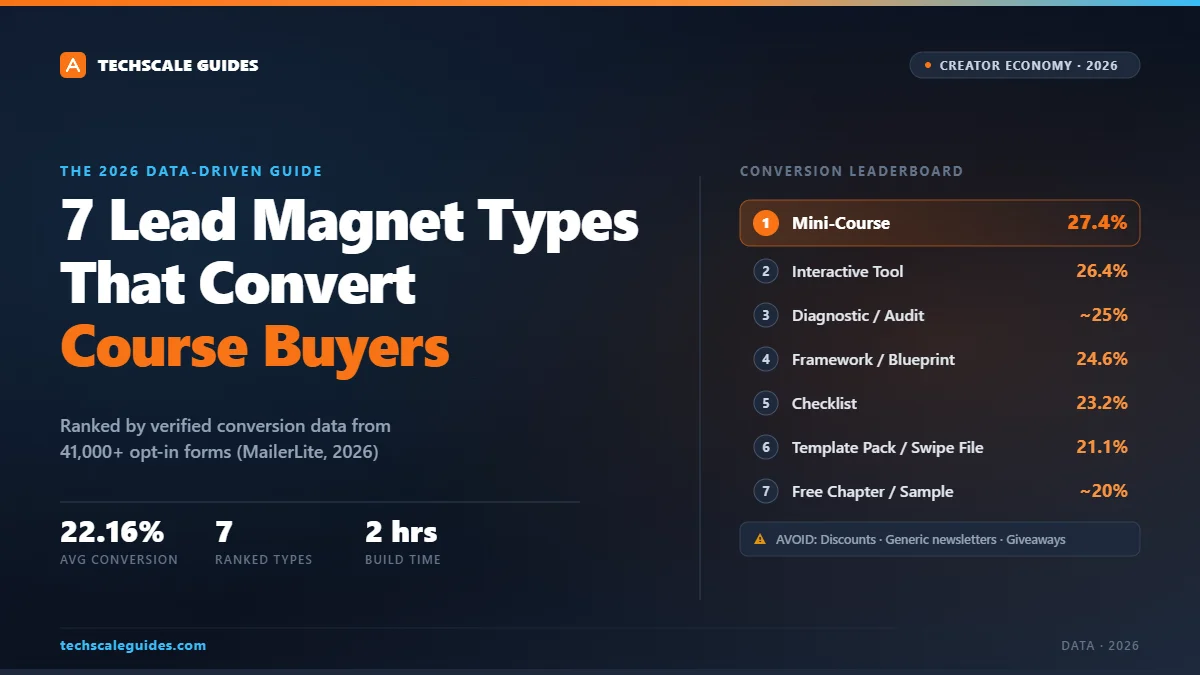
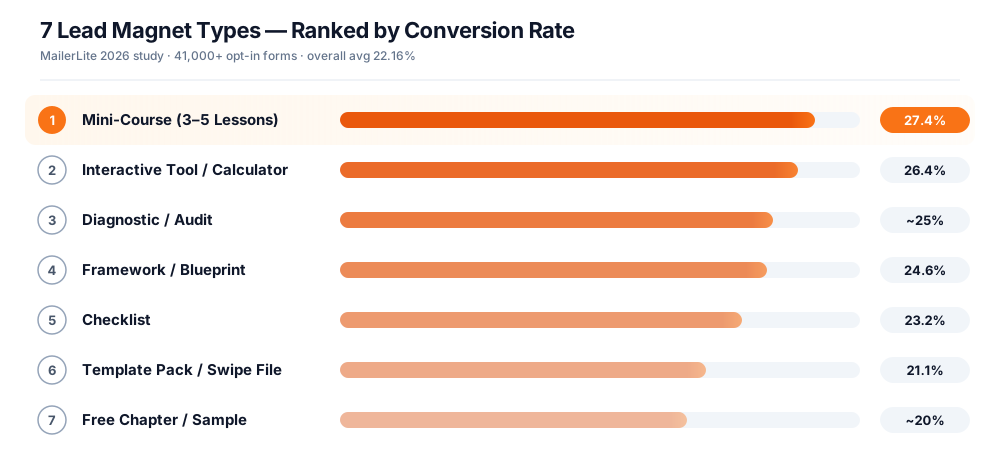
The ranking below is based on MailerLite's 2026 study of 41,000+ opt-in forms across 10,000+ paid accounts, plus supplemental benchmarks where the study doesn't cover a specific format.
Overall average conversion across the study: 22.16%.
Your mileage will vary based on your audience, offer specificity, and traffic source. But the relative ranking holds across the categories surveyed.
1. The Mini-Course (3–5 Lessons)
27.4% — Highest in MailerLite studyWhy it works: Shows your teaching style before they buy. If they finish 3 lessons and want more, they're pre-sold on the paid product. The mini-course is essentially a demo of your paid offer.
When to use: Your course is high-ticket ($297+) and the audience needs to see your style before committing. This is the single best converter per MailerLite's data.
Example:
"The 3-Day Email Warm-Up Crash Course — 3 video lessons showing how to warm up a list before a launch."
Bridge to paid offer: The mini-course teaches "what to do." The main course teaches "how to do it at scale with templates, sequences, and post-purchase automation."
2. The Interactive Tool / Calculator
26.44%Why it works: Highest perceived value because it delivers a personalized output. The reader enters their data, the tool tells them something they didn't know.
When to use: Your course solves a quantifiable problem. Pricing calculator, ROI calculator, course revenue projector.
Example:
"The Course Revenue Calculator — enter your list size + conversion rate + price, see what your next launch will make."
Bridge to paid offer: The calculator shows them the upside. The course shows them how to hit it.
3. The Diagnostic / Audit
~25% — Interactive categoryWhy it works: Personalization + curiosity. The reader wants to know "how bad is my situation?"
When to use: Your course fixes a specific deficiency (SEO, email deliverability, course completion rate). The diagnostic tells them where they stand.
Example:
"The Course Funnel Audit — answer 10 questions, get a scorecard of where your funnel leaks."
Bridge to paid offer: The audit surfaces the exact leaks your course fixes.
4. The Framework / Blueprint
24.61% — Reports/eBooks categoryWhy it works: Authority signal. Frameworks look polished, considered, and professional — the exact opposite of "generic free PDF."
When to use: You have a signature methodology (e.g., "The 4-Pillar Fulfillment Stack" or "The AOV Ladder"). The framework becomes the entry point to your paid offer.
Example:
"The Creator Launch Framework — a 1-page visual showing the 7 stages of a successful course launch."
Bridge to paid offer: The framework is the map. The course is the terrain.
5. The Checklist
23.22%Why it works: Lowest cognitive load. Reader sees a clear list of steps, downloads, applies, sees result. The "I can do this in 10 minutes" bar is met on day one.
When to use: Your course teaches a repeatable process (editing, email writing, course launching, sales calls). Checklists pre-sell the process without giving it all away.
Example:
"The 12-Point Pre-Launch Checklist — 12 items every course creator should verify 14 days before launch."
Bridge to paid offer: The checklist is the "what." The course is the "how."
6. The Template Pack / Swipe File
21.14%Why it works: High speed-to-value. Reader downloads, opens the file, and can use it immediately — no learning curve.
When to use: Your course teaches a creative or production skill where reusable assets exist. Email templates, Notion dashboards, Canva templates, spreadsheet calculators.
Example:
"The 30-Email Launch Swipe File — copy-paste emails for pre-launch, launch, and post-launch sequences."
Bridge to paid offer: The swipe file gets them started. The course teaches them to customize it for their audience and product.
7. The Free Chapter / Sample
~20% — Reports-adjacent formatWhy it works: Lets the reader sample your voice and depth before buying. Traditional publishing logic — and still effective.
When to use: Your course includes a substantial written component (workbook, eBook, script library). Give away the highest-value chapter.
Example:
"Chapter 4 of The Order Bump Playbook — 'The 4 Anatomy Components Every Order Bump Needs.'"
Bridge to paid offer: Sample is one chapter. Full course is the complete playbook.
⚠️ What to AVOID (Data-Backed)
Here's where the data surprises most creators:
Discounts / coupons: Worst-converting lead magnet category. Attracts price-sensitive buyers who churn immediately. Unless you're running a Black Friday launch, don't lead with discounts.
Generic newsletters: MailerLite's data shows "just subscribe to my newsletter" converts at 17.46% — the 2nd worst category behind discounts. Subscribers want a specific outcome, not a general relationship.
Giveaways / contests: 29.37% conversion rate — the highest in the study — but lead quality is poor. You attract people who want the prize, not your course. Net result: high churn, low purchase rate.
→ The pattern: Lead magnets that promise a specific transformation outperform lead magnets that offer generic value.
How to Build One in 2 Hours (Step-by-Step)
You don't need a designer or developer. Here's the exact build sequence.
Hour 1 — Create the asset
- Pick your format based on the 7 types above. Match to your course: if the course teaches a process, build a checklist. If it teaches a skill with reusable assets, build a template pack. If it's high-ticket, build a mini-course.
- Draft the content in Notion or Google Docs. Keep it under 10 pages. Bigger ≠ better.
- Design in Canva (free tier is enough). Use a template, don't build from scratch. 15 minutes of polish, not 2 hours.
- Export as PDF. Optimize for mobile — most of your audience will read on phone.
Hour 2 — Build the opt-in flow
- Create a landing page. Options:
- Kit (formerly ConvertKit): Free up to 10,000 subscribers + built-in landing pages. Creator plan at $39/mo (1,000 subs) or $33/mo annual. (Kit pricing, as of 2026-09)
- MailerLite: Free up to 250 subscribers (reduced from 500 in June 2026), $10/mo for Comfort at 500 subs. (MailerLite pricing, as of 2026-09)
- Beehiiv: Free up to 2,500 subscribers, $43/mo annual for Scale plan. (Beehiiv pricing, as of 2026-09)
- Systeme.io: Free tier includes 3 funnels, 1 automation rule, 1 custom domain, and up to 2,000 contacts — covers landing pages + email + course hosting. (Systeme.io pricing, as of 2026-09.) Try Systeme.io free →
- Wire the form to your email platform. Most platforms have native form-to-list automation. If you're on n8n or Make.com, see our n8n Workflow Automation Guide for the webhook pattern.
- Set up the welcome email. Subject: "Here's your [lead magnet name]." Include the download link, plus a soft mention of what you'll send next.
- Test with your own email. Submit the form, confirm delivery, download the PDF, check mobile rendering.
Total time: 2–3 hours. Design isn't the bottleneck — clarity is.
The Opt-In Flow: From Subscriber to Course Buyer
A lead magnet alone doesn't sell courses. The flow does.
Stage 1 — The Opt-In (Day 0)
Reader lands on your page, submits email, gets instant access.
Stage 2 — The Delivery + Bridge Email (Day 0, +5 min)
Subject line: "Here's your [lead magnet name] — plus a quick question."
Body: delivers the file. Asks one question: "What's the #1 thing you're trying to fix right now?"
The answer segments your list.
Stage 3 — The Value Emails (Days 1–5)
3–5 emails that deliver small wins. Each one: a specific tip + a link back to the lead magnet (reinforcing value).
Stage 4 — The Bridge Email (Day 6)
"Over the last few days you've done [X]. The next step is [Y] — and that's what my course teaches."
First soft pitch.
Stage 5 — The Nurture + Launch Sequence (Days 7–30)
Before launch: pre-launch emails warm up the list (see Creator Economy Growth Blueprint Strategy 1).
At launch: 5-email cart-open/cart-close sequence.
Post-purchase: Automated Fulfillment takes over.
Where most creators mess this up: They send the lead magnet, then go silent for 30 days, then launch. Result: unsubscribe spikes, low opens, low conversion.
The fix is Stages 2–5 — a structured nurture sequence that shows up consistently.
Common Pitfalls to Avoid
Pitfall 1: Too broad a promise
"Free 30-day course creator guide" converts at <5%. Narrow it: "The 1-page checklist to fix your worst-converting email."
Pitfall 2: Too much content
10-page PDFs feel like homework. 1–3 pages get read. The reader's "I got value" bar is met faster with less.
Pitfall 3: No bridge to the paid offer
If your lead magnet is "10 productivity tips" and your course is "how to launch a $10K course," the bridge is missing. Make the lead magnet a partial solution to the exact problem your course solves.
Pitfall 4: Wrong email platform
If your platform has a tiny free tier (like MailerLite's 250-sub limit post-June 2026), you'll hit the ceiling fast. Match the platform to your 12-month growth trajectory.
Pitfall 5: Skipping the test
Send yourself the form. Download the PDF on mobile. Check spam. If you skip this, real subscribers will hit the bug you didn't catch.
Frequently Asked Questions
What's the best lead magnet for a course creator?
Based on MailerLite's 2026 study of 41,000+ opt-in forms, mini-courses (3–5 lessons) convert highest at 27.4%, followed by interactive tools (26.44%) and diagnostics (~25%). What these three have in common: high specificity + fast time-to-value + a natural bridge to the paid offer. Avoid generic newsletters (17.46%) and discount-based lead magnets — they attract low-intent subscribers.
How many subscribers do I need to launch?
200–500 engaged subscribers is the minimum. With 200 subscribers and a 2–5% conversion rate on a well-nurtured list, launch day can generate 4–10 sales — roughly $388–$970 at a $97 price point. Don't wait for 5,000 subscribers to launch — early launches give you real signal to iterate on.
Should the lead magnet be free or paid?
Free. The purpose is list growth, not revenue. Paid lead magnets under $10 cannibalize your course pricing and attract low-quality buyers.
What's the difference between a lead magnet and a free trial?
A lead magnet is delivered instantly (PDF, template, checklist, mini-course). A free trial is time-limited access to the paid product. Lead magnets work better for course creators because they don't require a commitment decision — just an email.
How do I know if my lead magnet is working?
Track 3 numbers: (1) Landing page conversion rate — target 10–15%+ for lead magnet opt-ins (this is above the ~2–5% general landing-page average, but achievable with a well-targeted offer). (2) Welcome email open rate — target 40%+. Welcome emails typically outperform standard campaigns; GetResponse's email marketing benchmarks report an average open rate of 39.64% across industries — so 40%+ is a realistic target for a well-segmented welcome sequence. (3) Email click rate — target 2–5% (industry benchmark for nurture sequences). If any is under target, the lead magnet or the email sequence needs work.
Can I use AI to create the lead magnet?
Yes — AI helps with drafting checklists, generating template structures, and repurposing course content into PDFs. But always review the output for accuracy and specificity. Generic AI-generated content converts poorly because it lacks the personalization the specificity criterion demands.
How often should I update my lead magnet?
Every 6–12 months. Conversion rates drop as your audience grows more sophisticated. Refresh the design, tighten the promise, and A/B test the landing page headline at least once per quarter.
📚 For the Complete Creator Framework
This guide covers one piece of the puzzle — lead magnets. For the full 11-system blueprint that includes pre-launch email warm-up, order bumps, one-click upsells, and automated fulfillment — read our Creator Economy Growth Blueprint.