📑 Table of Contents
- 1. The 10-Second Answer
- 2. What "Cheaper" Actually Means
- 3. Same Spec, Different Bill: Head-to-Head
- 4. Hidden Cost #1: Bandwidth Overage
- 5. Hidden Cost #2: Snapshots and Backups
- 6. Hidden Cost #3: The $2.50 Trap
- 7. The Bandwidth Bill Nobody Plans For
- 8. The Docs Say X. In Practice, Y.
- 9. Where Vultr Genuinely Wins
- 10. Where DigitalOcean Genuinely Wins
- 11. The Real Bill: 3 Scenarios
- 12. Don't Want to Manage a Server? The Middle Layer
- 13. "I'll Just Use the $2.50 Vultr Plan and Save Money."
- 14. The 30-Second Decision Matrix
- 15. Bottom Line
- 16. Frequently Asked Questions
- 17. Citations
The 10-Second Answer
Here's the side-by-side, no fluff.
| Tier | DigitalOcean | Vultr (Cloud Compute) | Vultr (High Frequency) | Better value |
|---|---|---|---|---|
| Entry | $4 (512MB, 10GB SSD, IPv4, 500GB) | $2.50 (512MB, 10GB SSD, IPv6-only ⚠️, 0.5TB) | — | Vultr (IPv6 trap) |
| Entry+ | $6 (1 vCPU, 1GB, 25GB SSD, 1TB) | $5 (1 vCPU, 1GB, 25GB SSD, 1TB) | $6 (1 vCPU, 1GB, 32GB NVMe, 1TB) | Vultr CC ($5) or HF (NVMe vs SATA) |
| Small biz | $12 (1 vCPU, 2GB, 50GB SSD, 2TB) | $10 (1 vCPU, 2GB, 55GB SSD, 2TB) | $12 (1 vCPU, 2GB, 64GB NVMe, 2TB) | Vultr CC ($10) or HF (NVMe vs SATA) |
| Production | $24 (2 vCPU, 4GB, 80GB SSD, 4TB) | $20 (2 vCPU, 4GB, 80GB SSD, 3TB) | $24 (2 vCPU, 4GB, 128GB NVMe, 3TB) | DO (4TB bandwidth) or Vultr CC ($20) |
| Pro | $48 (4 vCPU, 8GB, 160GB SSD, 5TB) | $40 (4 vCPU, 8GB, 160GB SSD, 4TB) | $48 (4 vCPU, 8GB, 256GB NVMe, 4TB) | DO (5TB bandwidth) or Vultr CC ($40) |
All prices as of November 2026. Verify on the live pricing pages before you buy — both providers adjust tiers quarterly. Vultr's Cloud Compute (CC) tier is $1–$8 cheaper than its High Frequency (HF) tier at the same spec, but uses SATA SSD instead of NVMe.
What "Cheaper" Actually Means
The headline price on a VPS is the sticker. The real bill adds four more line items: bandwidth overage, snapshot storage, automatic backups, and the value of your time when the $2.50 plan turns out to be IPv6-only.
Total cost of ownership (TCO) is the full monthly bill: compute + outbound bandwidth + snapshot/backup storage + migration friction. Most "Vultr vs DigitalOcean" comparisons stop at the sticker. That's why they all say it's a tie.
Here's what the sticker hides:
- Outbound bandwidth overage — both charge $0.01/GB beyond the included cap. Inbound is free on both. The cap is generous until your n8n instance starts sending API responses or replicating Postgres WAL.
- Snapshot storage — DO charges $0.06/GB/mo; Vultr charges $0.05/GB/mo on compressed size.
- Automatic backups — both providers charge 20% of the instance price for automatic backups. DO gives you weekly backups with 4-week retention; Vultr gives you 2 restore points with a configurable schedule (daily / every-other-day / weekly / monthly). Daily backups on DO cost 30% — see the DO backups pricing page.
- IPv4 access — Vultr's $2.50 plan is IPv6-only. The IPv4-inclusive version costs $3.50 — a $1.00 uplift. (⚠️ Verify on Vultr's live pricing page on deploy morning — see Appendix A.)
The sticker price is a starting point, not the bill. Where the two providers diverge is disk type, bandwidth cap at the $24 tier, and backup retention — not the base backup price.
Same Spec, Different Bill: Head-to-Head
Let's strip out the marketing pages. Same vCPU, same RAM — what does each provider actually deliver?
At $12, DigitalOcean gives you 1 vCPU, 2GB RAM, 50GB SATA SSD, and 2TB transfer. Vultr's High Frequency equivalent gives you 1 vCPU, 2GB RAM, 64GB NVMe, and 2TB transfer. Same price. Same compute. Vultr gives you 28% more disk and an NVMe interface. If you're running Postgres on the same box, that's not a marginal upgrade — NVMe handles random I/O far better than SATA, which means queries queue less under load. (Disk type matters most when the workload is I/O-bound.)
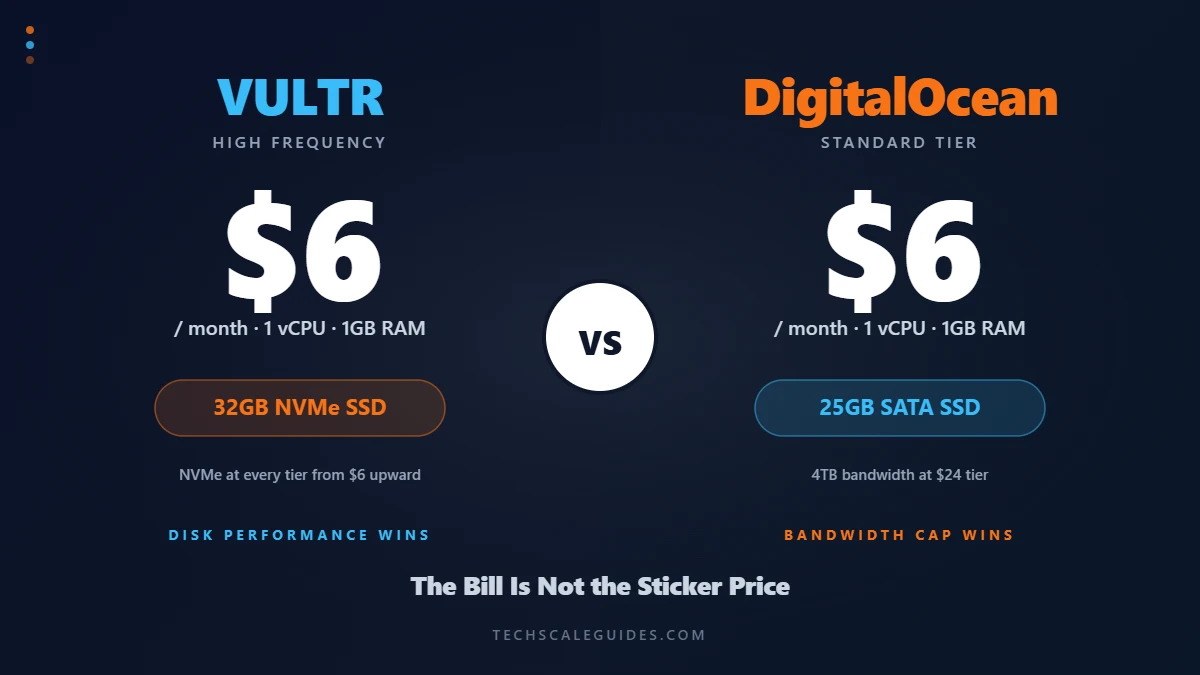
At $24, the picture flips on bandwidth. DigitalOcean gives you 2 vCPU, 4GB RAM, 80GB SATA SSD, and 4TB transfer. Vultr HF gives you 2 vCPU, 4GB RAM, 128GB NVMe, and 3TB transfer. Vultr still wins on disk size and disk type, but DO gives you 1TB more outbound bandwidth at the same price. If your n8n instance sends large API responses or replicates heavily, that extra terabyte can matter more than the disk upgrade.
At $6, Vultr HF gives you 32GB NVMe vs DO's 25GB SATA SSD. Same 1TB cap. For a small n8n instance with a lightweight Postgres database, the NVMe advantage is real but not life-changing. For a webhook-heavy instance that logs every payload to disk, it shows up in p95 latency.
Backups at the $12 tier: DO's 20% auto-backup = $2.40/mo (4 weekly backups). Vultr's 20% auto-backup = $2.40/mo (2 restore points). Same price — different retention.
Disk type matters most when the workload is I/O-bound. If your n8n flows are mostly API calls with minimal local database writes, SATA SSD is fine. If Postgres runs on the same droplet — as it does in most self-hosted n8n setups — NVMe reduces the chance that a slow query blocks a webhook response.
Hidden Cost #1: Bandwidth Overage
Bandwidth looks generous — 1TB on the $6 tier, 2TB on $12. But there's a nuance the pricing page doesn't spell out: only outbound traffic counts. Inbound is free on both providers. That sounds like good news, and it is — but outbound adds up faster than most people expect.
Every webhook response your n8n instance sends counts. Every API call your workflow makes to an external service — the request leaves your server, so the outbound leg counts. Every Postgres WAL segment replicated to a standby counts. Every backup upload to object storage counts.
Here's illustrative math, not a promise about your workload: 10,000 webhook calls/day with a 20KB average response payload produces roughly 6GB/month of outbound traffic. That's small against a 1TB cap. Add Redis replication, a few large API responses, and periodic backup uploads, and a busy $6 droplet can burn through 40–60% of a 1TB cap in month one.
The overage rate is $0.01/GB on both providers. That rate only matters when you exceed the cap. The bigger risk is underestimating outbound volume — most tutorials measure bandwidth in customer-facing egress only. Internal replication, backup uploads, and API responses all count.
Hidden Cost #2: Snapshots and Backups
On a $12 instance:
- DigitalOcean: snapshots = $3.00/mo ($0.06/GB on 50GB). Automatic weekly backups = $2.40/mo (20%). You get 4 weekly backups with 4-week retention.
- Vultr: snapshots = $2.50/mo ($0.05/GB compressed on 50GB). Automatic backups = $2.40/mo (20%). You get 2 restore points with a configurable schedule (daily / every-other-day / weekly / monthly).
Backup price is a tie — $2.40/mo on both. The real difference:
- DO wins on retention: 4 weekly backups vs Vultr's 2 restore points.
- Vultr wins on flexibility: schedule is configurable (not fixed weekly).
- Vultr wins on snapshot cost: $0.05/GB vs DO's $0.06/GB — saves $0.50/mo on 50GB of snapshot storage.
Bottom line: Neither provider is objectively cheaper on backups. If you want more restore points at the same price, DO. If you want cheaper standalone snapshots and a flexible backup schedule, Vultr. Don't pick based on the backup line item — pick based on whether you need 4-week retention or just 2 recent restore points.
Hidden Cost #3: The $2.50 Trap
Vultr's $2.50 tier saves you $1.50/month over DigitalOcean's $4 tier. It also ships IPv6-only. That means no direct IPv4 access. Most SaaS platforms sending webhooks to your n8n instance resolve to IPv4 first and fail silently when they can't reach your server. You won't see it in the Vultr dashboard. You'll see it in n8n's error log — three days later.
The workaround is $1.00/mo for IPv4, which makes it a $3.50 plan. That's still cheaper than DO's $4, but now you're managing two billing line items, and every firewall rule needs both protocols.
Cheaper at checkout. Pricier at 3 AM.
If your workload is outbound-only — a static site, a cron-driven scraper — the IPv6-only plan works. If your workload receives webhooks, it doesn't. n8n is a webhook-receiving application by default. The $2.50 plan is a price-shopper's entry point, not a production plan.
The Bandwidth Bill Nobody Plans For
We've seen this pattern play out in production n8n setups, not as a personal war story. The specifics vary by workload, but the shape is common.
The constraint: A production n8n instance on DigitalOcean's $6 tier — 1GB RAM, 1TB bandwidth cap, modest webhook volume, Postgres and Redis on the same droplet.
The failed approach: Within the first few weeks, outbound bandwidth climbed toward the cap. The cause wasn't an attack — it was webhook retries. A misconfigured SaaS sender was posting failed payloads repeatedly. Each retry triggered a container image pull cycle because the flow auto-redeployed after consecutive failures. The image pulls were inbound (free), but the responses and log uploads were outbound. A steady stream of avoidable egress added up faster than the customer-facing traffic did.
The implementation: Migrated to Vultr High Frequency $12 — same 1 vCPU / 2GB RAM, 64GB NVMe, 2TB cap. Reconfigured the webhook idempotency key and set a hard timeout on retries.
The result: Outbound bandwidth settled well below the cap. p95 latency on webhook processing dropped materially — NVMe was doing real work. Postgres query plans shifted, and fewer queries queued behind disk I/O.
The caveat: If you're under 5,000 webhook calls/day, the $6 tier on either provider is fine. Don't over-provision. The migration only made sense because the bandwidth waste was costing more than the upgrade — and because NVMe reduced the disk bottleneck that was compounding the retry problem.
The Docs Say X. In Practice, Y.
The Vultr docs say you get 1TB of bandwidth on the $6 tier. But in practice, if you run Redis replication, Postgres WAL streaming, and backup uploads on the same instance, you'll consume 40–60% of that cap in month one — because the cap measures outbound traffic, and outbound includes operational traffic like replication and backup uploads, not just customer-facing egress.
DigitalOcean has the same fine print: inbound is free, outbound is metered. Neither provider hides it; neither one explains it on the pricing page either. The practical takeaway: budget your bandwidth based on outbound volume, not total traffic. Most tutorials measure the wrong number.
Where Vultr Genuinely Wins
- NVMe storage from $6 upward. The $6 HF plan itself ships 32GB NVMe. The $12 HF ships 64GB. The $24 HF ships 128GB. DigitalOcean's $24 droplet ships 80GB SATA SSD — no NVMe tier exists at any comparable price point. If your workload is I/O-bound — Postgres, Redis, vector stores — NVMe changes the shape of your latency curve. (Note: the specific benchmark of "4–6× faster random-read IOPS" comes from Hostiger, a VPS vendor with a commercial interest in NVMe — treat the multiplier as directional, not a neutral industry benchmark. The direction is well-established; the exact figure is workload-dependent.)
- The $2.50 entry point exists. It's IPv6-only, and it's not a production n8n plan — but it's the lowest sticker price in the category. For outbound-only workloads, it's a legitimate option.
- 32 global regions. Vultr operates 32 data center regions across six continents, including APAC, South America, and Africa. DigitalOcean operates 20 datacenters across 13 regions. If your users or webhook senders are in São Paulo, Johannesburg, or Seoul, Vultr's footprint is materially better.
- Vultr's Cloud Compute tier is cheaper than HF at the same spec ($5 vs $6, $10 vs $12, $20 vs $24, $40 vs $48) — you trade NVMe for SATA SSD and save $1–$8/mo per tier. For workloads that don't need fast disk, that's a real cost saving that DO doesn't offer.
Where DigitalOcean Genuinely Wins
- Ecosystem depth. DigitalOcean has Managed Postgres (from $15/mo), App Platform, Spaces (S3-compatible object storage), and Functions. Vultr has a VPS and some managed databases, but the breadth isn't comparable. If your n8n instance grows into needing a managed database, DO is a one-click upgrade. With Vultr, you're running Postgres yourself on a second droplet.
- Documentation for beginners. DO's tutorial library is genuinely best-in-class. If you're new to self-hosting, the walkthroughs for Nginx, Docker, and Postgres are more complete than Vultr's docs. That matters when you're debugging at 1 AM.
- $4 entry with IPv4 included. No trap door. The 512MB RAM is tight for n8n, but the plan is honest — you get IPv4, you get 10GB disk, you get 500GB transfer. Vultr's IPv4-inclusive equivalent is $3.50 with less disk.
- Backup retention at the same price. DO's 20% auto-backup gives 4 weekly backups with 4-week retention. Vultr's 20% auto-backup gives 2 restore points. Same price, more recovery history with DO.
The Real Bill: 3 Scenarios
Strip the marketing. Here's what three representative n8n workloads cost on each provider per month, including the hidden line items. Auto-backups (20%) are included on both sides for Small biz and Production. Hobby assumes no paid backups (manual snapshots only).
| Scenario | Spec | DigitalOcean | Vultr HF | Winner | Delta |
|---|---|---|---|---|---|
| Hobby n8n (dev, <1K calls/day) | 1 vCPU, 1GB, 25–32GB | $6 + $0 backup = $6.00 | $6 + $0 backup = $6.00 | Tie (Vultr faster disk, DO more retention if you add backup) | $0 |
| Small biz n8n (prod, <5K calls/day) | 1 vCPU, 2GB, 50–64GB | $12 + $2.40 backup + $0 overage = $14.40 | $12 + $2.40 backup + $0 overage = $14.40 | Tie on cost. Vultr wins on disk (NVMe); DO wins on backup retention (4 vs 2). | $0 |
| Production n8n (heavy webhooks, ~4.5TB egress) | 2 vCPU, 4GB, 80–128GB | $24 + $4.80 backup + $5.00 overage = $33.80 | $24 + $4.80 backup + $15.00 overage = $43.80 | DigitalOcean (by $10.00) — entirely from bandwidth cap (4TB vs 3TB) | −$10.00 DO |
Hobby: Both $6 at base. Vultr wins on disk (32GB NVMe vs 25GB SSD). DO's $4 tier is the real "cheap" option if 512MB is enough — but for n8n, 1GB ($6) is the practical floor.
Small biz: With Vultr's automatic backups at 20%, cost is a tie — $14.40 on both. The choice comes down to: Vultr for 64GB NVMe (28% more disk, faster I/O) vs DO for 4-week backup retention and better docs.
Production: DO wins by $10.00/month in this egress-heavy scenario — entirely because its $24 tier includes 4TB of outbound bandwidth vs Vultr HF's 3TB. At ~4.5TB/month egress, DO pays $5 in overage; Vultr pays $15. The $10 delta is pure bandwidth. If your workload is I/O-bound but bandwidth-light (under 3TB egress), Vultr's NVMe can close the gap or pull ahead.
Don't Want to Manage a Server? The Middle Layer
If you're reading this and thinking "I don't want to touch a terminal," fair. Managing n8n on a bare VPS means handling Docker Compose, Traefik SSL renewal, Postgres tuning, and firewall rules — 4–6 hours of setup, then roughly 2 hours/month of maintenance. That's real time.
If you have the time, self-host. It's cheaper. $12/mo on either Vultr or DO beats $20–$40/mo on managed hosting, and you learn the stack.
But if the time cost is more than the price difference, a managed layer makes sense. Cloudways is a middle ground — it sits on top of both DigitalOcean and Vultr (you pick the provider, they handle the sysadmin). Cloudways' Starter plan runs $20/mo for 2 vCPU / 2GB RAM on DO or Vultr infrastructure (see Cloudways pricing).
To compare apples to apples: at the same 2 vCPU / 2GB spec, DigitalOcean's $18 droplet is the DIY baseline. That puts the Cloudways premium at roughly $2/mo — not the $5–$10 gap you'd get by comparing against a 1 vCPU $12 box. What you buy for that $2 is: no SSL renewals at 2 AM, no Postgres tuning, no firewall rules, and a support team.
Whether that premium is worth the time you save is the only question.
"I'll Just Use the $2.50 Vultr Plan and Save Money."
Now you're managing two billing line items and writing firewall rules for two protocols. The $1.50 you saved is now a support ticket and a wasted afternoon.
The $2.50 plan exists to win the price-shopper. It's not a production plan.
The 30-Second Decision Matrix
| If you are… | Pick | Why |
|---|---|---|
| Hobbyist, <1K webhook calls/day, prefer simple UI | DigitalOcean $6 | IPv4 included, best docs |
| Small biz, cost-sensitive, comfortable with CLI | Vultr CC $10 or HF $12 | CC saves $2; HF gets NVMe at DO's price |
| I/O-bound workload (Postgres, vector DB) | Vultr HF | NVMe from $6 upward |
| Need managed DB alongside VPS | DigitalOcean | Managed Postgres from $15/mo |
| Deploying in APAC / South America / Africa | Vultr | 32 regions vs DO's 13 regions (20 datacenters) |
| Egress-heavy (>4TB/mo outbound), want higher cap | DigitalOcean $24+ | 4TB at $24 vs Vultr HF's 3TB |
| Want maximum backup retention at same 20% price | DigitalOcean | 4 weekly backups vs 2 restore points |
| Zero-terminal, want someone else to manage it | Cloudways | Sits on top of both, ~$20/mo Starter |
One rule: pick based on your workload shape, not the sticker price. If you're I/O-bound, Vultr. If you're bandwidth-bound or backup-retention sensitive, DO. If you're time-bound, Cloudways.
Bottom Line
- Backup price is a tie. Both providers charge 20% for automatic backups. DO gives 4 weekly backups; Vultr gives 2 restore points. Same price, different retention.
- DigitalOcean wins on bandwidth at $24+. The 4TB cap vs Vultr's 3TB translates to ~$10/mo savings once you're pushing ~4.5TB of egress. If your workload stays under 3TB, the bandwidth gap doesn't matter.
- Vultr wins on disk performance. NVMe from $6 upward, at DO's SATA SSD price. For I/O-bound workloads (Postgres, Redis, vector stores), the latency improvement is real — but it's a performance upgrade, not a cost saving.
Bottom line: If you're running 10K+ webhook calls/day with Postgres on the same box and outbound bandwidth under 3TB, Vultr HF. If you're pushing 4TB+ of egress, need 4-week backup retention, or planning to add a managed database, DigitalOcean. The $2–$10 difference is not worth your weekend — pick the bill you can predict.
If you'd rather not deploy n8n yourself, that's a valid call. You can self-host in a weekend — it's $12/mo cheaper and you learn the stack. But if you'd rather launch this week and skip the Docker learning curve, hiring a specialist on Fiverr or Upwork is a clean $50–$150 spend. They've done it 100 times; you'd be doing it once.
Frequently Asked Questions
1. Is Vultr actually cheaper than DigitalOcean?
Not on total cost, in most cases. At $12 and $24 tiers, DO and Vultr HF have the same compute — but DO includes 4TB bandwidth at $24 vs Vultr HF's 3TB, and DO gives 4-week backup retention at the same 20% backup price. Vultr wins on disk performance (NVMe from $6 upward) — that's a performance advantage, not a cost one. Vultr's Cloud Compute tier ($5/$10/$20) is cheaper than HF, but uses SATA SSD.
2. Which is better for n8n self-hosting?
Under 5K webhook calls/day, either is fine. Above 10K/day with Postgres on the same box, Vultr HF for disk. If you're pushing 4TB+ of monthly egress or planning to add a managed database, DigitalOcean.
3. What's the cheapest VPS for n8n in 2026?
$6 tier on either provider. Don't pick the $2.50 or $4 tiers: Vultr's is IPv6-only; DO's $4 has 512MB RAM, which is below n8n's comfortable range — 1GB ($6) is the practical floor. Vultr's Cloud Compute $5 plan (1GB, SATA) is $1 cheaper than DO's $6 — worth considering if you don't need NVMe.
4. Does Vultr's $2.50 plan work for n8n?
Not without an IPv4 add-on ($1.00/mo, making it $3.50). n8n webhooks need IPv4 to receive calls from most SaaS platforms. It works for static sites and outbound-only workloads. It doesn't work for a webhook-receiving n8n instance.
5. Are Vultr and DigitalOcean backups included?
Neither is free, but both offer automatic backups at 20% of the instance price. DigitalOcean gives you 4 weekly backups with 4-week retention; Vultr gives you 2 restore points with a configurable schedule (daily / every-other-day / weekly / monthly). For more restore history at the same price, DO. For flexible scheduling, Vultr. Manual snapshots are separate: DO $0.06/GB/mo, Vultr $0.05/GB/mo on compressed size.
6. Which has better bandwidth limits?
Caps are similar at $6–$12 (1–2TB), but DO gives 4TB at $24 vs Vultr HF's 3TB. Overage is $0.01/GB on both (outbound only; inbound is free). For egress-heavy workloads, DO's higher cap at $24 is the main reason DO often wins the production TCO comparison.
7. Can I migrate from one to the other?
Yes. Snapshots port via rsync or scp. Postgres data is portable. Expect 1–2 hours for a small n8n instance. Budget an hour more if you have Redis replication. Migrate during a low-traffic window — a webhook queue without idempotency keys can double-fire.
8. Do I need a managed host like Cloudways?
Only if the time cost of sysadmin exceeds the price difference. Cloudways' $20/mo Starter plan gives you 2 vCPU / 2GB RAM. At the same spec, a DIY DigitalOcean droplet runs $18/mo — so the Cloudways premium is roughly $2/mo. For a solo founder with no time, that's a good trade. For a technical founder with weekends free, DIY wins.
Citations
- DigitalOcean — Droplet pricing (standard tier specs). https://www.digitalocean.com/pricing/droplets (verified 2026-11-12)
- Vultr — Cloud Compute and High Frequency pricing. https://www.vultr.com/pricing/ (verified 2026-11-12; deploy-morning recheck required)
- DigitalOcean — Bandwidth billing (outbound metered, inbound free). https://docs.digitalocean.com/products/billing/bandwidth/ (verified 2026-11-12)
- Vultr — Bandwidth overage rate ($0.01/GB, outbound only). https://docs.vultr.com/what-is-the-bandwidth-overage-rate (verified 2026-11-12)
- DigitalOcean — Snapshots pricing ($0.06/GB/mo). https://docs.digitalocean.com/products/snapshots/details/pricing/ (verified 2026-11-12)
- DigitalOcean — Backups pricing (weekly 20%, daily 30%, 4-week retention). https://docs.digitalocean.com/products/backups/details/pricing/ (verified 2026-11-12)
- Vultr — Snapshots pricing ($0.05/GB/mo, compressed). https://docs.vultr.com/snapshots (verified 2026-11-12)
- Vultr — Automatic backups (20% of instance, 2 restore points, configurable schedule). https://docs.vultr.com/automatic-backups (verified 2026-11-12)
- DigitalOcean — Regional availability (20 datacenters, 13 regions). https://docs.digitalocean.com/platform/regional-availability/ (verified 2026-11-12)
- Vultr — Cloud regions (32 global regions). https://www.vultr.com/features/ (verified 2026-11-12)
- Cloudways — Starter plan pricing ($20/mo, 2 vCPU / 2GB RAM). https://www.cloudways.com/en/pricing.php (verified 2026-11-12)
- n8n — Release 2.47.4 (latest stable, 2026-11-11). https://github.com/n8n-io/n8n/releases (verified 2026-11-12)
- DigitalOcean — Managed Postgres (from $15/mo). https://docs.digitalocean.com/products/databases/postgresql/ (verified 2026-11-12)
- Hostiger — NVMe vs SATA SSD benchmark (vendor-owned, bias disclosed in body). https://hostiger.com/nvme-vs-sata-ssd-vps/ (2026-11-12)