📑 Table of Contents
- 1. What The Broadcaster actually is
- 2. The 5 failure modes that break delivery
- 3. The 4-layer Broadcaster architecture
- 4. Idempotency — the single most important concept
- 5. Multi-channel routing rules
- 6. Delivery verification
- 7. Build vs buy
- 8. Implementation walkthrough — n8n 2.45.7 workflow
- 9. Micro-case study — the "no confirmation" bug
- 10. Troubleshooting
- 11. The bottom line
- 12. Frequently Asked Questions
- 13. Citations
What The Broadcaster actually is (not what the name suggests)
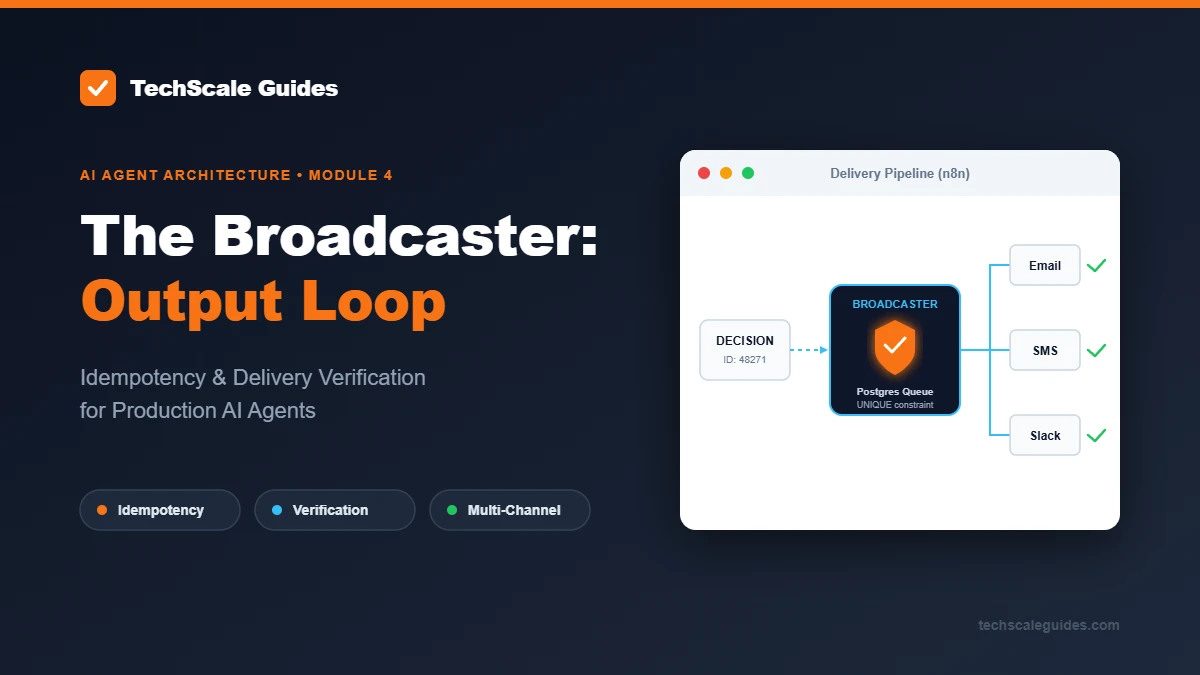
The name is misleading. "Broadcaster" sounds like a megaphone — one message, many ears. In production, it's the opposite: many messages, one correct ear, zero duplicates.
Here's the job in one sentence. The Broadcaster answers three questions after every AI decision:
- Who needs to know about this? (recipient)
- Through which channel? (email, SMS, Slack, WhatsApp, CRM, in-app)
- How do I prove it arrived? (delivery receipt, retry state, escalation path)
Most AI agent tutorials stop at Module 3. They show you a chatbot that classifies a lead, calls a CRM API, and returns "success" to the user. What they skip is the part where the lead actually gets a notification. The part where the sales rep gets an SMS. The part where the CRM shows the note instead of a blank field.
The decision is Module 2. The action is Module 3. The proof is Module 4.
Skip Module 4 and you get a class of bug that's nearly invisible: the agent thinks it succeeded, the CRM says it succeeded, but the customer never received the confirmation. Support tickets pile up. Nobody knows where the message went.
The 5 failure modes that break delivery
Before you build anything, know what you're defending against. In production, delivery fails in five predictable ways.
1. Duplicate sends
The most common one. Your n8n workflow retries the HTTP Request node. But the HTTP Request node already hit Twilio's API successfully — it just timed out waiting for a slow response. Now the customer gets two SMS messages for the same booking.
The docs say the retry node retries failed requests. In practice, it retries the node execution — which means the downstream API call fires a second time [1]. Idempotency has to live upstream, not inside the retry logic.
2. Rate-limit failure
Every channel has a ceiling. Twilio enforces per-second SMS throughput limits that scale with your phone number type and carrier/10DLC status [8]. SendGrid's free trial caps at 100 emails/day for 60 days [2]. Slack's chat.postMessage allows about one message per second per channel, plus a workspace-wide limit — documented, but easy to miss until you hit it [3].
If your agent processes 50 leads in a burst, the Broadcaster either queues them or dies. There is no third option.
3. Delivery failure (silent)
A message leaves your system. It never arrives. No error in your logs. No bounce email. This happens when:
- Email lands in spam (no SPF/DKIM/DMARC alignment)
- SMS carrier rejects the message (bad 10DLC routing)
- Slack webhook URL expired after workspace admin rotation
- CRM update hit a permissions wall the API account didn't have
Every one of these is invisible unless you poll for delivery status. Most teams don't. That's the bug.
4. Template drift
You change the email copy in the Broadcaster. You forget to update the SMS copy. Now the customer gets an email that says "Confirm your booking at 3 PM" and an SMS that says "You have a new appointment." Both are technically correct. Together, they look like a system failure to the customer.
Multi-channel delivery requires a single template registry — one source of truth for every message variant, per channel.
5. Channel mismatch
The AI agent decides a customer's booking needs immediate attention. It routes the notification to email. The customer booked 40 minutes ago and is standing in the parking lot. Email was the wrong channel. SMS would have worked. The Broadcaster's routing rules are the difference between "useful" and "ignored."
The 4-layer Broadcaster architecture
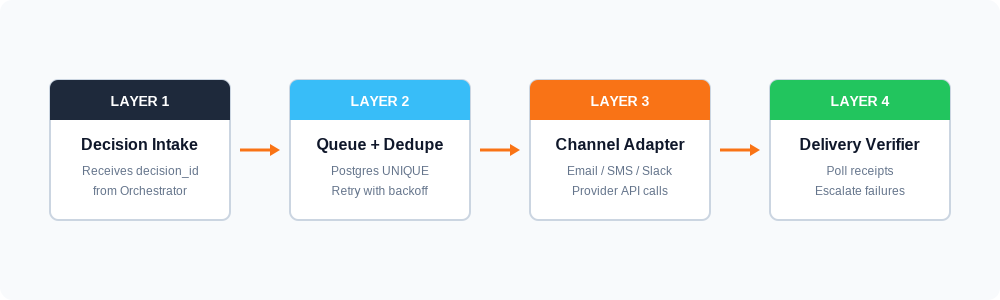
Every production Broadcaster I've audited reduces to the same four layers. Skip any layer and the failure modes above come back.
Layer 1 — DECISION INTAKE
Receives: decision_id, channel_target, recipient_id, payload, priority
↓
Layer 2 — QUEUE + DEDUPE
Idempotency key → reject duplicates → FIFO enqueue → retry with stepped backoff
↓
Layer 3 — CHANNEL ADAPTER
Per-channel: template, rate limiter
↓
Layer 4 — DELIVERY VERIFIER
Poll receipts → escalate failures → close the loop
Layer 1 is the entry point. Every decision from the Orchestrator arrives with a stable decision_id. If it doesn't, the Broadcaster cannot deduplicate. Fix Module 2 first.
Layer 2 is the decoupling layer. The Orchestrator never talks to Twilio directly. It writes to a queue. The queue enforces the idempotency key and applies backpressure. This is also where retries live. If a send fails, Layer 2 re-queues the message with a stepped backoff (e.g., retry after 1 min, then 2 min, then 4 min). After max attempts, it stops and escalates to Layer 4.
Layer 3 owns channel-specific logic. Email has one template format. SMS has another (160-char limit, no rich text). Slack has a third (Block Kit JSON). Note on Provider Idempotency: Provider support for idempotency keys varies. Some providers, including SendGrid, do not expose a standard idempotency-key header at the API level. If your provider supports it, use it. If not, rely entirely on Layer 2's queue constraint to prevent re-queuing duplicates.
Layer 4 is the part most builders skip. It polls delivery receipts from each provider, updates the delivery record, and escalates any message that failed. Without Layer 4, the Broadcaster is fire-and-forget — and fire-and-forget is not production.
Idempotency — the single most important concept
The key is built from three components:
idempotency_key = hash(decision_id + channel + recipient_id)decision_idcomes from the Orchestrator (Module 2)channelis the target channel (email, sms, slack, crm)recipient_idis the resolved customer or system ID
Why three components instead of one? Because a single decision might legitimately deliver to multiple channels for multiple recipients:
- A booking decision → confirmation email to customer + SMS reminder to customer + Slack alert to front desk
- Three legitimate messages. One
decision_id. Different(channel, recipient)pairs.
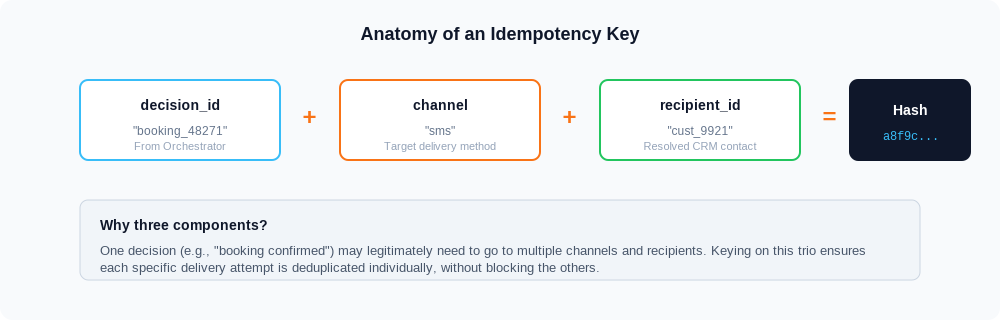
If you key on decision_id alone, two of those three messages get deduped and never sent. If you key on (channel, recipient) alone, you send duplicates when the Orchestrator retries.
The three-part key is the only safe choice.
Implementation in n8n
- Orchestrator writes decision to a Postgres table (
delivery_queue) with a unique constraint on(decision_id, channel, recipient_id). - Broadcaster attempts INSERT. Duplicate insert → Postgres rejects → skip. Successful insert → message queued.
- Downstream channel adapter sends the message.
- Delivery verifier polls provider receipt, updates row.
Postgres handles the dedupe. n8n handles the orchestration. No custom idempotency logic in the workflow itself.
Multi-channel routing rules
Not every decision needs every channel. The Broadcaster applies a routing table — a policy layer between the decision and the delivery.
| Decision type | SMS | Slack | CRM note | Rationale | |
|---|---|---|---|---|---|
| New lead captured | ✅ | ❌ | ✅ (sales) | ✅ | Email for record, Slack for action |
| Booking confirmed | ✅ | ✅ | ❌ | ✅ | Customer needs both; no team alert |
| Booking canceled | ✅ | ✅ | ✅ (front desk) | ✅ | High urgency |
| Refund processed | ✅ | ❌ | ✅ (finance) | ✅ | Money involved |
| AI confidence <80% | ❌ | ❌ | ✅ (ops) | ✅ | Human review needed first |
| Routine status update | ❌ | ❌ | ❌ | ✅ | No human touch required |
The table lives in the Broadcaster, not in the Orchestrator. Why? Because routing is a delivery concern, not a decision concern. The Orchestrator says "this is a booking confirmed." The Broadcaster says "for this customer, booking confirmed means email + SMS + CRM."
If you move routing into the Orchestrator, you couple decision logic to channel logic. When Twilio goes down, you're editing the Orchestrator. That's the wrong place to make that fix.
Delivery verification — how do you know it arrived?
Sending is not delivery. Three things have to be true:
- The provider accepted the message (HTTP 200 from Twilio/SendGrid/Slack)
- The provider delivered the message (delivery receipt with status
delivered) - The recipient did not bounce or complain (no bounce event, no spam report)
Most workflows stop at #1. That's a 200 OK from the API. It means the message entered the provider's queue. It does not mean it reached anyone.
The verification pattern in n8n
- After a message is sent, write a row to
delivery_statuswithstatus = 'sent'. - A separate n8n Schedule Trigger runs every 5 minutes.
- For each row with
status = 'sent'and age >2 minutes, query the provider's delivery API. - If
delivered→ update row, done. - If
failedorbounced→ update row, escalate to Slack ops channel. - If age >1 hour and still
sent→ escalate as "unconfirmed".
Provider delivery APIs you'll poll:
- Twilio:
GET /2010-04-01/Accounts/{AccountSid}/Messages/{MessageSid}— returns a detailed status enum, includingqueued,sent,delivered,undelivered,failed,accepted, andread[4]. - SendGrid: Event Webhook (better than polling).
- Slack: no delivery API — Slack messages are fire-and-forget. Accept this limitation.
Build vs buy
There are three ways to build a Broadcaster. Each has a real trade-off.
Option 1 — n8n + Twilio/SendGrid (self-hosted)
What it is: You build all four layers in n8n. Postgres for the queue. Twilio for SMS. SendGrid for email. Slack webhook for team alerts.
Cost: A low-cost VPS + Twilio per-message + SendGrid 60-day trial at 100 emails/day, then Essentials from $19.95/mo [2].
Trade-off: Maximum control. You own the routing table, the retry policy, the verification loop. You also own every bug. Budget a couple of weeks to get the verification layer right — it's the part that isn't covered by any tutorial.
Best for: Teams already running n8n. You'll add a few hundred lines of workflow JSON and one Postgres table.
Option 2 — Customer.io / Courier / Knock (managed)
What it is: A managed notification platform that handles multi-channel delivery, templates, and verification. You send an event, they handle the rest.
Cost: Courier's Developer plan is free for 10,000 sends/month. The Business plan charges $0.005 per send for every message, with no free tier [5]. Customer.io Essentials starts at $100/month for up to 5,000 profiles [6].
Trade-off: Zero infrastructure. The verification layer is their problem. You lose fine-grained control over retry logic and channel quirks. Most teams outgrow the free tier fast — 10,000 notifications sounds like a lot until you're sending 3 per booking.
Best for: Small teams who don't want to run Postgres. Not for teams already self-hosting n8n.
Option 3 — Build on n8n, use managed delivery
What it is: n8n owns Layers 1, 2, and 4 (intake, queue, verification). A managed provider owns Layer 3 (channel adapters) — usually Courier or a focused provider like Resend (email) + Twilio (SMS).
Cost: n8n VPS + the managed provider's per-notification fee.
Trade-off: Best of both. You control the idempotency key and the verification loop. You outsource the boring channel-specific edge cases (email deliverability, SMS carrier routing). This is the pattern I recommend unless you're a Twilio expert who enjoys reading 10DLC campaign updates.
Implementation walkthrough — n8n 2.45.7 workflow
Here's the minimal viable Broadcaster. 6 nodes in the core send path, plus a verification loop, and one Postgres table.
-
Create the delivery queue table
CREATE TABLE delivery_queue (
  id              BIGSERIAL PRIMARY KEY,
  decision_id     TEXT NOT NULL,
  channel         TEXT NOT NULL,
  recipient_id    TEXT NOT NULL,
  payload         JSONB NOT NULL,
  status          TEXT NOT NULL DEFAULT 'queued',
  attempts        INT NOT NULL DEFAULT 0,
  created_at      TIMESTAMPTZ NOT NULL DEFAULT NOW(),
  sent_at         TIMESTAMPTZ,
  delivered_at    TIMESTAMPTZ,
  UNIQUE (decision_id, channel, recipient_id)
);

CREATE INDEX idx_status_created ON delivery_queue (status, created_at);
The
UNIQUEconstraint is the idempotency key. This single line prevents more production bugs than any other piece of code in the stack. -
Intake webhook
Add a Webhook node at
/broadcaster/intake. It receives the decision from the Orchestrator. Body:{ "decision_id": "booking_48271", "channel": "sms", "recipient_id": "cust_9921", "payload": { "template": "booking_confirmed", "vars": { "time": "3:00 PM" } } } -
Insert with dedupe
Add a Postgres node. Operation:
Execute Query. Use a plainINSERTstatement.If the query throws a unique constraint violation (Postgres error code
23505), the decision is a duplicate — route to an end node. If it throws any other DB error, route to an error handler. If it succeeds, continue to Step 4.(Note: Do not use
ON CONFLICT DO NOTHINGhere. It returns 0 rows and silently stops the workflow without triggering the error branch). -
Fetch recipient
Add an HTTP Request node pointing at your CRM. Resolve
recipient_id→ phone number / email / Slack user ID. Do not skip this. If you cache recipient data in the decision payload, you'll send to stale addresses when the customer updates their contact info. -
Render template
Add a Code node that loads the template from your template registry (a Postgres table or JSON file in the repo) and interpolates the vars. Output channel-specific format.
-
Send
Add an HTTP Request node per channel — or use the native Twilio / SendGrid / Slack nodes. Set
retryOnFail: false. Retry lives in Layer 2, not Layer 3. If you retry here, you duplicate. -
Mark as sent
Add a Postgres node:
UPDATE delivery_queue SET status = 'sent', sent_at = NOW() WHERE id = .... -
Verification schedule
Add a Schedule Trigger (every 5 minutes). Query
SELECT * FROM delivery_queue WHERE status = 'sent' AND created_at < NOW() - INTERVAL '2 minutes'. For each row, call the provider's delivery API. Update status. Escalate failures to Slack.
That's the whole system. No custom code beyond the template renderer. No retry logic. No queue management. Postgres and n8n do the heavy lifting.
Micro-case study — the "no confirmation" bug
The Constraint: A booking agent handled a high volume of appointment requests a day across web chat and phone. The AI decisions were correct — classification was accurate enough that the ops team trusted them. But customers kept complaining about "no confirmation."
The Failed Approach: The team added more channels. Email. SMS. In-app. The result was worse. Some customers got three notifications. Some got zero. The email provider rate-limited during peak hours. SMS fired before the booking actually committed to the CRM — so the confirmation message referenced an appointment that didn't exist yet. WhatsApp messages piled up in a dead queue nobody checked.
The Implementation: They moved delivery behind a single Postgres queue with a three-part idempotency key. Each channel got its own adapter with its own retry policy. A verification job polled delivery receipts every five minutes and escalated failures to a Slack channel the ops team actually watched.
The Result: Duplicate notifications dropped to near-zero. The "no confirmation" complaints essentially disappeared — not because delivery got faster, but because it became consistent. Customers stopped asking "did it go through?" because the answer was always the same.
The Caveat: This only works if the Orchestrator emits a stable decision_id. If your Module 2 doesn't produce one, the Broadcaster cannot deduplicate. Fix Module 2 before you touch Module 4. I've seen three teams rebuild the Broadcaster trying to solve a bug that lived in the Orchestrator.
Troubleshooting
| Symptom | Likely cause | Fix |
|---|---|---|
| Customers get duplicate SMS | Retry fires at Layer 3 (send node) instead of Layer 2 (queue) | Move retry to queue, set retryOnFail: false on send node |
| Emails land in spam | Missing SPF/DKIM/DMARC alignment | Add DNS records, verify with MXToolbox |
| Slack messages fail silently | Webhook URL rotated after admin change | Move to Slack Bot token, not webhook URL |
| SMS rate-limits during peak | No queue, direct API calls | Add Postgres queue + rate limiter |
| "No confirmation" tickets | Verification layer missing — sends succeed but delivery fails | Add Layer 4 verification schedule |
| Wrong template sent | Template registry drift between channels | Single source of truth (one JSON, all channels) |
| Twilio returns 400 on US numbers | 10DLC campaign not approved | Complete A2P 10DLC registration [7] |
The bottom line
The Broadcaster is the least glamorous module in the stack. It doesn't demo well. Nobody tweets about their delivery verification pipeline. But it's the module that determines whether your AI agent is a demo or a product.
A decision nobody hears is just compute. Sending isn't delivery. Delivery is proof.
Build Layer 4 before you build Layer 3. Add the UNIQUE constraint before you add the second channel. Poll for delivery receipts before you scale the volume.
If the delivery layer isn't something you want to own, Upwork has engineers who specialize in notification infrastructure. Give them the four-layer spec above and the idempotency key rule. They'll build it in a week.
Frequently Asked Questions
1. What is The Broadcaster module in an AI agent?
It's Module 4 of the four-module production stack. It delivers AI decisions to humans and systems across email, SMS, Slack, and CRM — with idempotency and delivery verification.
2. Why does my AI agent send duplicate notifications?
Retry logic lives in the wrong layer. If your send node retries, duplicates happen. Retry belongs in the queue (Layer 2), not in the send step.
3. What's an idempotency key in notification systems?
A stable identifier that prevents the same message from being sent twice. Build it from hash(decision_id + channel + recipient_id).
4. How do I verify that a notification was actually delivered?
Poll the provider's delivery API (Twilio message status, SendGrid Event Webhook). A 200 OK from the send API only means the message was accepted, not delivered.
5. Do I need a queue for the Broadcaster?
Yes, if you handle more than ~10 decisions/minute or if any channel has a rate limit. Postgres is enough. Redis is overkill until you're at scale.
6. Can I use n8n's built-in retry instead of building a queue?
No. n8n's retry re-runs the node — which means a second API call. Idempotency has to live upstream of the send step.
7. How do I route decisions to the right channel?
Keep the routing table in the Broadcaster, not the Orchestrator. Decision = "what happened." Routing = "who needs to know, through which channel."
8. What if the Orchestrator doesn't emit a stable decision_id?
Fix Module 2 first. Without a stable decision_id, the Broadcaster cannot deduplicate. This is the single most common root cause of delivery bugs.
Citations
- n8n Docs — Handle rate limits, Enable Retry On Fail re-runs the node. https://docs.n8n.io/integrations/builtin/handle-rate-limits/#enable-retry-on-fail (verified live, 2026-11-09)
- Twilio SendGrid — Email API pricing, Free Trial 100 emails/day for 60 days, Essentials from $19.95/mo. https://www.twilio.com/en-us/products/email-api/pricing (2026-11-09)
- Slack — Rate limits, chat.postMessage ~1 message/second/channel + workspace-wide limit. https://docs.slack.dev/apis/web-api/rate-limits (2026-11-09)
- Twilio — Fetch a Message, GET /2010-04-01/Accounts/{AccountSid}/Messages/{MessageSid}, status values include queued/sent/delivered/undelivered/failed/accepted/read. https://www.twilio.com/docs/messaging/api/message-resource (2026-11-09)
- Courier — Developer plan free up to 10,000 sends/month; Business $0.005/send. https://www.courier.com/pricing/ (2026-11-09)
- Customer.io — Essentials starts at $100/mo for up to 5,000 profiles. https://customer.io/pricing (2026-11-09)
- Twilio — Trust Hub / A2P 10DLC registration required for US SMS from 10DLC numbers. https://www.twilio.com/docs/trust-hub (2026-11-09)
- Twilio — Message Rate Limits & Queueing, default 1 message per second per long code. https://www.twilio.com/docs/messaging/guides/message-rate-limits (2026-11-09)
- n8n GitHub — Release 2.45.7. https://github.com/n8n-io/n8n/releases/tag/n8n%402.45.7 (2026-11-09)