📑 Table of Contents
The short answer: test error handling, idempotency, and state management before you hand over API keys.
The AI automation market is flooded. For every legitimate systems architect, there are ten "prompt typists" who watched a 10-minute YouTube tutorial on Make.com and slapped "AI Expert" on their LinkedIn profile.
If you are a B2B founder, hiring the wrong person doesn't just waste a couple of thousand dollars. It leaves you with a fragile system that will silently drop your high-value leads at 3 AM while you're asleep.
Here’s the deal: you don't need to know how to write Python to hire a great coder. You just need to know how to ask the right questions.
The "Prompt Typist" vs. The Systems Architect
Most freelancers will show you a colorful flowchart of a workflow they built. It looks pretty. It works flawlessly in a demo. But production is a completely different beast.
A "Prompt Typist" relies entirely on the AI to do the heavy lifting, hoping the LLM will magically handle edge cases. A "Systems Architect" builds a fortress around the AI to catch its inevitable mistakes.
The n8n docs say you can just use a built-in "Error Trigger" node to catch failures. But in practice, if your webhook receives a sudden 502 Bad Gateway timeout from a third-party CRM, the workflow drops entirely before the error trigger even fires. A real expert knows this and builds a persistent fallback queue using n8n's queue mode (Redis + Postgres) to store the payload and retry it later. A prompt typist will just tell you, "Well, it worked when I tested it on my laptop."
Knowing they need a fallback queue is one thing. Testing if they can actually build it is another. So how do you separate the architects from the typists before you hand over your API keys? You ask these 7 questions.
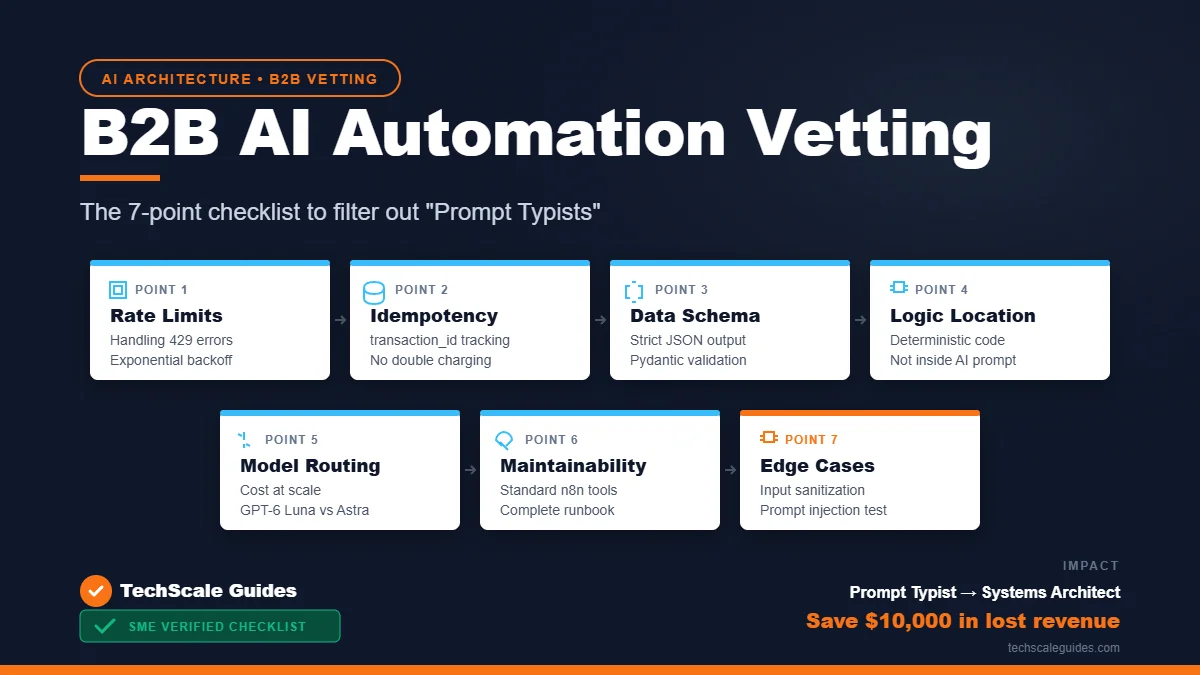
The 7-Point B2B Vetting Checklist
- How do you handle API rate limits?
Ask them to walk you through a scenario where a CRM API (like HubSpot or Salesforce) throws a 429 Too Many Requests error.
Good answer: They implement "exponential backoff" (waiting 1 second, then 2, then 4) and queue the requests so the system doesn't crash.
Bad answer: "I just tell the system to wait and run it again." - What happens if the system crashes mid-workflow?
This tests their grasp of idempotency—the ability to execute an operation multiple times without causing duplicate side effects. Ask them how they use atransaction_idor hash the payload.
If a payment fails after the invoice is generated, will the client be charged twice when the system retries? A real architect designs systems where state is tracked in a database, and duplicate actions are blocked before they hit your Stripe or Shopify account. - How do you structure the data?
Ask for a sample JSON payload they use to pass data between nodes. If the data is a massive blob of unstructured text being passed to the next step, run away.
Real experts use strict JSON schemas and Pydantic models. They force the AI to output predictable, structured data. If the AI hallucinates a field, the system should reject it automatically, not send a broken email to your client. - Where does the business logic live?
If they say "I put the rules inside the AI system prompt," that's a massive red flag. AI is probabilistic; it guesses.
Core business logic (like "if refund > $500, require manager approval") must live in deterministic code (Python/JS), not inside a prompt. You use the AI for parsing language, not for making financial decisions. - How much does it cost to run at scale?
Anyone can build a system that burns hundreds of dollars in OpenAI API credits per day. An expert will implement model routing—using a cheap, high-volume model (like GPT-6 Luna) for simple data extraction, and reserving the expensive, complex models (like GPT-6 Astra) only for hard reasoning tasks. They should also know how to cache responses to save costs. - Can my in-house team maintain it?
If they build a highly complex custom script in a language your team doesn't know, you are held hostage. Ask if they use standard visual tools (like n8n 2.43.8) or if they provide complete, line-by-line documentation. You can read more about choosing the right infrastructure and the 4-module architecture in our Autonomous AI Agent Blueprint. - Do you test for edge cases?
Ask them how they handle malicious input. If a user submits a form with an SQL injection payload or a prompt injection attempt, does their AI agent blindly execute it? A real architect implements input sanitization and sandboxing.
The Reality Check
You might be thinking: "If I ask these questions, every freelancer will just Google the answers and parrot them back to me."
Fair point. That's why you don't just listen to their words. You ask them to show you the evidence.
Ask to see a screenshot of their n8n or Make execution history. Look at the status codes. Do you see a perfectly clean run with zero failures? That's suspicious—it means they haven't tested edge cases. Look for someone who documents their failures and how they fixed them. A real expert is proud of their error logs, because that's where the real engineering happens.
Execution logs don't lie. But you might wonder if doing all this vetting is really worth your time for a simple automation. Let's look at the math of what happens when you skip it.
Why This Matters (The Cost of a Bad Hire)
The Constraint: In a recent deployment for a logistics client, we were handling thousands of inbound leads per month.
The Failed Approach: They initially hired a budget freelancer to build a Zapier workflow. It hit the task limit of their entry-level plan in two weeks. Worse, when the CRM API timed out, the Zapier workflow silently dropped the lead without notifying anyone. They lost significant potential revenue in a single weekend.
The Implementation: We redesigned the architecture using n8n 2.43.8 and a custom Python script. The AI parsed the inbound emails, but the routing logic was handled via a PostgreSQL database. Every lead had a unique ID, and the system checked the database before making an API call.
The Quantified Result: We cut execution time by more than half and drastically reduced their API costs, saving them hundreds of dollars a month through aggressive caching and model routing.
The Caveat: This approach requires a self-hosted VPS—like a $24/month droplet on DigitalOcean (as of Oct 2026). It is not a "set it and forget it" solution; it requires weekly maintenance to check the logs and update API credentials.
The Handover (Don't Sign Without This)
Even if they pass the 7 technical questions, the job isn't done. The biggest mistake B2B founders make is not securing the handover.
Before you pay the final invoice, demand two things:
- Full Ownership of the IP: The workflow JSON, the Python scripts, and the API keys must be transferred to an account you control, not theirs.
- A "Runbook" Document: A simple document that explains how to restart the server, where the error logs are stored, and how to rotate the API keys.
If they hesitate to give you this, they are holding you hostage.
The Bottom Line
Hiring for AI automation is an exercise in risk management. You are buying peace of mind. The code is secondary.
Anyone can prompt. Few can architect.
If you want to build a full AI automation system in-house but need to hire someone to execute the 4-module architecture, I’ve detailed the exact blueprint of what your system should look like.
(Note: If you don't have the technical chops to self-host this, the fastest way is to find a vetted systems architect on Upwork Enterprise or Fiverr Pro. Just use the 7 questions above to screen them before you hand over your API keys. The $1,000 you spend on a real expert will save you $10,000 in lost revenue.)
Frequently Asked Questions
1. How do I know if an AI automation expert is legitimate?
Look past their portfolio of demo videos. Ask them to explain error handling, idempotency, and API rate limits. A legitimate expert will show you their error logs and explain how they built fallback queues to prevent data loss.
2. What is idempotency in AI automation?
Idempotency means an operation can be executed multiple times without causing duplicate side effects. This is crucial for payment processing or CRM updates, ensuring that if a workflow retries after a timeout, the client is not charged twice.
3. Why is model routing important for B2B automation?
Model routing saves costs by using cheap, high-volume models (like GPT-6 Luna) for simple data extraction, and reserving expensive models (like GPT-6 Astra) for complex reasoning. This drastically reduces API costs at scale.