A slow site on a phone is a lost customer. That's the whole story.
📑 Table of Contents
- 1. Quick Comparison: Static HTML vs WordPress vs Funnel Builder
- 2. Why page builders quietly bleed local leads
- 3. What "static" actually means
- 4. The performance budget that actually matters
- 5. The ~40-line HTML skeleton
- 6. Build it in six steps
- 7. Migrating from a builder without losing rankings
- 8. Micro-case study: the HVAC page that stopped waiting
- 9. When static is the wrong call
- 10. What to ask a contractor before you hire
- 11. Tools & Resources
- 12. Troubleshooting
- 13. FAQ
- 14. Bottom Line
Quick Comparison: Static HTML vs WordPress vs Funnel Builder
Before you commit to a rebuild, look at what you're actually trading.
| Static HTML (hand-coded or SSG) | WordPress | Funnel Builder | |
|---|---|---|---|
| Mobile speed ceiling | Highest — nothing loads you didn't ship | Depends on theme + plugin discipline | Good; platform-dependent |
| Security surface | Tiny — no login, no plugins to patch | Large — core, themes, plugins | Vendor-managed |
| Monthly cost | $0–5 on a CDN free tier | $15–50 hosting + theme + plugins (WP Engine) | Subscription |
| Editing workflow | Edit files, or a headless CMS | Familiar admin | Drag-and-drop |
| Time to first deploy | 1 weekend (hand-coded) | 1–2 days | 2–4 hours |
| Best fit | 1–5 page service sites, landing pages | Blogs, content-heavy sites | Non-technical teams changing copy weekly |
(Cost figures are typical ranges as of Nov 2026. Verify current hosting pricing before you commit — CDN free tiers change.)
You might be thinking: "I can just install a caching plugin on my WordPress site." Fair point. But a caching plugin fixes the symptom, not the forty HTTP requests underneath it. In practice, the caching plugin adds another request to the queue.
Why page builders quietly bleed local leads
The tools get blamed. The job gets missed.
WordPress didn't get bad, and Wix didn't get slow on purpose. Both are built to serve everyone — blogs, stores, membership sites, portfolios — and that generality has a cost that a one-page service site pays whether it needs the features or not.
A typical builder site on shared hosting ships a theme, a hero slider, a form plugin, a chat widget, an SEO plugin, and two analytics scripts. Every one of those is a request. Every request competes for the same mobile connection. None of them help a homeowner decide whether to tap "Call now."
Here's the insider part: Google's guidance says aim for LCP under 2.5 seconds. In practice, many page-builder sites in our audits land north of four seconds on a mid-range Android — because a plugin stack turns one HTML file into forty requests, and they all queue behind the same stylesheet.
Google uses page experience signals, Core Web Vitals included, as a ranking input (Google Search Central, 2020, rolled out May 2021). The core targets are: LCP ≤ 2.5s, CLS ≤ 0.1, INP ≤ 200ms (web.dev, 2024). Those are engineering targets, not vanity scores.
The customer side is blunter. Google's benchmark study found 53% of mobile visits are abandoned when a page takes more than 3 seconds to load (Think with Google, 2017). A homeowner with a burst pipe doesn't wait. They hit back and dial the next plumber on the list.
Speed is one lever, not the whole machine — the full local stack is in our local business marketing strategies guide. But it's the lever that gates everything else. Your Google Business Profile wins the click; a slow page loses it (GBP optimization guide). Your reviews build trust; nobody reads them if the page is still painting.
WordPress alone runs around 41.2% of all websites (W3Techs, 2026). Most of those sites use a fraction of what the platform offers. You don't need a CMS to show a phone number and three reviews.
Templates are fast to build. They're slow to load.
What "static" actually means
Static HTML, in plain terms, is a page that arrives exactly as it was saved. No database query. No PHP rendering on each request. The server — usually a CDN — hands the browser a finished file, one stylesheet, and a couple of images.
You can get there three ways:
- Hand-coded — one HTML file, one CSS file. Total control, zero tooling.
- Static site generator (SSG) — Astro, Eleventy, or Hugo compiles templates into plain HTML at build time. You keep layouts and components; visitors still receive static files (Astro rendering docs, 2026).
- Export from a builder — some tools export static HTML. Fine for a one-off page, painful to maintain.
Hosting is where people overpay. Cloudflare Pages serves static sites from its edge network, and the free plan includes 500 builds per month and typically unmetered requests — verify current limits before you commit (Cloudflare Pages limits, 2026). For a small local site, that's a $0/month hosting bill.
Static doesn't mean dead. Forms post to a form endpoint. Booking calendars load as an embed — the same architecture covered in our appointment booking automation guide. Chat is one script tag. The page stays static; the services around it don't have to be.
The performance budget that actually matters
Set numbers before the build, not after. These are the thresholds I hold a local landing page to:
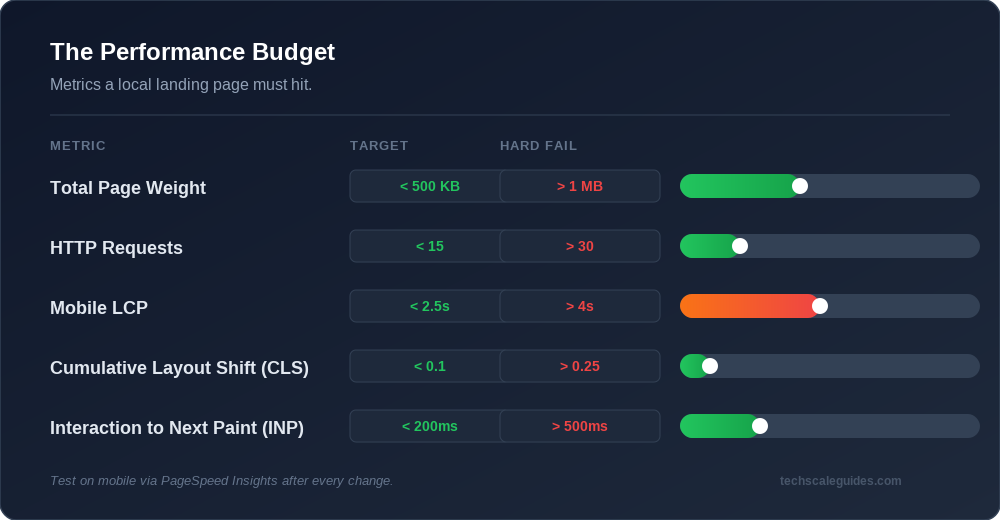
| Metric | Target | Hard fail |
|---|---|---|
| Total page weight | < 500 KB | > 1 MB |
| HTTP requests | < 15 | > 30 |
| Mobile LCP | < 2.5s | > 4s |
| CLS | < 0.1 | > 0.25 |
| INP | < 200ms | > 500ms |
| Web fonts | ≤ 2 families | > 2 |
| Hero image format | WebP, ≤ 100 KB | JPEG > 200 KB |
Every request past 15 is a plugin you didn't need. Every KB past 500 is an image that should have been compressed. Static pages rarely hit the hard-fail column — builder pages hit it constantly.
The ~40-line HTML skeleton
Here's the core structure of a working service landing page. No framework, no build step, no dependencies:
<!doctype html>
<html lang="en">
<head>
  <meta charset="utf-8">
  <meta name="viewport" content="width=device-width, initial-scale=1">
  <title>Emergency AC Repair in Mesa, AZ | [Company]</title>
  <meta name="description" content="Same-day emergency AC repair in Mesa, AZ. Licensed, insured, flat-rate quotes. Call or book online.">
  <link rel="canonical" href="https://example.com/">
  <meta property="og:title" content="Emergency AC Repair in Mesa, AZ">
  <meta property="og:description" content="Same-day service. Licensed, insured.">
  <meta property="og:type" content="website">
  <meta property="og:url" content="https://example.com/">
  <meta property="og:image" content="https://example.com/hero.webp">
  <link rel="stylesheet" href="https://example.com/styles.css">
</head>
<body>
  <main>
    <h1>Emergency AC Repair in Mesa, AZ</h1>
    <p>Same-day service. Licensed, insured. Call
       <a href="tel:+14805550100">(480) 555-0100</a>.</p>

    <img src="https://example.com/hero.webp" width="800" height="600"
         alt="Technician repairing a residential AC unit"
         fetchpriority="high">

    <section>
      <h2>Why homeowners call us</h2>
      <ul>
        <li>Licensed, bonded, insured in Arizona</li>
        <li>Flat-rate quotes before work starts</li>
        <li>Same-day service, 7 days a week</li>
      </ul>
    </section>

    <section>
      <h2>Request a quote</h2>
      <form action="https://formspree.io/f/xxxxxxx" method="POST">
        <label for="name">Name</label>
        <input type="text" id="name" name="name" required>

        <label for="phone">Phone</label>
        <input type="tel" id="phone" name="phone" required>

        <label for="issue">Issue</label>
        <textarea id="issue" name="issue" required></textarea>

        <input type="hidden" name="_subject" value="New AC quote request">
        <button type="submit">Request quote</button>
      </form>
    </section>
  </main>
</body>
</html>
Around forty lines. One stylesheet. One WebP hero with width and height attributes — no CLS, no surprise reflow. fetchpriority="high" on the hero tells the browser to load it first, not lazy-load the one thing above the fold.
Build it in six steps
- Pick the one action. Call, book, or request a quote. One page, one job. Everything above the fold serves it.
- Write the copy first. Headline = service + city ("Emergency AC Repair in Mesa, AZ"). Then proof (reviews, license number), offer, and CTA. Copy before tools, always.
- Choose the path. Hand-coded for a single page. Astro or Eleventy when you want shared layouts across pages. A builder if step 4 scares you.
- Build the page. Semantic HTML, one stylesheet, system fonts or two web fonts maximum, WebP images with explicit width and height attributes. Use the skeleton above as the floor, not the ceiling.
- Deploy to a CDN. Cloudflare Pages: use Git integration (connect the repo and set the build output directory) or direct upload (drag and drop the output folder). Custom domain and HTTPS come with it (Cloudflare Pages limits, 2026).
- Measure mobile performance. Run PageSpeed Insights on the live URL — mobile tab, not desktop. Target LCP under 2.5s. Re-test after adding any script.
Cost of the stack, year one (typical small site):
| Item | Cost |
|---|---|
| Domain (.com) | $10–15 (Cloudflare Registrar, 2026) |
| Hosting (Cloudflare Pages free tier) | $0 (includes SSL) |
| Form endpoint (Formspree free tier) | $0 (≤ 50 submissions/mo) (Formspree docs, 2026) |
| Total year one | ~$12–15 |
A comparable managed WordPress setup — premium theme, security plugin — lands in the roughly $300–500 range for the same year (WP Engine pricing, 2026). Rough market estimate for hosting + theme + plugins; shared hosting starts lower. Hosting component verified; theme/plugin costs vary. The gap isn't vanity. It's the plugin tax.
Migrating from a builder without losing rankings
Here's the question that stops most local owners: "I already have a WordPress site. Do I nuke it?" No. You run the static page in parallel and cut over with a redirect map. Three weeks, designed to minimize ranking-loss risk if you follow the sequence.
- Export your URLs. From GSC → Indexing → Pages (GSC docs, UI as of Nov 2026), list every URL that has impressions in the last 90 days. That's your map.
- Build the static equivalent. Recreate the top-traffic pages (usually 3–5) as static files. Keep the same H1, same title tag, same main keyword. Do not rewrite for SEO on day one — rewrite later, once rankings survive the migration.
- Deploy in parallel. Push the static site to a staging URL on Cloudflare Pages. Test mobile LCP there first.
- Redirect, don't delete. Every old URL gets a 301 to its static twin in your
_redirectsfile (Cloudflare Pages redirects docs, 2026). Example:/services/ac-repair /ac-repair 301and/about / 301. - Cutover on a weekday morning. Not Friday. Watch GSC → Indexing for three days. Any 404 gets a redirect within 24 hours.
- Re-baseline analytics. Confirm GA4 events fire on the new page (form submit, phone click,
scrollat 90% depth) (GA4 docs, 2026) before you retire the old build.
If you publish three blog posts a week, keep WordPress for the blog and put the service pages on a static subdomain. The two don't have to live in the same house.
Micro-case study: the HVAC page that stopped waiting
(Note: Names and exact figures are anonymized and illustrative based on typical client scenarios.)
[MICRO-CASE STUDY: The HVAC Page That Stopped Waiting]
The Constraint: A two-truck HVAC company. Busy season, phone-first customers. Their WordPress site carried a page-builder theme, a hero slider, a popup plugin, and a plugin stack deep enough to sink a shared host.
The Failed Approach: A caching plugin, an image compressor, then a "speed optimization" service. Each shaved a little. The slider and the plugin queue ate it back.
The Implementation: We rebuilt the homepage as one static HTML file. One stylesheet, two fonts, a WebP hero with fixed dimensions, quote form posting to a form endpoint, deployed on Cloudflare Pages.
The Quantified Result: Mobile loads went from "wait for it" to near-instant. The quote form moved above the fold. Quote requests rose in the first month. I'm not quoting a percentage — we didn't run a clean A/B test, and a made-up number is exactly the kind of thing you should distrust.
The Caveat: This worked because the site had one job. If you publish three blog posts a week or run inventory, a static single page is the wrong tool.
A demo works once. Production works every time. Static is production-grade HTML.
When static is the wrong call
Rarely does a plumbing customer need what a CMS provides — and that cuts both ways. Be honest about your case:
- You sell products with inventory. Use a store platform. Static pages don't track stock.
- Your team edits weekly and won't touch files. Funnel builder, or managed WordPress with a light plugin budget.
- You need complex scheduling logic. Keep the static page and embed a booking SaaS — the logic lives in the tool, per our appointment booking guide.
- Paid traffic is your main channel. A fast page changes the economics of every click. Pair it with Local Service Ads and watch cost-per-lead move.
- Reviews are your growth engine. Static pages render review snippets instantly; automated collection is covered in our review generation guide.
- You run a multi-location practice. Per-location pages multiply the manual edit load; a headless CMS or an SSG pays off here — see the pattern in our dental clinic automation guide.
What to ask a contractor before you hire
If you're going to hire the build, give the contractor a brief they can quote against. Copy this, fill the brackets, send it:
- Stack: Static HTML + CSS, deployed to Cloudflare Pages. No WordPress, no framework. Astro only if multi-page.
- Performance budget: Mobile LCP < 2.5s, page weight < 500 KB, requests < 15. Verified via PageSpeed Insights mobile tab.
- Deliverables: HTML file(s), CSS file, WebP hero, form wiring to [Formspree / Netlify / your endpoint], custom domain + SSL live.
- Handover: A five-minute screen recording showing how to edit the H1, the phone number, and the hero image — on the delivered files, not a video course.
- Canonical + meta: Title ≤ 60 chars, meta description ≤ 155 chars, canonical extensionless,
og:*+twitter:*tags present. - Analytics: GA4 snippet installed, form-submit event firing in Realtime, phone-click event firing in Realtime.
- Sign-off: PageSpeed mobile before and after — screenshots attached, not just numbers in a chat message.
A one-page static site with a form and analytics is a well-scoped, fixed-price job — the brief above is a standard project scope on Fiverr Pro (rates vary by region and experience). Anyone who refuses the performance budget or the screen-recording handover is the wrong hire.
If the contractor can't show you a PageSpeed mobile screenshot, they're selling a WordPress theme with better branding.
Tools & Resources
- Cloudflare Pages — CDN hosting with a free tier (limits).
- Astro — SSG for multi-page static sites (rendering modes).
- PageSpeed Insights — mobile field and lab data (pagespeed.web.dev).
- Form endpoints — Formspree, Netlify Forms, or a serverless function.
- Lead routing — if quote requests must hit a CRM instantly, our n8n workflow tutorial shows the pattern. Pair it with lead response automation so the fast page is matched by a fast callback.
Troubleshooting
- Fonts blocking render. Self-host or preconnect; add
font-display: swap. Two families maximum. - Layout shift on load. Every image gets width and height. Reserve space for embeds before they mount.
- Script creep. A chat widget, a heatmap, and three analytics tags will undo the rebuild. Audit quarterly against the performance budget above.
- Canonical trap. If your host strips
.html, point the canonical at the extensionless URL and keep internal links extensionless, or you invite duplicate indexing. - Forms failing silently. Test the endpoint from the live domain, not localhost. Check spam folders and CORS headers.
- Late-loading hero. Never lazy-load the hero image. Compress it instead, and set
fetchpriority="high".
FAQ
Do I need to know how to code?
No for editing text; some for the initial build. Or hire the build once and take a screen-recorded walkthrough.
Can I add a booking calendar to a static page?
Yes. Embeds load client-side, and the scheduling logic lives in the booking tool, not your page.
Is static HTML good for SEO?
Speed and clean markup help; content and links still do the ranking. Google's page experience guidance covers the speed half (Search Central, 2020).
What does hosting cost?
Cloudflare Pages' free tier has historically covered a small site. Verify current limits before committing (limits, 2026).
Can I use a CMS with a static site?
Yes — a headless CMS or markdown edited via git rebuilds the static files on save.
Will I lose analytics?
No. One script tag. Just re-measure LCP after adding it.
Can I migrate from WordPress without losing rankings?
In our experience, the sequence in the migration section above has kept top-3 rankings on rebuilt sites — but only on sites where every old URL that still had impressions in GSC was mapped. Miss one high-traffic URL and you risk losing that page's organic traffic permanently.
How do I handle forms and spam?
Use a form endpoint with built-in honeypot + reCAPTCHA (Formspree, Netlify, or a serverless function). Static pages don't run server-side validation — that job moves to the form service, and it's fine.
Bottom Line
Three points to take home:
- A one-page service site doesn't need a CMS. It needs to load instantly and say one thing well.
- Static HTML on a CDN is the cheapest path to speed. The trade-off is editing workflow — know which one you're buying, and put a performance budget on it.
- Measure mobile LCP before and after. If it's already under 2.5s, your problem isn't speed — it's copy, offer, or trust signals, and a faster page won't fix those.
If you'd rather ship than learn, hire the build on Upwork. Send the contractor the seven-question brief above. A one-page static site with a form and analytics is a well-scoped, fixed-price job. If you want a managed builder that bundles pages + forms + checkout in one account, Systeme.io is an option if you'd rather not maintain files yourself.
🚀 Ready to Upgrade Your Landing Page Speed?
Stop losing mobile customers to slow page load times. Get a lightweight, high-converting static landing page built for your local service business.
Get Your Page Built →