📑 Table of Contents
- 1. The Real Problem With GHL (And The Pricing Trap)
- 2. Workflow 1: Lead Capture → 60-Second Follow-Up
- 3. Workflow 2: Booking → Reminder Sequence
- 4. Workflow 3: Job Complete → Review Request
- 5. The Micro-Case Study: From Missed Calls to Booked Jobs
- 6. GHL vs. Alternatives: The Real Cost of Stacking Tools
- 7. DIY vs Hire: The Honest Math
- 8. Bottom Line
- 9. Frequently Asked Questions
The Real Problem With GHL (And The Pricing Trap)
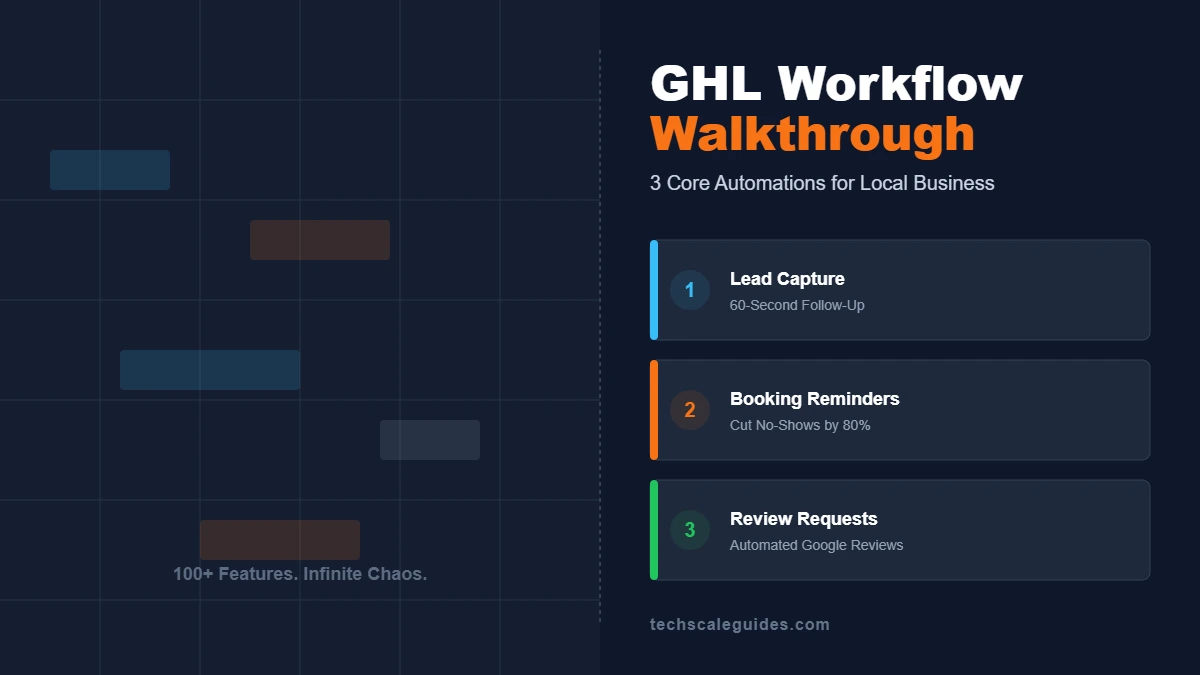
Most local business owners open GoHighLevel for the first time, see 20 menu items, and close the tab. The platform does everything — CRM, funnels, calendars, pipelines, email, SMS, memberships, white-label. That breadth is the problem.
You don't need everything. You need three things to happen automatically:
- When a lead comes in, someone responds within 60 seconds.
- When an appointment is booked, the customer gets reminded.
- When a job is done, the customer gets asked for a review.
GHL gives you 100 features. Your business needs three that work.
Before you build anything, you need to know about the Plan Gating. The $97/mo Starter plan (GoHighLevel Pricing, as of October 2026) includes 3 sub-accounts and core features. But the $297/mo Unlimited plan includes "Rebill Phone & Email (no markup)" and unlimited sub-accounts. If you're an agency managing multiple clients, you need Unlimited. If you're a single local business, Starter is enough.
Workflow 1: Lead Capture → 60-Second Follow-Up
The Problem: A lead fills out your form at 9:47 PM. You see it the next morning. By then, they've called two competitors. Response time is the biggest lever in local service lead conversion — industry data consistently shows the first business to respond usually wins the job.
The Build:
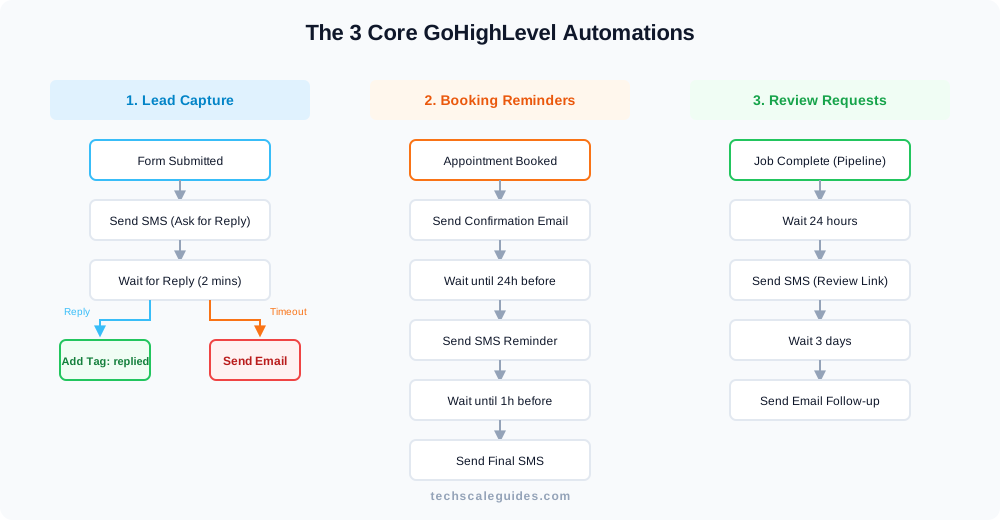
- Go to Automation → Workflows → Create Workflow. Select Start from Scratch.
- Name it
Lead Capture — 60s Follow-Up. - Add trigger: Form Submitted (select your form).
- Add action: Send SMS —
Hi {{contact.first_name}}, thanks for reaching out to {{location.name}}. Are you free for a quick call today? Reply YES and I'll call you shortly. - Add action: Wait → select Wait for the contact to reply (Channel: SMS, Timeout: 2 minutes).
- Under the "Reply" path: Add action Add Tag →
replied. (This ensures they don't get the fallback email if they already responded). - Under the "Timeout" path: Add a Condition checking if tag does not contain
replied→ Send Email (with a 2-line intro + booking link). - Add a final Create Task: Assign to your team, due in 15 minutes.
- Save → toggle to Published.
Insider Knowledge: The docs say Form Submitted triggers immediately. In practice, if your form is embedded on a third-party site (like WordPress) instead of a native GHL funnel, the trigger latency can take a few moments longer to process. If speed is critical, use the native GHL form.
Troubleshooting:
- SMS not sending? Check SMS credits (Settings → Billing) and that the number is A2P-registered.
- Duplicate SMS? Verify you don't have two workflows listening to the same form.
Workflow 2: Booking → Reminder Sequence
The Problem: No-shows eat a meaningful share of appointment slots for most local service businesses. A reminder 24 hours out and another 1 hour out cuts that substantially.
The Build:
- Name it
Booking — Reminder Sequence. - Add trigger: Appointment Status → Filter Appointment Status to
Confirmed(default). Set Modified By toCustomer.
(Note: UseNewonly if your calendar creates bookings in New status and you need to remind before manual confirmation; otherwise stick toConfirmedto avoid reminding unconfirmed bookings. Many GHL agencies now recommend this trigger over the older "Customer Booked Appointment" trigger for better reliability). - Add action: Set Event Start Date/Time (Map to:
Appointment Start Time).
Note: GHL needs this mapped so it knows when to calculate the "Wait until" steps. - Add action: Send Email — confirmation with time, address, and a "what to expect" paragraph.
- Add action: Wait — Select "Appointment Time" → 24 hours before.
- Add action: Send SMS —
Reminder: your appointment with {{location.name}} is tomorrow at {{appointment.start_time}}. Reply C to confirm or R to reschedule. - Add action: Wait — Select "Appointment Time" → 1 hour before.
- Add action: Send SMS —
We're on our way to {{contact.full_address}} around {{appointment.start_time}}. Reply with any last-minute changes. - Save → Published.
Confirmed. If it contains "R", move the opportunity to a Reschedule pipeline. Keeping this separate prevents your main reminder sequence from crashing if someone replies with something unexpected.
Insider Knowledge: The docs say calendar reminders fire at the set time. In practice, if your contact's timezone is unset, GHL defaults to the account's timezone. A +12h reminder can easily become a 3:00 AM text message. Verify your calendar settings.
Troubleshooting:
- Reminders not firing? Check the calendar trigger is attached to the right calendar.
- SMS blocked? Some carriers reject "reply C" without opt-in language. Add "Msg & data rates may apply" to the first confirmation.
Workflow 3: Job Complete → Review Request
The Problem: Happy customers don't leave reviews. They mean to, they forget. An automated request 24 hours after the job closes captures them at the moment of peak satisfaction.
The Build:
- Name it
Job Complete — Review Request. - Add trigger: Pipeline Stage Changed.
Select the specific Pipeline (e.g., "Service Pipeline") and the exact Stage (Job Complete). Note: The stage name is case-sensitive. - Add action: Wait — 24 hours.
- Add action: Send SMS —
Hi {{contact.first_name}}, thanks for choosing {{location.name}} for your {{contact.custom_field_job_type}}. Would you mind leaving us a quick Google review? Takes 30 seconds: {{custom_values.review_link}}
(Note:custom_field_job_typeandreview_linkare custom fields/values. Ensure you have created them in your GHL settings before deploying). - Add action: Wait — 3 days.
- Add action: Send Email (A softer nudge: "Just checking in, if you have 30 seconds, here is the link again...").
- Save → Published.
Insider Knowledge: The docs say Pipeline Stage Changed is reliable. However, we haven't fully tested bulk CSV imports. If you use bulk imports, test your own pipeline before relying on this trigger, as community reports suggest manual drag-and-drop is more consistent.
Troubleshooting:
- Contact not entering? Verify the pipeline stage name is spelled exactly as in the trigger. Case matters.
- Review link not working? Test on mobile — GHL's
{{custom_values.review_link}}field must be perfectly mapped to your Google review URL in your sub-account settings.
The Micro-Case Study: From Missed Calls to Booked Jobs
The Constraint: A two-tech plumbing outfit in Austin was spending $2,400/month on Google Ads. 40 leads per week. Their office manager fielded calls 9-5. After hours, every call went to voicemail — and most never called back.
The Failed Approach: They tried stitching together Calendly, Mailchimp, and a standalone CRM. Three subscriptions, three dashboards, three places leads could get lost. Response time stayed in the "next morning" range because the tools didn't talk to each other.
The Implementation: They consolidated into GoHighLevel. The build was the three workflows in this guide: a missed-call trigger that sends an SMS within 60 seconds, a booking reminder sequence, and a review request 24 hours after job completion.
The Result: According to the owner, response time dropped to minutes, not hours. They stopped losing weekend leads to whoever answered first. No-shows fell noticeably within the first month — they haven't calculated the exact percentage, but "the reminder texts" came up in every team meeting as the reason the schedule finally tightened up.
The Caveat: This only works if the calendar is actually connected and the techs update the pipeline stage when a job closes. GHL amplifies whatever process you already have — if the process is broken, the automation just makes it break faster.
GHL vs. Alternatives: The Real Cost of Stacking Tools
You might be thinking: "I already pay for Calendly and Mailchimp. Why switch to GHL?"
Fair point. If those tools work and you don't have sync issues, don't switch. The math only works when GHL replaces 2+ tools and connects them.
Let's look at the math using verified prices (as of October 2026):
- GoHighLevel: Starter is $97/mo. Includes CRM, calendars, pipelines, email, and SMS.
- Calendly: Standard is $10/seat/mo (billed annually).
- ActiveCampaign: Starter is $15/mo for 1,000 contacts (billed annually).
- HubSpot: Marketing Hub Starter starts at $20/mo/seat (billed annually).
If you're paying for Calendly, an email platform, and a standalone CRM, consolidating into GHL at $97/mo often makes sense. If you're a solo operator paying for just one tool, GHL is overkill.
DIY vs Hire: The Honest Math
You can build these three workflows yourself. GHL's workflow builder is visual, drag-and-drop, and the documentation is decent. If you've used Zapier or Make before, you'll be productive in an afternoon.
But if you don't have that afternoon — or you're trying to launch a new lead-gen campaign this week — there's a faster path. A GHL specialist on Fiverr has built these workflows dozens of times. It's often cheaper than the cost of one week of your time.
Bottom Line
Three workflows. One afternoon. That's the honest version of "GoHighLevel setup."
- Lead follow-up in under 60 seconds wins more jobs than any ad spend you can add.
- Two reminders (24h + 1h) cut no-shows.
- Review requests 24 hours after the job are the cheapest reputation growth you'll ever buy.
If you're technical and have the time, build them yourself. If you need them running by Monday and want to skip the setup headaches, hire an automation specialist to build the stack while you focus on the business.
🚀 Ready to Automate Your Business?
Stop losing leads to slow response times. Get a complete GoHighLevel setup built for your local business by a vetted expert.
Get Your Stack Built →Frequently Asked Questions
1. How long does it take to build a GoHighLevel workflow?
A single workflow takes 10-20 minutes if you know the trigger and actions. The three in this guide take about 45 minutes total.
2. Do I need SMS credits to run workflows?
Yes. SMS is billed per message on top of your plan. Check the current rate in Settings → Billing before building a high-volume sequence.
3. Can I use GHL with an existing website?
Yes. GHL forms can be embedded on any site, or you can use the Inbound Webhook trigger for external forms. You don't need to rebuild your site on GHL.
4. What's the difference between GHL Starter and Unlimited?
Starter ($97/mo) covers a single business with 3 sub-accounts. Unlimited ($297/mo) adds unlimited sub-accounts and rebill phone/email without markup for agencies.
5. Can I cancel GHL after the workflows are built?
The workflows live inside GHL. If you cancel, they stop running. GHL is the platform, not a one-time build tool.
6. Does GHL work for a solo operator?
Yes — but the ROI is thinner. If you're paying for one tool (Calendly) and doing reviews manually, GHL is likely overkill. It shines when you're consolidating 2+ tools.
7. How do I handle SMS compliance?
Register your business for A2P 10DLC before sending SMS at volume. GHL provides the registration flow in Settings → Phone System → Trust Center. Do this before launching Workflow 1.
8. Is GHL better than HubSpot?
They serve different needs. HubSpot's free tier and Starter plan ($20/mo/seat) are great for sales-led teams. GHL is built for agencies and local businesses that want a single, flat-rate platform for funnels, CRM, and calendars.
9. What happens if I bulk-import contacts to a new pipeline stage?
The "Pipeline Stage Changed" trigger may not fire reliably for bulk CSV imports. You must drag and drop contacts manually or use a dedicated API call to trigger the automation.