📑 Table of Contents
- 1. The Problem — 8 Reviews/Month Is a Ceiling, Not a Strategy
- 2. The 4-Stage Review Pipeline
- 3. The 6 Review Platforms That Actually Matter
- 4. The Timing Playbook
- 5. 7 Copyable Review Request Templates
- 6. Handling Negative Reviews When They Go Public
- 7. Compliance — FTC, Google, and Industry Rules
- 8. Multi-Location + Multi-Service Logic
- 9. The Response Playbook
- 10. Metrics That Matter
- 11. Case Study — From 8 Reviews/Month to 40+ in 60 Days
- 12. Common Pitfalls (Red-Flag Protocol)
- 13. Frequently Asked Questions
- 14. Bottom Line
The Problem — 8 Reviews/Month Is a Ceiling, Not a Strategy
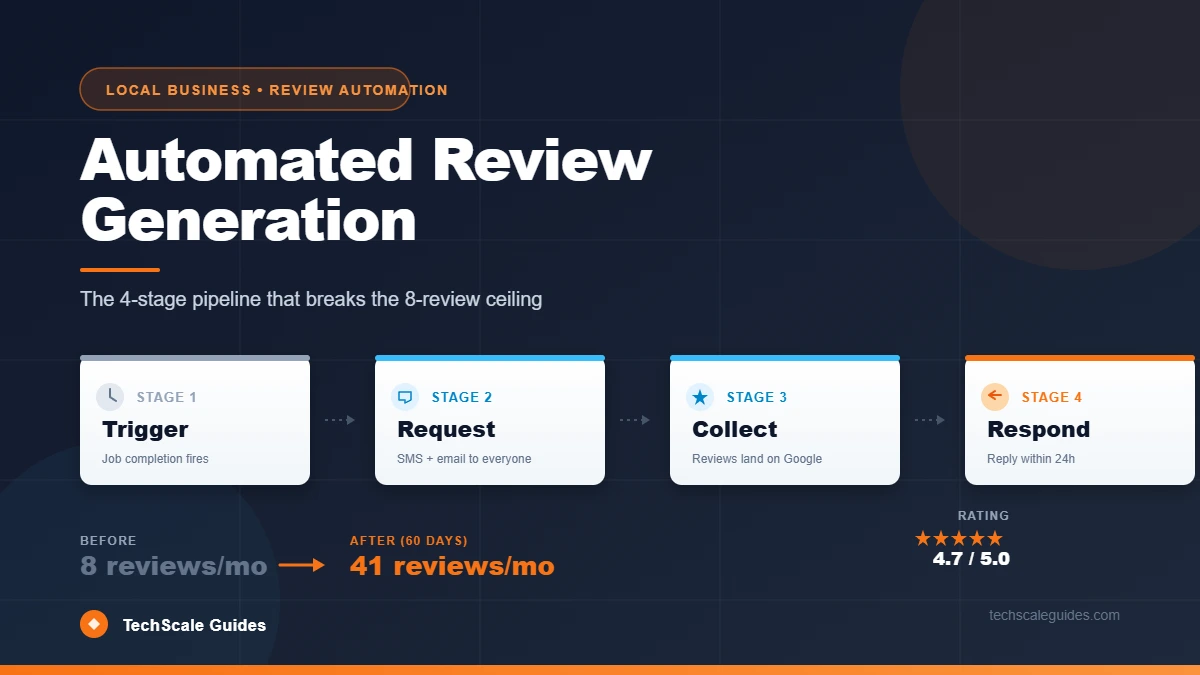
Here's the deal. A local business owner finishes a job, texts the customer "hey, leave us a review if you have a minute," and maybe gets 1 review out of every 5 requests.
Then they forget for two weeks. Then they remember. Then the cycle repeats.
The math adds up fast:
- Manual requests → ~20% ask rate → ~15% conversion rate → ~8-10 reviews/month
- Automated requests (post-job) → ~100% ask rate → ~25-35% conversion → ~30-40 reviews/month
The difference isn't a better script. It's consistency.
Most local businesses already know reviews matter. They just don't have a system. That's the problem this playbook solves.
Why this matters more in 2026 than 2020:
Industry data consistently points to review recency, velocity, and response rate as the strongest drivers of Map Pack movement — more than raw review count. A business with 40 fresh reviews in the last 90 days typically outranks a competitor with 200 reviews from 2019, because Google's local ranking favors active, responsive businesses over dormant ones.
The secondary benefit is psychological. 97% of consumers read reviews before choosing a local business, and 49% say they trust online reviews as much as recommendations from friends and family (BrightLocal 2026 Local Consumer Review Survey).
So the investment is clear. Let's build the system.
This article is part of our complete Local Business Growth Blueprint — read the pillar for the full 10-strategy framework.
The 4-Stage Review Pipeline
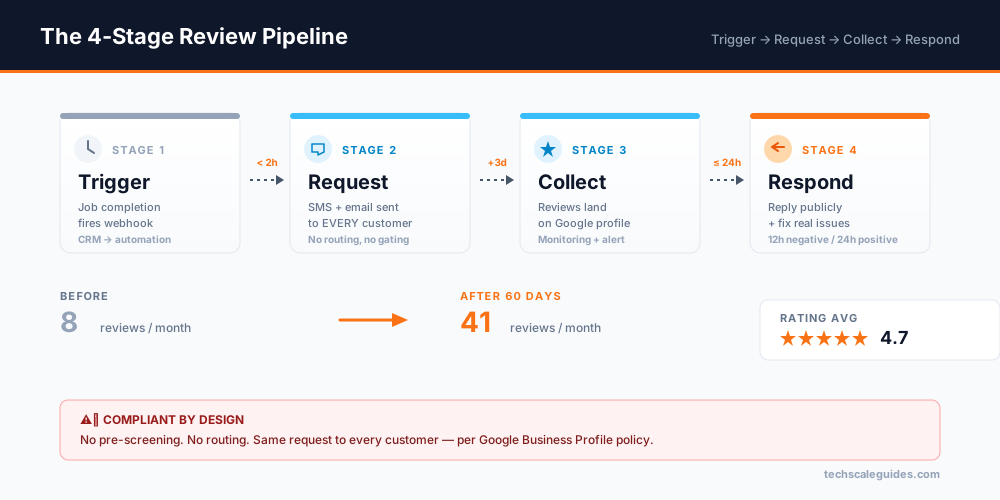
Every review system — manual or automated — has 4 stages. Miss one and the pipeline stalls.
| Stage | Purpose | Failure mode |
|---|---|---|
| 1. Trigger | Detect "job completed" event | Reviews never get asked if the trigger is missed |
| 2. Request | Send SMS + email with review link — to every customer | Manual sends get forgotten |
| 3. Collect | Reviews land on your profile; monitor for negatives | Slow monitoring = unresolved complaints |
| 4. Respond | Reply within 24h (positive) or 12h (negative) | Slow response = lower ranking + lower trust |
Here's how the stages actually flow:
[Job marked complete in CRM]
    ↓ (within 2 hours)
[Request: SMS + email with review link — sent to EVERY customer]
    ↓ (if no review in 3 days)
[Reminder: Email, once]
    ↓
[Collect: reviews appear on Google]
    ↓
[Respond: reply within 24h positive / 12h negative]
The 2-hour window matters. Review conversion drops significantly when requests go out the next day. The customer's experience is fresh in the first 2 hours — after that, they've mentally moved on.
Important compliance note: Notice there's no "routing" stage. Google's review policy prohibits selectively soliciting positive reviews — meaning you cannot send only happy customers to your public review page while diverting unhappy ones elsewhere. Every customer gets the same request. If someone leaves a negative review, you respond professionally afterward — you don't pre-screen them away from it.
This is covered in detail in Section 6.
The 6 Review Platforms That Actually Matter
Not every platform deserves the same effort. Here's the hierarchy for a US local business:
| Platform | Weight in local search | Best for | Effort level |
|---|---|---|---|
| Google Business Profile | 🔴 Highest | Every local business | Medium — primary focus |
| Yelp | 🔴 High (varies by industry) | Restaurants, home services | Medium — no solicitation |
| 🟡 Medium | Consumer-facing, retail | Low — sync from other sources | |
| Better Business Bureau (BBB) | 🟡 Medium | B2B, contractors, healthcare | Low — auto-import |
| Industry-specific (Healthgrades, TripAdvisor, Houzz) | 🟡 Varies | Niche verticals | Medium — one platform per niche |
| Apple Maps / Bing Places | 🟢 Low | Emerging | Low — auto-sync from Google |
Rule of thumb: Google first, then one secondary platform that fits your industry. Adding a third platform is only worth it if you're already getting 30+ reviews/month on Google.
Google Business Profile — Primary Focus
Everything in this playbook drives Google reviews. Google is the platform that most directly impacts:
- Map Pack rank
- Local organic rank
- Voice search ("best [service] near me")
- Google's AI Overviews (which now pull local business data)
Important: Google's review policy prohibits review gating — sending only happy customers the link to leave a public review while actively preventing unhappy customers from doing so. The compliant approach is straightforward:
- Send every customer the same neutral review request (no sentiment filtering)
- Let the reviews land where they land
- Respond professionally to every review — positive and negative
- Fix the underlying issue if the review exposed a real problem
No pre-screening, no routing. Just consistent asks + professional responses.
Yelp — Separate Rules
Yelp explicitly prohibits asking for reviews. Any automated system that sends "leave us a Yelp review" requests violates their guidelines — and Yelp's recommendation software may filter solicited reviews out of the default display, so the requests fail silently anyway. (Yelp Support: Don't Ask for Reviews)
Yelp reviews are 100% organic. If your industry relies heavily on Yelp (restaurants, nightlife), the playbook shifts to "encourage organic Yelp presence" rather than "automate Yelp requests."
For most local service businesses, Google + secondary platform is enough. Yelp's rules are stricter, and the impact is vertical-specific.
The Timing Playbook
When you ask matters as much as what you ask. Here's the timing framework:
| Timing window | Conversion rate | Best for |
|---|---|---|
| Within 2 hours of job completion | Highest | Default for most service businesses |
| Same-day evening (6-8 PM) | High | Residential services (HVAC, plumbing, cleaning) |
| Next morning | Medium | Auto, medical, B2B |
| 24-48 hours later | Lower | Only if 2h window missed |
| >72 hours | Lowest | Skip — send nothing |
Why 2 hours works:
The customer is still feeling the outcome — clean house, working AC, resolved issue. The goodwill is at its peak. By tomorrow, they've mentally moved on and the request feels like a chore.
The "evening" exception:
For residential services, same-day evening (6-8 PM) often converts higher than immediate sends because:
- The customer is home and relaxed
- They're not distracted by kids/work
- Peak email + SMS check time
Test both for your industry. There's no universal best.
The 3-day reminder:
If no review is left within 3 days, send one reminder — email, not SMS (feels less naggy). After that, stop. Additional reminders damage the customer relationship and often fail anyway.
7 Copyable Review Request Templates
Every template follows the same pattern: [Brand] + [Specific moment] + [Single action] + [Time commitment].
Template 1 — SMS, immediate (post-service)
Template 2 — Email, immediate (post-service)
Template 3 — SMS, day-3 reminder
Template 4 — Email, day-3 reminder
Template 5 — Phone call follow-up (high-ticket only)
Use this one for jobs over $2,000. A personal call converts higher than SMS for high-ticket services, and it gives the customer a natural opening to raise concerns.
Template 6 — Multi-channel SMS (text + email)
Multi-channel (SMS + email) converts higher than single-channel for most service businesses.
Template 7 — Multi-location SMS
Key principle: Every template ends with a single action. No "and also follow us on Instagram." One ask, one link.
Handling Negative Reviews When They Go Public
This is where most local businesses get it wrong. Some try to prevent negative reviews from ever landing publicly — which violates Google's policy. Others ignore negative reviews once they're up — which damages their rating and future search rank.
Here's the compliant, effective approach.
What you CANNOT do
Google's review policy prohibits "selectively soliciting positive reviews from customers." In plain English, this means you cannot:
- Send only 5-star customers to your Google review link
- Pre-screen customers with "how did we do?" and route unhappy ones to a private form
- Send a "review request" only to customers you believe are happy
- Review gate in any form
Pre-screening + routing that sends happy customers to Google and unhappy customers to a private form is review gating. It's prohibited — even when framed as "we're just being polite." Google's policy is unambiguous. (Google Business Profile prohibited content policy)
What you CAN do
The compliant strategy is simpler and more durable:
1. Send the same request to every customer. No sentiment check. No "how did we do?" filter. The review request goes out after every completed job.
2. Respond professionally to whatever lands. Reviews are not something to curate — they're a conversation. Your job is to respond well, not to control which ones get posted.
3. Fix real problems quickly. If a 2-star review exposes a legitimate issue (technician was late, billing error, missing part), fix it. Then reply publicly. This signal matters more than the rating itself — because future customers read the response.
4. Track complaint patterns internally. If the same complaint appears 3+ times in a month, that's an operations problem to solve — not a review problem to hide. Use review feedback as ops intel, not as PR risk.
Why this actually works better than gating
Counterintuitive, but true:
- You end up with a more trustworthy review profile. Mix of ratings + professional responses = stronger conversion signal than a suspiciously perfect 5.0.
- You stay compliant. No risk of Business Profile suspension.
- You fix real problems. Gating hides issues. Responding surfaces them and forces resolution.
- You build a better relationship with unhappy customers. A public, professional response to a 1-star review often converts that customer back — and future customers see it.
The response framework
The full response playbook (positive, neutral, negative) is covered in Section 9.
Compliance — FTC, Google, and Industry Rules
Review automation has legal and platform-policy constraints. Skipping this section is how businesses get their Google Business Profile suspended.
FTC rules (updated 2023)
The FTC's updated endorsement rules (effective 2023, enforced 2024+) prohibit:
- Fake reviews — obviously
- Incentivized reviews without disclosure — you can offer a discount for a review, but it must be disclosed in the review
- Review gating that materially misleads — the technical bar is "reasonable consumer perception"
- Insider reviews — employees/family reviewing as if they're customers
Practical takeaway: Automation is legal. Incentives are legal (with disclosure). Fake reviews are never legal. Gating is not legal. Sending every customer a neutral ask is legal.
(FTC Endorsement Guides, June 2023 revision)
Google review policy
Google's official policy prohibits:
- Review gating (sending the link only to happy customers)
- Incentivizing reviews (any discount, gift, or payment for a review)
- Bulk review requests from purchased lists (only real customers)
- Discouraging negative reviews
(Google Business Profile prohibited content policy)
Practical takeaway: Send to every customer. No incentives. No pre-purchase lists. No routing. Pre-screening that leads to routing is not compliant — full stop.
Industry-specific rules
| Industry | Additional rule |
|---|---|
| Healthcare (HIPAA) | Review requests to patients may implicate HIPAA if the communication reveals the patient-provider relationship. Third-party tools that handle PHI typically require a Business Associate Agreement (BAA) — see HHS.gov: Business Associates for the regulatory framework. Verify with legal counsel before automating. See our dental clinic automation guide for a HIPAA-compliant flow. |
| Legal | Most state bars prohibit soliciting reviews in some form. Consult state bar rules. |
| Financial services | SEC/FINRA have specific testimonial rules. |
| Real estate | Varies by state — some require disclosure of agency relationship. |
Rule of thumb: If your industry has a regulator, check the regulator's rules before automating. Automation is fine — it's the messaging that needs to comply.
Multi-Location + Multi-Service Logic
Once you're running 2+ locations, the pipeline gets more complex. Here's how to scale without breaking:
Location routing
Every request must fire from the correct location's Google Business Profile. This means:
- Each location has its own Google review link
- The CRM must pass the location ID to the automation
- The customer SMS/email uses the correct location's link
Common mistake: Sending all customers to a single "brand" Google profile. This splits the review velocity across locations and hurts every location's rank.
Multi-service routing
If a location offers 3+ services (e.g., HVAC + plumbing + electrical), you can either:
- Option A: One Google profile, one review link, one request template
- Option B: Service-specific requests (rarely worth the complexity)
Recommendation: Option A for most businesses. Service-specific requests only make sense if you're running distinct brands.
Centralized tracking
Multi-location review pipelines need a single dashboard. Track:
- Requests sent per location
- Conversion rate per location
- Response time per location
- Rating trend per location
Tools like Birdeye, Podium, and Reputation.com handle this natively. Custom setups can too, but require a bit more build-out.
The Response Playbook
Responding to reviews matters as much as generating them. Here's the framework:
Positive reviews (4-5 stars)
Response time: Within 24 hours
Length: 2-3 sentences
Goal: Confirm the reviewer's experience + invite them back
What to watch: Avoid copy-pasting the same "Thanks for the review!" every time. Readers notice generic replies and it weakens the trust signal — a personalized response reads as genuine.
Neutral reviews (3 stars)
Response time: Within 24 hours
Length: 3-4 sentences
Goal: Acknowledge + ask how to improve
Negative reviews (1-2 stars)
Response time: Within 12 hours
Length: 3-5 sentences
Goal: Acknowledge + take ownership + offer resolution
What NOT to do:
- Argue with the reviewer (always makes it worse)
- Get defensive ("actually, per our contract...")
- Offer compensation in the public reply (opens floodgates)
- Reply with the same template text
Note: For fake reviews or policy violations, use Google's flagging tool — don't engage publicly. This is rare but worth knowing.
Metrics That Matter
Track 5 numbers monthly. If you track more, you'll lose focus. If you track fewer, you'll miss leaks.
| Metric | Target | Where to track |
|---|---|---|
| Requests sent | = job completions | CRM |
| Request → Review conversion | ≥25% | Review platform |
| Response time (positive) | <24h | Google dashboard |
| Response time (negative) | <12h | Google dashboard |
| Rating average | >4.5 | Google dashboard |
Red flags
| Signal | What it means |
|---|---|
| Requests sent but 0 reviews in a week | Trigger broken OR link broken |
| Conversion <10% | SMS copy weak OR timing off |
| Rating dropping month over month | Real service issue OR response time lagging |
| Response time >48h | Owner not monitoring dashboard |
Rule: Review the metrics dashboard weekly for the first 30 days after setup. After that, monthly is fine.
Case Study — From 8 Reviews/Month to 40+ in 60 Days
The business: A regional HVAC contractor (3 locations, 25 trucks).
The problem:
- 8 reviews/month (all manual requests)
- 4.2 average rating
- Map Pack rank: position 7 in most service areas
- Owner spent ~30 min/week tracking requests and following up
The implementation:
| Stage | Action | Time invested |
|---|---|---|
| 1. Trigger | Job completion in field service software → webhook | 1h |
| 2. Request | Automated SMS + email within 2h — sent to every customer | 2h |
| 3. Collect | Monitoring dashboard + alert on new reviews | 1h |
| 4. Respond | Owner response workflow (12h / 24h SLA) | 2h |
Total build time: ~6 hours
The results (after 60 days):
| Metric | Before | After |
|---|---|---|
| Reviews/month | 8 | 41 |
| Average rating | 4.2 | 4.7 |
| Map Pack rank (primary service area) | 7 | 2 |
| Owner time spent on review management | 30 min/week | 10 min/week |
The ROI: The owner estimates Map Pack movement generated 15-20% more inbound leads in the first 60 days. At their close rate, that's roughly $8,000-$12,000/month in additional revenue.
What made the difference:
- The 2-hour timing window (vs. next-day manual requests)
- Consistent asks — every customer, every job, no exceptions
- Fast responses (12h on negatives, 24h on positives) — which itself became a ranking signal
What DIDN'T work initially:
- First month: 3 one-star reviews landed in week one. The owner's first instinct was to start filtering who got asked. That's the trap — it's both ineffective and non-compliant.
- What worked instead: responding within 12 hours to every negative, fixing the underlying issue, and letting the mix stand. Future customers saw a business that engaged, not a business that hid.
- Second lesson: SMS alone converted at 18%, SMS + email converted at 31% — multi-channel matters.
Common Pitfalls (Red-Flag Protocol)
Pitfall 1: Review gating
Symptom: Pre-screening customers and routing only happy ones to Google
Why it's bad: Violates Google policy → can trigger Business Profile suspension
Fix: Send the same neutral ask to every customer. No routing.
Pitfall 2: Incentivized reviews without disclosure
Symptom: "Leave a review, get 10% off" without mentioning the incentive in the review
Why it's bad: FTC violation if not disclosed
Fix: If you offer an incentive, require the reviewer to disclose it. Or skip incentives entirely.
Pitfall 3: Bulk requests from purchased lists
Symptom: Sending review requests to people who never bought
Why it's bad: Google detects this; account can be penalized
Fix: Only send to verified customers in your CRM.
Pitfall 4: No response to negative reviews
Symptom: 1-2 star reviews sit without a reply
Why it's bad: Signals to future customers (and Google) that you don't care
Fix: Respond within 12 hours. Acknowledge + offer resolution.
Pitfall 5: Copy-paste responses
Symptom: Every reply starts with "Thanks for the review!"
Why it's bad: Readers notice generic replies and trust drops
Fix: Personalize every reply with the reviewer's name + a specific detail.
Pitfall 6: Manual follow-ups
Symptom: "I'll follow up with the unhappy ones later"
Why it's bad: Doesn't happen — 100% of the time
Fix: Automate the entire pipeline. Responding is the one manual step.
Frequently Asked Questions
1. Is automated review generation against Google's terms?
No — automation itself is allowed. What's prohibited is review gating — sending the review link only to happy customers while routing unhappy ones elsewhere. The compliant approach is simple: send the same neutral review request to every customer, then respond professionally to whatever they post. (Google Business Profile prohibited content policy)
2. How many reviews should I aim for per month?
Target 30+ reviews/month for a mature local business. Below 10/month is a ceiling, not a target. Above 50/month means you should focus on response quality, not volume.
3. Can I offer a discount for a review?
Only with disclosure. The FTC requires reviewers to disclose any incentive received. In practice, most compliant businesses skip incentives entirely — the ask rate is what matters, not the bribe.
4. Which platform should I focus on first?
Google Business Profile — always. It has the highest weight in local search and voice search. Add a secondary platform (Yelp, Facebook, BBB, industry-specific) only after you're consistently hitting 30+/month on Google.
5. How fast can I expect results?
First reviews typically land within 24-48 hours of the first automated request. Ranking improvements in the Map Pack appear within 30-60 days. Full impact on local organic rank takes 90-120 days.
6. What if a customer complains instead of leaving a review?
Treat the complaint as feedback. Respond directly to resolve it, and if they later leave a review, respond to that too. Do NOT route their complaint away from Google — that's review gating. Every customer gets the same review request, and every review (positive or negative) gets a response.
7. Can I automate Yelp reviews too?
No — Yelp explicitly prohibits soliciting reviews. Any Yelp requests must be organic. Focus automation on Google + secondary platforms that allow solicitation. (Yelp Support: Don't Ask for Reviews)
8. How do I handle a fake or defamatory review?
Flag it via Google's review flagging tool. Respond only if flagged review is not removed within 7 days — and respond professionally, not defensively. Do not engage with the reviewer publicly beyond one reply.
Bottom Line
Three things to take away:
1. Manual review requests cap you at 8-10/month. Automation breaks the ceiling — not by asking more aggressively, but by asking consistently.
2. Send to every customer. Respond to every review. This is the compliant alternative to review gating, and it produces a stronger trust signal than a curated 5.0 profile. No pre-screening, no routing — just consistent asks + professional responses.
3. Compliance matters. Google, FTC, and platform rules are all enforceable. Gating is prohibited. Incentives need disclosure. Yelp can't be solicited. Get it right or get suspended.
If you'd rather skip the build and have someone set up your full review pipeline, hire a specialist on Upwork — most deliver a working system in under a week.
🚀 Ready to Break the 8-Review Ceiling?
Stop leaving reviews on the table. Build the 4-stage pipeline that fires after every job — with copyable templates, compliant routing, and a multi-location dashboard.
Get Your Review Pipeline Built →