📑 Table of Contents
Why Manual Booking Is Costing You Money (The Salon Math)
Let's be blunt. Your booking process is where the revenue leaks first.
If you run a salon, spa, or clinic, you already know the sting of an empty chair. The lost service fee is only part of the cost. The bigger hit is the ripple effect: your stylists are still on the clock, the lights are on, and the rent is due.
The frequency problem: Only 8% of UK salons, spas, and grooming businesses say they never experience cancellations or no-shows. For the rest, it's a weekly reality: 30% deal with it one to two times a week, and 14% face it three or more times a week (Fresha survey, 2026).
The short-notice problem: This is where it hurts most. 62% of clients give less than 24 hours' notice when cancelling. One in five cancellations lands with less than half a day to react (Fresha survey, 2026). At that point, your staff is scheduled, products are prepped, and you have zero time to fill the gap.
The revenue math: According to Zenoti's 2026 Beauty & Wellness Benchmark Report, a Full-Service Salon has a median ticket of $114. If you lose just two appointments a week to no-shows or late cancellations, that's ~$988/month walking out the door. Whether you operate in London or Los Angeles, the math tells the same story.
The 5-Step Pre-Launch Checklist (Do This First)
Before you buy software, you need to fix your internal process. Automation scales whatever system you already have—even a broken one. Do these five steps first:
- Audit your actual no-show rate. Don't guess. Look at the last 30 days of appointments. Count the no-shows and late cancellations. That baseline is how you'll measure success later.
- Map your service durations accurately. If a "Haircut" is listed as 30 minutes but actually takes 45, your booking page will create scheduling conflicts. Update your service menu with buffer times.
- Decide your deposit policy. You don't need to charge a deposit for a $30 trim, but high-ticket services (color corrections, balayage, spa packages) should require a card on file.
- Clean your client database. Export your current clients, remove duplicates, and ensure phone numbers are formatted correctly for SMS.
- Set your staff permissions. Decide who can override the calendar, who can issue refunds, and who can view client notes.
The 4-Part Booking Automation Stack
Here's the exact architecture that stops the leak. Don't skip steps.
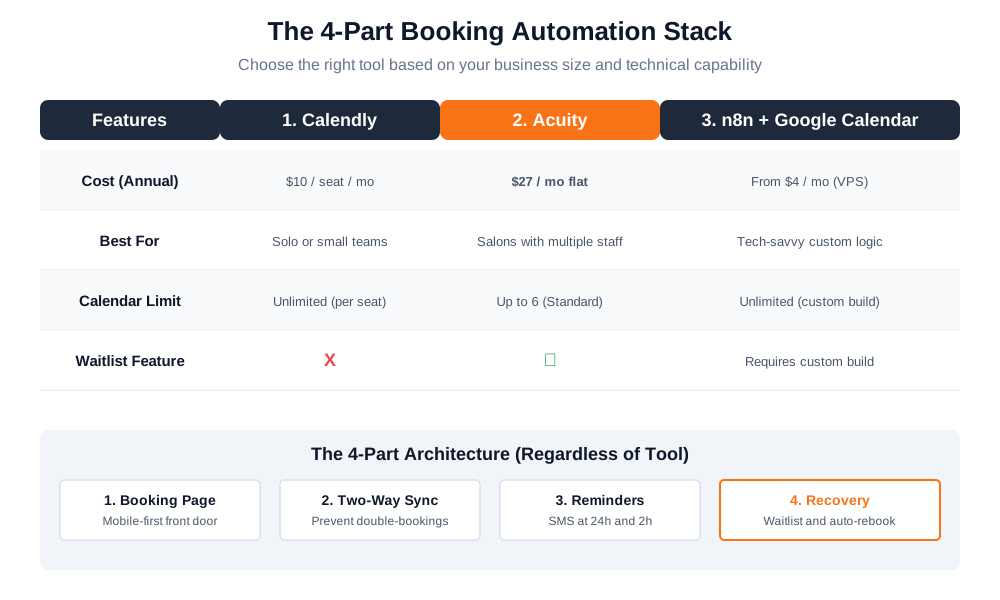
1. Self-Serve Booking Page (The Front Door)
Your clients book at 10 PM while watching Netflix. If you don't have a booking link on your Google Business Profile, Instagram bio, and website, you're invisible.
What it needs: A mobile-first service menu with durations, staff selection, real-time availability, and an instant confirmation email. If a client has to download an app or create a password to book a $40 haircut, you've already lost them.
2. Two-Way Calendar Sync (The Brain)
A booking page without calendar sync is a double-booking machine. You need two-way sync between your booking tool and Google Calendar (or Outlook).
This prevents the classic disaster: A client books on the app at 9 AM. Your receptionist is on the phone with a walk-in at 9:05 AM and books that same slot because her screen hasn't refreshed. Now you have two angry people in your lobby. Two-way sync means if a slot is taken on your booking page, it instantly blocks out on your personal calendar, and vice versa.
3. Automated Reminders (The Safety Net)
This is the highest-ROI piece of the puzzle. You need a 24-hour reminder and a 2-hour reminder via SMS or email.
4. No-Show Recovery (The Backup Plan)
When someone no-shows, don't just eat the loss. Send an automated "We missed you—here's a link to rebook" message, and trigger a waitlist notification to your regulars.
You don't have to require deposits for every appointment, but the option needs to exist for your most expensive services. Studies show that requiring pre-payment or a card on file can significantly reduce no-shows for high-ticket services.
Choosing the Right Tool for Your Business Size
Here's the pricing trap that most local business owners miss: Calendly charges per seat, while Acuity charges per account. The right choice depends heavily on how many people are managing the calendar.
| Approach | Cost (Annual Billing) | Setup Time | Best For |
|---|---|---|---|
| Calendly (Standard) | $10/seat/mo (Calendly pricing, as of Oct 2026) | 1 hour | Solo or small teams with simple needs |
| Acuity (Standard) | $27/mo flat (Acuity pricing, as of Oct 2026) | 1–2 hours | Salons with multiple staff, waitlist needs |
| n8n + Google Calendar (DIY) | From $4/mo for a low-cost VPS (DigitalOcean pricing, as of Oct 2026) | 1–2 days | Tech-savvy owners with custom workflows |
| Hire a Specialist | Low one-time freelance fee (varies by scope, as of Oct 2026) | 2–5 days | Busy owners who want it done |
Solo Stylist: Go with Calendly Free or Standard. You don't need a waitlist or multiple calendars. Keep it simple.
Boutique Salon (2-6 staff): Acuity Standard is the sweet spot. The flat $27/mo fee covers your whole front desk, and the built-in waitlist pays for itself.
Multi-Location: You need enterprise tiers. Look at Acuity Premium ($49/mo), or consider building a custom n8n workflow if you have unique CRM requirements.
The n8n Technical Deep Dive (For DIYers)
If you need custom logic—like sending a specific intake form based on the service booked, or syncing client data directly into a CRM—SaaS tools will box you in.
You can build a workflow with n8n 2.43.8 using the Google Calendar API. Here's the basic architecture:
- Webhook Node: Listens for a POST request from your custom booking form.
- Google Calendar Node: Checks availability using a FreeBusy query.
- IF Node: Verifies the slot is open.
- Set Node: Formats the data (Name, Service, Duration).
- Google Calendar Node: Creates the event and triggers an email/SMS confirmation via Twilio.
It takes a weekend to set up, but it gives you total control and eliminates SaaS subscription fees.
Micro-Case Study (Hypothetical Composite)
Note: This scenario illustrates how the 4-part stack applies to a typical local business. Specific figures are qualitative to represent common outcomes.
The Constraint: A multi-chair full-service salon with a busy front desk. The staff was drowning in phone calls and manual scheduling.
The Failed Approach: A paper calendar system. The no-show rate was consistently high, and most cancellations came less than 24 hours out, leaving empty chairs that the receptionists couldn't fill in time.
The Implementation: They switched to a booking tool + two-way Google Calendar sync + SMS reminders at 24h and 2h. They enabled the waitlist feature for their busiest days.
The Result: The no-show rate dropped significantly within 30 days. Recovering just a few slots a week easily covered the monthly software cost, making the tool pay for itself in the first week.
The Caveat: This only works if the front desk actually checks the waitlist dashboard. If staff ignore the automated waitlist notifications when a cancellation comes in, the recovery system is useless. You have to train the team to trust the software.
Common Pitfalls (And How to Avoid Them)
- One-way calendar sync. If your booking tool syncs to Google Calendar but not back, you'll double-book. Always verify the sync is two-way.
- Reminder timing is too late. A 2-hour reminder is your last resort. A 24-hour reminder gives clients time to cancel and gives you time to fill.
- No waitlist. If you don't have a waitlist, a cancellation is just an empty chair. Turn it on.
- Ignoring the "forgot" factor. 22% of clients who cancel say they simply forgot (Fresha survey, 2026). Automated reminders fix this. Don't take it personally; just automate the nudge.
- No cancellation policy. Even if you don't charge a deposit, you need a clear written policy. Clients respect boundaries when they are stated upfront.
Frequently Asked Questions
1. How much does appointment booking automation cost?
Expect $10–$27/month for SaaS tools (Calendly or Acuity, billed annually). DIY with n8n on a low-cost VPS starts at $4/month (DigitalOcean pricing, as of Oct 2026). Hiring a specialist to set it up for you is a one-time freelance fee.
2. Can I automate reminders without a booking page?
Yes, but you'll still have manual data entry. Most tools bundle reminders with the booking page because it's cheaper and more reliable. Buying a standalone SMS reminder tool is usually a waste of money.
3. Does it work for multiple staff or locations?
Acuity handles multiple staff on one account ($27/mo for up to 6 calendars). Calendly charges per seat ($10/seat). For more than 6 calendars, Acuity Premium is $49/mo annual (up to 36 calendars).
4. What's the best tool for local business?
For salons and spas with multiple staff, Acuity Standard is the better deal due to flat-rate pricing. For solo consultants, Calendly Standard is cheaper and has a lower learning curve.
5. How do I reduce no-shows?
Three levers: 24-hour reminders, 2-hour reminders, and waitlist recovery. Requiring pre-payment or a card on file for high-ticket services is another effective policy to significantly reduce no-shows.
6. Can n8n handle appointment booking?
Yes. You can build a custom workflow with the Google Calendar API, but it takes 1–2 days of setup. It's best if you need custom logic (e.g., specific intake forms, CRM syncing, or multi-step approvals).
7. Do I need a developer to set this up?
No. SaaS tools are plug-and-play. But if you want a custom n8n workflow integrated with your CRM, you should hire a specialist.
8. What if my clients prefer to call?
They can still call. The booking page isn't meant to replace the phone entirely—it's meant to capture the clients who book after hours. You're covering the gap, not closing the door.
Bottom Line
- The leak is real: 56% of beauty businesses lose significant income to no-shows.
- The fix is simple: A booking page + two-way sync + reminders + waitlist.
- The math: Acuity at $27/mo beats a receptionist at €600/mo in manual time.
Bridge CTA (Fiverr): You can set this up yourself in an afternoon. But if you'd rather not touch the backend, hire a booking automation specialist on Fiverr. They've done it 100 times—and you'll have it live by Monday.
Bridge CTA (Upwork): You could build this custom integration yourself, but it takes real dev time. If you need a custom n8n workflow that syncs with your CRM, hire an AI automation freelancer on Upwork. It's worth it if you have specific data flows.
🚀 Ready to Stop the Leak?
Don't let another empty chair eat into your revenue. Build the 4-part booking automation stack today.
Get Your Booking System Built →