📑 Table of Contents
- 1. The 3 Signs You've Outgrown Your Platform
- 2. The Decision Framework: Which Platform Fits Your Course Type?
- 3. Kajabi → Thinkific: Full Migration Walkthrough
- 4. Teachable → Thinkific: Full Migration Walkthrough
- 5. The Hidden Costs Nobody Mentions
- 6. The 3 Migration Mistakes That Cost $1,000+
- 7. Before You Migrate: Consider These 3 Alternatives
- 8. DIY vs Hire — The Actual Math
- 9. Bottom Line
- 10. Frequently Asked Questions
The 3 Signs You've Outgrown Your Platform
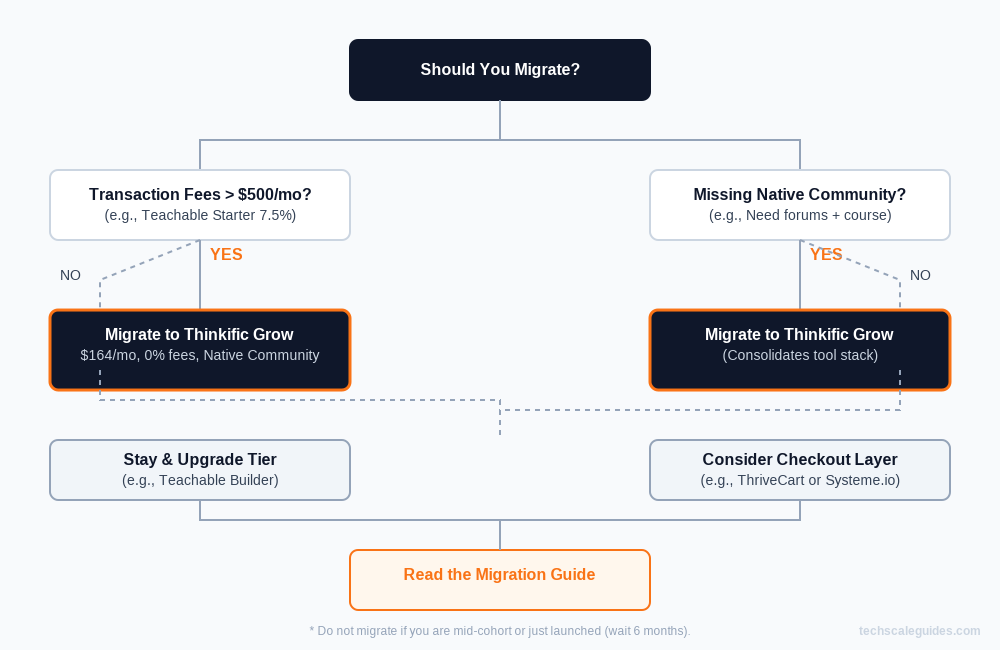
Most creators migrate on a whim. Don't. Verify that moving is actually worth the headache. You are looking for three specific triggers.
Sign 1 — Transaction Fees Hit $500/Month (Teachable territory)
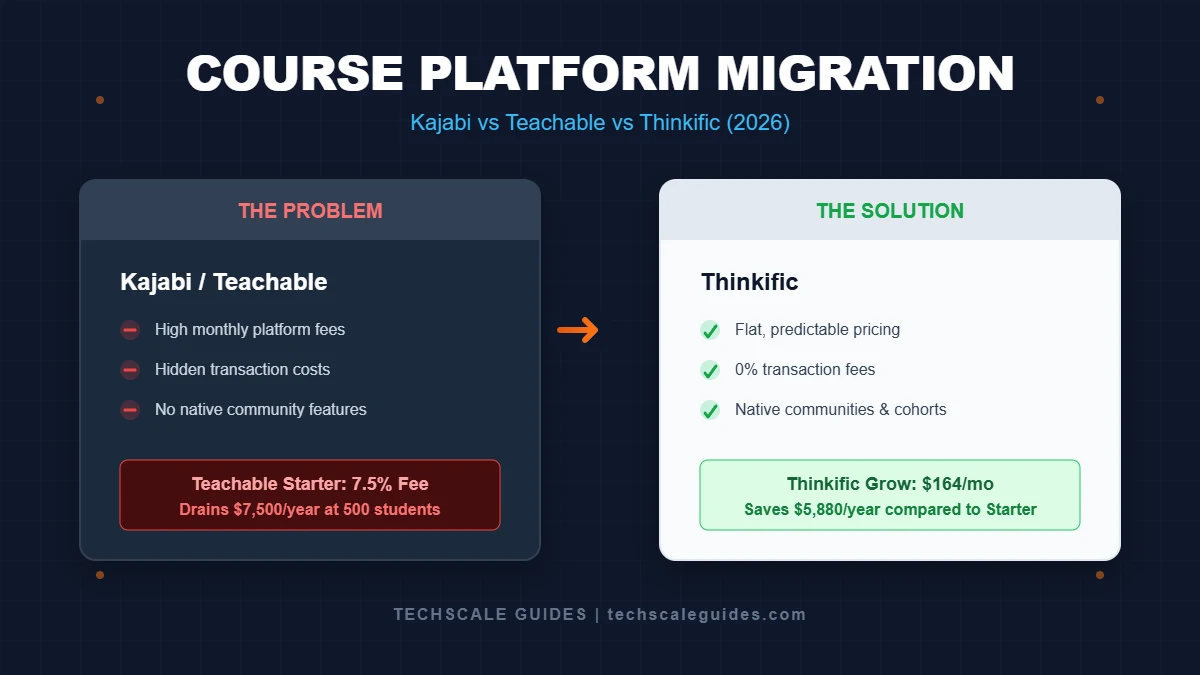
If you are on Teachable Starter ($29/mo), you are paying a 7.5% transaction fee on every sale. At 100 students buying a $200 course, you pay $1,500 in fees. Total yearly cost: $1,848. If you move to Teachable Builder ($69/mo, 0% fees), your yearly cost drops to $828. You save $1,020/year just by upgrading a tier, let alone migrating.
Sign 2 — You're Paying for Features You Don't Use (Kajabi territory)
You are on Kajabi Growth ($199/mo) because it's the only tier with live cohort courses and advanced automations. But you aren't using Kajabi's native email (Marketing Hub) or their Pipeline builder. You are paying $2,388/year for software features that sit idle. Thinkific Start ($82/mo) or Grow ($164/mo) might fit your actual usage better at a lower cost.
Sign 3 — Your Course Type Changed (Thinkific territory)
Cohort-based courses require heavy community engagement. Evergreen courses require reliable, unlimited video hosting. If you started with a cohort on Kajabi and now want to sell 5 evergreen courses, you might be overpaying for live features you no longer need.
When NOT To Migrate (The Anti-Signs)
- You just launched. Give your current platform 6 months to prove itself.
- You have zero revenue. Migration time is better spent on marketing.
- You are mid-cohort. Do not migrate while a class is running. Student churn will spike significantly due to login errors and broken links. Wait for the gap between cohorts.
The Decision Framework: Which Platform Fits Your Course Type?
If you've confirmed you need to move, don't just pick the cheapest option. Pick the one that matches your course delivery model.
1. The Cohort-Based Creator (Kajabi or Teachable)
You run 8-week bootcamps with live Zoom calls. You need drip content, live cohort tracking, and native community spaces. If you want it all in one login, stick with Kajabi Growth ($199/mo). If you are willing to use Discord for community, Teachable Builder ($69/mo) is cheaper and has better native quizzes.
2. The Evergreen Author (Teachable or Thinkific)
You have 5 self-paced courses that sell 24/7. You don't need live features. You need unlimited video bandwidth and a frictionless checkout. Thinkific Start ($82/mo) gives you unlimited video and 0% fees. Teachable Builder ($69/mo) is slightly cheaper but limits you to 10 products. If you have 11+ courses, go Thinkific.
3. The Community Builder (Thinkific)
Your revenue comes from a $49/mo membership where people network, plus one core course. You need native forums, direct messaging, and cohort spaces. Thinkific Grow ($164/mo) gives you 3 Communities and 0% transaction fees. Kajabi Basic ($143/mo) gives you Community features, but lacks the live cohort features unless you upgrade to Growth ($199/mo).
Kajabi → Thinkific: Full Migration Walkthrough
Kajabi is an all-in-one ecosystem. Thinkific is a course builder with native community. Moving from one to the other means downgrading your all-in-one tool and upgrading your external integrations.
(Note: Names and exact figures in the following case study are anonymized and illustrative based on typical client scenarios).
[MICRO-CASE STUDY: The $1,400 Annual Savings]
The Constraint: A freelance UX designer sold a 12-module design course. She had 320 students on Kajabi Growth ($199/mo) but only used course delivery and two sales pages. The native email and pipeline features sat completely unused.
The Failed Approach: She tried downgrading to Kajabi Basic ($143/mo). She immediately lost access to live cohort courses and her sales page templates. The $56/month savings wasn't worth the feature loss.
The Implementation: We migrated her to Thinkific Start ($82/mo) and connected her existing Kit (formerly ConvertKit) account (which she was already paying for). The migration took three weekends, primarily spent re-uploading videos and rebuilding pages.
The Quantified Result: We cut platform spend from $2,388/yr to $984/yr. Total saved: $1,404/year. More importantly, the native Zapier integration enabled automation she couldn't build in Kajabi Basic.
The Caveat: This only worked because she wasn't using Kajabi's native email. If your entire email funnel lives inside Kajabi, migrating will cost you more in lost automation time than you save on the subscription.
Kajabi sells you a business. Thinkific sells you the tools to build one. The difference is $1,404/year.
The Detailed 6-Step Migration Process
- Export Contacts: Go to Kajabi > Contacts > Export to CSV. Ensure you include tags and last login date if available — this data is crucial for segmenting later.
- Manually Download Videos: Kajabi does not offer bulk video export. You must download each MP4 individually. For a 40-lesson course, this takes roughly 4-6 hours on a fast connection.
- Rebuild Sales Pages: Thinkific uses a different block builder. Copy your text, but expect to rebuild all formatting. Do not copy/paste raw HTML; it will break Thinkific's mobile responsiveness.
- Import to Thinkific: Use Thinkific's bulk upload tools to drag-and-drop your downloaded videos into the new curriculum. Warning: Compress massive 4K files to 1080p first, or you will exhaust your monthly bandwidth limits quickly.
- Set Up Redirects: Map every old Kajabi URL to the new Thinkific URL. Use a spreadsheet to map
kajabi.com/course-module-1tothinkific.com/courses/module-1. You can bulk-upload these to Cloudflare or your domain registrar. - Migrate Students: Import the CSV. Thinkific will flag duplicate emails. Force a password reset so they can access the new site.
Teachable → Thinkific: Full Migration Walkthrough
Teachable is for authors. Thinkific is for community builders. The migration trigger here is almost always pricing math.
(Note: Names and exact figures in the following case study are anonymized and illustrative based on typical client scenarios).
[MICRO-CASE STUDY: The 7.5% Fee Escape]
The Constraint: A fitness coach ran 8-week cohort bootcamps. She had 500 students on Teachable Starter ($29/mo + 7.5% transaction fee). At $200 per course, she was paying $7,500/year in transaction fees alone—more than double her platform subscription. Total annual cost: $7,848.
The Failed Approach: She upgraded to Teachable Builder ($69/mo + 0%) to kill the fees. But she needed native community features for her bootcamps, so she added a standalone community tool like Circle. Stack cost: $2,016/year (plus the community tool).
The Implementation: We migrated her to Thinkific Grow ($164/mo, 0% transaction fee, native Communities). We absorbed the community function into Thinkific's native spaces and connected Kit (formerly ConvertKit) for email.
The Quantified Result: Total stack cost dropped to $1,968/year (saving $48/year compared to the Builder + external tool stack). But the real win was escaping the Starter trap: she is now saving $5,880/year compared to her original setup.
The Caveat: Migration took four weekends, not three. Teachable's video hosting doesn't export MP4s cleanly; we had to re-upload from local backups. If your video library is 50+ files, budget extra time.
The Detailed 6-Step Migration Process
- Export Data: Teachable requires you to export student data and transaction history via CSV. You cannot export quiz results.
- Download Videos: Go to each lecture, click the three dots, and download the video. (Yes, it's as tedious as it sounds).
- Rebuild Quizzes: Teachable quizzes don't export. Take screenshots of your questions and rebuild them manually in Thinkific.
- Set Up Communities: Configure Thinkific Spaces to host your student discussions. Map out your forum categories before you invite students.
- Re-wire Email: Rebuild your Teachable email triggers inside Kit or Zapier. Do not rely on Thinkific's built-in email for complex launches.
- Execute Redirects: Map your course links to avoid 404 errors. Test 10 random links before going live to ensure your redirect rules are firing correctly.
The Hidden Costs Nobody Mentions
The docs say: "Export your course content and import it to the new platform."
In practice: If you search Kajabi's help center for "export," you will find guides to export contacts, landing pages, and course templates (structure). You will not find a native bulk video downloader.
Kajabi and Teachable do not advertise native bulk video export features. You have to manually download 40+ videos and re-upload them to Thinkific. A 40-lesson course means 40 manual clicks—not a 5-minute automated migration.
Kajabi's help center tells you your email list will migrate cleanly. What it doesn't tell you is that when you move to a new platform, you are sending from a new IP address. If you import 500 students and send a launch email on day one, your open rates will tank. Gmail and Outlook don't trust your new IP yet. You must warm up your domain for 2-4 weeks by sending to your most engaged subscribers first before emailing the full list.
Other hidden costs:
- Email Automation Rewrite: Kajabi Pipelines and Teachable Automations do not map to Thinkific. You must rebuild them in Zapier or an external ESP. Time cost: 8-15 hours.
- SEO Redirect Debt: If you miss a redirect for a high-traffic blog post, you will lose meaningful organic traffic.
- The "30-Day Refund Window" Trap: Most platforms offer a 30-day money-back guarantee. But if you cancel your old platform too early during a migration, you lose access to your videos before they are re-uploaded. You have to pay for both platforms for at least one month.
The 3 Migration Mistakes That Cost $1,000+
Mistake 1 — Migrating Mid-Cohort
Never migrate while a cohort is active. Students will panic when their login fails. Expect student churn to spike significantly on that specific cohort. Wait for the break.
Mistake 2 — Skipping the Parallel Run
Do not turn off your old platform on day one. Run both platforms in parallel for 30 days. This means paying for two subscriptions. It is worth the insurance.
Mistake 3 — Not Redirecting Old URLs
Search engines need a 301 redirect from the old URL to the new one. If you don't set up a redirect map, Google will drop your pages from the index, and your organic traffic will vanish.
You might be thinking: "Why not just pay the extra $40/month and upgrade to Teachable Builder?"
Fair point—until you do the math. At 100 students × $200 course, Teachable Starter's 7.5% fee = $1,500/year. Add the $348 annual Starter subscription, and you are paying $1,848/year. Teachable Builder at $69/mo = $828/year. You save $1,020/year just by upgrading, and you get a more stable platform for scale. The break-even point is just 32 students. Do the math before you migrate entirely.
Before You Migrate: Consider These 3 Alternatives
If you are reading this and feeling overwhelmed by the migration process, good. It is overwhelming. Before you pull the trigger, check if one of these alternatives solves your problem.
- Can you just upgrade your tier? If you are on Teachable Starter and the 7.5% fee hurts, upgrading to Builder ($69/mo) solves it without migration. If you are on Kajabi Basic and need live cohorts, upgrading to Growth ($199/mo) solves it.
- Can you bolt on a 3rd party tool? If you hate Thinkific's community or Teachable's lack of one, don't migrate. Just embed a standalone tool like Circle or Discord. It adds an extra monthly subscription to your stack, but saves you 40 hours of migration.
- Do you just hate your checkout? If your only issue is checkout friction or order bumps, you don't need a new platform. You need a new checkout layer. Read our Systeme.io vs Kajabi vs ThriveCart guide to see how changing the checkout alone can save you fees.
DIY vs Hire — The Actual Math
You can do this yourself. Kajabi's export docs are decent. Thinkific's import docs have step-by-step screenshots. But there is a massive time trade-off.
A Kajabi to Thinkific migration means: re-uploading 40+ videos, rebuilding 8 sales pages, rewriting 12 email automations, migrating 500 student accounts, and setting up 200+ URL redirects. Realistic time: 3 weekends—24 to 40 hours.
If you have 3 weekends and basic technical comfort, save the money and do it yourself. You will learn the new platform inside and out.
But if you are mid-cohort or pre-launch and can't spare 3 weekends of downtime, hiring a course platform migration specialist on Fiverr typically costs a few hundred dollars—and they've done this dozens of times. Do the math: your time at $80/hr × 30 hours = $2,400. The specialist is cheaper. And they know the 5 things that break on every migration.
If you need complex API re-wiring or advanced Zapier automations to connect your new platform to your CRM, look for an automation specialist on Upwork.
Bottom Line
- Verify the Math: Don't migrate just because a new platform looks shiny. Calculate your transaction fees at your current volume. If the savings are less than $500/year, stay put.
- Prepare for Video Hell: Video migration is manual. It is the critical path. Budget 2 weekends just for video downloads and re-uploads.
- Run Parallel: Pay for both platforms for 30 days. Redirects and student logins will break, and you need a safety net.
If you just need a cheaper checkout layer and don't want to rebuild your whole platform, check out our Systeme.io vs Kajabi vs ThriveCart guide.
Frequently Asked Questions
Can I import my students and their exact progress?
You can import student emails and basic profiles via CSV. You cannot import their exact progress (e.g., "Lesson 3 completed"). Students will have to mark lessons as complete again.
Will I lose my SEO rankings if I migrate?
Only if you fail to set up 301 redirects. If you map every old URL to the new URL, Google will transfer the authority within 2-4 weeks.
Can I keep my custom domain?
Yes. You simply change the DNS records to point to the new platform. Expect 24-48 hours of downtime while DNS propagates.
Do I have to rebuild my email automations?
Yes. Kajabi Pipelines and Teachable Automations do not export. You must rebuild them manually in your new platform or in an external tool like Kit or Zapier.
How long does the migration actually take?
For a course with less than 20 videos, expect 1-2 weekends. For 40+ videos, expect 3-4 weekends. The bottleneck is always video upload and sales page rebuilding.
Can I migrate mid-cohort?
No. Never do this. Student churn will spike, and support tickets will overwhelm you. Wait for the gap between cohorts.
What if I just need a checkout page?
If your only issue is checkout fees, consider a dedicated checkout layer like ThriveCart instead of migrating your whole platform. (Check our Systeme.io vs Kajabi vs ThriveCart guide for that math).
Is Thinkific better than Kajabi for SEO?
They are roughly equal. Both allow custom domains, meta tags, and fast load times. The SEO difference comes down to how well you structure your URLs and redirects.